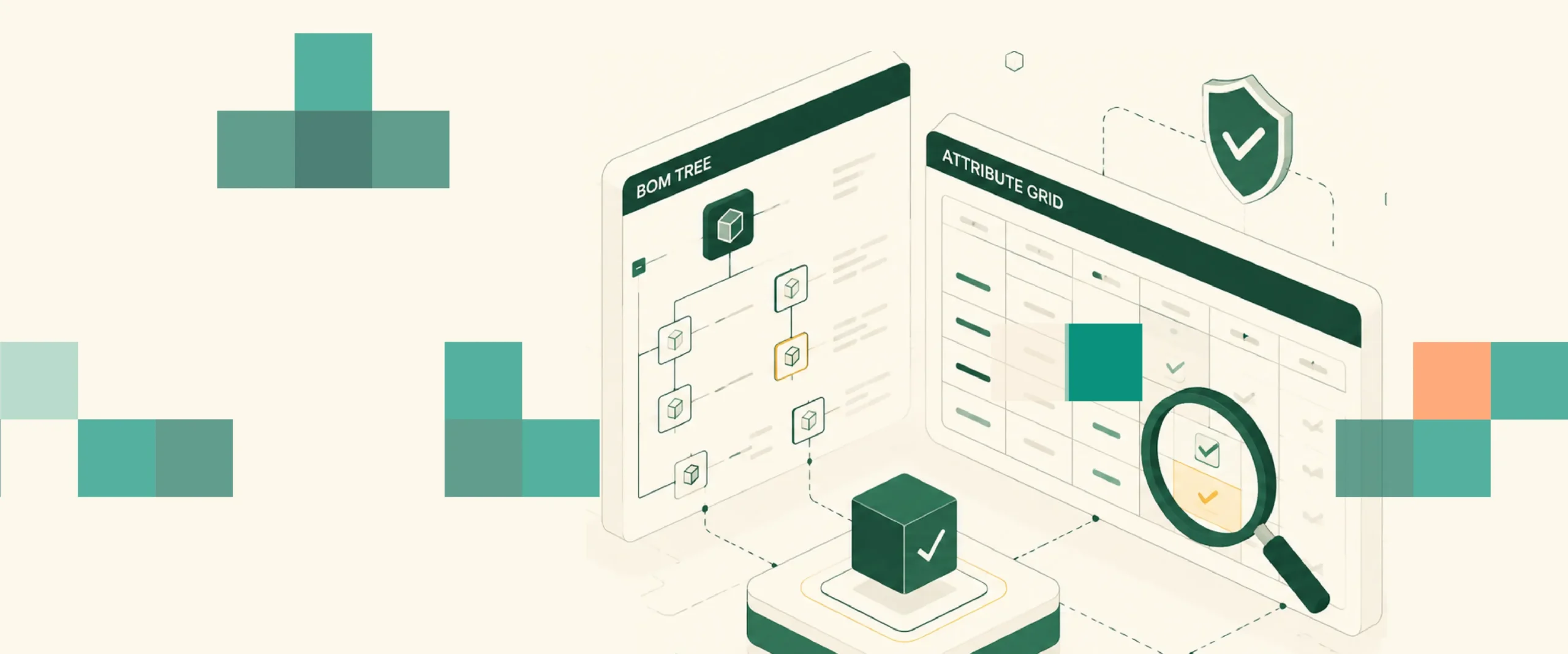
Windchill’s browser portal looks like a standard web automation target. The BOM management and engineering change workflows your QA team actually needs to validate run in the Java PDM Link thick-client, where standard WebDriver returns nothing.
TL;DR
- Windchill’s Java PDM Link interface is architecturally invisible to browser-based automation tools including Playwright, Selenium, and Cypress, standard DOM queries return null on Java-rendered controls
- Canvas-rendered attribute grids inside Windchill’s Java panels are painted as pixels with no accessible DOM elements; OCR-based identification is the only way to interact with them reliably
- SAP ERP routing validation alongside Windchill testing doubles the automation surface area; only tools with native SAP GUI and Java coverage handle this in one test script without custom bridge code
- Script stability across PTC version upgrades is the primary long-term cost driver, tools relying on XPath or Java object hierarchy locators reset a significant portion of their test suite on every major PTC release
- Sahi Pro is the only tool in this list with documented coverage for Windchill Java thick-client, canvas-rendered attribute grids via OCR, and SAP ERP integration in a single test sequence
What Makes Windchill Harder to Automate Than It Looks
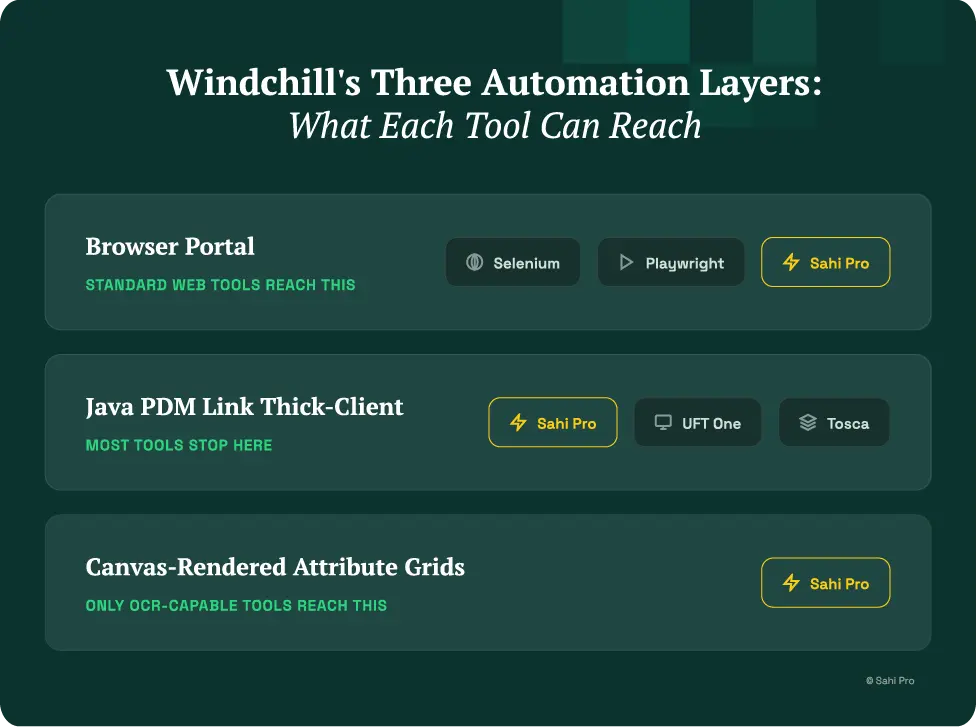
Every Windchill evaluation starts the same way: a QA lead opens the browser portal, sees a reasonably modern web interface, and concludes that any competent web automation tool should cover it. This assumption is correct for one specific layer, and wrong for the layers that matter most.
Windchill PDM Link is a Java-based thick-client application delivered as a separate interface from the browser portal. BOM management, engineering change orders, part classification, and Creo plugin integration all run in this Java client. When a manufacturing QA team talks about validating Windchill workflows, they are almost always talking about PDM Link processes, part structure validation, BOM sync to SAP, ECO approval sequences, and Creo drawing check-in. None of these are browser workflows.
Inside the Java client, attribute grids present a second layer of complexity. Windchill renders property grids and classification attribute tables as canvas elements, the controls are painted to the screen by the Java runtime rather than rendered as accessible DOM or Windows UI elements. Standard WebDriver returns null. Windows UI Automation returns null. These elements can only be interacted with through OCR-based identification that reads text directly from the rendered pixel region.
The third layer is SAP ERP integration. Most manufacturing Windchill deployments sync to SAP for BOM validation, material master cross-reference, and engineering change handoff to production. For QA teams running end-to-end validation across Windchill and SAP, confirming that a BOM change in PDM Link propagates correctly to SAP MM, the automation tool needs to cover SAP GUI transactions in the same test script. Running separate tools for Windchill and SAP means two maintenance cycles, two training pipelines, and gaps at the integration boundary that neither tool covers.
The Evaluation Criteria for This List
Java thick-client BOM panel coverage: Does the tool interact with Windchill PDM Link’s Java-rendered BOM management and change management panels natively?
Canvas-rendered attribute grid handling: Does the tool read text from canvas-rendered Java panels using OCR or image recognition, not brittle pixel coordinate interactions?
SAP ERP integration in one script: Can the tool execute a test sequence that starts in Windchill PDM Link and continues into SAP GUI transactions without switching tools or writing custom integration code?
Script stability across PTC version upgrades: Does the element identification approach survive Windchill’s major release cycles without requiring full test suite reconstruction?
On-premise deployment: Can the tool run entirely within your network for IP-sensitive manufacturing environments?
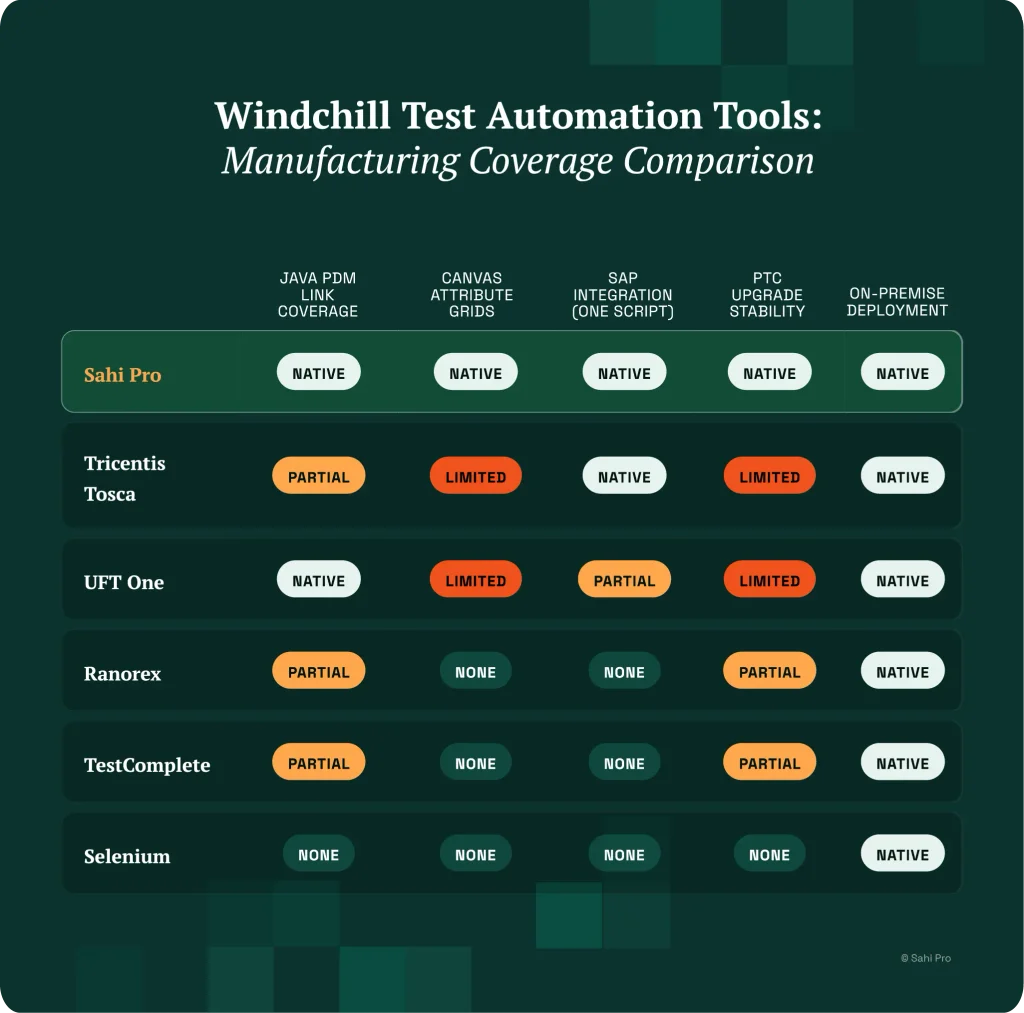
The 6 Best Windchill Test Automation Tools for Manufacturing Companies
1. Sahi Pro
Sahi Pro is the strongest fit for manufacturing teams needing Java thick-client Windchill coverage alongside SAP ERP integration. The Desktop add-on reaches Windchill PDM Link’s Java Swing and AWT panels natively, BOM management, change order workflows, and part classification interfaces are all accessible in the same test script as the Windchill browser portal.
The AI Assist OCR add-on reads text directly from canvas-rendered regions that have no accessible element handles. Windchill’s attribute grids, which render property values as painted text in Java panels, are reachable through OCR-based identification. This is the layer where every other tool in this list has a coverage gap.
SAP GUI automation runs within the same Sahi Pro test sequence through the SAP Scripting API. A BOM sync validation test, starting with a part structure change in PDM Link, triggering the SAP sync, and confirming the material master update in SAP GUI, runs end-to-end in one script. This eliminates the integration boundary gap that two-tool approaches leave uncovered.
Proximity-based element identification means Sahi Pro locates elements by visible label and spatial relationship rather than DOM XPath or Java object hierarchy. When PTC releases a major Windchill update that restructures the Java client interface, tests continue resolving elements by their visible labels rather than brittle positional identifiers. Manufacturing teams that have switched from XPath-dependent tools report the re-validation scope after a PTC upgrade shrinks significantly.
On-premise deployment is standard, with no external data routing. IP-sensitive manufacturing environments, automotive Tier 1s, aerospace subcontractors, industrial equipment manufacturers, use this as the baseline configuration.
Honest limitation: Desktop add-on and AI Assist OCR are separately licensed. Plan for the full module stack when building the business case, and confirm current Windchill version compatibility with the Sahi Pro team before evaluation completion.
2. Tricentis Tosca
Tosca covers Windchill through its TCD (Technical Component Definition) model approach and has enterprise manufacturing deployment credentials. For large programmes requiring centralised test governance, standardised test case management at scale, and formal compliance documentation, Tosca’s model-based architecture provides a structured approach.
Windchill Java thick-client coverage exists through Tosca’s Java add-on capabilities. For stable, well-defined test scenarios that do not change frequently, the model-based approach works well. Model maintenance after PTC upgrades requires Tosca-certified specialist involvement.
Honest limitation: Tosca’s licensing and certification requirements create the highest Year 1 cost in this list. For manufacturing QA teams where engineers need to author and maintain tests independently without specialist certification, the Tosca model creates a dependency that complicates ongoing operations.
3. UFT One (OpenText)
UFT One covers Windchill PDM Link through its Java Add-in with genuine depth in Java thick-client element identification. The Java object recognition approach works reliably for standard Java Swing and AWT controls in stable environments. On-premise deployment is supported and UFT One has broad manufacturing industry deployment history.
For teams already running UFT One for other enterprise applications, SAP, legacy desktop systems, consolidating Windchill coverage into the existing tool avoids additional vendor complexity.
Honest limitation: UFT One’s Java object recognition breaks when PTC version upgrades restructure the Java object hierarchy. Canvas-rendered attribute grids are not within UFT One’s standard coverage scope, they fall outside the Java accessibility layer that the UFT Java Add-in relies on. Licensing costs have increased significantly under OpenText.
4. Ranorex
Ranorex handles native Windows desktop automation through Windows UI Automation and Win32, and is a solid choice for manufacturing teams running standard WinForms or WPF applications alongside Windchill. On-premise deployment is straightforward.
For Windchill-specific automation, Ranorex covers standard Java controls where Windows UI Automation handles are accessible. The coverage limitation is canvas-rendered attribute grids, Windchill’s Java panels that paint property values as pixel regions rather than accessible Windows elements. Ranorex returns null on these controls.
Honest limitation: Canvas-rendered Windchill attribute grids are outside Ranorex’s identification scope. For manufacturing teams where BOM attribute validation is a primary test scenario, this is the gap that matters most.
5. TestComplete (SmartBear)
TestComplete covers Java thick-client applications through its Java bridge and handles a broad range of application types within one product. For manufacturing teams running diverse application stacks, SAP, legacy desktop systems, web portals, and Windchill, TestComplete reduces tool sprawl by handling multiple layers in one product.
Scripting in JavaScript, Python, or VBScript allows automation engineers with existing coding skills to build and maintain suites without additional tool-specific certification.
Honest limitation: Canvas-rendered element identification requires additional configuration and custom scripting in TestComplete. Out of the box, canvas attribute grids in Windchill require workarounds rather than native coverage. For attribute-grid-heavy test scenarios, the additional development effort is significant.
6. Selenium (Reference Baseline)
Selenium covers Windchill’s browser portal layer, navigation, document management, and web-based collaboration interfaces, with the same reliability it provides for any modern web application. It is the most widely deployed open-source framework and can run entirely on-premise.
Selenium is included as a reference baseline to clarify the coverage boundary. If your Windchill automation scope is limited to the browser portal layer and your BOM management and change workflows are not part of your test coverage requirements, Selenium is a viable option.
Honest limitation: Windchill PDM Link Java thick-client, canvas-rendered attribute grids, and SAP ERP integration are outside Selenium’s architectural scope. For manufacturing QA teams with BOM validation requirements, Selenium covers the portal navigation and leaves the most consequential test scenarios unautomated.
The PTC Version Upgrade Problem: What It Costs and How to Prevent It
Windchill major version upgrades, moving from Windchill 12 to 13, or between major feature releases, consistently break automation suites built on XPath or Java object hierarchy locators. PTC restructures interface components, changes element IDs, and updates the Java client rendering in ways that invalidate brittle locators throughout the test suite.
For a 200-script Windchill regression suite built on XPath-dependent automation, a major PTC upgrade typically requires review and update of 60-70% of scripts. At average QA engineer rates and four to six hours per script, this is a significant unplanned cost that recurs with every major upgrade cycle.
Proximity-based identification addresses this at the architectural level. When tests locate elements by visible label (“Part Number” field, “Approve” button, “BOM Structure” panel) and spatial relationship rather than by XPath or object ID, the test continues to find the right element even after the underlying structure changes. The element moved, but the label and its relationship to surrounding labels did not.
Manufacturing QA teams evaluating Windchill automation tools should ask vendors directly: show us this specific scenario, a major PTC version upgrade, and demonstrate how many scripts in a representative suite require updates. The answer to that question tells you more about long-term cost of ownership than any feature comparison.
Sources
- PTC Windchill product documentation: PDM Link architecture and Java client overview, ptc.com/en/products/windchill
- PTC Windchill 13.1.2 release documentation: interface and capability updates, support.ptc.com
- Sahi Pro: SAP PLM Test Automation, Teamcenter to SAP Integration Testing, sahipro.com/sap-plm-test-automation-teamcenter-to-sap-integration-testing-sahi-pro/
- Sahi Pro: PLM Test Automation vs Standard Web Testing: Key Differences, sahipro.com/plm-test-automation-vs-standard-web-testing-key-differences-sahi-pro/
- Autify: Canvas and WebGL Application Testing, autify.com/solutions/canvas-and-webgl-testing