
















- Proven in production
Flutter Testing That Actually Works.
Stable widget identification, no maintenance sprint needed after any release.
- Teams that rely on sahi pro


- The technical root cause
What Flutter Does Differently - and Why It Breaks Appium
Why Flutter Is Different
Flutter renders its own UI instead of native iOS and Android components, which makes native-component-based automation less reliable.
What This Means for Test Automation
Flutter has its own testing protocol, but support is limited. Appium’s Flutter plugin inherits these limits: it struggles with animated widgets and breaks when dynamic IDs shift between renders.
The Maintenance Loop That Follows
Flutter selector fragility traps teams in a high-maintenance loop where each UI change breaks automation, forcing days of rework, limiting coverage to a few stable flows, and leaving most regression testing manual.
- Built for Flutter architecture
Flutter-Specific Element Handling That Survives UI Updates
Flowcharts turns every major automation pattern into a drag-and-drop interface. Conditional logic, data-driven testing, and suite dependencies without writing a single line of code.

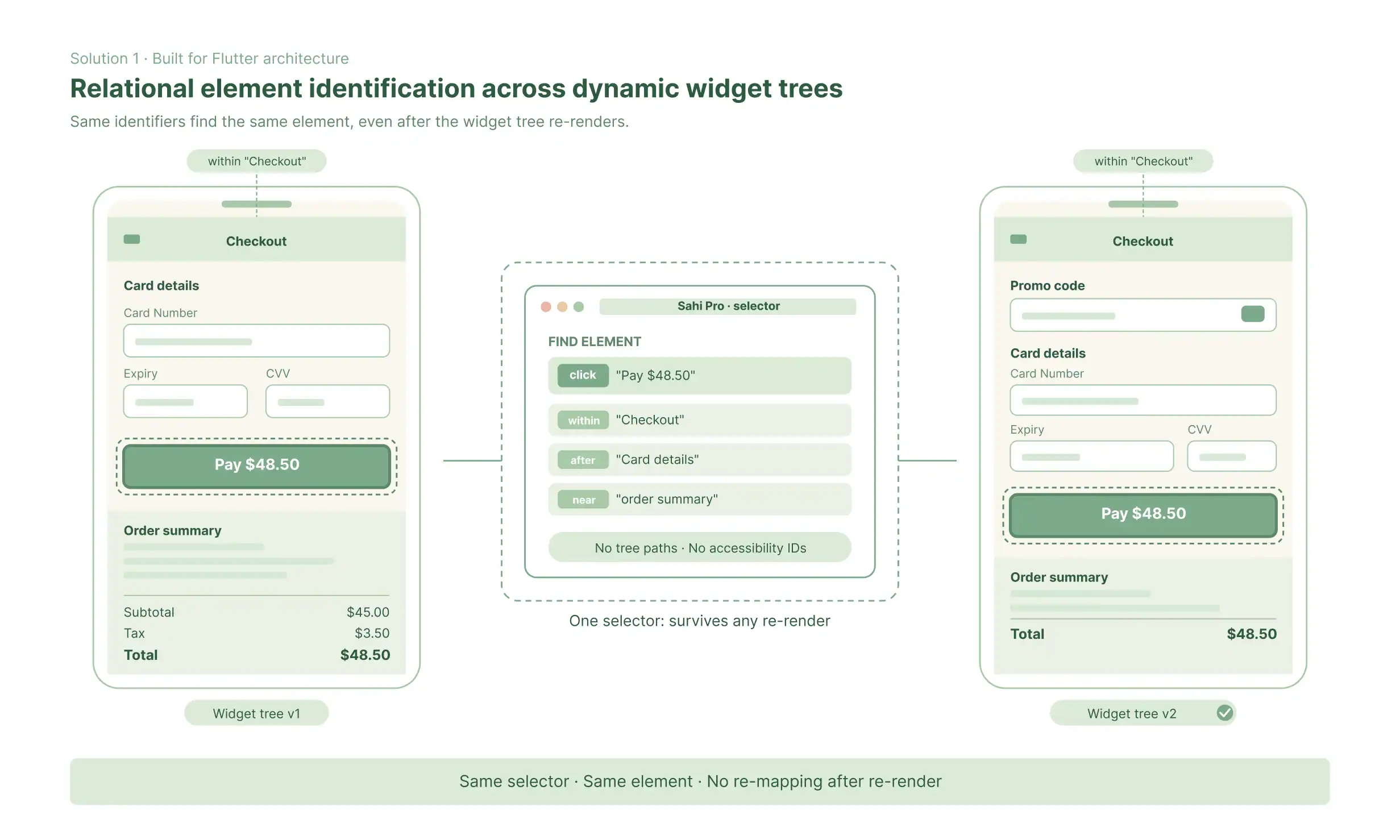
Relational Element Identification Across Dynamic Widget Trees
Sahi Pro identifies Flutter widgets by proximity and context - visible labels, spatial relationships, and element types - rather than by tree positions or accessibility IDs that shift when the layout updates. When a Flutter widget tree re-renders after a state change, the visible labels and contextual relationships Sahi Pro uses to find elements remain stable. Tests continue running correctly after UI updates, without engineers manually re-mapping element identifiers.
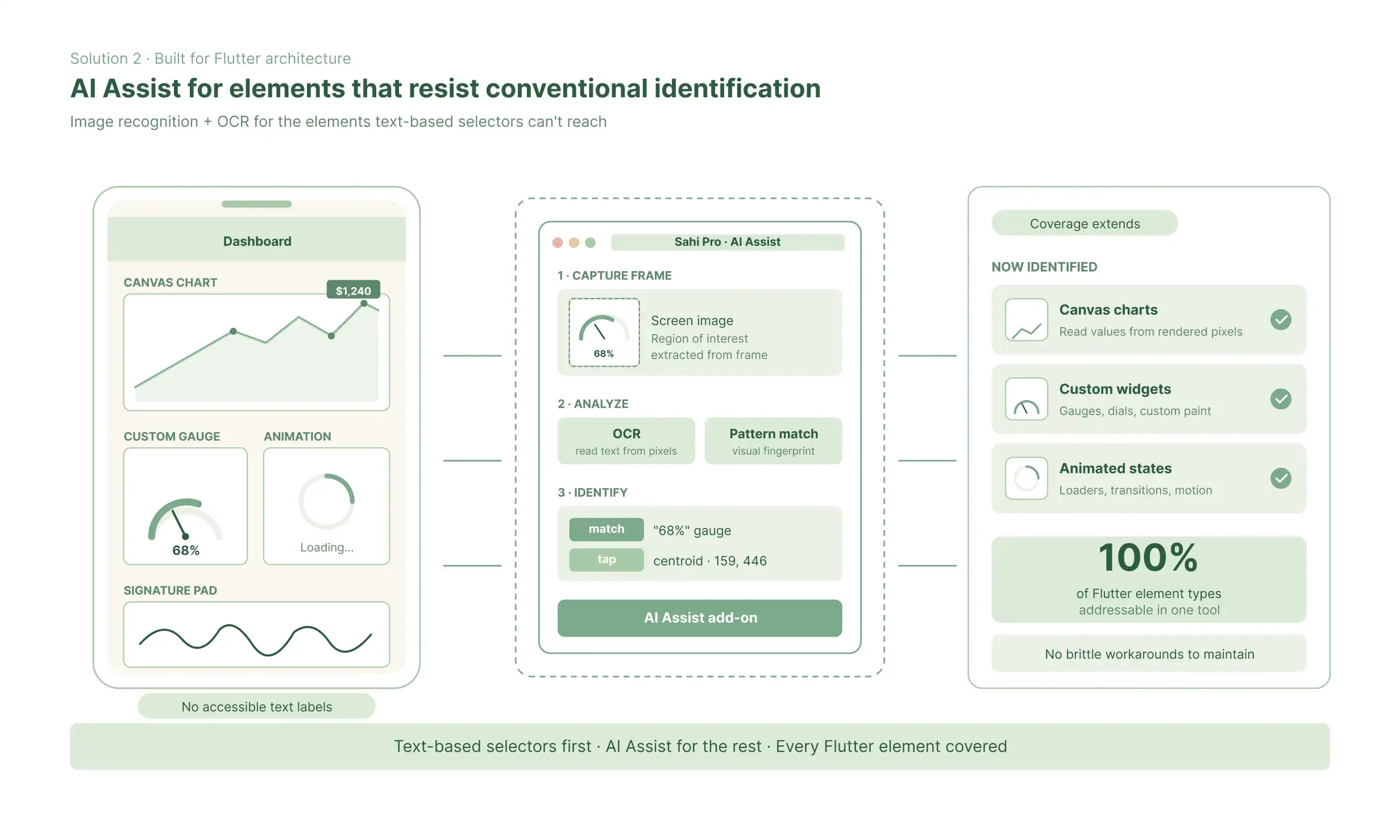
AI Assist for Elements That Resist Conventional Identification
For Flutter elements that are genuinely difficult to identify through contextual relationships - custom-rendered widgets, canvas-based components, or highly dynamic animations - Sahi Pro’s AI Assist add-on provides image-recognition-based identification using OCR and visual pattern matching. This covers the subset of Flutter elements that no text-based identification approach handles reliably, without requiring engineers to maintain brittle workarounds.
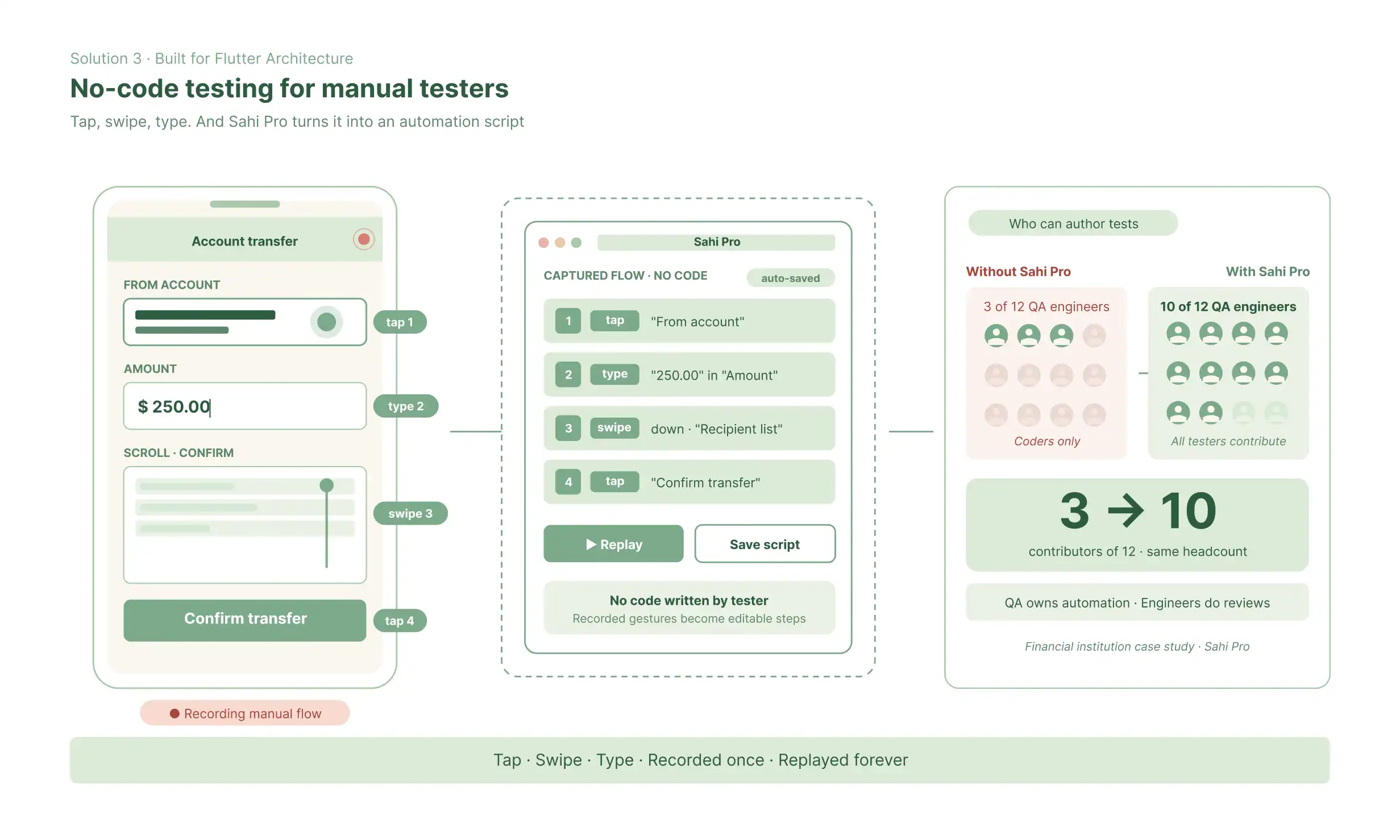
No-Code Recorder for Manual Testers
The Sahi Pro recorder captures Flutter interactions - taps, swipes, text entry, scrolls - without the tester writing code. Manual testers author Flutter test flows using recorded interactions in the no-code interface. When Appium requires developers to write and maintain scripts, Sahi Pro lets QA team members who understand the app’s behaviour build and own the automation themselves. At the financial institution case study, this changed who could contribute - from 3 of 12 QA engineers to 10 of 12 - without a change in headcount.

- Outcomes from production regression
What Regression Automation Looks Like With Sahi Pro
Mahindra Comviva automated thousands of test cases with Sahi Pro and reduced ongoing regression effort by 90%
Sahi Pro has been ideal solution for our web test automation needs with one tool addressing various web technologies. Its adoption is an exciting journey in which the test coverage is increasing constantly within Mahindra Comviva.
Mahesh VG,
Technical Manager, Mahindra Comviva
ITG reduced regression cycle time by 50%, cutting a 10-day manual process to 5 days with Sahi Pro.
Sahi Pro Automation tool has been built with the QA fraternity in mind and does not require advanced software programming skills. It is easy to use across multiple browsers and the support from the Sahi team is always prompt.
Basheer Shaik,
Head of QA, ITG
SmartEtailing uses Sahi Pro to run regression automation as part of its daily production release cycle.
I rely on it each day as we release to production every day. It works out of the box across browsers. Much less coding and configuration than using Selenium.
Mandi Papich
Manager Testing Automation QA, SmartEtailing
DirectPath’s Senior QA relies on automation that keeps pace with continuous product changes.
Support for refactoring and maintaining tests has been an amazing feature. As the products evolve so do the automation suites.
Monica Becerra,
Senior QA, DirectPath
ChartWise got regression tests running quickly with Sahi Pro, turning failure logs into clear signals of real product changes.
I wish I would have found this product sooner. I was able to get our products regression tests up and running very quickly. Post running the regression tests against every build, now a failure in the log is one that tells me that something has changed, a bug has been introduced. Sahi is a time saver.
Linda Markhart,
Principal QA Engineer, ChartWise
- The full scope of Flutter automation
Every Flutter Testing Type in One Product
Functional
testing
Widget-level interaction validation: buttons, forms, navigation, state changes
Regression
testing
Full app test suite re-execution before every release
Cross-platform mobile
testing
The same Flutter test suite run on Android and iOS
Cross-device
testing
Switch between Android, iOS, and web targets from one test
Integration
testing
Flutter UI steps combined with REST API calls and database validation
Smoke
testing
A focused core-flow suite executed on every build
UAT
testing
Business-scenario test flows authored by non-technical contributors
Performance
testing
User interaction scenarios replayed with concurrent virtual users
AI-assisted
automation
Image recognition and OCR-based identification for complex widgets
- Flutter automation into delivery
Flutter Tests in Your CI/CD Pipeline - Jenkins, AWS Device Farm, GitHub Actions
1. How Flutter CI/CD Integration Works in Sahi Pro
Flutter test suites run from a command-line trigger – the same command that executes the suite from the Sahi Pro UI, which CI/CD tools call as a pipeline step. Results return in JUnit XML and TestNG formats, readable natively by Jenkins, Azure DevOps, GitLab CI, and GitHub Actions. No custom integration scripting. No CI-specific configuration separate from the standard suite execution.
2. Device Execution Infrastructure
The financial institution case study deployed Sahi Pro with Jenkins orchestration and AWS Device Farm for device execution – real iOS and Android devices accessed through Amazon’s managed device infrastructure. For teams with on-premise infrastructure, Sahi Pro runs Flutter tests on physical devices connected to the local network or on emulators.
3. Smart Logs for CI/CD Failure Diagnosis
When a Flutter test fails in the CI/CD pipeline, the smart log captures visual playback of the execution sequence alongside the failure point, screenshots at each step, and exact log lines where the failure occurred. Engineers diagnosing a failed build see what the app displayed at the moment of failure – eliminating the rebuild-and-reproduce cycle that slows CI/CD failure investigation in mobile testing.
4. Supported CI/CD Integrations for Flutter Testing
Jenkins: Command-line trigger, JUnit XML results, wizard configuration
AWS Device Farm: Native integration with device execution and result aggregation
GitHub Actions: Workflow step integration, test results as workflow output
Azure DevOps: Pipeline task, results published to Azure Test Plans
GitLab CI: .gitlab-ci.yml step, JUnit XML artefact
Docker: Containerised test execution for consistent CI environments
- For teams evaluating product
Flutter Automation Approaches: A Practical Comparison
Capability
Flutter Driver (Native)
Appium (Flutter Plugin)

Sahi Pro
Widget identification stability
Breaks on layout changes
Limited, protocol-dependent
Relational, survives updates
No-code authoring
None - scripting required
None - Dart code required
No-code interface - zero code
Cross-platform (iOS + Android)
Supported
Limited
Supported, single script
Cross-layer flows (Mobile + API + Web)
Requires separate tools
Web and API require separate tools
Native single-flow support
CI/CD integration
Manual configuration
Native Jenkins, AWS Device Farm, GitHub Actions
AI-assisted identification
Not available
Not available
AI Assist add-on (image recognition + OCR)
Non-technical contributor access
None
None
Full - no-code interfaces
Maintenance overhead
High - frequent break
Moderate - tool-dependent
Low - relational IDs auto-adapt
Questions Flutter Teams Ask Before Evaluating Sahi Pro
Why is Flutter hard to automate?
Flutter renders its UI using its own graphics engine, bypassing iOS and Android native accessibility layers. Standard mobile automation tools, including Appium, interact with apps through those native accessibility layers. When the layers do not exist, the tools lose their ability to reliably identify and interact with elements. The result is that tools built for native mobile automation break frequently in Flutter apps, requiring significant maintenance effort after every UI update.
Does Appium work with Flutter?
Appium has a Flutter plugin, but its reliability on complex real-world Flutter applications is limited. The plugin wraps Flutter’s own driver protocol, which means it inherits Flutter driver’s limitations – including poor handling of dynamic widget trees, fragility on apps mixing Flutter and native views, and instability on some real device configurations.
What is the Flutter widget tree and why does it matter for testing?
The Flutter widget tree is the hierarchical structure Flutter uses to represent its UI. When the UI changes – due to state updates, animations, navigation, or developer changes – the widget tree re-renders and element positions shift. Tools that identify elements by widget tree position break every time this happens. Tools that identify elements by visible labels and contextual relationships, as Sahi Pro does, stay stable across re-renders.
How does Sahi Pro identify Flutter elements without using the accessibility layer?
Sahi Pro identifies Flutter widgets using proximity and context – the visible labels adjacent to a widget, its spatial position relative to other widgets, and its widget type. These properties remain consistent across widget tree re-renders. For widgets that resist contextual identification, Sahi Pro’s AI Assist add-on uses image recognition and OCR to identify elements visually.
Can non-technical testers write Flutter test automation with Sahi Pro?
Yes. The Sahi Pro recorder captures Flutter interactions – taps, swipes, text input, scrolls – as the tester uses the app normally. Captured interactions are organised into test flows using the no-code interface. Manual testers and business analysts with no scripting experience build and maintain Flutter test cases directly. This is what enabled the financial institution case study to move from 3 of 12 to 10 of 12 QA engineers contributing to automation.
Can Sahi Pro run Flutter tests on real devices?
Yes. Sahi Pro runs Flutter tests on physical iOS and Android devices connected to your network and on emulators. For teams using cloud-based device infrastructure, Sahi Pro integrates with AWS Device Farm.
Can Sahi Pro test Flutter apps on both iOS and Android with the same test script?
Yes. Sahi Pro runs the same Flutter test script on Android and iOS without requiring separate test implementations for each platform. The script is authored once, and the execution engine handles the platform-specific interaction differences.
How does Sahi Pro handle a Flutter app that also has web and API components?
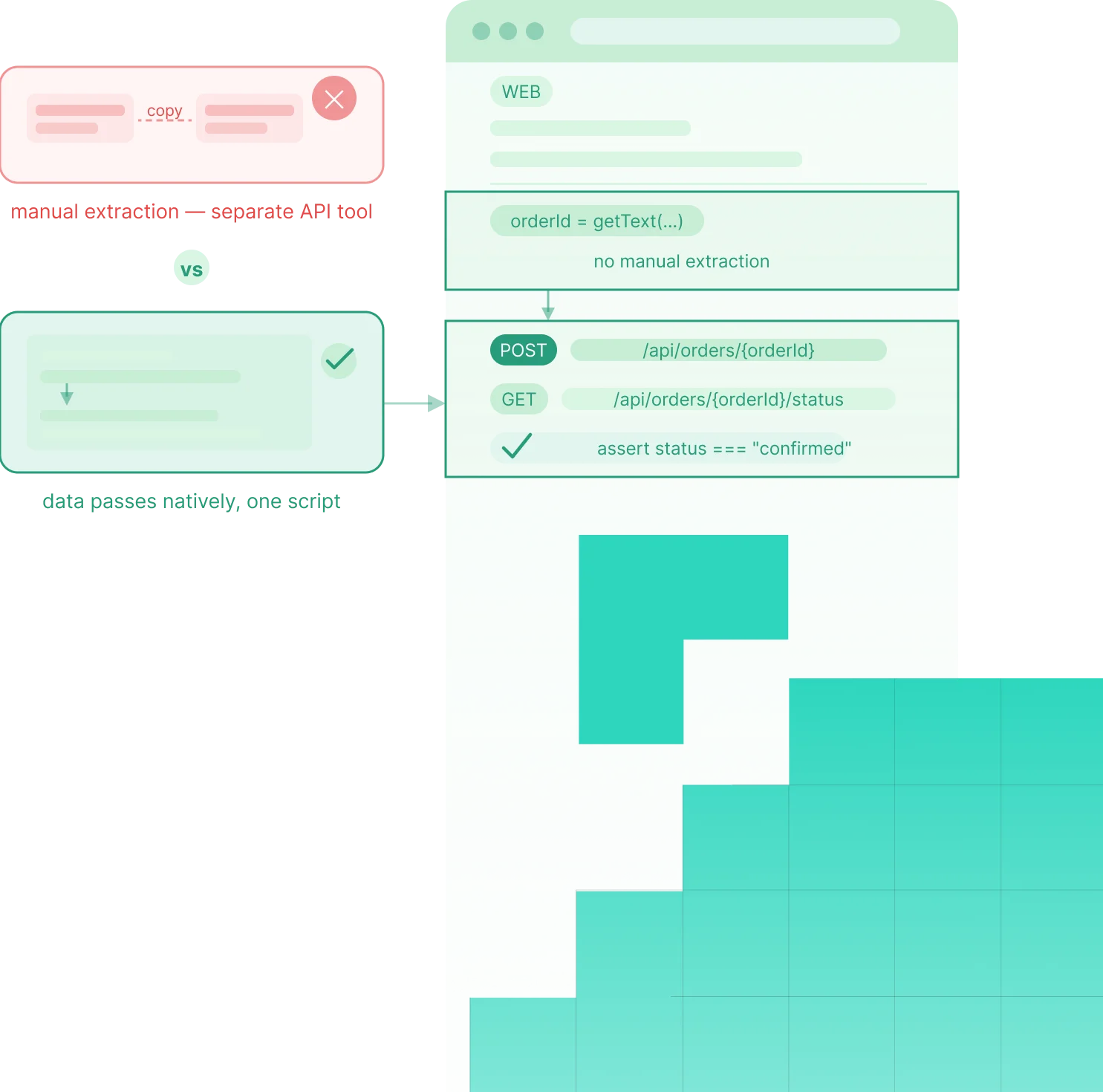
A single Sahi Pro test script can span the Flutter mobile app, REST or SOAP APIs, a web portal, and a database in a single uninterrupted sequence. Data extracted from a Flutter UI step is available automatically in the next step, whether that step is an API call, a database query, or a web portal interaction. No custom data-passing code, no tool switching, no coverage gaps between layers.
How quickly can a QA team get productive with Sahi Pro Flutter testing?
Teams using Sahi Pro’s no-code recorder and interface are typically productive within two weeks. For teams with QA engineers who prefer scripted automation, the Sahi Pro JavaScript API is available alongside the no-code interfaces. Both groups work in the same product and produce tests that run on the same execution engine.
How does Sahi Pro integrate with CI/CD for Flutter testing?
Sahi Pro integrates with Jenkins, GitHub Actions, Azure DevOps, GitLab CI, TeamCity, and Bamboo using a standard command-line trigger. Flutter test suites run as pipeline steps, return results in JUnit XML and TestNG formats, and execute on connected physical devices, emulators, or cloud device infrastructure such as AWS Device Farm. The same command that runs the Flutter suite from the Sahi Pro UI runs it in CI/CD – no separate configuration required.
- Two ways to move forward
Run Sahi Pro on Your Flutter App, or Walk Through Your Current Automation Challenges
Try It Yourself
Full product access including Flutter-specific handling, the no-code recorder, and unified mobile + API + web test flows. No credit card. No sales call required. Take your Flutter app and your worst-maintained Appium suite and see whether stable element identification and no-code authoring change what your team can cover before any conversation about purchasing.
Talk to Our Team
Tell us your Flutter app’s platform targets - iOS, Android, or both - your current Appium failure rate, and how many of your QA team members can currently contribute to automation. We will give you a specific picture of what stable Flutter automation looks like in your environment and a realistic timeline for what the transition involves.