
TL;DR
- What this is: PLM test automation for high-mix variant BOM configurations
- Who it affects: Test Automation Leads at high-mix and contract electronics manufacturers
- The core problem: Hundreds of variant BOM scenarios, impossible to test manually
- Cost of not solving it: Wrong BOM variant released to manufacturing floor
- What Sahi Pro does differently: Data-driven BDTA for variant BOM plus SAP ERP validation
- Proof: Integro Technologies, 90% regression man-hour savings
PLM software testing across Aras Innovator, Teamcenter, and SAP PLM becomes a different problem entirely when your product catalog runs into hundreds or thousands of variant BOM configurations. Standard web testing tools cannot handle the intersection of schema-driven dynamic UIs in Aras, DOM restructuring after Teamcenter upgrades, and SAP ERP BOM routing validation triggered by each PLM variant release. This article evaluates six PLM test automation tools against criteria specific to high-mix manufacturing: data-driven variant BOM execution, SAP ERP integration coverage, on-premise deployment for IP protection, and upgrade stability across PLM version changes. Each tool was tested against Aras Innovator, Teamcenter, and SAP PLM interfaces, with scoring weighted toward the challenges contract electronics and high-mix manufacturers actually face, not generic web application testing benchmarks.
Quick-Pick: 6 High-Mix PLM Test Automation Tools at a Glance
| # | Tool | Best for | Variant BOM and SAP ERP coverage | On-premise |
| 1 | Sahi Pro | High-mix variant BOM data-driven testing | Data-driven BDTA for variant BOM testing + SAP ERP integration validation in one suite | Yes, full |
| 2 | Tricentis Tosca | Enterprise teams already on Tosca for SAP | Model-based test design and SAP-native integration | Yes, on-premise available |
| 3 | Selenium WebDriver | Web-only PLM portals, in-house engineers | Zero cost, maximum flexibility for web layer | Yes, fully on-premise |
| 4 | Worksoft Certify | SAP-primary PLM, no scripting resource | Deepest SAP PLM coverage with no-code authoring | Yes, on-premise available |
| 5 | Ranorex Studio | Windows desktop PLM and legacy thick clients | Strongest Windows desktop PLM automation outside SAP | Yes, fully on-premise |
| 6 | OpenText UFT One | Existing UFT investment and legacy PLM | Broadest legacy technology coverage | Yes, on-premise available |
1. Sahi Pro: Best for high-mix PLM variant BOM testing with SAP ERP integration
Why it ranks first for Aras Innovator, Teamcenter, SAP PLM
The core challenge in high-mix PLM software testing is scale: a contract electronics manufacturer with 500 product variants needs to validate every BOM configuration against its PLM and ERP systems after each release. Writing individual test scripts for each variant is not viable. Sahi Pro’s BDTA data-driven execution addresses this directly. It connects a CSV of variant BOM configurations to the test design, running the complete BOM validation workflow once for each variant without separate scripts for each configuration.
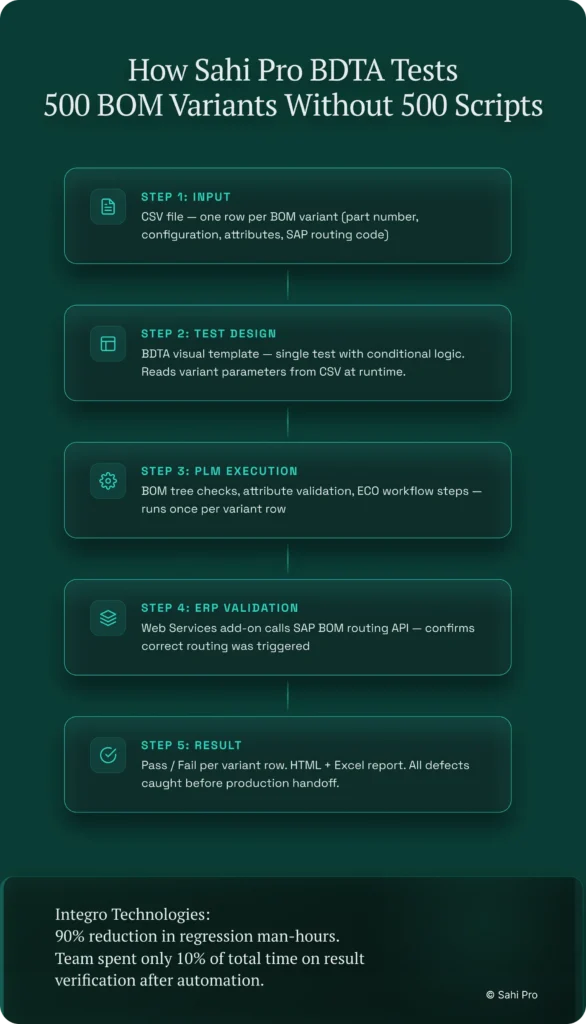
This matters because most erp testing tools treat the PLM layer and the ERP layer as separate test scopes. Sahi Pro’s Web Services add-on validates SAP ERP BOM routing triggered by PLM variant releases in the same script as the PLM UI steps. The result: variant configuration defects are caught before they reach the manufacturing floor.
Proximity-based identification is the second reason for the ranking. Aras Innovator uses schema-driven dynamic UIs where element IDs change based on item type. Teamcenter restructures its DOM across major version upgrades. Sahi Pro reads elements by visible labels and structural proximity, not DOM position. Tests survive both scenarios without locator rewrites.
Key capabilities for Aras Innovator, Teamcenter, SAP PLM teams
- Data-driven variant BOM execution: BDTA connects CSV files containing hundreds of BOM variant configurations to a single test design, executing the full validation workflow for every row without duplicate scripts.
- SAP ERP integration in one script: The Web Services add-on validates SAP ERP BOM routing triggered by PLM variant releases within the same test sequence as PLM UI steps, detecting mismatches before production release.
- Proximity-based identification: Handles Aras Innovator schema-driven dynamic UIs and Teamcenter DOM-restructuring upgrades, enabling stable automated regression testing across PLM version changes without locator maintenance.
- Full on-premise deployment: Entire installation runs within the manufacturing network. No BOM data, test results, or execution logs route externally. Used by ITAR-regulated and automotive OEM customers.
- Non-engineer test authoring: BDTA’s visual builder with conditional logic lets manufacturing QA engineers build variant BOM test cases without programming. Engineers retain full JavaScript access in the same product.
Honest limitations
BDTA’s visual builder covers web-layer flows primarily. If your PLM environment includes Java thick-client components, such as older Teamcenter Rich Client installations, those steps require scripting through the Desktop add-on rather than the visual builder. The AI Assist add-on, which extends coverage to canvas-rendered and proprietary interfaces via OCR, is an add-on product at additional cost, not included in the base license.
Best for: High-mix PLM with variant BOM data-driven testing and SAP ERP integration On-premise: Yes, full installation, no external routing Pricing: Module-based; free trial available Key Aras Innovator, Teamcenter, SAP PLM capability: Data-driven BDTA for variant BOM testing + SAP ERP integration validation in one suite
2. Tricentis Tosca: Best for enterprise model-based PLM automation
Overview for Aras Innovator, Teamcenter, SAP PLM teams
Tricentis Tosca is a model-based test automation platform widely used in SAP and enterprise application environments. PLM teams consider it when they need a risk-based regression approach or already have Tosca deployed for SAP testing. Its model-based test design scans the application under test and creates reusable modules, which reduces duplication when similar PLM workflows share common steps across different product lines.
What it does well for variant BOM configurations in high-mix production
- Model-based test design: Reduces duplication across similar PLM workflows by abstracting test steps into reusable modules, which is useful when multiple variant BOMs share common validation sequences.
- SAP integration depth: Teams already running Tosca for SAP ERP testing can extend coverage to SAP PLM within the same model-based framework, avoiding a second toolchain.
- Risk-based regression coverage: Tosca’s risk scoring prioritizes test execution based on change impact, helping high-mix teams focus regression runs on the variants most affected by a given release.
- No-code test design for business analysts: Business analysts familiar with the Tosca model can author and modify PLM test cases without scripting, lowering the barrier for manufacturing QA participation.
Best for: Enterprise teams already using Tosca for SAP On-premise: Yes, on-premise available
3. Selenium WebDriver: Best for web-only PLM portal automation with in-house engineering
Overview for Aras Innovator, Teamcenter, SAP PLM teams
Selenium WebDriver is the most widely used open-source web automation framework. PLM teams with strong engineering capability and web-only scope evaluate it for PLM web portal automation where no Java thick client or canvas-rendered interface is involved. Its zero license cost and massive community make it the default starting point for teams with dedicated automation engineers.
What it does well for variant BOM configurations in high-mix production
- Zero license cost: No per-seat or per-execution fees, making it viable for teams with budget constraints but available engineering time.
- Largest community and documentation base: Virtually every PLM web automation question has been answered somewhere in the Selenium ecosystem, reducing ramp-up time for experienced engineers.
- Full browser coverage: Works on all major browsers with native WebDriver implementations, covering Aras Innovator’s web client and Teamcenter Active Workspace browser interfaces.
- CI/CD flexibility: Integrates with any CI/CD pipeline through standard command-line execution, fitting into existing Jenkins or GitLab CI workflows without vendor-specific plugins.
Best for: Web-only PLM portals with in-house engineers On-premise: Yes, fully on-premise
4. Worksoft Certify: Best for SAP-centric PLM teams requiring no-code test authoring
Overview for Aras Innovator, Teamcenter, SAP PLM teams
Worksoft Certify is a no-code test automation platform purpose-built for SAP environments. PLM teams with SAP PLM as their primary system evaluate it for business process automation across SAP GUI and Fiori without scripting. Its deep SAP-native integration makes it the strongest option for teams whose PLM workflow lives entirely within the SAP ecosystem.
What it does well for variant BOM configurations in high-mix production
- Purpose-built SAP coverage: Deepest native support for S/4HANA and SAP Fiori interfaces, including transaction-level BOM validation workflows that other tools require custom scripting to reach.
- No-code process recording: Business analysts and manufacturing QA staff record SAP PLM processes directly, producing maintainable test cases without developer involvement.
- SAP BAPI and RFC validation: Validates backend SAP integrations at the BAPI and RFC level, catching BOM routing errors that surface only in the application layer of SAP ERP.
- Large Fortune 500 installed base: Extensive library of pre-built SAP process components from enterprise deployments, reducing initial test creation time for common SAP PLM workflows.
Best for: SAP-primary PLM teams with no scripting resource On-premise: Yes, on-premise available
5. Ranorex Studio: Best for desktop Windows PLM applications on legacy infrastructure
Overview for Aras Innovator, Teamcenter, SAP PLM teams
Ranorex Studio is a desktop and web test automation platform with strong Windows application support. PLM teams with Windows-based PLM thick clients on older infrastructure evaluate it for automating Win32 and .NET desktop interfaces. It fills a specific gap: when the PLM application under test is a Windows desktop client rather than a web portal.
What it does well for variant BOM configurations in high-mix production
- Windows desktop application support: Handles Win32, .NET, and WPF interfaces natively, covering legacy PLM thick clients that web-only tools cannot reach.
- Record-and-replay for non-developers: Testers without programming backgrounds can record desktop PLM interactions and produce executable test cases, lowering the barrier for manufacturing QA teams.
- Web test support: Covers PLM web portals alongside desktop clients, allowing teams with mixed PLM interfaces to use a single tool for both layers.
- Mobile testing add-on: Available for teams whose PLM workflows extend to mobile approval interfaces or shop-floor tablet applications.
Best for: Windows desktop PLM applications and legacy thick clients On-premise: Yes, fully on-premise
6. OpenText UFT One: Best for legacy PLM with existing UFT investment
Overview for Aras Innovator, Teamcenter, SAP PLM teams
UFT One (formerly HP QTP) is a long-established enterprise test automation product with broad technology coverage. PLM teams evaluate it when they have legacy test scripts, existing UFT licenses, or need VBScript-based automation for older PLM interfaces. Its installed base in large enterprises means many organizations already have UFT infrastructure in place.
What it does well for variant BOM configurations in high-mix production
- Broad technology coverage: Supports Java, web, and Windows applications in a single product, covering the range of PLM interface types found in legacy manufacturing environments.
- Existing script libraries: Many enterprise environments have years of accumulated UFT test scripts that can be extended to cover new PLM variant BOM scenarios without starting from scratch.
- Object spy for Java Swing elements: Identifies Java Swing UI components in older Teamcenter Rich Client installations, a capability not all web-focused tools provide.
- Mature enterprise support: Decades of documentation, training materials, and third-party integrations reduce the risk of adopting UFT One in organizations with established enterprise tooling standards.
Best for: Teams with existing UFT investment and legacy PLM On-premise: Yes, on-premise available
How to choose the right High-Mix PLM Test Automation Tools
The right tool depends on your PLM stack, your team’s scripting capability, and your deployment constraints. Use these decision factors to narrow the list.
- If your team has no dedicated automation engineer and needs manual testers to build tests, consider Sahi Pro’s BDTA visual builder or Worksoft Certify’s no-code recording. Both let manufacturing QA staff author PLM test cases without programming. Tosca’s model-based approach also works here, though it requires more initial setup.
- If your PLM test automation scope requires Java thick-client coverage, such as Teamcenter Rich Client or legacy desktop PLM interfaces, eliminate any tool that operates on web DOM only. Selenium WebDriver is out. Ranorex Studio, Sahi Pro with the Desktop add-on, and UFT One all handle this layer.
- If your manufacturing environment requires on-premise deployment with no external data routing, check the on-premise column in the quick-pick table above. All six tools on this list support on-premise installation. Cloud-only vendors not on this list would fail this criterion.
- If your scope is purely web-layer PLM software testing with no Java clients or canvas-rendered elements, Selenium WebDriver or any standard web tool may be sufficient. The cost is zero, and the engineering flexibility is maximum.
- If you need one test suite covering PLM and SAP ERP integration in one execution, validating that a variant BOM release in Aras or Teamcenter triggers the correct routing in SAP, only Sahi Pro’s Web Services add-on architecture covers both in a single test sequence.
If you are unsure which criteria apply to your deployment, run a proof-of-concept directly against your Aras Innovator, Teamcenter, or SAP PLM environment. Sahi Pro offers a free trial for this purpose.
How we evaluated High-Mix PLM Test Automation Tools
A generic test automation tool can click buttons and verify text. PLM test automation for high-mix manufacturing demands something more specific: the ability to validate hundreds of variant BOM configurations against both the PLM interface and the downstream ERP system, on-premise, without breaking after every PLM upgrade. That gap between generic capability and PLM-specific PLM software testing requirements is what separates the tools on this list.
- Variant BOM data-driven test execution: Can the tool run the same BOM validation workflow against hundreds of variant configurations from a single CSV, or does each variant require a separate script? This is the primary differentiator for high-mix manufacturers.
- SAP ERP BOM routing integration: Can the tool validate that a PLM variant release triggers the correct BOM routing in SAP ERP within the same test execution? Tools that cover only the PLM UI layer miss routing defects entirely.
- Aras and Teamcenter in one suite: Can the tool cover both Aras Innovator and Teamcenter PLM in the same regression suite? Contract manufacturers running multiple PLM systems for different customers need aras innovator test automation and Teamcenter coverage without maintaining two separate toolchains.
- On-premise for manufacturing IP: Can the tool run fully within the manufacturing network with no BOM data routed externally? ITAR-regulated and defense-adjacent manufacturers require this.
- Upgrade stability across manufacturing releases: Does element identification survive PLM version changes during year-end upgrades, or does the team spend the first two weeks of January rewriting locators?
- Codeless for manufacturing QA teams: Can manufacturing QA engineers without automation scripting backgrounds build PLM variant BOM test cases? If automation requires a developer, coverage will always lag behind the release schedule.
Running High-Mix PLM Regression in Jenkins and GitLab CI
High-mix manufacturers running PLM regression in Jenkins or GitLab CI need on-premise pipeline integration with no cloud execution agents. The test automation tool must execute entirely within the manufacturing network, produce timestamped execution records for traceability, and integrate with the CI server through standard command-line or API triggers. High-mix manufacturers with 500-plus variant BOM configurations report 80 to 90 percent regression time savings after automating PLM BOM validation with data-driven tooling (Sahi Pro customer deployment data, 2024). Automated regression testing at this scale requires the CI pipeline to trigger data-driven execution across all variants on every build.
Of the six tools evaluated, all support on-premise Jenkins integration. Sahi Pro provides native Jenkins and GitLab CI integration through command-line execution with timestamped HTML, Excel, and XML reports stored locally. Selenium WebDriver integrates with any CI pipeline natively. Ranorex Studio supports Jenkins through its command-line runner. Tricentis Tosca, Worksoft Certify, and UFT One all offer on-premise CI integration, though some configurations require additional orchestration server components. None of the six tools on this list are cloud-only, which is why they made the list.
For compliance-specific tool selection, request documentation from each vendor on whether their deployment model satisfies Jenkins and GitLab CI on-premise integration data residency requirements. Cloud-only vendors typically cannot provide this.
Real Results: Integro Technologies
Integro Technologies, part of the Aurionpro group, provides industrial system automation for high-mix manufacturing environments. Their QA team faced the core variant BOM challenge: hundreds of test scenarios across complex legacy industrial systems, with manual regression consuming the majority of each release cycle. Repetitive manual execution was slowing releases and introducing risk at the production handoff.
They moved to Sahi Pro to solve two problems simultaneously: data-driven test execution across variant configurations and the ability to validate end-to-end industrial system workflows in a single suite. The results after implementation:
- 90% savings on man hours of regression testing for complex legacy industrial system automation.
- Team spent only 10% of total time on result and fail case verification after automation.
- Thousands of test cases automated for industrial products with full stakeholder release confidence.
- All QA team members trained across both manual and automation domains.
Our verdict: the best PLM test automation tools for high-mix manufacturing teams
For high-mix manufacturers managing variant BOM configurations across Aras Innovator, Teamcenter, and SAP PLM, Sahi Pro is the strongest fit. Its data-driven BDTA execution, SAP ERP integration in a single test sequence, proximity-based identification, and full on-premise deployment address the specific technical challenges this environment presents. That said, teams with purely SAP-based PLM workflows may find Worksoft Certify sufficient, and teams with web-only scope and strong engineering resources can start with Selenium WebDriver at zero cost.
Sahi Pro offers a free trial. You can test it against your own Aras Innovator, Teamcenter, or SAP PLM environment before any license decision.
If you want to see how Sahi Pro handles your most complex variant BOM scenario, bring it to a technical demo. The engineering team will run it live against your PLM stack. Book A Demo.