


TL;DR
- A flaky test passes and fails on the same code, so the suite stops telling you whether a build is safe.
- Most flakiness traces to a handful of root causes: timing and async waits, shared state across tests, network and environment variance, and locators tied to a changing UI.
- The durable fixes are structural: condition-based waits, full state isolation between tests, stubbed external calls, and element identification that survives UI change.
- Locator drift is the largest single source in UI suites, and it is the one most teams keep patching by hand.
- A Sahi Pro benchmark that rebuilt a Selenium suite cut regression maintenance by 80 percent, with maintenance effort dropping from a score of 89 to 27.
- Honest caveat: you can engineer away whole categories of flakiness, but environment and third-party variance still need test discipline. No tool removes all of it.
A flaky test is the one that failed this morning, passed on rerun, and changed nothing about your code in between. One is an annoyance. A few hundred across a regression suite is a release problem, because the team stops trusting red. People rerun until the pipeline goes green, and a real failure hides in the noise.
The good news is that flakiness is not random. It comes from a small set of causes, and each one has a fix. Some of those fixes are habits your team adopts. Others are architectural, and they remove an entire category of flaky failure so you never write a workaround for it again.
What is a flaky test?
A flaky test is an automated test that produces different results, pass or fail, on the same code and the same inputs, with no change to the application. The failure comes from something outside the behavior under test, such as timing, test order, or an unstable element reference. That makes it dangerous, because it looks like a bug and usually is a false alarm.
The cost is measurable. In one engineering analysis drawing on Google’s internal data, developers spent around 2 percent of their coding time investigating flaky tests, and every false failure pulls an engineer out of deep work for the 15 to 25 minutes it takes to get back.
Why do tests go flaky?
Flakiness comes from the test or its environment reacting to conditions the test was never meant to measure. The common causes are well understood, and almost every flaky test in a UI suite maps to one of them. Name the cause first, because the fix follows directly from it.
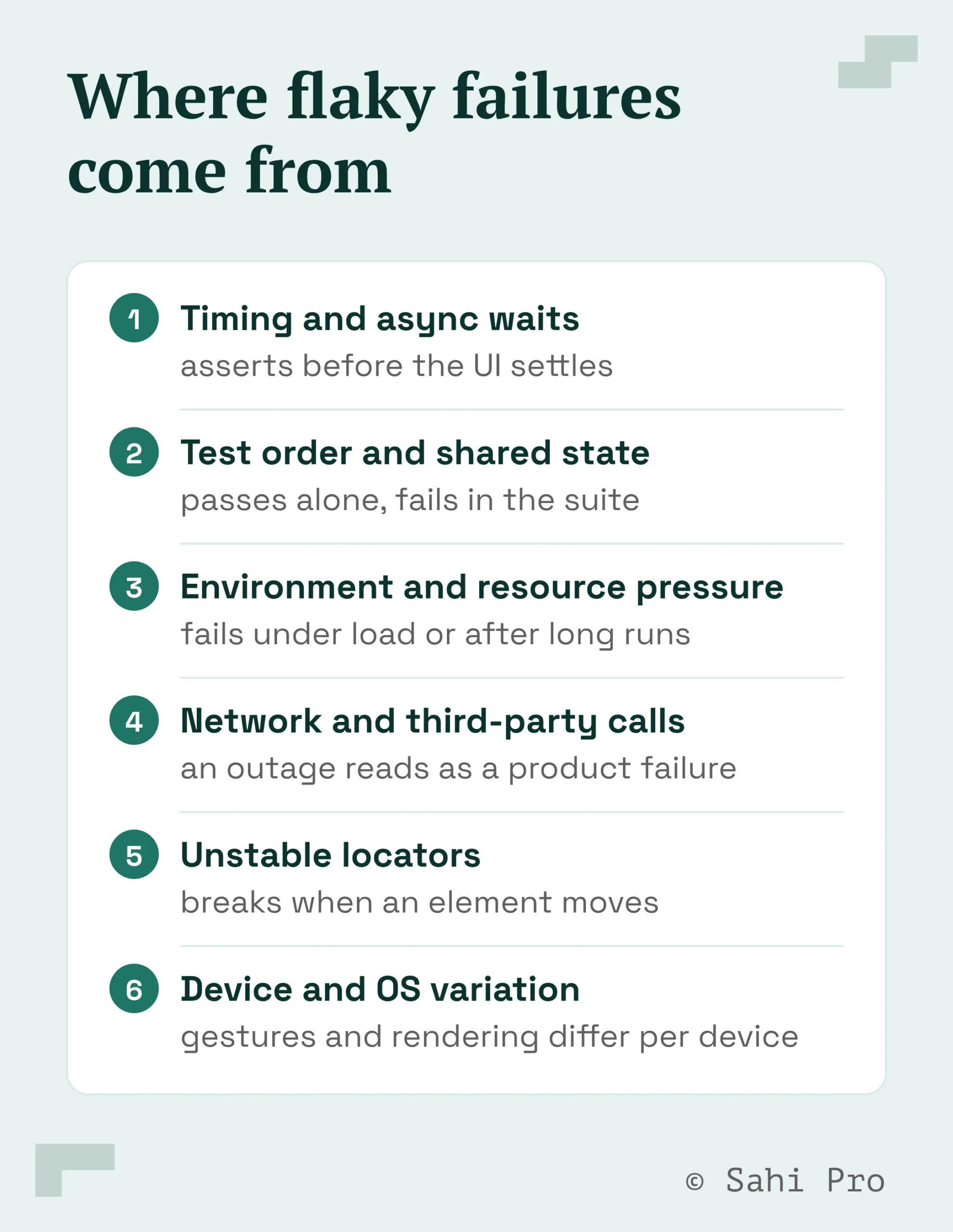
The recurring sources:
- Timing and async waits. The test asserts before the UI settles or before a network call returns, so it fails intermittently depending on machine speed and load.
- Test order and shared state. A test passes alone and fails in the full suite because it inherited data or session state from a test that ran before it.
- Environment and resource pressure. Failures appear only after the app has run for hours, under low memory, or when other processes compete for the machine.
- Network and third-party calls. An external service is slow or down at assertion time, and the test treats that as a product failure.
- Unstable locators. A selector tied to a DOM position or an auto-generated ID breaks the moment a developer moves an element or the framework re-renders it.
- Device and OS variation. Gesture timing and rendering differ across devices and OS versions, so the same script behaves differently on each.
How do you fix flaky tests for good?
You fix flakiness by removing the dependency the test has on conditions it was never meant to check. That means replacing guesses with explicit conditions, isolating every test’s state, and tying element references to something that survives a UI change. These are engineering decisions. A retry only hides a flaky test, so it belongs nowhere near the fix.
The durable fixes, in order of payoff:
- Replace fixed sleeps with condition-based waits. Wait for the element to be present and interactive, or for the request to complete. Do not pause for a hardcoded number of seconds, which is where most timing flakiness starts.
- Isolate test state. Reset the database, clear sessions, and tear down mocks between runs so no test can inherit side effects from another. This makes parallel execution safe.
- Stub external dependencies. Mock third-party and network calls so a slow payment gateway or a rate-limited API cannot decide your test result.
- Stabilize element identification. Stop binding selectors to DOM positions or generated IDs. Identify elements by their stable attributes and their relationship to nearby labels and fields.
- Quarantine and fix, do not rerun. Pull a known-flaky test out of the gating suite, fix the root cause, then return it. A test kept green by three retries costs three times the compute and gives none of the confidence.
Where most flakiness actually lives
In UI automation, the largest single source of flaky failures is the locator. A selector written as an XPath position or an auto-generated ID is a guess about where an element sits in the page, and that guess breaks every time the UI changes. Sahi Pro identifies elements by relationship and context, by the label next to a field or the text on a button, so a test keeps finding the right element after a layout change.
This is the mechanism behind what the market calls self-healing. Sahi Pro’s engine is proprietary and not built on Selenium or Appium, so it reads the page through relational accessors and waits for the application to be ready before it acts. Shadow DOM and iframes, which force teams into brittle XPath workarounds with browser-bound tools, are handled directly. The waits are automatic, so the timing category of flakiness largely disappears without a single explicit wait in the script.
Atlas, Sahi Pro’s AI test design studio, takes this a step further upstream. It builds a verified specification of how the application behaves and generates a deterministic test suite from it, so the starting point is a stable test. A recorded click path, by contrast, drifts.
What changes when the engine removes whole categories
The payoff shows up in maintenance hours, because maintenance is where flakiness is paid for. In a Sahi Pro benchmark that rebuilt a brittle Selenium suite across equivalent scenarios, regression maintenance fell by 80 percent. Maintenance effort dropped from a score of 89 to 27, and the number of scenarios the team could cover rose from 23 to 144 with the same people.
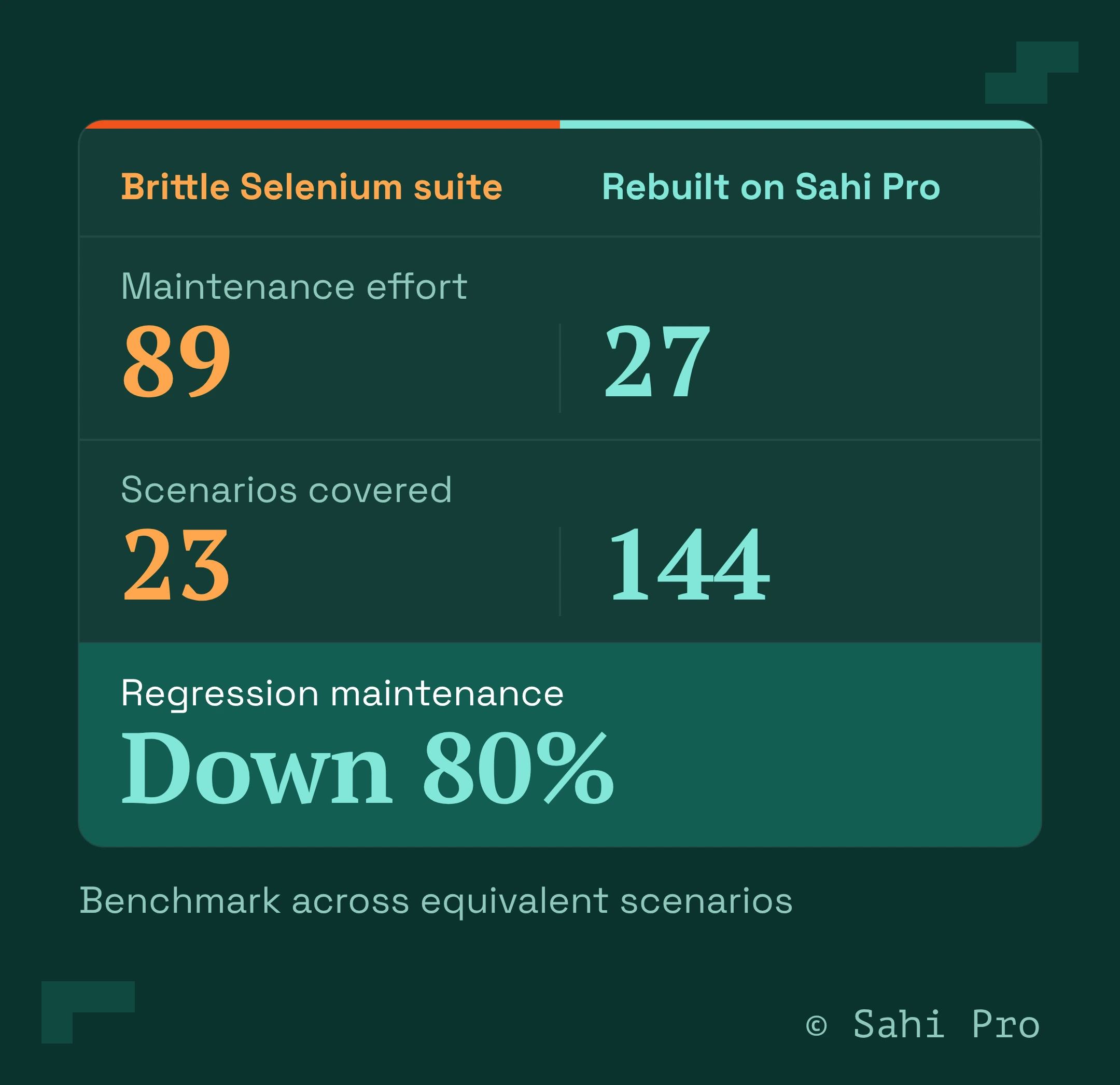
Those numbers come from one thing. When the engine waits on its own and finds elements by relationship, the two categories that generate the most flaky failures, timing and locator drift, stop producing failures the team has to triage. The test writer spends the recovered hours on coverage. That is the difference between a suite that grows and a suite that rots.
Can you eliminate flaky tests completely?
Not entirely, and any tool that claims otherwise is selling. You can engineer away the two biggest categories, timing and locator drift, because those are properties of how the tool finds elements and when it acts. Environment variance, third-party outages, and real concurrency bugs still need test design and discipline. The honest goal is a suite where a red result means a real problem.
Start with the two causes you can design away
Flaky tests erode the one thing a test suite exists to give you, a trustworthy signal. Fix the habits first, condition-based waits and state isolation, then remove the biggest structural source by identifying elements the way a person does, by what they are and what sits next to them. See how Sahi Pro’s engine handles waits and locators on your own application in a working session.
Sources
- Flaky Tests: An Engineering Guide, Minitap, 2025. https://www.minitap.ai/magazine/flaky-tests-engineering-guide
- A 2020 IEEE study on flaky-test root-cause localization (Google static analysis, 82% accuracy across 428 projects), as cited in the Minitap engineering guide above.