


TL;DR
- Flutter integration testing validates the whole app on a real device, using Flutter’s official integration_test package.
- Flutter is hard for traditional tools because of its render pipeline. Widgets are painted on a canvas, so they are not native OS views in the accessibility tree Appium queries.
- Flutter’s own finders work on the widget tree, find.byKey, find.text, find.byType, and keys are the only stable one.
- At scale the problem is stability and reach. Scripts tied to widget type or text break on UI change, and integration_test cannot drive native dialogs or platform views.
- A US financial institution running a 5M+ user Flutter app cut regression from 4 to 5 days to under 8 hours with Sahi Pro, and raised coverage from 10 to 15 percent to over 80 percent.
- Honest caveat: widget tests still belong in the Flutter toolchain. The gap is stable end-to-end automation across a real device matrix, including canvas-painted and native content.
Flutter testing looks easy in a tutorial. You write a widget test, tap a button by its key, assert the counter reads one, and it passes. Then the app grows to millions of users, releases go weekly, and the UI changes every sprint. Scripts that worked last month break, only a few engineers can keep them running, and regression slips from hours into days.
The reason is specific to how Flutter renders, and so is the fix. This guide covers what Flutter integration testing is, why the render pipeline defeats traditional tools, the finders Flutter gives you and their limits, the edge cases that break suites at scale, and what it takes to automate a Flutter app without rebuilding the suite every release.
What is Flutter integration testing?
Flutter integration testing verifies the behavior of the complete app running on a real device or emulator, rather than a single class or widget. It uses integration_test, the official package in the Flutter SDK, which runs on the target device and uses the same flutter_test APIs as widget tests. Flutter organizes testing into three types, unit, widget, and integration, and integration tests are the end-to-end layer that confirms whole flows work together.
Why the render pipeline defeats traditional tools
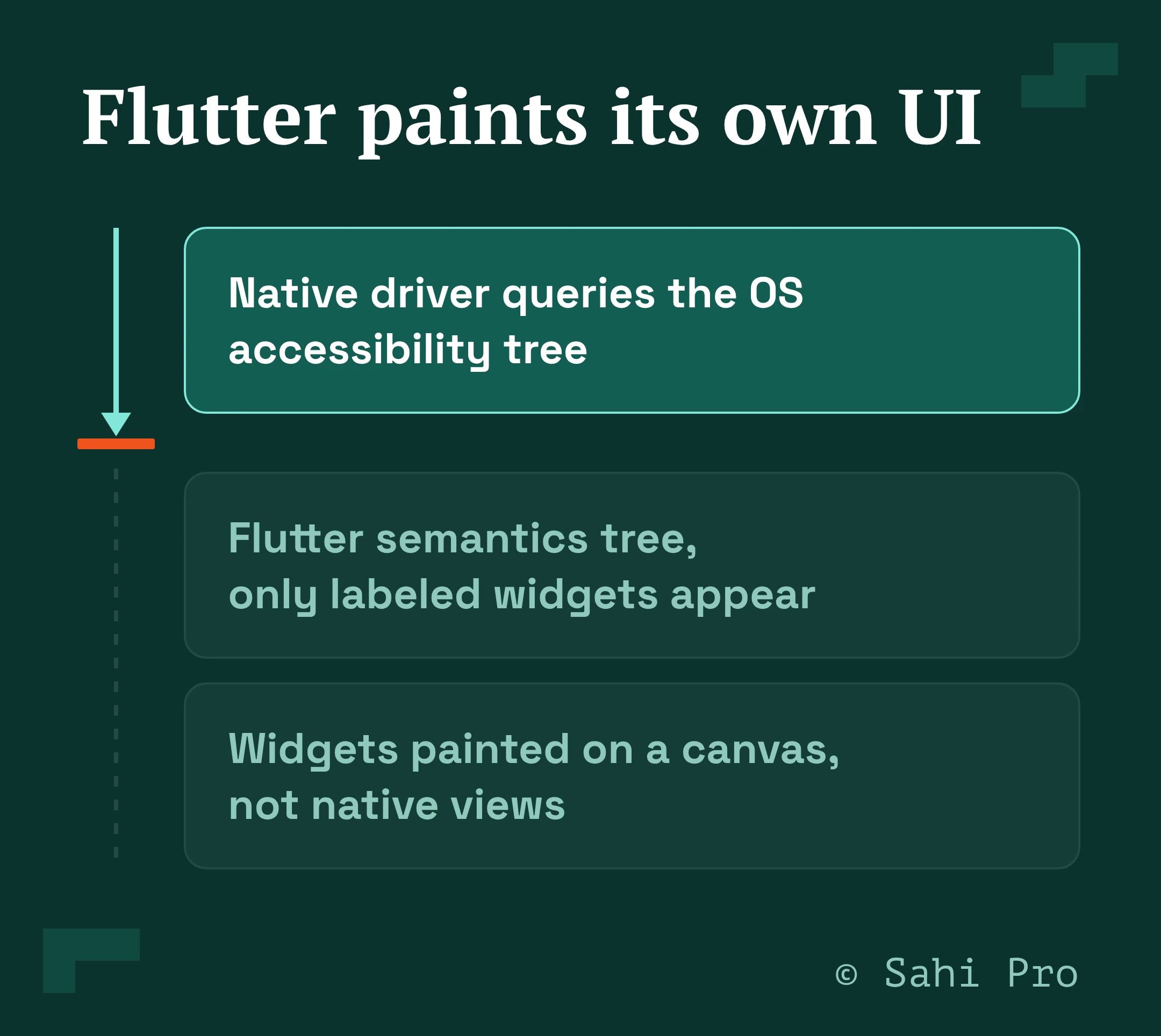
Flutter does not use the operating system’s native UI components. It composes a widget tree, inflates it into an element tree, builds a render-object tree, and paints the result onto a canvas through its own graphics engine. The buttons and fields you see are pixels on that canvas, not native views.
This is why Appium struggles. Native drivers, UiAutomator2 on Android and XCUITest on iOS, work by querying the OS accessibility tree for components. Flutter exposes a separate semantics tree to the OS for accessibility, and unless a widget carries a semantic label, it may not appear there at all. To a standard native inspector a Flutter screen often looks like one graphic surface, so By.id, Accessibility ID, and XPath have nothing internal to target.
The finders Flutter gives you, and their limits
Flutter’s own tools drive the widget tree directly, which is the right layer, and they have sharp edges. In an integration_test, you find widgets like this:
testWidgets(‘add item to cart’, (tester) async {
app.main();
await tester.pumpAndSettle();
// byKey: stable, independent of text and layout
await tester.tap(find.byKey(const ValueKey(‘addToCart_sku_8842’)));
await tester.pumpAndSettle();
// byText: breaks when copy or locale changes
expect(find.text(‘1 item in cart’), findsOneWidget);
// byType: ambiguous when several widgets share a type
expect(find.byType(CartBadge), findsOneWidget);
});
Keys are the only reliable finder, because text breaks when copy or the locale changes and a type match is ambiguous when several widgets share a type. The catch is that keys only exist if developers added them, and most production widgets do not carry one. That is the hidden tax of the native toolchain, someone has to instrument the app with ValueKeys before the tests are stable.
To reach a Flutter app from Appium you add the Appium Flutter Driver, which talks to Flutter’s test extension rather than the accessibility tree:
// Appium Flutter Driver: finders map to flutter_driver, not native locators
await driver.execute(‘flutter:byValueKey’, ‘addToCart_sku_8842’);
That driver and its configuration have to be installed and maintained per project, and it still depends on keys existing in the app.
The edge cases that break Flutter suites at scale
A technical plan has to account for the parts of a Flutter app that defeat the standard finders entirely:
- Canvas-painted widgets. A CustomPaint chart, a signature pad, or a CAD-style viewport is drawn directly to the canvas with no child widgets, so there is nothing for find.byKey or byType to hit. Testing it needs coordinate or image-based interaction.
- Platform views. An embedded WebView, map, or native video surface is a native view hosted inside Flutter, so integration_test cannot reach inside it. This is the gap Patrol and native tooling fill.
- Native dialogs and permissions. integration_test cannot interact with native platform UI such as permission prompts and notifications, so a flow that hits an OS permission dialog stalls without a tool that can drive it.
- Missing keys. Any widget the developers did not key has to be found by text or type, which reintroduces the fragility keys were meant to remove.
- Virtualized lists. A long ListView.builder only renders visible rows, so a finder for an off-screen item fails until the test scrolls it into view.
A plan that ignores these ships a suite that passes in the demo and breaks on the real app.
What Flutter test automation needs at scale
At scale the deciding factor is whether a test survives a UI change and whether one tool can reach the whole app, including canvas and native content. A script bound to widget type or unkeyed text breaks on the next rebuild, so maintenance climbs and only the engineers who wrote the scripts can fix them. What scale needs is identification that does not depend on widget type or developer-added keys, support for the dynamic widget tree without a brittle driver chain, and a single flow that can cross from the Flutter app into the web and API calls behind it.
Sahi Pro supports Flutter natively and identifies elements by relationship and context rather than by type or position, so a rebuild of the tree does not break the test, and it does not require the app to be pre-instrumented with keys for every element. Its engine is proprietary and not built on Appium, so it handles the dynamic widget trees that break Appium-based tools directly. Because the architecture is single-flow, one script can run across the Flutter mobile app, the web app, and the API in one continuous test, with session state carried through.
How Sahi Pro automates Flutter at scale
The payoff is a suite a whole team can run that keeps up with weekly releases. A US financial institution running a high-traffic Flutter app with more than 5 million users came to Sahi Pro with Appium scripts that broke on UI changes, where only 3 of its 12 QA engineers could automate at all.
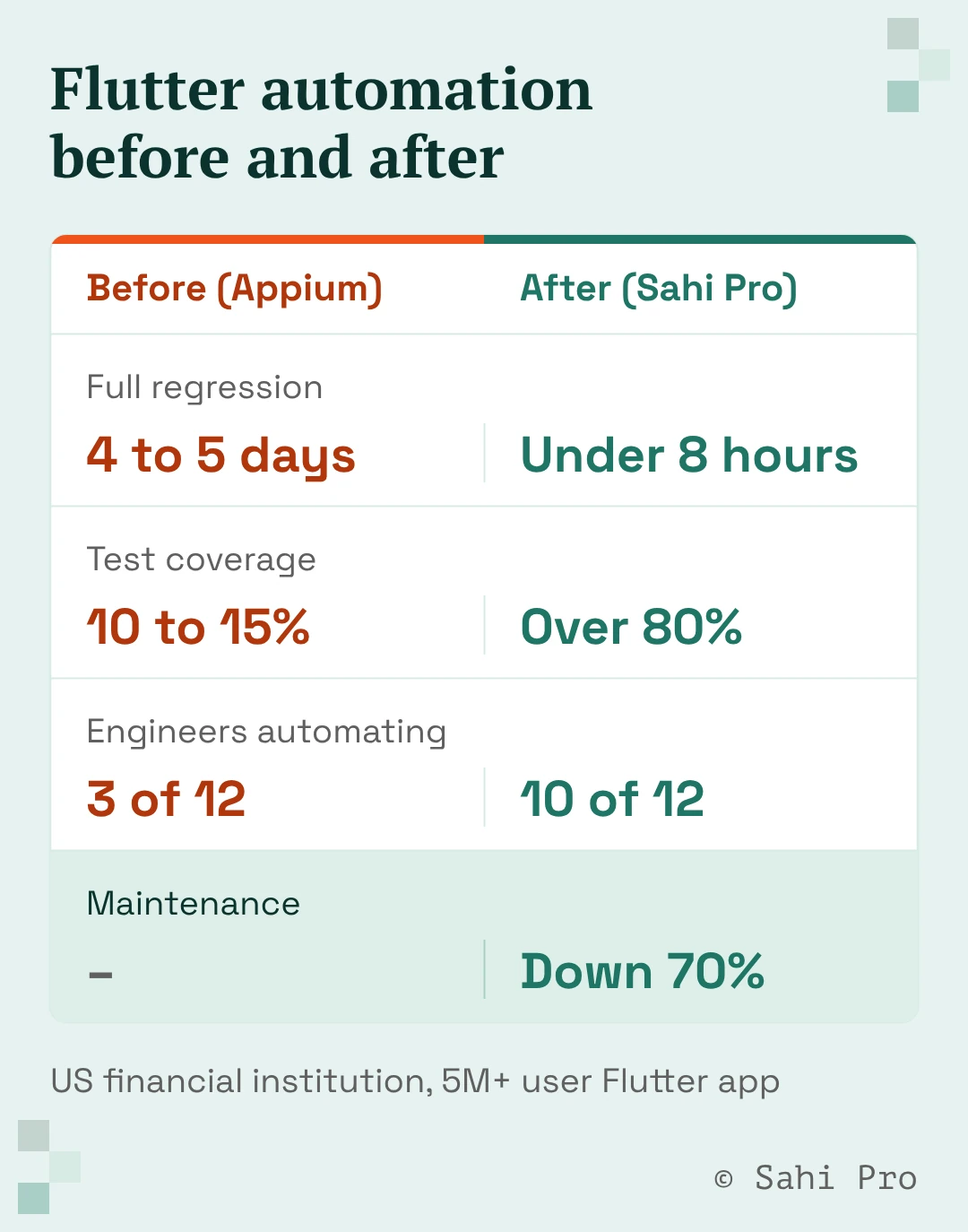
After the move, that team cut full regression from 4 to 5 days to under 8 hours, and raised coverage from 10 to 15 percent to over 80 percent. Maintenance dropped 70 percent, 10 of the 12 engineers could automate, and the app moved to weekly releases. The deployment used Sahi Pro’s AI Assist and integrated with the team’s Jenkins and AWS Device Farm setup, so the automation ran inside the pipeline they already had.
Keep widget tests, fix the end-to-end layer
Flutter’s own toolchain is the right place for unit and widget tests, and it is worth using well. The gap it leaves is stable end-to-end automation across a real device matrix, including canvas and native content, that does not break every time the UI changes. Close it with identification that ignores widget type and keys, and native Flutter support that does not lean on a brittle driver chain. See how Sahi Pro automates your Flutter app in a working session.
Sources
- Integration testing, Flutter official docs, 2026. https://docs.flutter.dev/cookbook/testing/integration/introduction.html
- Flutter Testing: Introduction, WebdriverIO docs, 2026. https://webdriver.io/docs/flutter-testing/introduction