














Regression Test Automation That Stay Working

Stable tests, distributed execution, and automatic logs on every run.

Three Reasons Regression Test Suites Break Down at Scale

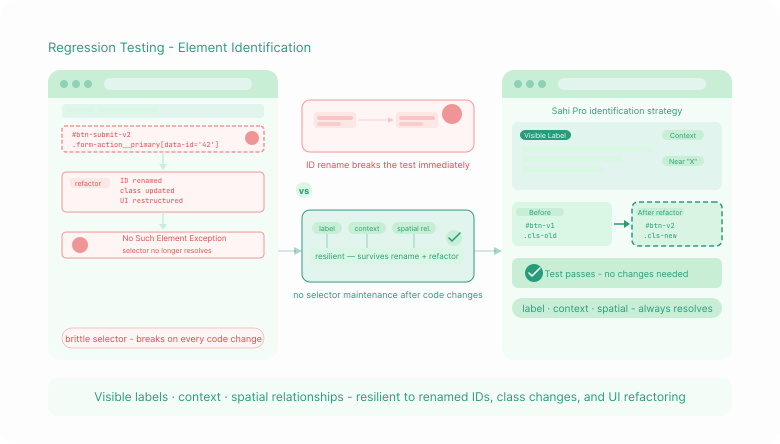
Tests That Break Every Time the Application Changes

Most regression automation is built on CSS selectors and XPath expressions tied to DOM positions. When developers refactor code – those locators break.

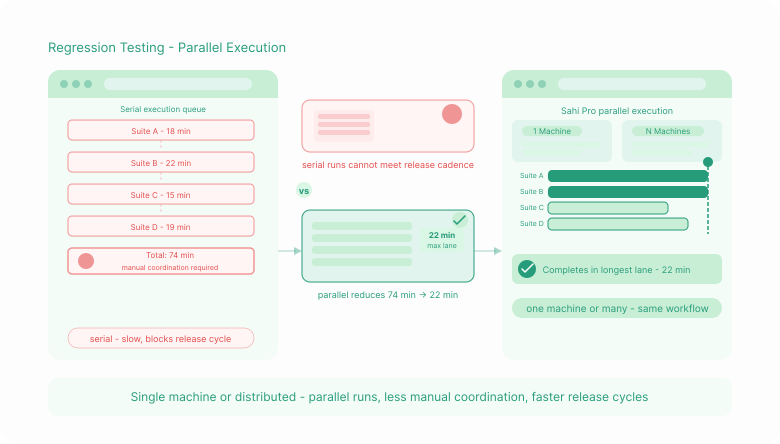
Suites That Run Too Slowly to Fit the Release Cycle

A regression suite that takes three days to execute sequentially is not a regression suite – it is a release delay mechanism.

Maintenance Overhead That Inverts the Teamโ€™s Time

QA teams using conventional automation tools spend the majority of their time maintaining tests rather than writing new ones.

Three Capabilities That Make Regression Automation Work

Flowcharts turns every major automation pattern into a drag-and-drop interface. Conditional logic, data-driven testing, and suite dependencies without writing a single line of code.

Sahi Pro โ€“ Final Responsive Stacking
Solution 1

Element Identification That Survives Code Changes

Sahi Pro identifies elements using visible labels, context, and spatial relationships[cite: 1].

Solution 2

Parallel Execution That Fits Your Release Cycle

Execute large suites faster with less manual coordination[cite: 1].

Solution 3

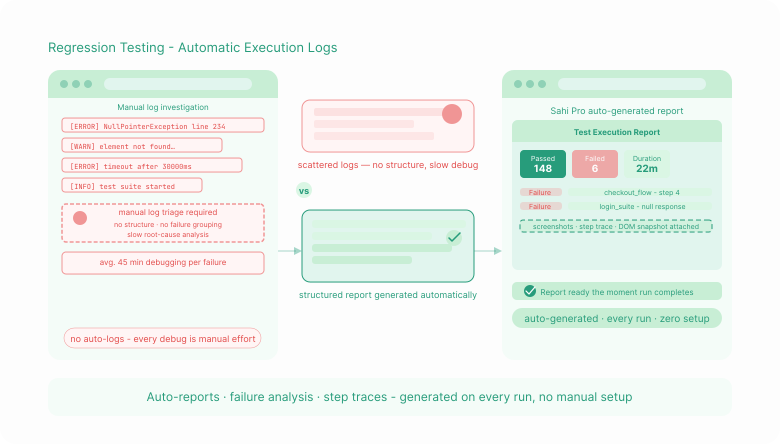
Automatic Execution Logs on Every Run

Detailed test reports and failure analysis generated automatically[cite: 1].

What Regression Automation Looks Like With Sahi Pro

Every Test Type Your Regression Suite Requires

Functional
regression

Verification that existing features behave correctly after every change

Cross-browser
regression

The same suite executed across Chrome, Firefox, Safari, and Edge

API
regression

Backend service validation after changes that affect integration points

Database
regression

Backend state verification after transactions and workflow changes

Mobile
regression

Native and hybrid application regression on iOS and Android

Desktop application
regression

Windows desktop and Java application regression testing

Integration
regression

End-to-end workflow validation across web, desktop, API, and database layers

Performance
regression

Replaying regression scenarios with concurrent virtual users

Visual
regression

Screenshot comparison integrated into regression runs

From First Test to Full Suite: How the Product Works

1. Record or author individual test cases

Create test cases either through Sahi Proโ€™s no-code recorder or directly in JavaScript, with both running on the same execution engine.

Group test cases into a suite, then add tags, dependencies, and data files through a simple UI action.

Configure threads and machines, and let Sahi Pro distribute tests, respect dependencies, and combine results automatically.

Execute suites from the UI or CI/CD command line and review live progress with root-cause-focused failure analysis.

Update only changed elements and propagated those changes across all linked scripts through the Accessor Repository.

Questions Teams Ask Before Automating Their Regression Suite

How does automated testing work for insurance policy management systems?

Regression test automation uses software tools to automatically re-execute tests after application changes, verifying that existing functionality still works correctly. It replaces manual re-testing, which becomes impractical as applications grow and release cadences increase. A regression automation suite provides documented evidence that changes have not broken existing behaviour before every release.

Regression tests should run whenever the application changes in a way that could affect existing functionality. In practice, this means before every release – and in teams following continuous integration, it means on every commit to shared branches. Parallel execution makes frequent, complete regression runs practical by reducing total suite time significantly.

Retesting re-executes a specific test case that previously failed, after the reported defect has been fixed, to confirm the fix is effective. Regression testing re-executes the full relevant test suite after any application change, to verify that the fix has not introduced new defects elsewhere. Retesting is targeted and narrow. Regression testing is broad and runs regardless of whether a specific defect was previously found.

Regression tests become fragile when they rely on identifiers that change as the application is updated – DOM positions, dynamic element IDs, XPath expressions tied to page structure, or CSS class names that developers rename during refactoring. When any of those identifiers change, the tests fail – not because the application is wrong, but because the test was written against an unstable anchor. Sahi Pro identifies elements using proximity and context that remain stable across code changes.

The starting point is test cases that cover functionality your users depend on – workflows that, if broken, would produce a defect report or a support call. Functional tests for core business processes, integration tests for critical data flows, and tests for known high-risk change areas. Coverage expands over time as new functionality is automated.

In agile, regression testing runs at the end of every sprint, before each release, and – in teams with CI/CD pipelines – on every code commit. The suite grows sprint by sprint as new functionality is automated. Parallel execution solves the speed challenge: Sahi Pro runs multiple test threads simultaneously, so a suite that would take hours sequentially completes faster as machine or thread count increases.

Choose an element identification approach that does not depend on identifiers developers change during normal development. Tools that identify elements by visible labels, proximity, and element type – the way a human tester would find them – require significantly less maintenance when application structure changes. Sahi Proโ€™s relational API approach is why customers report tests running robustly across many major application versions without rebuilding the suite.

Sahi Pro integrates with Jenkins, Azure DevOps, GitLab CI, GitHub Actions, TeamCity, and Bamboo. The suite runs from a command-line call that CI/CD tools trigger as a pipeline step. Results are returned in JUnit XML and TestNG formats, which CI tools read natively to display pass/fail status.

Automated regression testing runs a defined suite of existing test cases after application changes. Continuous testing integrates that automated execution directly into the development pipeline, so tests run automatically on every code commit without requiring a manual trigger. Teams new to automation typically start with triggered regression runs before releases. Teams with mature CI/CD pipelines integrate Sahi Pro into the pipeline so regression runs automatically on every build.

Try It Against Your Regression Suite, or Talk Through Your Requirements

Try It Yourself

Full product access across all modules and capabilities. Run Sahi Pro against your actual application - the one whose regression suite is currently giving you problems - before any conversation about purchasing.

Talk to Our Team

Tell us about your current regression suite - test case count, application technologies, release frequency, and current maintenance overhead. We will come back with a specific assessment of where Sahi Pro addresses your problems and what deployment looks like in your environment.