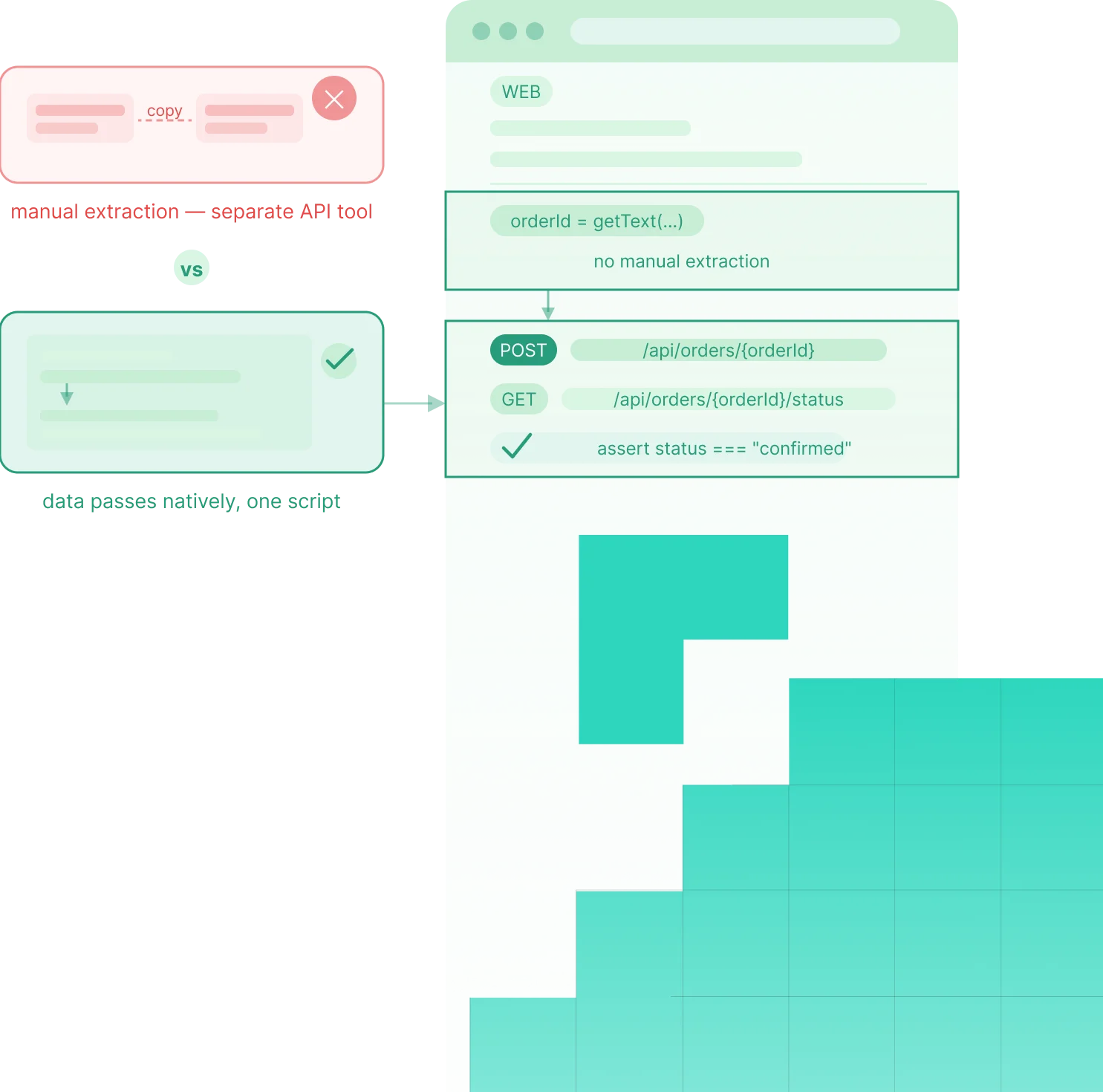

















Reliable Test Automation for CI/CD.

Automatic sync, stable elements, and distributed execution without race conditions.

Three Ways Tests Break in CI/CD Pipelines

Tests That Pass Locally and Fail in CI

The most common automation failure pattern tests that rely on hardcoded waits often pass on faster local machines but fail in CI, turning timing differences into ignored build failures.

Flaky Tests That Erode Trust in the Pipeline

Flaky tests turn the pipeline into noise by failing unpredictably, teaching teams to rerun builds instead of trusting them as real quality gates.

Parallel Execution That Creates Race Conditions

Parallel execution speeds up CI in theory, but shared state, data, or records can create race conditions that force teams back to slower sequential runs.

Three Capabilities That Make Tests Reliable in Production Pipeline

Flowcharts turns every major automation pattern into a drag-and-drop interface. Conditional logic, data-driven testing, and suite dependencies without writing a single line of code.

Sahi Pro โ€“ Final Responsive Stacking
Solution 1

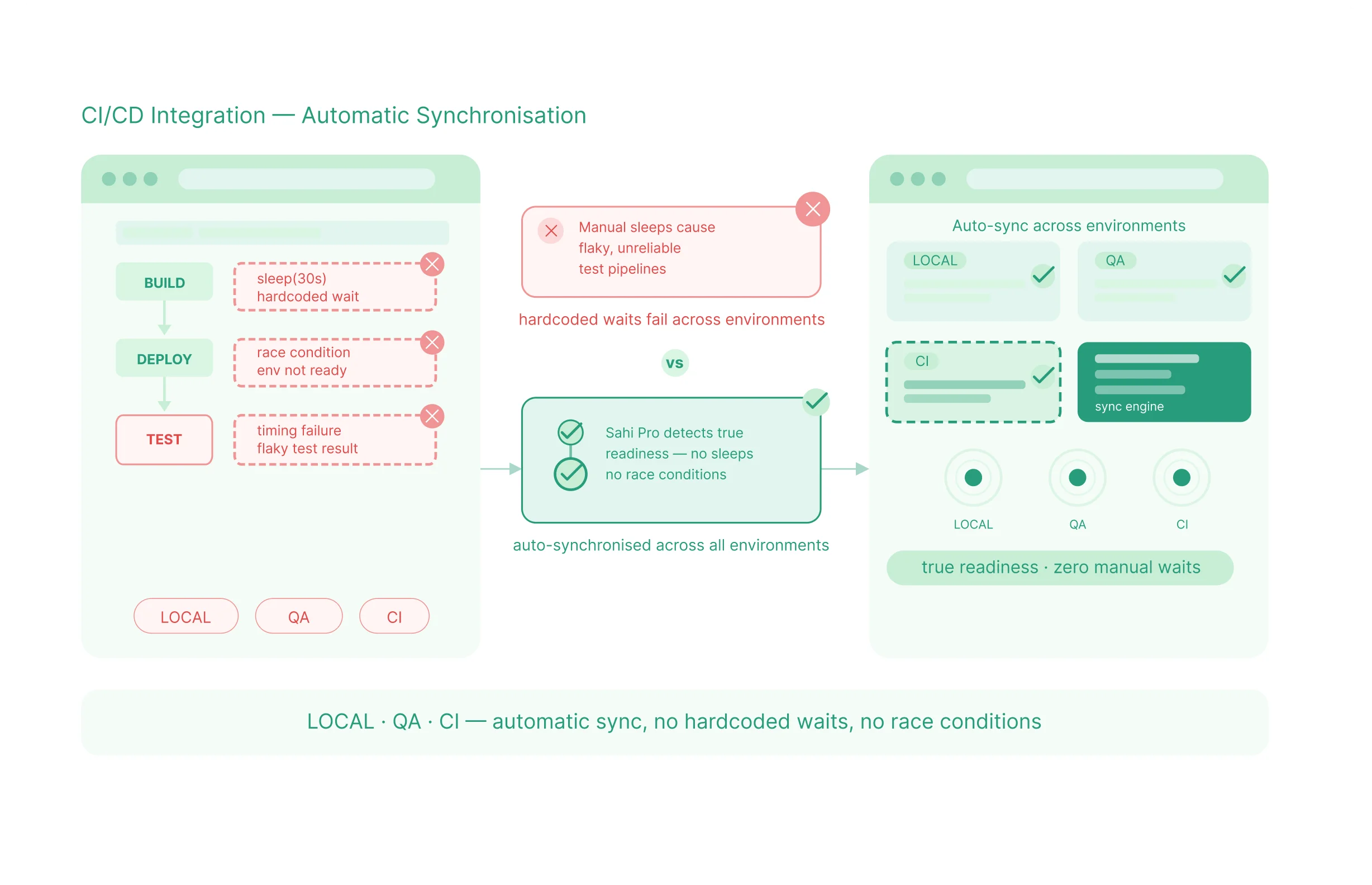
Automatic Synchronisation - No Manual Waits, No Race Conditions

Sahi Pro automatically waits for true readiness across local, QA, and CI environments, eliminating hardcoded waits, timing failures, and race conditions.
Solution 2

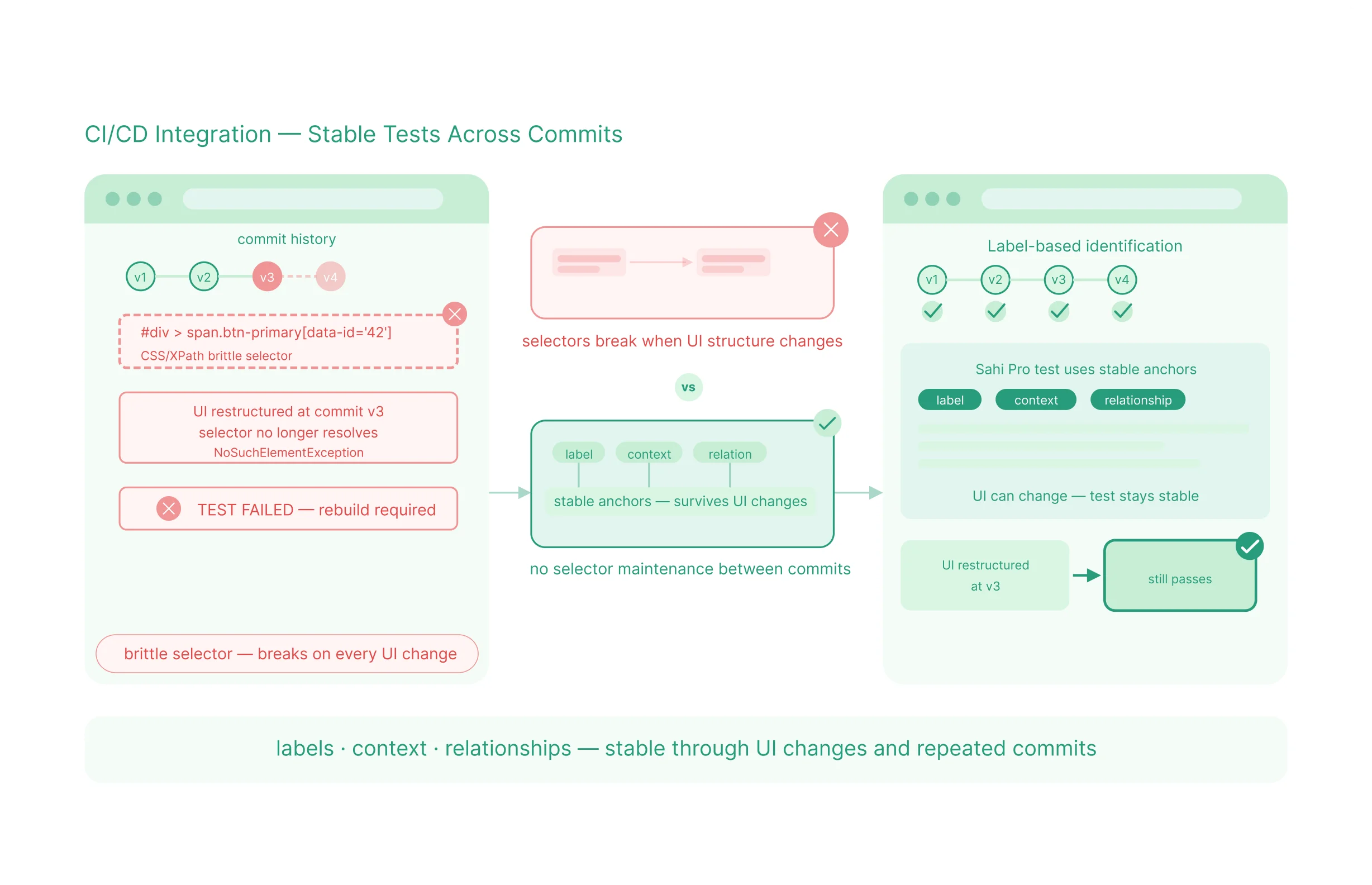
Stable Tests That Do Not Break Between Commits

Sahi Pro uses labels, context, and element relationships instead of brittle selectors, keeping tests stable through UI changes and repeated commits.
Solution 3

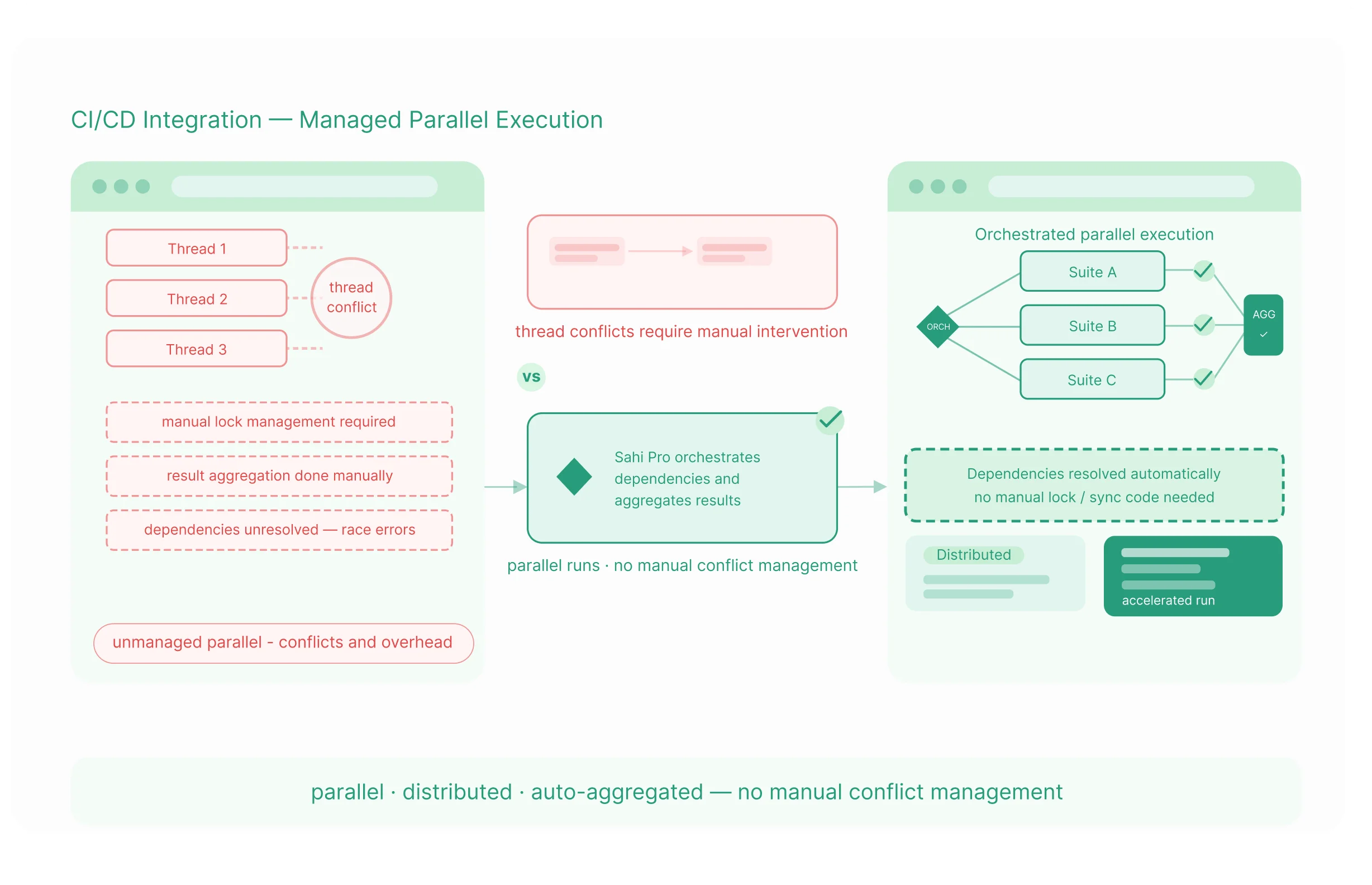
Managed Parallel Execution Without Thread Conflicts

Sahi Pro manages parallel and distributed execution by handling dependencies and result aggregation automatically, accelerating runs without manual conflict management.

What CI/CD Integration Looks Like When It Works

Every Test Type You Can Run as a Pipeline Step

Regression
testing

Full suite or targeted subset, triggered on every commit or release

Smoke
testing

Fast, focused suite that verifies core functionality on every build

Functional
testing

Individual feature verification triggered when relevant modules change

Cross-browser
testing

The same test suite executed in parallel across all target browsers

API
testing

REST and SOAP service validation integrated into the pipeline as a step

Integration
testing

End-to-end workflows spanning web, desktop, and API layers

Database
validation

Backend state verification after application transactions

Mobile application
testing

iOS and Android native application testing in the pipeline

Performance
testing

Browser-based load scenarios replayed with concurrent virtual users

UAT
automation

Business-scenario test cases authored by non-technical contributors

How Sahi Pro Runs in Your Pipeline: The Technical Picture

1. On-Premise and Infrastructure Control

Sahi Pro runs inside your own infrastructure by default, making it fit regulated, security-sensitive, and data-residency-driven environments without extra deployment complexity.

Sahi Pro uses its own automation layer rather than external browser drivers, removing a separate driver-management task from pipeline maintenance.

Sahi Pro supports reliable parallel execution by helping teams isolate thread-level data, avoid conflicts, and clean up safely after runs.

Sahi Pro uses the same suite execution approach across environments, so teams do not need a separate CI mode or different operational behavior.

Questions Technical Teams Ask Before Integrating

What is CI/CD test automation?

CI/CD test automation is the practice of running automated tests as a defined step inside a continuous integration or continuous delivery pipeline. Every time a developer commits code, the pipeline triggers the test suite automatically and returns a pass/fail result. The goal is immediate feedback: developers find out within minutes whether a change has broken existing functionality, rather than finding out during a scheduled manual test cycle days later.

Sahi Pro integrates with Jenkins through a command-line trigger that runs the suite as a Jenkins build step. Results are returned in JUnit XML format, which Jenkins reads natively and displays in its test results interface. A configuration wizard inside Sahi Pro generates the Jenkins command for the specific suite and environment, eliminating the need to write integration scripts manually. The same approach applies to Azure DevOps, GitLab CI, and GitHub Actions.

The most common cause is timing. A local machine has more resources than a CI runner. Tests written with hardcoded wait times or assumptions about load speed behave differently when the CI environment is slower. Sahi Pro eliminates this by monitoring application state continuously and proceeding when elements are genuinely ready for interaction, regardless of how quickly the environment loads them. Tests behave consistently across environments because the synchronisation logic is product-level, not per-test.

Continuous integration is the practice of automatically building and integrating code changes as they are committed. Continuous testing is the practice of automatically running tests as part of that integration process. The two work together: continuous integration triggers continuous testing, and continuous testing provides the quality gate. Sahi Pro handles the testing layer – it integrates with CI tools so tests run automatically whenever integration happens.

The right answer is eliminating the cause, not managing the symptom. Flaky tests fail inconsistently because of timing issues or brittle element identification – both of which have engineering solutions. Sahi Proโ€™s automatic synchronisation addresses timing: the product does not proceed until the application is ready. Its proximity-based element identification addresses selector fragility: tests continue working when developers change code that breaks DOM-based locators.

Sahi Pro produces results in JUnit XML, TestNG, HTML, Excel, PDF, and XML. JUnit XML is the format most CI/CD tools read natively to display pass/fail status and test history. HTML reports include screenshots, logs, and execution traces. The suite analysis report identifies which specific failures are root causes and which are downstream cascades, reducing the time engineers spend investigating failed builds.

Yes. Sahi Pro runs inside Docker containers for consistent, reproducible test environments. Container-based execution ensures the CI environment matches the QA environment at the infrastructure level, eliminating the โ€˜passes here but fails in CIโ€™ class of problems. Kubernetes is supported for teams that need scalable parallel execution orchestrated at the infrastructure level.

Sahi Pro supports multiple threads on a single machine and distributed execution across multiple machines. Sahi Pro manages thread distribution, dependency ordering, and result aggregation automatically. The practical parallel capacity is determined by available infrastructure – more threads and more machines reduce suite execution time proportionally for tests without shared dependencies. Sahi Pro delivers over 70% reduction in execution time through parallel and distributed playback.

Yes. Sahi Pro runs entirely within your own infrastructure. The CI/CD pipeline, test execution, and result storage all operate on your network. No test data, application data, or execution information is routed through external systems. For teams in regulated industries or with security policies that require on-premise infrastructure, this is the standard deployment configuration. The integration with Jenkins, Azure DevOps, GitLab CI, and other CI tools operates over your internal network.

Integration typically involves adding a command-line trigger to an existing pipeline step and configuring the output format to match your CI toolโ€™s native test result reader. Sahi Pro provides configuration wizards for the major tools and CloudFormation templates for AWS environments. Torsten Reschke at Thieme Group describes the integration as easy, noting that it โ€œruns smoothlyโ€ from the point of setup. For teams with existing CI infrastructure, integration is a hours-long task rather than a multi-day project.

Run It in Your Pipeline, or Walk Through Your CI/CD Setup With Our Team

Talk to Our Team

Tell us your CI/CD tool - Jenkins, Azure DevOps, GitLab, GitHub Actions, or another - and describe your current flaky test rate and maintenance overhead. We will show you how Sahi Pro integrates with your specific setup and what stable, reliable pipeline automation looks like in your environment.

Evaluate the Product

Full product access across all modules and integrations. No credit card. No sales call required. Connect Sahi Pro to your CI/CD pipeline and run your first automated build trigger. See whether the timing problems, the flaky test rate, and the parallel execution issues resolve before any conversation about purchasing.