
















End-to-End Automation, One Test Flow.

One test script covering web, desktop, mobile, and API layers.

What โ€œEnd-to-Endโ€ Usually Means in Practice - and Why It Is Not Enough

Separate Tools for Each Layer Mean Gaps Between Them

Using separate tools for web, desktop, APIs, and databases leaves the cross-layer handoffs untested, which is where many production defects occur.

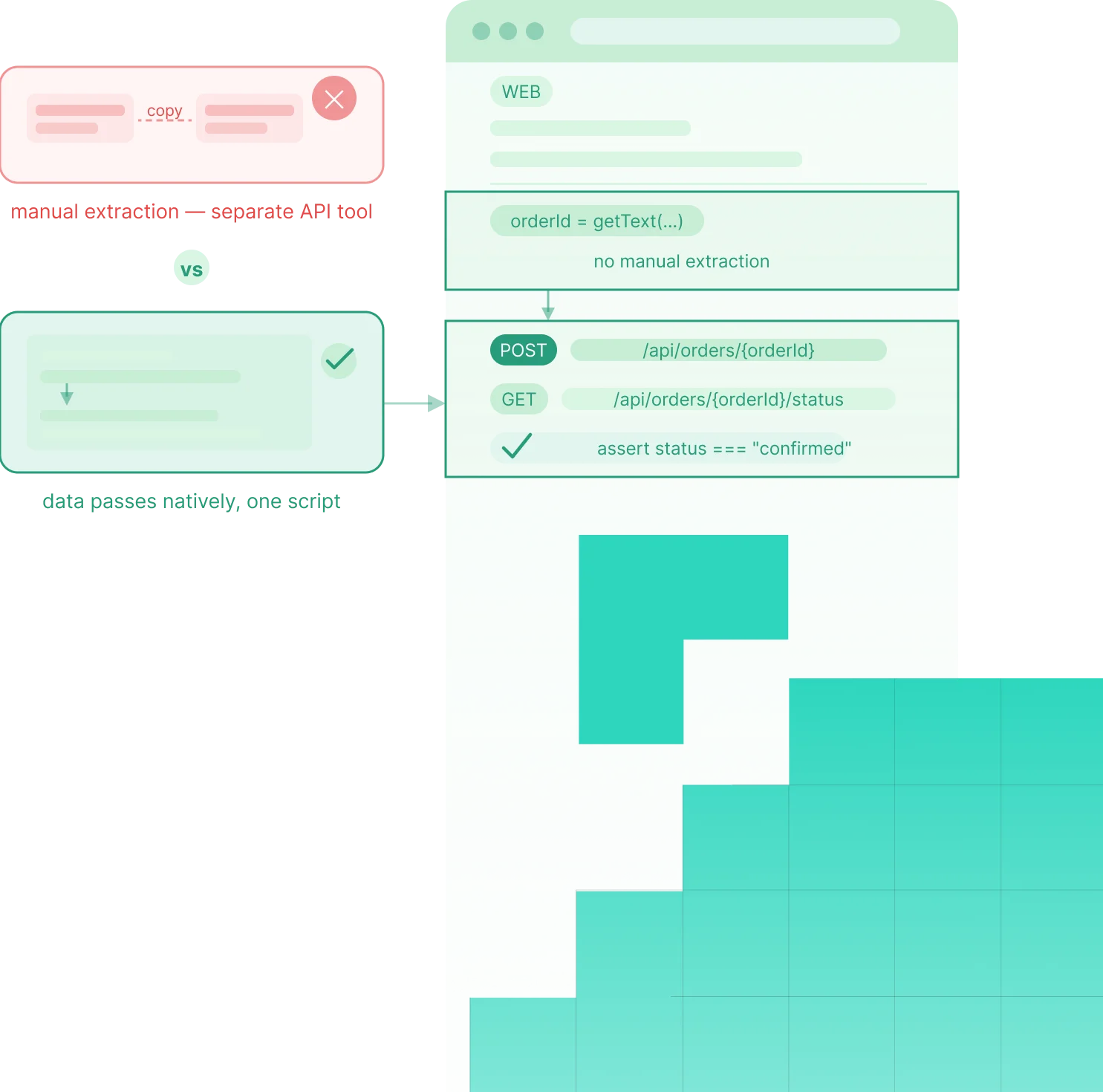
Data Cannot Flow Between Separate Test Tools

When each layer is tested in a different tool, data context breaks between steps, so workflows are tested in pieces rather than end-to-end.

Maintaining Three or Four Separate Tools Is Not Sustainable

Running multiple automation tools multiplies maintenance, upgrades, and scripting complexity instead of simply adding more test coverage.

One Product, One Test Flow, Every Layer

Flowcharts turns every major automation pattern into a drag-and-drop interface. Conditional logic, data-driven testing, and suite dependencies without writing a single line of code.

The Single-Flow Architecture

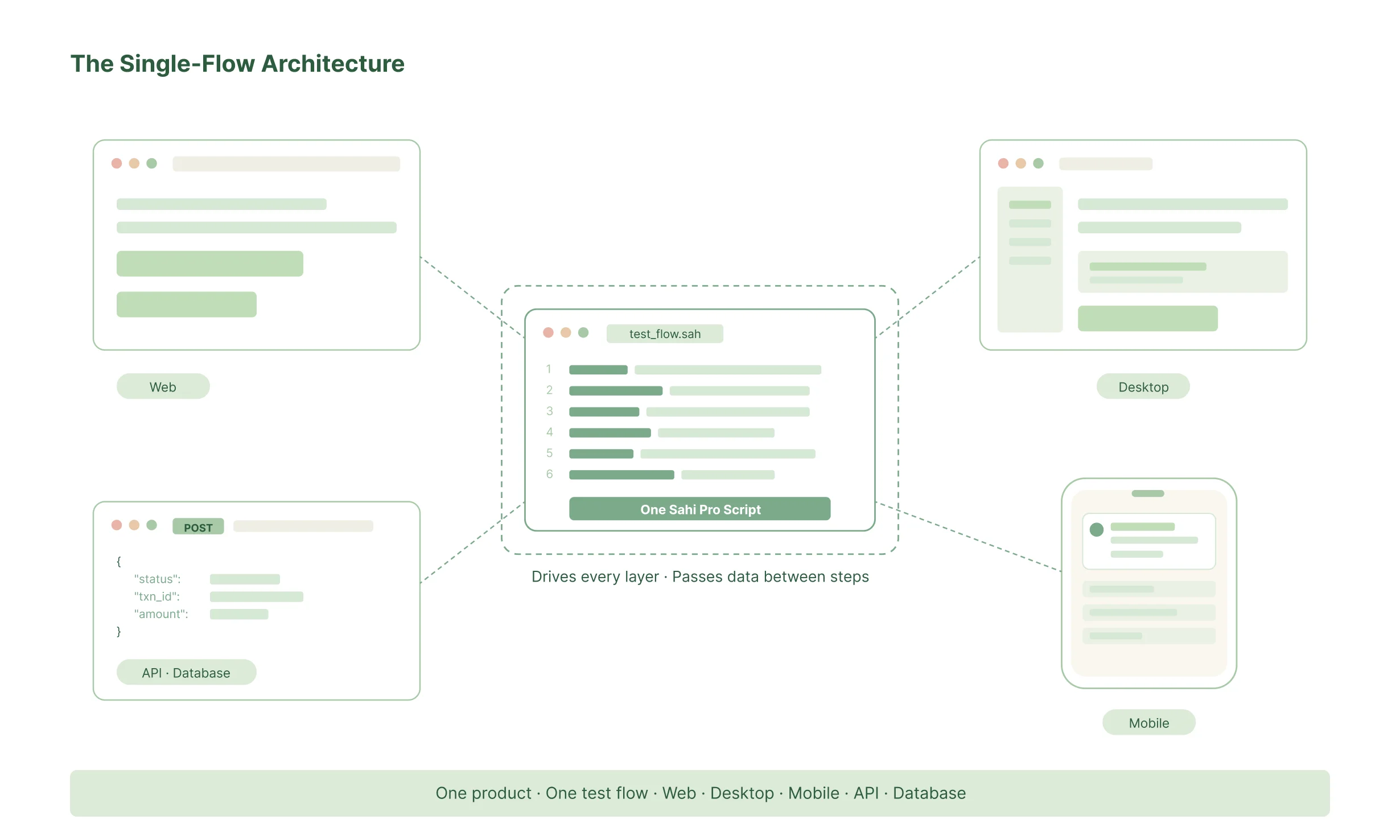
Sahi Pro uses its own automation engines across web, desktop, mobile, and API, letting one script move across layers, pass data between steps, and validate full workflows without tool-switching or coverage gaps.

No other product in the market delivers verified single-flow testing across web, desktop, mobile, and API in a single script. Competitors require separate modules or context switching between testing sessions.
What a Single-Flow Test Covers

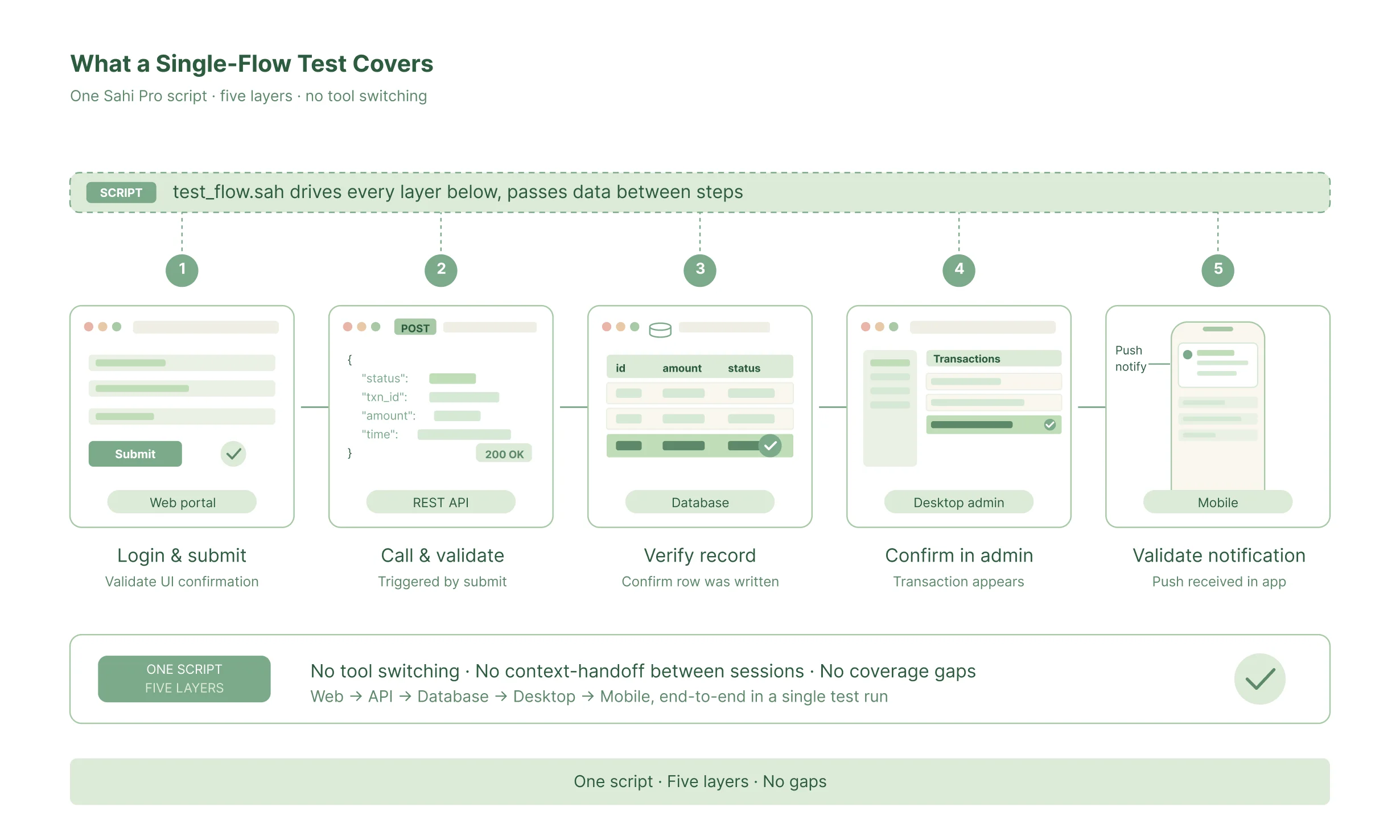
A concrete example of what one Sahi Pro test script handles without switching tools:

A customer logs into the web portal and submits a transaction

The test validates the web UI confirmation response

The same script calls the triggered REST API and validates the returned response.

The same script checks the database and verifies the transaction record was written.

The same script opens the desktop admin interface and confirms the transaction appears.

The same script validates mobile notifications when the workflow includes a mobile step.

Every Layer Your End-to-End Workflows Cross

What Regression Automation Looks Like With Sahi Pro

Every Testing Type in a Single End-to-End Run

Functional
testing

Verification that each step in the workflow produces the correct result

Integration
testing

Validation of the handoffs between systems in a connected workflow

Regression
testing

Full workflow re-execution before every release

User acceptance
testing

Business-scenario test execution against real application behaviour

Cross-browser
testing

The same end-to-end workflow executed across all target browsers

Mobile application
testing

Workflow steps that cross from web to mobile in a single script

API
testing

Service-layer validation embedded inside end-to-end workflow scripts

Database
validation

Backend state verification after workflow transactions

Performance
testing

End-to-end workflow scenarios replayed with concurrent virtual users

Compliance
testing

Complete execution records for every workflow run

Three Ways to Build End-to-End Tests, All in the Same Product

1. Record and Extend

Use the recorder for web interactions, then extend the same script with API, database, and desktop steps using Sahi Proโ€™s APIs.

Build complete end-to-end flows visually with web, API, and database steps, without writing code.

Use Sahi Proโ€™s JavaScript API to write cross-layer tests with one scripting model for web, desktop, API, database, and mobile.

Questions Teams Ask Before Evaluating End-to-End Automation

What is end-to-end testing?

End-to-end testing validates a complete user workflow across every system layer it touches – from the front-end interface, through the APIs that process the request, to the database that stores the result. It verifies that the complete workflow behaves correctly as an integrated system, not just that individual components pass when tested in isolation.

Integration testing verifies that two or more components work correctly together – typically a specific interface between systems, such as an API call and its response. End-to-end testing covers the entire workflow from the userโ€™s starting point to the final result, across every system layer involved. Integration tests find failures at specific interfaces; end-to-end tests find failures in the complete workflow that do not show up in component-level tests.

Unit tests verify that individual functions or components produce the correct output for a given input, in isolation from the rest of the system. End-to-end tests verify that complete workflows behave correctly across the full integrated system. Unit tests run fast and find precise failures at the code level. End-to-end tests find failures that only appear when components interact under real conditions.

End-to-end tests should cover the workflows that matter most to users and the business – the core journeys that, if broken, produce a customer complaint, a support call, or a compliance violation. In practice: user login and authentication flows, core transaction workflows, data creation and retrieval across system layers, and any process with regulatory significance. Coverage should start with the highest-risk, highest-value journeys and expand as the automation investment matures.

No. End-to-end tests and unit tests serve different purposes and find different classes of defects. Unit tests run at every commit, execute in milliseconds, and pinpoint exactly which function is broken. End-to-end tests validate that the full integrated workflow works correctly before release. A testing strategy needs both: unit tests for fast, precise feedback during development; end-to-end tests for confidence that the complete system works before release.

End-to-end tests fail for three main reasons: timing issues across multiple systems, fragile element identification that breaks when UI changes, and brittle test data that produces unpredictable results when run in different orders or in parallel. Sahi Pro addresses all three: automatic synchronisation handles timing, proximity-based element identification handles UI changes, and built-in test data management handles data state.

Execution time depends on the number of workflows tested, the number of systems involved, and whether tests run sequentially or in parallel. Sahi Proโ€™s parallel execution reduces total suite time by over 70% by running multiple end-to-end scenarios simultaneously across threads and machines. Cross-browser execution runs the same suite across all target browsers in parallel rather than sequentially.

No. Sahi Pro automates web, desktop, mobile, API, and database layers from a single product. A single test script covers the full workflow across all layers with data passing between each step. This is an architectural distinction from products that support multiple layers through separate modules that must be integrated – Sahi Proโ€™s engines for each layer were built as part of the same product, not assembled from separate tools.

Try It Against Your Regression Suite, or Talk Through Your Requirements

Try It Yourself

Full product access across all modules and capabilities. Run Sahi Pro against your actual application - the one whose regression suite is currently giving you problems - before any conversation about purchasing.

Talk to Our Team

Tell us about your current regression suite - test case count, application technologies, release frequency, and current maintenance overhead. We will come back with a specific assessment of where Sahi Pro addresses your problems and what deployment looks like in your environment.