














- Trusted by Turnkey IPS and more.
No-Code Automation Every Role Owns.
Business analysts and manual testers contribute directly alongside engineers, the same product.
- Teams that rely on sahi pro


- Two Teams, one product
This Is For Two Kinds of Teams
The Manual Tester or Business Analyst
You know the workflows, edge cases, and defect patterns that matter, and Sahi Pro lets you turn that knowledge into automated coverage through a no-code interface and BDTA without writing code.
The QA Manager or Test Lead
Sahi Pro lets manual testers and business analysts contribute directly to automation, so engineers can focus on higher-complexity work while coverage expands without matching headcount growth.
- Capabilities matched to regression testing
Three Capabilities That Make Regression Automation Work
Flowcharts turns every major automation pattern into a drag-and-drop interface. Conditional logic, data-driven testing, and suite dependencies without writing a single line of code.

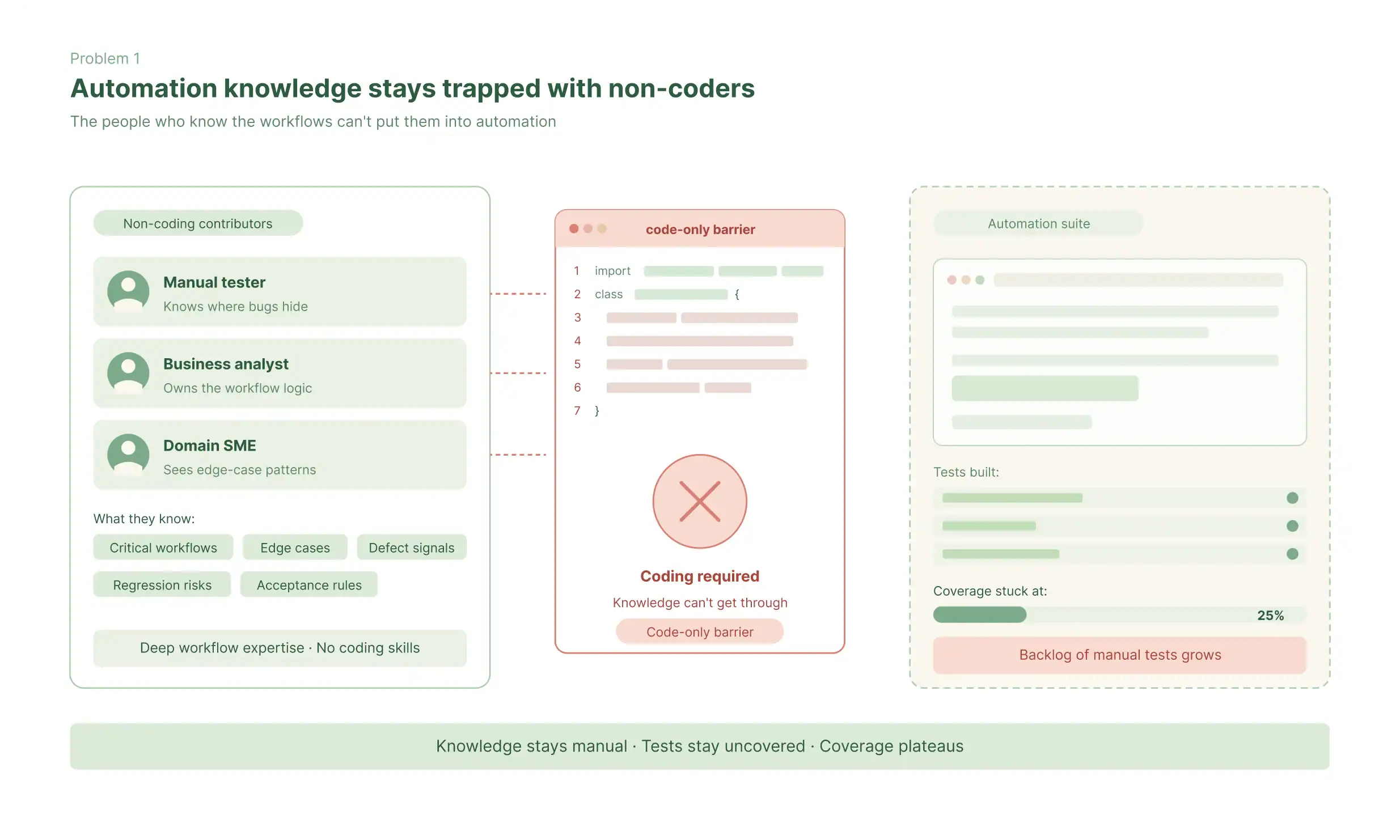
Automation Knowledge Stays Trapped With Non-Coders
Manual testers and business analysts often know the most critical workflows, edge cases, and defect patterns, but cannot contribute directly when automation depends on coding.
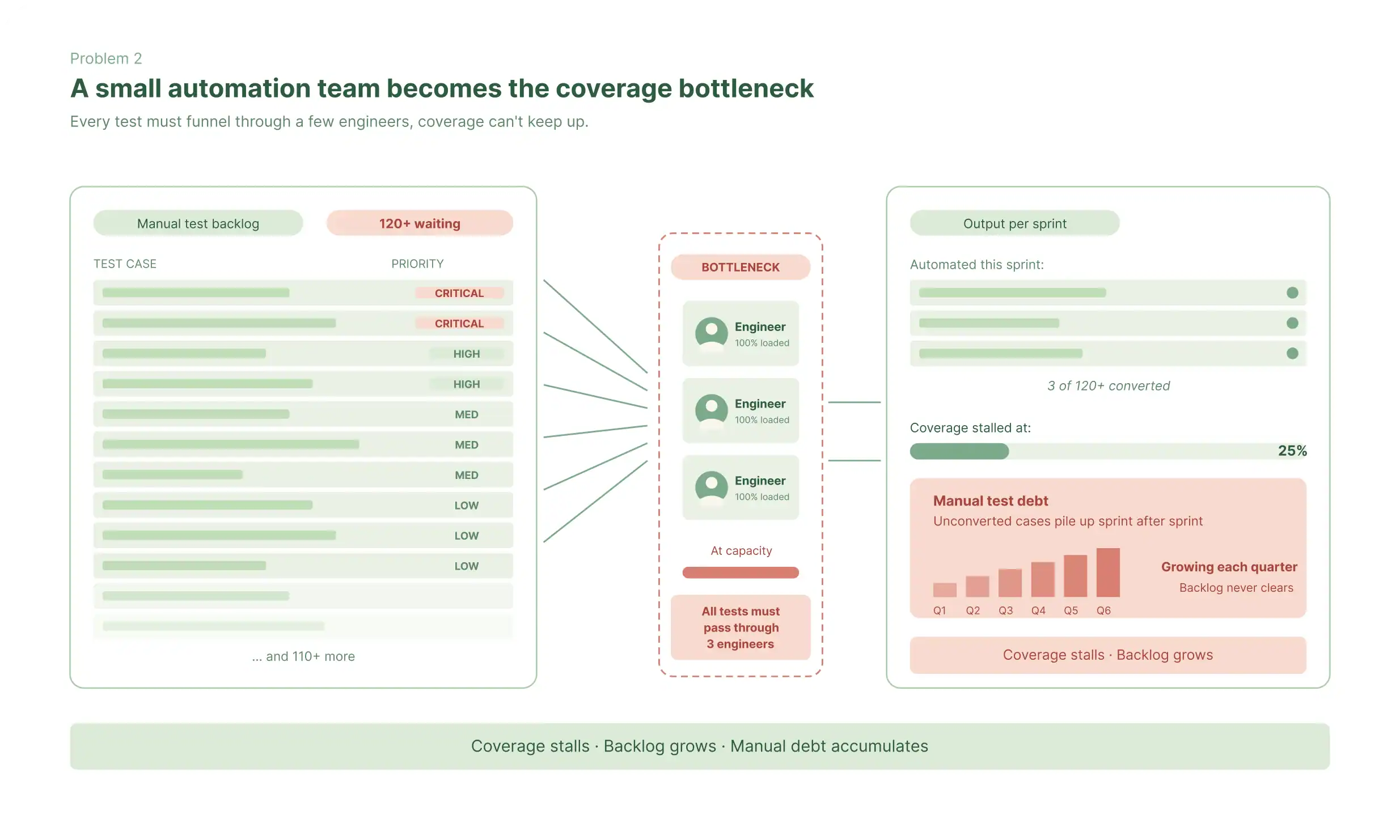
A Small Automation Team Becomes the Coverage Bottleneck
When every test must pass through a limited group of automation engineers, coverage stalls and manual test cases pile up as unconverted automation debt.
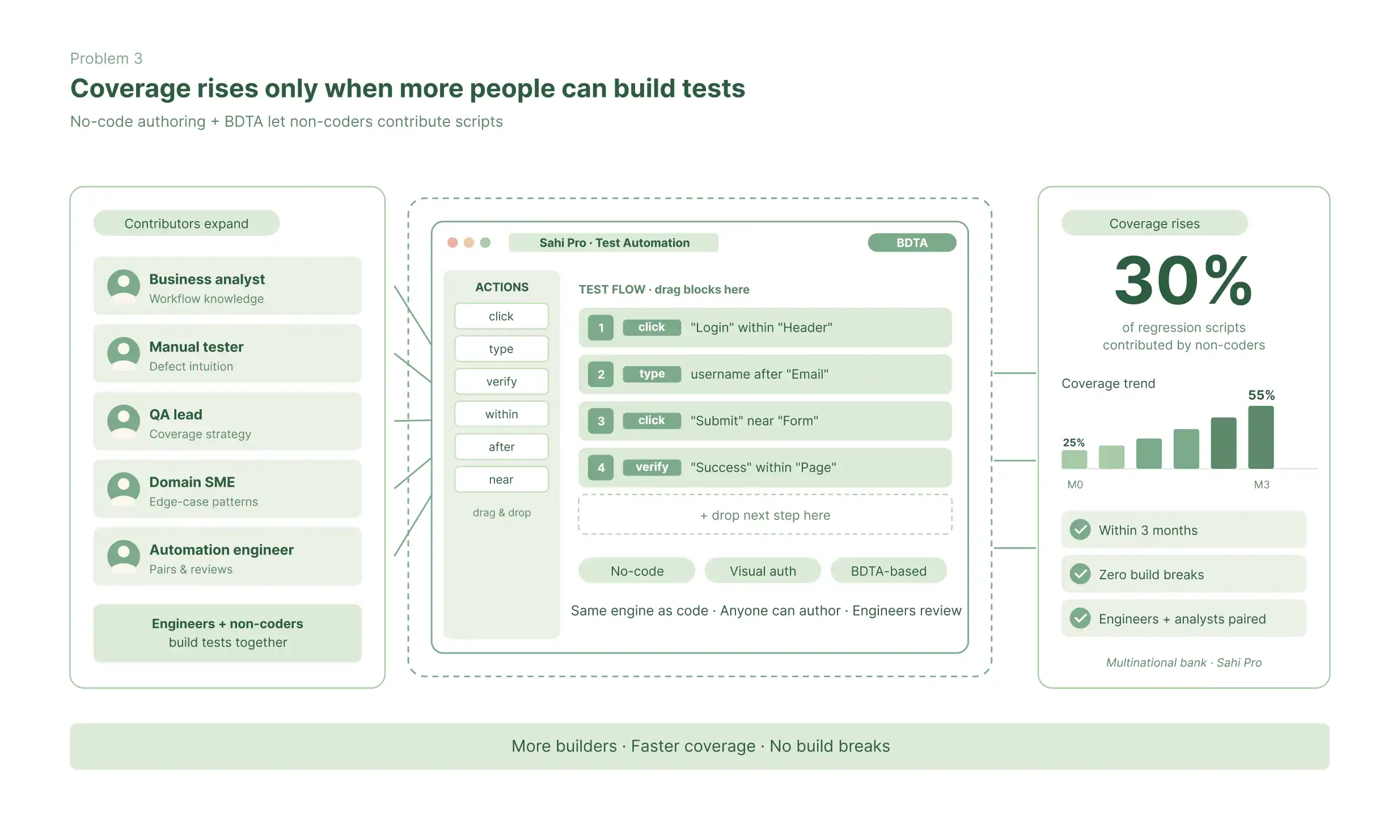
Coverage Rises Only When More People Can Build Tests
Sahi Pro expands automation coverage by letting non-technical contributors build tests through its no-code interface and BDTA.

- Two paths, requiring no code
Two No-Code Authoring Paths
Path 1
No-Code Interface
What non-technical users can build in the no-code interface:
- Conditional flows - If the application shows result A, follow this path; if result B, follow another
- Data-driven tests - Execute the same flow against multiple data inputs automatically
- Positive and negative validations - Verify that the application accepts correct inputs and rejects invalid ones
- Precondition matching and automatic setup - Configure the application state required before a test runs
- Suite tagging and dependencies - Organise tests into suites with execution order and dependencies
Path 2
BDTA (Business Driven Test Automation)
How BDTA works in practice:
- A business tester or analyst defines the steps of a business flow in the BDTA spreadsheet
- The Run Recorder captures the actual application interactions for each step, recording exactly what the user does
- The data wizard extracts variable inputs and organises them for data-driven execution across multiple test scenarios
- The script is ready for automated execution - without the tester having written a line of code
Both Paths, Same Product
No-code and engineer-written tests run in the same engine, same suites, and same tools.
- Addressing the real evaluation questions
Can Non-Technical Testers Build Tests That Actually Mean Something?
- Multi-step business workflows spanning multiple screens and application layers
- Data-driven test suites covering dozens or hundreds of data scenarios
- Cross-browser test execution - the same test flow runs across all target browsers
- Conditional logic that handles multiple application responses in a single test
- Integration workflows that include API calls and database validation
- Positive path validation confirming the application accepts correct inputs
- Negative path validation confirming the application rejects invalid inputs
- For QA managers need reassurance
No-Code Does Not Mean No Depth - Engineers Keep Full Control
No-code does not reduce technical control: QA engineers still have full JavaScript access to Sahi Pro’s complete API for complex web, desktop, API, database, and mobile automation in the same product.
The product architecture means:
- Engineers and non-technical testers work in the same suite and execution environment.
- Engineers can review and verify tests created by non-technical contributors.
- No-code tests and scripted tests run together in the same suite, in the same CI/CD pipeline
- Teams do not need to manage separate systems or separate execution environments
The limit is not what the no-code interface can express. The limit is the tester’s knowledge of the application.
- Teams that deployed no-code automation and measured the outcome
Named Results From Teams Running No-Code Automation in Production

Turnkey IPS used Sahi Pro’s relational identification and BDTA to handle dynamic field IDs, remove a specialist maintenance bottleneck, and significantly reduce automation effort.

Sahi’s easy integration with other tools has enabled us to add testing into our build process, ensuring every build is automatically tested as part of the build process.
Laurence Gray,
QA Lead, Turnkey IPS
eBaoTech used Sahi Pro to help manual testers move into automation without programming expertise, expanding who could contribute.
Sahi Pro creates a win-win situation for employee as well as employer where manual testers’ skill enhancement provides better job satisfaction to employee and employer gets the benefits of employee retention, automation and load testing.
Rahul Agarwal,
Manager Testing Automation QA, eBaoTech
MetricStream used Sahi Pro to achieve automation goals quickly without hiring resources with specialised programming skills.
We have been able to meet our automation goals after starting to use Sahi quickly and without the need to hire resources with specialized skills. Sahi team has always been open about including specific challenges that we encountered into their roadmap.
Anil Bhat,
Associate Vice President R&D, MetricStream
ITG used Sahi Pro to build automation without specialist programming skills and cut regression time from ten days to five.
Sahi Pro Automation tool has been built with the QA fraternity in mind and does not require advanced software programming skills. It is easy to use across multiple browsers and the support from the Sahi team is always prompt.
Basheer Shaik,
Head of QA, ITG

Integro chose Sahi Pro because teams could learn it quickly and use its core capabilities without heavy complexity.

The major reason we chose Sahi Pro was because it is light, simple and provides all the basic functions needed by us. Every team member is able to pick up in very short time as compared to other tools like HP and IBM Rational Tester.
Tan Lun Sunar,
QA Manager, Integro
- The full scope of what build Sahi Pro
No-Code Does Not Mean Limited Coverage
Functional
testing
Verification that features behave as specified, authored by business testers
Regression
testing
Full suite re-execution before every release, run without engineering support
Data-driven
testing
The same test flow executed against multiple data inputs automatically
Cross-browser
testing
No-code tests execute across Chrome, Firefox, Safari, and Edge
User acceptance
testing
Business-scenario test execution by the people who understand the business
Positive and negative
validation
Tests that verify both that valid inputs are accepted and invalid inputs are rejected
Integration
testing
Multi-system workflows where the business logic spans multiple application layers
API
testing
REST API calls and validations included in no-code test flows
Smoke
testing
Fast verification of core functionality before full regression runs
- For QA managers planning the adoption path
From Manual Testing to No-Code Automation: A Practical Path
1. Pilot on high-value, repetitive tests (Weeks 1-4)
Start with frequently repeated, well-defined business workflows and run Sahi Pro alongside existing tools to prove fit and generate early wins.
2. Train business testers and manual QA on the product (Weeks 2-6)
Train selected team members on the no-code interface and BDTA so they can build tests, execute suites, review results, and support peer onboarding.
3. Expand coverage across priority test areas (Months 2-3)
After the pilot and training, extend automation into more priority scenarios and increase contribution from non-technical team members.
4. Integrate with CI/CD and scale (Months 3-6)
Run no-code and scripted tests in the same CI/CD pipeline and add parallel execution as the suite grows to match release cadence.
Questions Teams Ask Before Deploying No-Code Automation
What is no-code test automation?
No-code test automation is the practice of building and running automated tests using visual interfaces – spreadsheet-style frameworks or recorded interactions – without writing programming code. It allows non-programmers to create and maintain automated tests using their knowledge of application behaviour and business processes. Sahi Pro provides two no-code interfaces: a visual no-code editor and the BDTA (Business Driven Test Automation) spreadsheet framework.
Can non-technical people really write automated tests that are reliable?
Yes, with the right tool. The limitation of most early no-code tools was that they produced tests that were shallow, brittle, or unable to handle real application complexity. Sahi Pro’s no-code interfaces are built on the same automation engine as its scripted tests, which means non-technical users can create reliable tests for real business workflows, while engineers retain full code-level control for technically complex scenarios.
How is Sahi Pro’s no-code approach different from basic record-and-playback tools?
Sahi Pro’s no-code model is not limited to replaying clicks, because the no-code layer lets teams define business steps and outcomes first, then implement and validate them with recorded interactions and assertions. The product also supports conditional logic, preconditions, and structured handling of test data, which makes the approach more durable than simple recorder-only automation.
Can automation engineers and manual testers work in the same suite?
Yes. Sahi Pro is designed so manual testers, business analysts, and QA engineers can all contribute in the same product rather than splitting work across separate tools. Engineers retain full JavaScript access for technically complex scenarios, while non-technical users contribute through the no-code interface and BDTA framework.
How does Sahi Pro handle test data for no-code users?
Sahi Pro can extract entered values into reusable entities and attributes, so test data is separated from individual recorded steps instead of being hard-coded into every action. That structure makes data-driven execution easier to manage and reduces the manual effort required to update or reuse business scenarios across multiple runs.
Can no-code tests run in CI/CD pipelines?
Yes. Tests authored by technical and non-technical contributors run together in the same CI/CD pipeline. Sahi Pro supports common CI/CD environments including Jenkins, GitLab CI, and Azure DevOps. The same command-line trigger works for no-code tests and scripted tests – the pipeline does not distinguish between them.
How quickly can a manual testing team become productive with no-code automation?
Teams using Sahi Pro’s no-code recorder and interface are typically productive within the first pilot phase – building and running test cases against high-value, repetitive workflows. The product and support materials consistently describe rapid onboarding and a low learning curve for non-technical contributors compared with engineer-centric automation tools.
- Two ways to move forward
Try It Against Your Regression Suite, or Talk Through Your Requirements
Try It Yourself
Full product access across all modules and capabilities. Run Sahi Pro against your actual application - the one whose regression suite is currently giving you problems - before any conversation about purchasing.
- No sales call required
- No credit card required.
Talk to Our Team
Tell us about your current regression suite - test case count, application technologies, release frequency, and current maintenance overhead. We will come back with a specific assessment of where Sahi Pro addresses your problems and what deployment looks like in your environment.
- Thirty minutes
- No slides