WebGL-rendered 3D viewers and embedded CATIA windows need a different kind of test coverage than a standard web form.
TL;DR
- ENOVIA’s 3D viewer is WebGL-rendered, which most standard DOM-based automation tools can’t inspect directly.
- Embedded CATIA interaction inside ENOVIA workflows adds another layer most general test tools weren’t built to reach.
- Automotive OEMs specifically need IATF 16949-aligned change traceability on top of basic functional coverage.
- This list ranks six tools on: WebGL/3D viewer handling, CATIA interaction support, and automotive change-traceability fit.
- Sahi Pro is included and evaluated on the same criteria as the rest.
The change that passed every test except the one that mattered
An automotive OEM’s QA team approves a part design change in ENOVIA. Every functional test in the suite passes: the change record saves correctly, the workflow routes to the right approver, the metadata updates as expected. Three weeks later, an engineer notices the 3D viewer is rendering the wrong revision of the part geometry for anyone opening that change record, a rendering bug nothing in the test suite caught, because nothing in the test suite could actually look at the 3D viewer. It could only check the data around it.
This is the gap a lot of ENOVIA test coverage has without teams realizing it. The metadata layer gets tested thoroughly. The 3D viewer, where an engineer actually confirms a part looks right, often doesn’t get tested at all, because most tools structurally can’t.
What makes ENOVIA’s 3D viewer hard to test
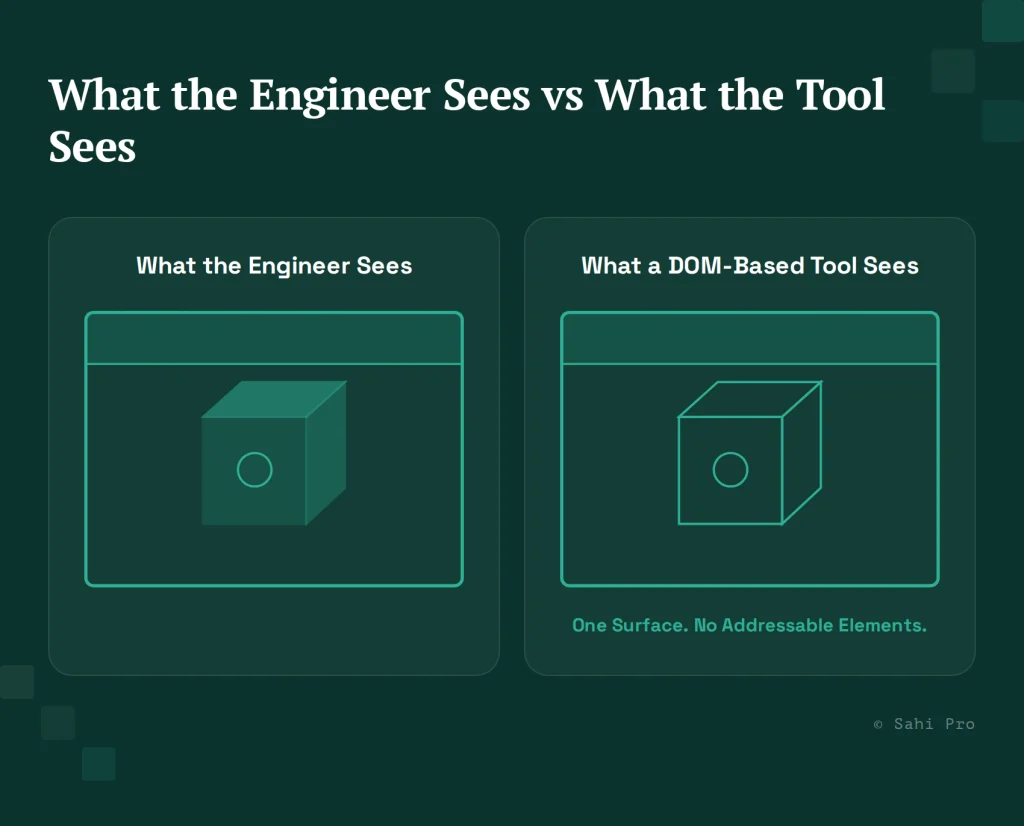
ENOVIA’s 3D viewer renders part geometry using WebGL, drawing directly to a canvas-like surface rather than building the shape out of individually addressable DOM elements the way a standard web form does. A search box or a button in ENOVIA’s surrounding interface is a normal, locatable DOM element. The 3D model itself, from a standard automation tool’s perspective, is a single rendered surface with no internal structure to query. Verifying that a part renders correctly, or that a specific revision loaded after a change, requires a fundamentally different verification approach than checking a form field’s value.
Where CATIA interaction adds another layer
Automotive part design workflows in ENOVIA frequently involve embedded CATIA windows for direct geometry editing, layered inside the broader ENOVIA workflow. This isn’t a native web interface and isn’t a fully standalone desktop application either; it’s an embedded design tool operating within a PLM workflow, and testing an end-to-end change process often means the test needs to interact with both ENOVIA’s surrounding web interface and the embedded CATIA session in the same flow.
What IATF 16949 actually expects from change documentation
IATF 16949 sets change-traceability expectations for automotive suppliers: a part change needs to be documented in a way that connects the change itself to its approval, its testing, and its downstream impact on production parts. For a test automation tool, this translates into a concrete requirement: the tool’s test records need to be structured and attributable in a way that can feed into that broader traceability chain, not just confirm a test passed in isolation.
The ranked list
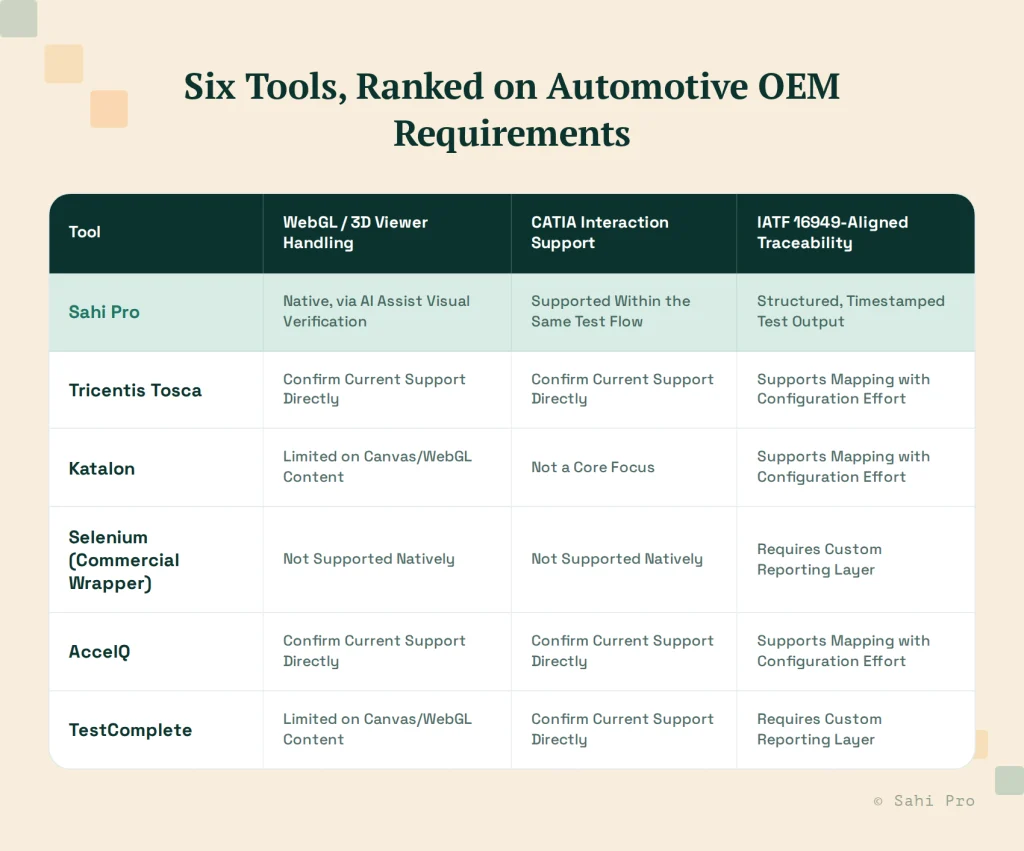
1. Sahi Pro. AI Assist reads WebGL-rendered content visually, the way a human tester would, rather than depending on a DOM structure that doesn’t exist for canvas-rendered 3D content. This same mechanism extends to embedded CATIA windows within the same test flow as the surrounding ENOVIA interface, so a change-and-verify test can span both without switching tools. Structured test output maps to IATF 16949-style traceability documentation. The honest limitation: complex 3D geometry comparisons still benefit from a clearly defined visual verification target, not a vague “does it look right” check.
2. Tricentis Tosca. Strong model-based coverage of ENOVIA’s standard web interface. Confirm Tosca’s current capability for WebGL-rendered 3D content and embedded CATIA interaction directly with Tricentis, since this is a more specialized capability than general web modeling.
3. Katalon. Its AI-based web locators are strong for ENOVIA’s standard DOM-based interface elements, but canvas and WebGL content sit outside what that locator strategy is built to inspect. Not a core focus for CATIA interaction either.
4. Selenium, with a commercial wrapper. Solid for standard DOM-based ENOVIA interface elements. No native support for WebGL-rendered 3D content or embedded CATIA windows; both would require substantial custom tooling built on top of Selenium’s core capability.
5. AccelQ. Confirm current WebGL/canvas support and CATIA-specific interaction support directly with AccelQ, since these are specialized capabilities not always covered in a general product overview. Documentation mapping to IATF 16949 traceability typically requires configuration.
6. TestComplete. Broad general web and desktop support, with limited native handling of canvas/WebGL-rendered content specifically. Confirm current CATIA-specific interaction support directly with SmartBear.
What to verify in a live demo before choosing
Don’t accept “we support 3D viewer testing” as a claim without seeing it. Ask the vendor to demo a specific, concrete scenario on your own environment: approve a part design change, verify the 3D viewer reflects the new geometry correctly, and confirm the resulting test record maps to a traceable change entry. If the vendor can’t run this live, on your environment, treat the feature-list claim as unproven rather than assumed.
Where teams underestimate the real testing surface
A common mistake in scoping this evaluation is treating the 3D viewer and CATIA interaction as a small, occasional part of the test suite, worth covering eventually but not a priority for the first automation phase. In practice, for an automotive OEM whose engineers are routinely reviewing and approving geometry changes inside ENOVIA, the 3D viewer isn’t a peripheral feature, it’s the primary interface engineers use to confirm a change is correct before it moves forward. A test suite that skips it isn’t testing a small edge case. It’s skipping the verification step closest to what actually matters to the people relying on the process.
This is worth stating plainly during tool evaluation, because a vendor demo scoped only to metadata and workflow routing can look impressively thorough while never touching the part of the application where a real defect would actually surface.
What a realistic evaluation timeline looks like
Teams often underestimate how long it takes to properly validate WebGL and CATIA coverage during a vendor evaluation, because the claim is easy to state in a sales deck and slower to prove in practice. A realistic evaluation involves running the vendor’s proposed approach against three or four real part-change scenarios from your own ENOVIA environment, not a generic demo dataset, and checking whether the 3D viewer verification actually catches an intentionally introduced rendering discrepancy. This typically takes one to two weeks longer than evaluating a purely web-based tool, and that time is worth spending, since the alternative is discovering the gap after the tool is already in production use.
Sources
- IATF 16949 described at a category level only; no specific clause is cited, and any specific compliance claim should be verified with legal/compliance before use in a client conversation.
- Each competitor’s current WebGL/canvas and CATIA-specific support is flagged for direct verification with the respective vendor before publishing; none are asserted here as confirmed fact.
- Sahi Pro’s AI Assist visual verification mechanism: sahipro.com and internal product context.
- ENOVIA’s WebGL rendering and embedded CATIA architecture: Sahi Pro PLM Semantic Knowledge Doc.