Your BOM tree is not a web table. The tools that automate web tables, reliably, at scale, do not automate BOM trees. The gap between those two statements is where the most consequential test scenarios in PLM automation live.
TL;DR
- PLM BOM trees in Teamcenter, Windchill, ENOVIA, and Aras are rendered inside Java thick-clients or as canvas/WebGL elements, standard DOM-based tools return null on both
- Canvas-rendered attribute grids are painted as pixels by the Java or WebGL runtime with no accessible DOM nodes; standard element identification produces null results regardless of selector strategy
- BOM hierarchy changes, renamed parts, restructured assemblies, added levels, break positional and ID-based locators reliably; proximity-based identification is the only stable approach across part structure changes
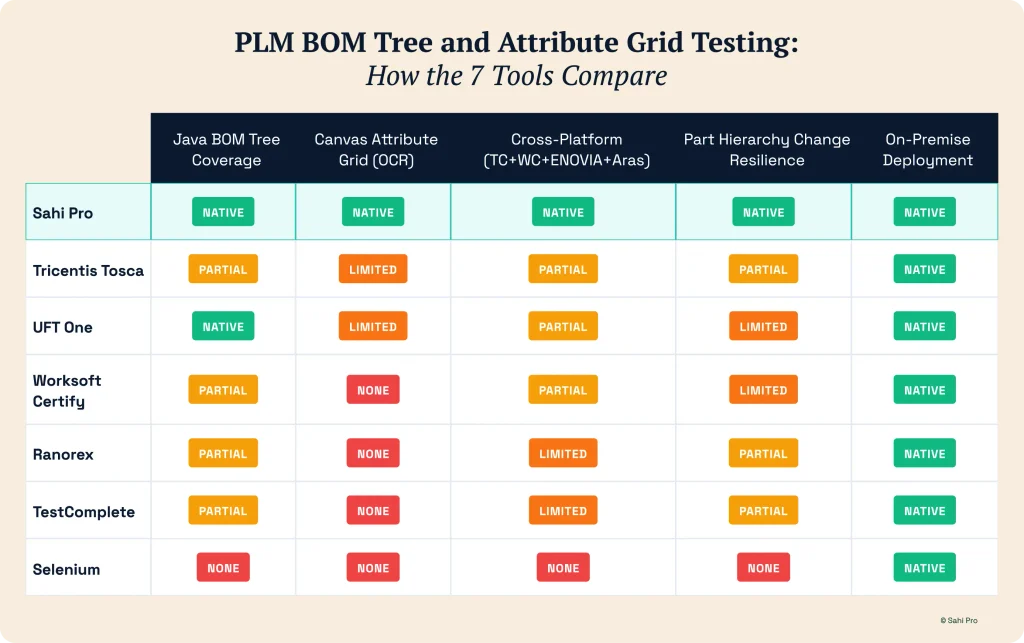
- Of the seven tools in this list, Sahi Pro is the only one with documented native coverage for both Java BOM trees and canvas-rendered attribute grids across Teamcenter, Windchill, ENOVIA, and Aras in one product
- OCR-based element reading is the critical differentiator at the attribute grid layer, tools without it automate around canvas elements rather than through them
Why BOM Trees and Attribute Grids Break Standard Automation Tools
Standard test automation tools, Selenium, Playwright, Cypress, and most modern web automation frameworks, rely on the browser DOM for element identification. They query the DOM for an element with a specific ID, class, XPath expression, or text content, interact with the matched element, and report the result.
PLM BOM trees live outside this model entirely.
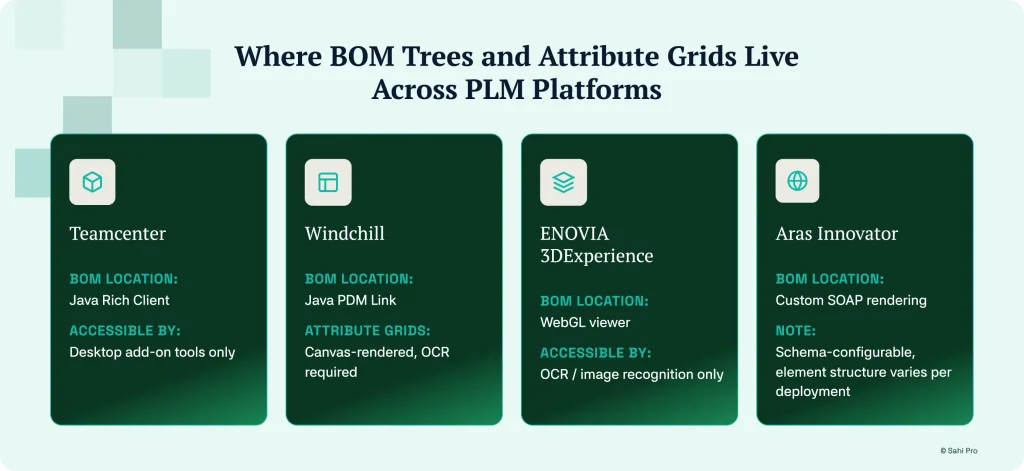
In Teamcenter, the BOM management interface runs in the Java Rich Client, a Java Swing application that communicates with the Teamcenter server but renders its interface entirely outside the browser DOM. When Selenium attempts to interact with a BOM tree in Active Workspace’s Java Rich Client, WebDriver returns null. There are no DOM elements to query.
In Windchill, BOM management and engineering change workflows run in the Java PDM Link thick-client with the same architectural result. In ENOVIA 3DEXPERIENCE, the product structure viewer uses WebGL rendering, the BOM tree is drawn directly to a WebGL canvas element with no accessible DOM structure behind it. In Aras Innovator, the BOM interface uses a custom SOAP-based rendering layer where the element structure changes significantly between deployments based on schema configuration.
Attribute grids add a second layer of complexity on top of BOM tree access. Inside Windchill’s Java PDM Link panels, classification attribute grids render property values as painted text in canvas regions. The grid exists visually on screen but has no DOM representation, no Windows UI Automation handles, and no accessible element tree. Standard tools return null. Coordinate-based automation, clicking a specific pixel position, breaks immediately when any layout change shifts the grid position.
The Evaluation Criteria for This List
Java BOM tree navigation stability: Does the tool interact with Java thick-client BOM trees natively, and does it maintain stable element identification when part hierarchies change?
Canvas-rendered attribute grid handling: Does the tool read text from canvas-rendered Java panels using OCR, not brittle pixel coordinate interactions?
Cross-platform reach: Does the tool cover BOM trees across Teamcenter, Windchill, ENOVIA, and Aras in one product, or only on specific platforms?
Part hierarchy change resilience: Does the identification approach survive renamed parts, added BOM levels, and restructured assemblies without requiring script rewrites?
On-premise deployment: Can the tool run entirely within your network for IP-sensitive PLM environments?
The 7 Best PLM Test Automation Tools for BOM Tree and Attribute Grid Testing
1. Sahi Pro
Sahi Pro is the strongest fit for teams needing BOM tree and attribute grid automation across multiple PLM platforms. The Desktop add-on covers Java Swing and AWT applications natively, Teamcenter Rich Client, Windchill PDM Link, Aras Innovator’s Java rendering layer, and ENOVIA’s desktop integration components are all reachable in the same test framework as browser-based PLM interfaces.
The AI Assist OCR add-on reads text directly from canvas-rendered regions that have no accessible element handles. Windchill attribute grids, ENOVIA WebGL product structure data, and Aras custom-rendered form fields are interactable through OCR-based identification rather than brittle coordinate clicks. When the grid layout shifts, a column is added, a row is inserted, OCR continues locating the correct field by reading its visible label rather than relying on a fixed screen position.
Proximity-based element identification means BOM tree navigation does not break when part hierarchies change. A test that navigates to a part by reading its number and expanding its assembly uses visible labels and spatial context to locate the part regardless of where it sits in the restructured hierarchy. Position-based approaches break when an assembly level is added; proximity-based approaches do not.
The same framework covers Teamcenter Active Workspace (browser layer), Teamcenter Rich Client (Java Desktop add-on), SAP GUI (SAP Scripting API), and cross-product sequences spanning all three in one test script. For teams validating BOM sync from Teamcenter to SAP, this eliminates the integration boundary gap.
Honest limitation: Desktop add-on and AI Assist OCR are separately licensed. Confirm the full module stack and cross-platform PLM version compatibility with the Sahi Pro team before evaluation completion.
2. Tricentis Tosca
Tosca covers Java thick-client BOM trees through its TCD model approach and has enterprise deployment credentials across Teamcenter and Windchill environments. For large programmes requiring centralised test governance and formal model management, Tosca’s structured approach provides consistency across multiple PLM systems.
Tosca’s model-based architecture works well for stable BOM structures where the part hierarchy does not change frequently. When it does change, model updates require certified specialist involvement.
Honest limitation: Canvas-rendered attribute grids require additional Tosca modules and configuration for OCR-based identification. Out-of-the-box coverage for canvas attribute grids is not a Tosca standard capability. Licensing and certification costs make this the highest Year 1 investment in the list.
3. UFT One (OpenText)
UFT One covers Java thick-client BOM trees through its Java Add-in with genuine depth in Java Swing and AWT element identification. For Teamcenter Rich Client and Windchill PDM Link BOM navigation, UFT One’s Java object recognition provides reliable access to the Java element tree in stable environments.
UFT One has broad PLM deployment history across Teamcenter and Windchill in regulated industries where the tool’s compliance documentation capabilities are valued.
Honest limitation: Java object hierarchy recognition breaks when PLM upgrades restructure the element tree. Canvas-rendered attribute grids are outside UFT One’s standard Java Add-in scope, the tool relies on accessible Java element handles, which canvas regions do not expose. Licensing costs have increased substantially under OpenText.
4. Worksoft Certify
Worksoft Certify is purpose-built for SAP automation and covers SAP PLM and ERP workflows with depth. For teams validating BOM sync between a PLM system and SAP, testing the SAP side of the integration, Worksoft handles SAP GUI transactions with the strongest coverage in this list.
Worksoft’s strength is the SAP layer. For PLM-side BOM tree navigation in Teamcenter, Windchill, or ENOVIA, Worksoft’s native coverage is limited. Teams needing both sides of a PLM-to-SAP BOM validation typically add Worksoft for SAP alongside a separate PLM automation tool.
Honest limitation: Windchill, Teamcenter, and ENOVIA Java thick-client BOM tree automation is not Worksoft’s core capability. For teams needing both PLM BOM tree coverage and SAP ERP validation, a two-tool approach with Worksoft adds cost and creates the integration boundary gap it ostensibly solves.
5. Ranorex
Ranorex handles native Windows desktop automation through Windows UI Automation and Win32. For PLM BOM management interfaces that render as standard WinForms or WPF applications with accessible Windows element handles, Ranorex provides solid coverage.
For canvas-rendered attribute grids in Windchill’s Java PDM Link panels, Ranorex returns null, these elements have no Windows UI Automation handles. For ENOVIA WebGL-rendered BOM structures, the same limitation applies. Ranorex covers the subset of Java PLM interfaces where Windows UI Automation accessibility is intact.
Honest limitation: Canvas-rendered PLM components are outside Ranorex’s coverage scope. For BOM attribute validation in Windchill or ENOVIA, Ranorex cannot reach the elements that matter most.
6. TestComplete (SmartBear)
TestComplete covers Java thick-client applications through its Java bridge and handles a broad application stack. For BOM tree navigation in standard Java Swing interfaces, TestComplete provides coverage with flexible scripting options across JavaScript, Python, and VBScript.
Canvas-rendered attribute grids require additional configuration and custom scripting beyond TestComplete’s standard coverage. The tool does not provide native OCR-based canvas identification out of the box.
Honest limitation: Attribute grid automation on canvas-rendered Windchill and ENOVIA elements requires custom workarounds rather than native coverage. For teams where attribute grid validation is a primary test scenario, the additional development investment is significant and ongoing.
7. Selenium (Reference Baseline)
Selenium is included as a reference baseline to define the coverage boundary clearly. Selenium’s DOM-based automation covers Teamcenter Active Workspace browser interfaces, ENOVIA web portal navigation, and web-based PLM document management workflows reliably.
For the BOM tree and attribute grid scenarios this article addresses, Java thick-client BOM trees, canvas-rendered attribute grids, WebGL product structure viewers, Selenium’s architectural limitations are absolute, not configurable. Standard WebDriver returns null on all of these elements.
Honest limitation: Java thick-client BOM trees, canvas-rendered attribute grids, and WebGL structures are architecturally outside Selenium’s scope. Selenium is appropriate for browser-portal PLM automation; it does not cover the layers this article evaluates.
How BOM Hierarchy Changes Break Automation and How to Prevent It
The most common BOM automation failure is a cascade triggered by a part hierarchy change. An engineering team adds an intermediate assembly level, renames a top-level part, or restructures a sub-assembly configuration. Tests that located BOM items by their position in the tree, node index, XPath position, DOM row number, now fail across the entire affected branch.
This is not a tool quality problem. It is an identification strategy problem.
Position-based identification encodes the assumption that the hierarchy will not change. It always will. The question is how expensive that change is when it happens.
Proximity-based identification encodes a different assumption: that visible labels and spatial relationships between elements are more stable than underlying structural positions. A part with number “P-12345-A” sits above its child parts and below its parent assembly in the BOM tree, regardless of which index position it holds in the current tree rendering. Tests that navigate by visible label and spatial context find the right element after a hierarchy restructure; tests that navigate by index position do not.
Before committing to a BOM automation strategy, ask the tool vendor this specific question: what happens to a 50-node BOM tree test when an intermediate assembly level is added? The answer reveals whether the identification approach is resilient or brittle.
Sources
- Sahi Pro: PLM Test Automation vs Standard Web Testing: Key Differences, sahipro.com/plm-test-automation-vs-standard-web-testing-key-differences-sahi-pro/
- Sahi Pro: AI Testing Tools for PLM: Sahi Pro OCR Automation for Canvas UIs, sahipro.com/ai-testing-tools-plm-sahi-pro-ocr-automation/
- Sahi Pro: 7 Best PLM Test Automation Tools for Aerospace and Defence Compliance in 2026, sahipro.com/blog-plm-test-automation-tools-aerospace-defence-compliance-2026/
- Autify: Canvas and WebGL Application Testing, autify.com/solutions/canvas-and-webgl-testing
- LambdaTest: How to Use Selenium and Cypress for Canvas Automation, lambdatest.com/blog/selenium-cypress-canvas-automation/