


TL;DR
- “SAP automation tools” covers two genuinely different categories of software: tools that test SAP processes, and tools that run SAP’s batch jobs and IT operations. This guide is about the first one. If you searched for the second, we’ll point you the right way and get out of your way.
- Four things decide whether an SAP test automation tool actually works once it’s in production: how much of your SAP landscape it can reach in one flow, how it identifies elements on screen, whether it can deploy on-premise, and what it costs once you count maintenance hours, not just the license.
- SAP GUI scripting itself has documented, native limitations, drag-and-drop can’t be recorded, modal dialogs block capture by default, password fields can’t be automated. These exist regardless of which vendor tool sits on top of the scripting layer.
- Maintenance, not licensing, is usually the bigger line item. Industry research puts test maintenance at 25 to 50 percent of the QA budget in teams running mature automation suites, and that share climbs with how often the application changes, which describes most active SAP landscapes.
- This is a buying framework, not another vendor list. Our tool-by-tool SAP comparison lives separately and is linked below, for when you’ve settled the criteria and want the shortlist.
If you’ve searched “SAP automation tools,” you’ve probably noticed the results don’t agree on what that phrase means. Some pages compare tools that test whether an SAP process still works after a change. Others list software that schedules and runs SAP’s batch jobs, an entirely different function with an entirely different buyer. This guide is about the first category: automation that validates SAP, not automation that operates it. If you’re in the second group, skip ahead to the section below that names the distinction plainly, it’ll save you time.
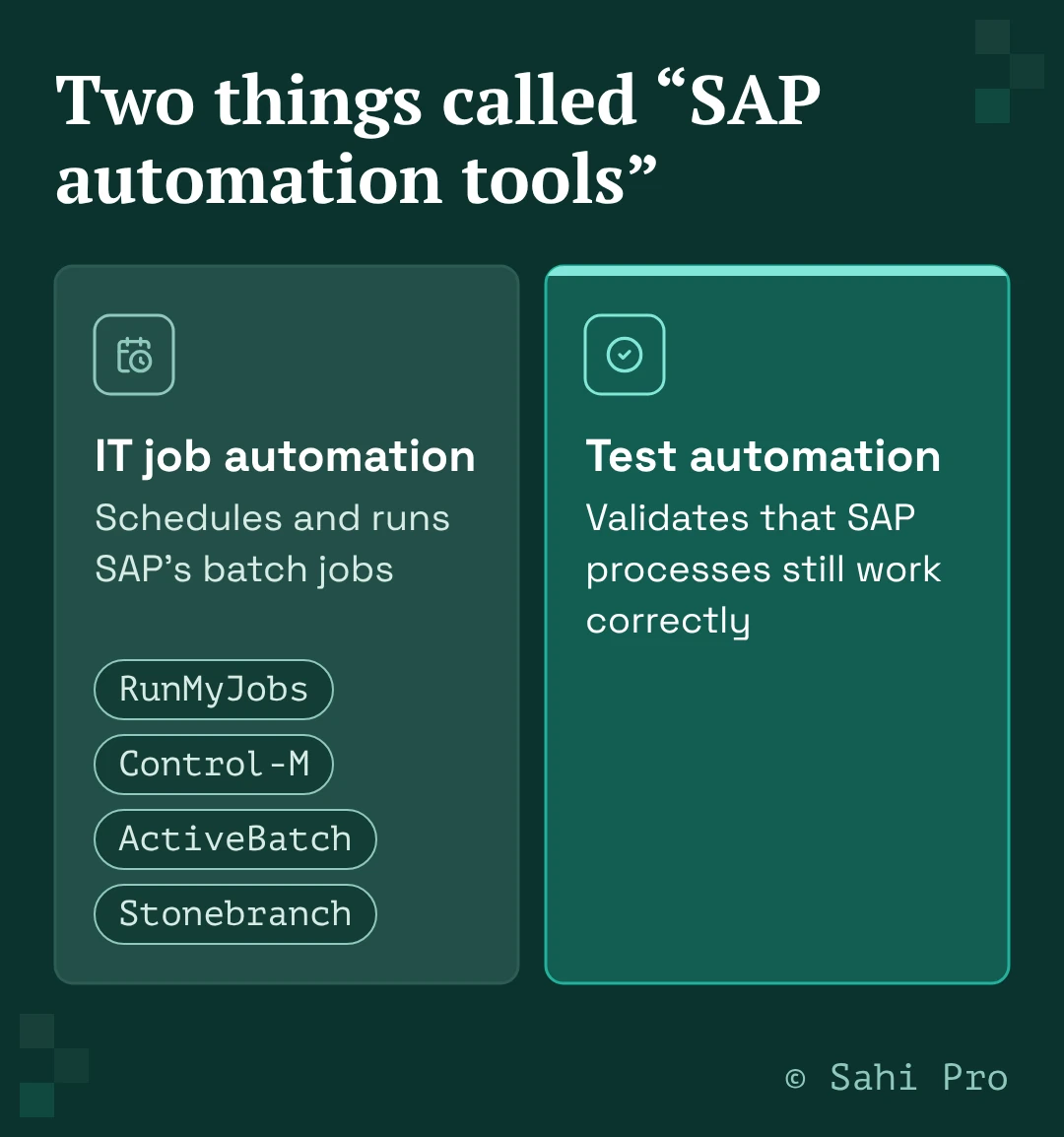
“SAP automation tools” means two different things
Type “SAP automation tools” into a search bar and you’ll get results for IT workload automation platforms like RunMyJobs, Control-M, ActiveBatch, and Stonebranch, tools built to schedule, sequence, and monitor SAP’s background and batch jobs. You’ll also get results for test automation platforms, built to check that an SAP business process still behaves correctly after a change, an upgrade, or a support pack.
These solve different problems for different teams. IT operations owns the first. QA and testing owns the second. Some vendors blur the line on purpose, Leapwork markets a combined “SAP Test Automation and RPA” guide that treats both under one automation umbrella, which is a defensible product strategy but not a helpful starting point if you’re specifically trying to stop tests from breaking every time SAP changes.
If your problem is batch jobs failing overnight, or a job scheduler that needs better visibility into SAP’s process chains, this guide isn’t for you. If your problem is that testing an SAP change takes your team weeks, or that a Fiori update broke half your test suite again, keep reading. Everything from here on is about the second category.
The four things that actually decide whether an SAP test automation tool works
Every vendor’s homepage claims broad coverage and low maintenance. The way to tell which claims hold up is to check four things specifically, before you’re in a sales conversation where it’s harder to ask.
Interface coverage. SAP is rarely one interface. A single business process might start in SAP GUI, hand off to Fiori, and finish in a connected web portal, mobile app, or API call. Ask whether a tool can reach SAP GUI’s Java-based rich client, Fiori’s UI5 controls, and whatever sits outside SAP in the same flow, as one continuous test, or whether you’ll need a separate tool per layer with the handoffs stitched together manually. The second option works until the process changes, then someone has to update three tools instead of one.
How it identifies elements. This is where most SAP test automation actually breaks. Tools that capture elements by fixed screen position or DOM structure fail the moment a layout shifts, a field moves, or a Fiori app gets a UI refresh. It’s worth knowing that SAP GUI scripting itself, the layer most automation tools build on, has real native limitations regardless of the tool sitting on top of it.
Panaya’s own technical documentation on SAP GUI scripting confirms several: drag-and-drop operations can’t be recorded at all, per SAP’s own advisory note on the subject, modal dialogs block activity capture unless a specific settings change is made first, grid cell navigation doesn’t reliably trigger the events an automation tool needs to capture each step, and password fields can’t be automated through the script at all, for security reasons with no workaround.
None of that is a knock on any specific vendor, it’s a property of the underlying interface. What varies between tools is how much of that friction they absorb versus pass on to whoever’s maintaining the test suite.
Deployment model. On-premise deployment matters more for SAP than for most applications, because SAP usually holds the business’s most sensitive operational, financial, and customer data. Regulated industries, aerospace, healthcare, defence, and PLM-heavy manufacturing environments among them, often can’t put that data through a cloud-only testing tool at all. Confirm on-premise is a real, supported option, not a roadmap item.
Total cost of ownership. The license quote is the number every vendor leads with. It’s rarely the number that determines whether the tool is worth it two years in. Industry research on test automation maintenance, cited by IT Convergence in a September 2026 piece and attributed there to Capgemini, Sogeti, and the World Quality Report, puts test maintenance at roughly 25 to 50 percent of the total QA budget in teams running mature automation suites, trending toward the higher end for applications that change frequently.
SAP changes frequently, support packs, configuration updates, module rollouts, and Fiori refreshes are constant in an active landscape. A tool that looks cheaper on the license line can end up more expensive once maintenance hours are counted, and a tool that looks more expensive upfront can be cheaper once they are.
The questions to bring into a vendor call, not the vendor’s slide deck
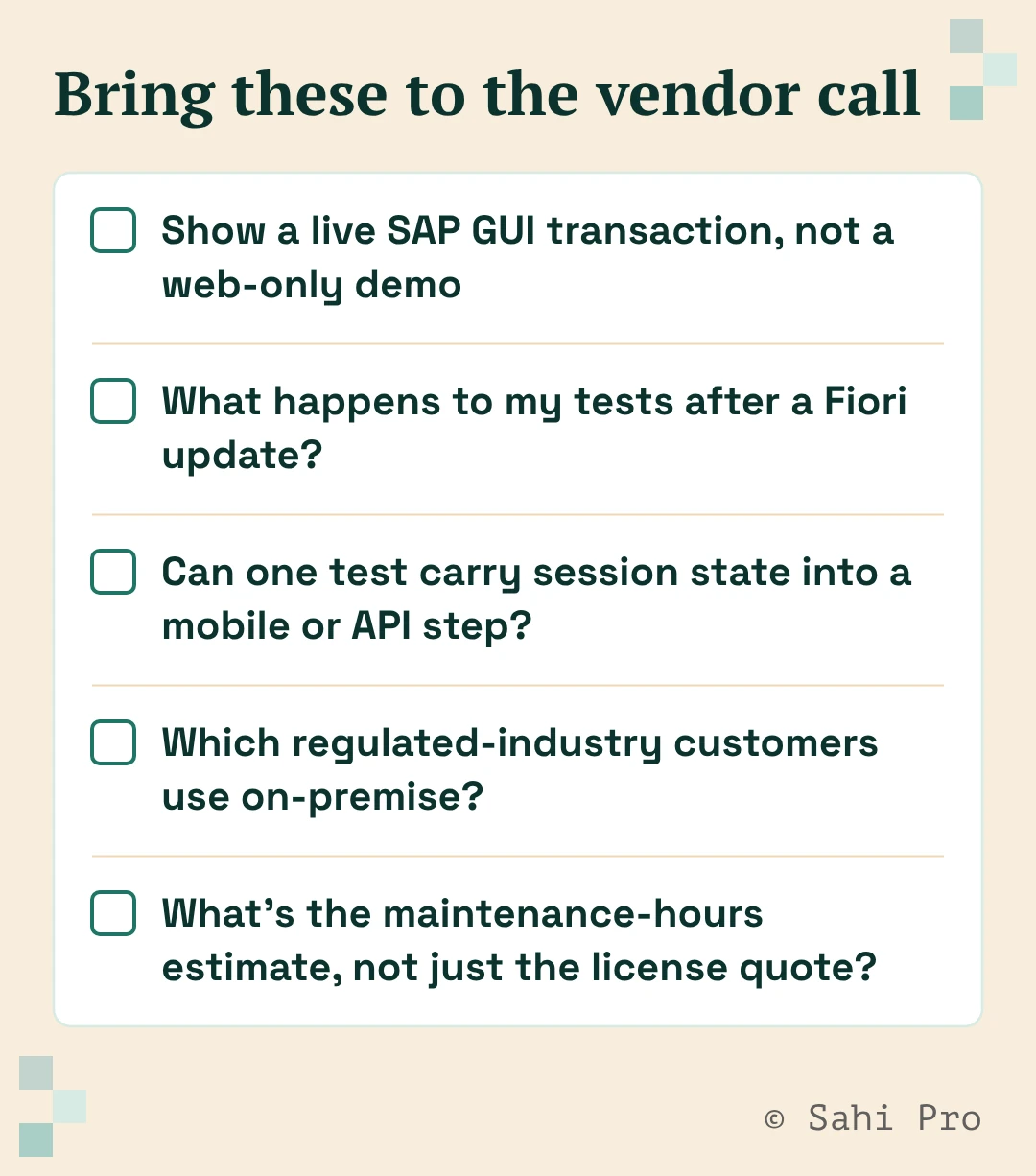
A demo shows you the tool at its best, on data the vendor chose. These are the questions that surface what a demo doesn’t:
Ask for a live run against an actual SAP GUI transaction, not a web-only demo dressed up to look like SAP. Ask what happens to your existing tests after a Fiori UI update, specifically whether they need to be rebuilt or just re-run. Ask whether a single test can carry session state from an SAP screen into a downstream mobile app or API call, or whether that requires stitching two tools together yourself.
Ask for the on-premise deployment option directly, and ask which of their regulated-industry customers actually use it, not just whether it exists on a slide. Ask for a maintenance-hours estimate based on a comparable customer’s actual experience, not a license quote alone.
Build vs buy: why stitching together open-source tools for SAP gets expensive
Some teams look at that TCO math and consider building their own SAP automation in-house with Selenium, Appium, or Playwright plus custom scripts, reasoning that open source avoids the license line entirely. It’s worth being clear about what that actually means for SAP specifically. These frameworks are built for standard, DOM-based web applications.
None of them has a native hook into SAP GUI’s Java-based rich client. Getting them to touch SAP GUI at all means wrapping SAP’s own GUI scripting layer, the same layer with the documented limitations above, drag-and-drop, modal dialogs, password fields, or falling back to screen-coordinate automation, which breaks on any layout change.
Either way, someone on the team owns and maintains that wrapper indefinitely. That’s not a cost that shows up on a license line. It shows up as the same maintenance-hour tax described above, except now it’s absorbed entirely in-house instead of partly handled by the vendor.
That doesn’t make build-your-own the wrong call in every case. It’s a reasonable choice for a team with a genuinely narrow set of SAP transactions to test, existing automation engineering capacity, and no near-term plan to expand coverage across more modules or interfaces.
It becomes the expensive choice once the number of flows, modules, or interfaces you need to cover grows past what one or two engineers can hand-maintain alongside their other work, which is where most SAP testing programs end up within a year or two of starting.
Where this fits with the rest of an SAP testing evaluation
If you’re earlier in the process and still working out what SAP testing actually involves, our complete guide to SAP testing is the place to start. If you’ve settled the criteria above and want the actual tool-by-tool shortlist, our SAP test automation tools comparison covers six real options against this same kind of criteria. If regression is your specific pain point, we’ve written a dedicated regression testing guide, and if your team needs the technical transaction codes testers actually use day to day, our T-code reference covers those directly.
Where Sahi Pro fits into this
Sahi Pro is built on a proprietary execution engine, not a Selenium or Appium wrapper, which is what lets it reach into SAP GUI’s Java-based rich client the same way it reaches web, desktop, mobile, and API layers, all in one continuous test flow rather than separate tools stitched together per interface.
Elements are identified by relationship and context instead of fixed screen position, which is the direct answer to the element-identification problem described above, tests stay stable through the layout changes that break position-based capture.
On-premise deployment is available for regulated industries, including the aerospace, healthcare, defence, and PLM-heavy manufacturing environments named earlier in this guide. Sahi Pro customers report a 90 percent reduction in regression man-hours and an 80 percent reduction in test maintenance compared to conventional tools, figures drawn from Sahi Pro’s 1,000-plus enterprise customer base as a whole, not a claim specific to any single scenario in this guide.
Teams are typically productive within two weeks, with no certification requirement, a deliberate contrast to automation platforms that require a formal certification ladder before a team can use the tool independently.
Ready to see how Sahi Pro handles your specific SAP landscape? Book a demo and bring your hardest test case.
Sources
- Panaya, “Test Automation – SAP GUI Limitations and Workarounds” (success.panaya.com) — cited for the specific, documented native limitations of SAP GUI scripting: drag-and-drop capture, modal dialog capture, grid cell navigation, password field automation. Panaya is a competitor’s own technical documentation, cited here for a factual, verifiable claim about SAP GUI scripting’s architecture, not as an endorsement of Panaya’s product.
- IT Convergence, “Why Test Automation Maintenance Is the Hidden Cost Driver in ERP Modernization” (September 14, 2026) — cited for the 25-50% of QA budget maintenance figure. IT Convergence attributes this figure to Capgemini, Sogeti, and the World Quality Report; I was not able to independently locate and verify the exact figure in a World Quality Report edition directly, so this is cited as IT Convergence’s characterization of that research, not as a directly-verified World Quality Report primary citation.
- SoftwareTestingHelp, “Top 11 SAP Automation & Testing Tools” — competitor content check, used only to confirm that IT workload-automation tools (RunMyJobs, ActiveBatch, Stonebranch, Control-M) genuinely appear in “SAP automation tools” search results alongside test automation tools, supporting the disambiguation section. Not cited for any claim about test automation itself.
- Leapwork’s own published blog content — competitor content check, used only to confirm that at least one named competitor markets SAP test automation and RPA under a combined “automation” framing, supporting the same disambiguation point. Not cited as a technical or factual claim about SAP testing.
- Sahi Pro proof points (90% regression man-hours reduction, 80% maintenance reduction, 1,000+ enterprise customers, productive within two weeks with no certification) are Sahi Pro’s own company-wide, previously established figures, not specific to this guide’s scenarios.
- https://www.sahipro.com/request-demo confirmed live and functioning as the demo request page.