Your SAP variant configuration logic determines what ships to the production floor. Automating the test for it requires covering both the SAP GUI layer where configuration runs and the Teamcenter or SAP PLM layer where the BOM originates.
TL;DR
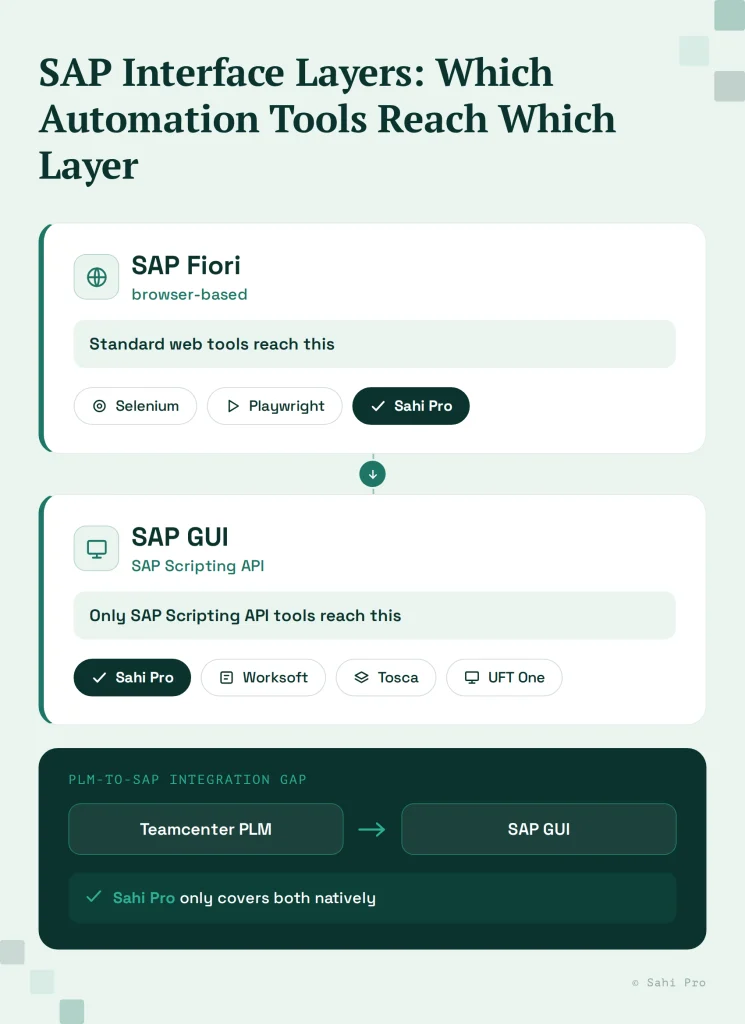
- SAP GUI uses a proprietary SAP Scripting API, not the browser DOM, Selenium, Playwright, and Cypress cannot interact with SAP GUI transactions regardless of how they are configured
- SAP Fiori is the modern browser-based interface, accessible to any standard web automation tool, but most automotive and industrial SAP variant configuration workflows still run through SAP GUI in current validated environments
- Variant configuration testing requires automation that can navigate complex classification hierarchies, validate characteristic-value dependency logic, and verify correct BOM explosion results across hundreds of product variants
- The most common automation failure for automotive and industrial teams: a tool that handles Fiori or web-layer SAP well but cannot reach the SAP GUI transactions where variant configuration, BOM management, and ERP routing verification actually run
- Sahi Pro covers SAP GUI and Fiori in one script alongside Teamcenter PLM, removing the integration boundary gap that two-tool stacks leave uncovered
The Two SAP Layers Automotive and Industrial Teams Actually Need to Test
SAP Fiori looks like a web application because it is one. It runs in a browser, renders HTML, and any competent web automation tool can interact with it. Teams evaluating SAP automation tools frequently test Fiori, declare it covered, and move forward.
SAP GUI is a separate application. It communicates through the SAP Scripting API, a proprietary protocol that operates entirely outside the browser DOM. WebDriver cannot reach it. When Selenium or Playwright attempts to interact with a SAP GUI transaction, it returns null. The transaction interface is architecturally invisible to DOM-based tools.
For automotive and industrial manufacturers, the SAP GUI transactions that matter most are not edge cases. Variant configuration maintenance (transaction PMEVC or CU24), production order confirmation (CO11N), goods movement (MIGO), and material master maintenance (MM02) all run through SAP GUI in the majority of currently deployed and validated manufacturing environments. SAP S/4HANA has expanded Fiori coverage significantly, but the organizations with validated SAP environments for automotive production are not migrating to Fiori-only workflows quickly. Validated environments have change control processes that make rapid interface migration expensive.
The practical implication: a team that chooses an automation tool based on a Fiori demo and assumes SAP GUI coverage follows is looking at a significant coverage gap when they start testing production-critical workflows.
Why Variant Configuration Testing Is Harder Than Standard SAP Testing
SAP Variant Configuration (VC) manages the logic that determines which components are included in a product for a given set of customer specifications. For an automotive OEM, this might mean which engine variants, transmission options, and trim configurations are valid combinations. For an industrial equipment manufacturer, it might mean which hydraulic system, control package, and safety options can be combined for a given regional market.
The automation challenge is not just navigating to a configuration transaction. It is validating the constraint logic.
Variant configuration tests need to verify three things. First, that selecting a specific characteristic value triggers the expected dependency logic, if a customer selects a heavy-duty transmission, the braking system requirement updates automatically. Second, that invalid combinations are correctly blocked, an electric powertrain should not be configurable with a diesel tank. Third, that BOM explosion produces the correct component list for each tested variant combination.
Each of these validations requires automation that can interact with classification hierarchies, read characteristic value fields, trigger and verify dependency evaluation, and check BOM explosion results. This is data-driven test automation at scale, not form-filling.
SAP’s Variant Configuration simulation tool (CU50 in SAP GUI, or the Fiori “Configuration Simulation” app in S/4HANA) is the primary interface for testing configuration models. For teams still running LO-VC on older SAP versions, CU50 in SAP GUI is the only available tool.
What Makes This Evaluation Different from a Generic SAP Automation Search
Standard SAP automation evaluations test transaction coverage. This evaluation tests three specific things that matter for automotive and industrial PLM contexts.
SAP GUI native coverage. Confirm this by asking vendors to automate a CU50 or MIGO transaction live. Fiori-only tools will not be able to do this.
Variant configuration test support. Ask vendors to demonstrate data-driven testing across multiple configuration variants. This means parameterized tests that feed different characteristic value combinations and verify different expected BOM explosion results.
Cross-system coverage from PLM to SAP. Automotive and industrial teams running Teamcenter alongside SAP need to validate that BOM changes in Teamcenter propagate correctly to SAP. This requires automation that covers both systems in one test sequence. Ask vendors to show this integration scenario in a demo.
On-premise deployment. For automotive OEMs with IP-sensitive manufacturing data and industrial manufacturers with proprietary product configuration logic, test data staying within your network is a requirement. Confirm whether on-premise is the standard deployment or requires additional licensing.
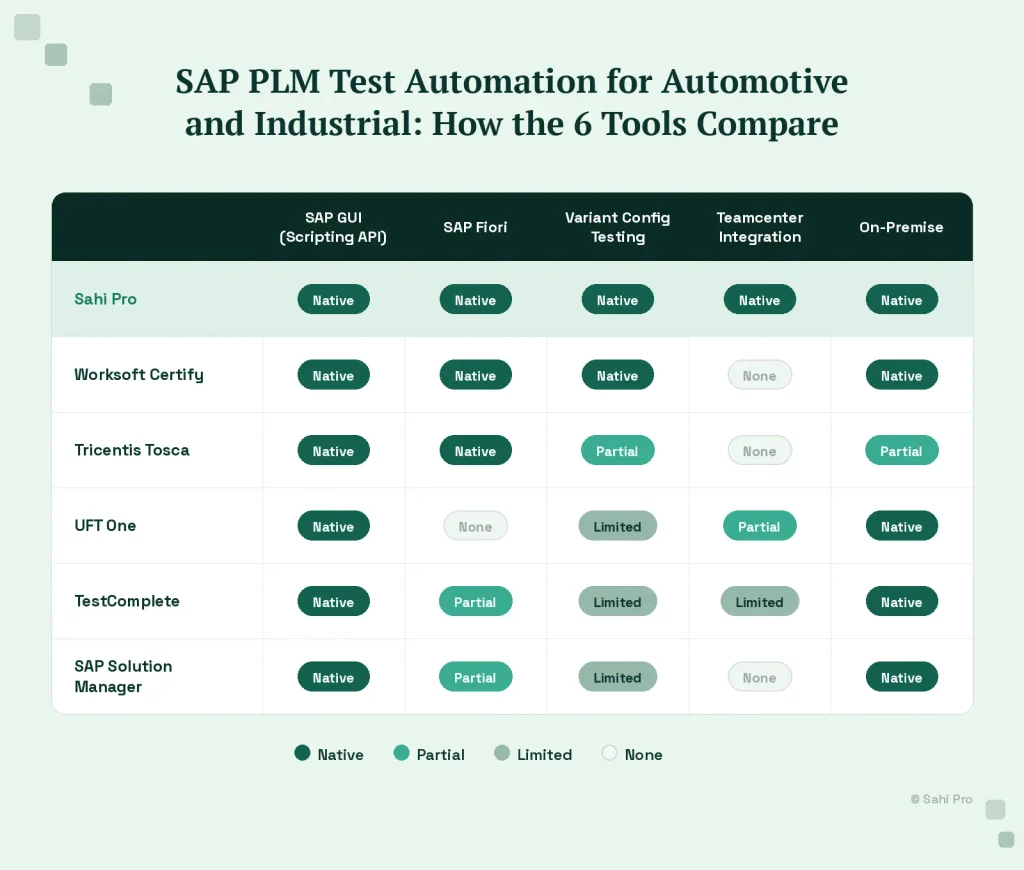
The 6 Best SAP PLM Test Automation Tools for Automotive and Industrial Teams
1. Sahi Pro
Sahi Pro covers SAP GUI transactions through the SAP Scripting API, SAP Fiori through standard browser automation, and Teamcenter PLM through its Java Desktop add-on in one product. For automotive and industrial teams running SAP variant configuration and Teamcenter BOM management together, Sahi Pro handles both in one test framework without custom integration code between tools.
Variant configuration data-driven testing runs through Sahi Pro’s data-driven test framework, feeding characteristic value combinations from external data sources and validating BOM explosion results against expected component lists per variant. The same test framework that runs SAP GUI CU50 simulation tests can run Teamcenter BOM validation in a single end-to-end sequence.
On-premise deployment is the standard configuration. Test execution data, screenshots, and results stay within your network infrastructure.
Honest limitation: SAP GUI coverage and Teamcenter Desktop add-on are separately licensed modules. Confirm the full module stack cost and validate SAP version compatibility with the Sahi Pro team before finalizing evaluation.
2. Worksoft Certify
Worksoft Certify is the purpose-built SAP automation tool with the deepest SAP GUI coverage in this list. It covers both SAP GUI transactions and SAP Fiori interfaces, handles SAP-specific testing patterns like BOM explosion validation and process chain testing, and has extensive automotive industry deployment credentials.
For teams running SAP-only test automation without PLM integration requirements, Worksoft is the strongest specialized option. It supports on-premise deployment and has documentation aligned with automotive quality requirements.
Honest limitation: Worksoft’s coverage stops at the SAP boundary. For teams running Teamcenter alongside SAP and needing PLM-to-SAP integration test sequences, Worksoft requires a second tool for the PLM side. The two-tool approach carries two maintenance cycles and leaves the integration boundary between PLM and SAP as an untested gap.
3. Tricentis Tosca
Tosca covers SAP GUI and Fiori through dedicated SAP modules and has broad automotive and industrial deployment references. Its model-based approach works well for large programmes requiring centralised governance across multiple SAP workstreams.
Tosca’s SAP coverage is mature and well-documented. For programmes where Tosca is already deployed for other workstreams, consolidating SAP PLM automation into the existing Tosca environment avoids additional vendor complexity.
Honest limitation: Tosca TBox certification is required for test authoring and suite maintenance. Year 1 total cost for a 10-person automotive QA team runs approximately double Sahi Pro based on published benchmarks. Variant configuration data-driven test support exists in Tosca but requires specific configuration that should be confirmed with Tricentis during evaluation.
4. UFT One (OpenText)
UFT One covers SAP GUI through its dedicated SAP add-in and has a long history in automotive and industrial SAP automation. The Java Add-in extends coverage to Teamcenter PLM for teams running both environments.
Compliance documentation capabilities are mature and appropriate for automotive audit requirements. On-premise deployment is fully supported.
Honest limitation: Licensing costs have increased significantly under OpenText. Variant configuration data-driven testing requires custom scripting work. UFT One’s Java object recognition for Teamcenter breaks on major SAP PLM version upgrades that restructure the interface, requiring periodic test suite maintenance.
5. TestComplete (SmartBear)
TestComplete covers SAP GUI through its SAP support and handles a broad application stack including web, desktop, and SAP in one product. Flexible scripting in JavaScript, Python, or VBScript allows engineers to build and maintain suites without additional tool-specific certification.
On-premise deployment is supported. For automotive and industrial teams already running TestComplete for other application layers, consolidating SAP coverage into the existing tool reduces vendor complexity.
Honest limitation: Variant configuration data-driven testing and PLM-to-SAP cross-system sequences require significant custom scripting beyond TestComplete’s standard SAP coverage. Automotive-specific compliance record output requires additional configuration.
6. SAP Solution Manager Test Suite (Native Option)
SAP Solution Manager’s built-in test capability provides native SAP integration without a third-party tool. For teams wanting to avoid additional vendor relationships and running SAP-only test scopes, Solution Manager covers standard SAP transactions with direct integration to SAP’s change management and transport processes.
The native integration means test records are directly linked to SAP change documentation, which is useful for automotive change control audit trails.
Honest limitation: Cross-system test sequences that span SAP and Teamcenter require substantial custom development. Variant configuration data-driven testing at scale requires scripting that Solution Manager does not provide out of the box. The tool covers SAP well and little outside it.
Running SAP and PLM Tests in One Script: Why the Integration Boundary Matters
The gap between SAP and Teamcenter is where the most consequential production quality issues originate.
An engineering change in Teamcenter that does not propagate correctly to SAP creates a mismatch between the design authority record and the production system. The BOM says one thing; production orders run another. For automotive manufacturers under IATF 16949 audit pressure, this is a major nonconformance scenario.
Testing this integration means running a test that starts in Teamcenter, executes an engineering change, waits for the SAP sync, switches to SAP GUI, and validates that the material master and production BOM reflect the change correctly. No single-tool approach short of Sahi Pro handles this sequence natively across both applications. Every other option in this list requires either accepting that the integration boundary goes untested or building custom test framework code that bridges two separate automation tools.
Ask vendors how they handle this scenario. The answer reveals which teams actually build cross-system PLM-to-SAP test sequences and which assume the boundary is someone else’s problem.
Sources
- SAP Community: Variant Configuration (LO-VC) in SAP S/4HANA, community.sap.com
- SAPinsider: Part 1: Understanding SAP Variant Configuration, LO-VC vs AVC, sapinsider.org
- SAP Help Portal: Variant Configuration (LO-VC), help.sap.com
- Sahi Pro: SAP Test Automation for PLM Teams: SAP GUI and Fiori Alongside Teamcenter, sahipro.com/sap-gui-fiori-test-automation-teamcenter/
- Sahi Pro: SAP PLM Test Automation: Teamcenter to SAP Integration Testing, sahipro.com/sap-plm-test-automation-teamcenter-to-sap-integration-testing-sahi-pro/