IATF 16949 requires documented quality evidence at every step. Most Teamcenter automation tools produce logs. The difference between those two things is what surfaces in your next certification audit.
TL;DR
- Teamcenter has two primary interfaces: Active Workspace, a browser-based HTML5 client, and the Rich Application Client, a Java SWT desktop application, most critical BOM management workflows for automotive teams span both
- IATF 16949 requires structured, timestamped execution records linked to test cases and quality system processes, not session-level pass/fail summaries
- CATIA and NX plugin windows inside Active Workspace render outside the browser DOM entirely, requiring OCR-based identification to automate
- Multi-plant automotive regression at scale means parallel execution across 20 or more sites, the tool’s parallel execution architecture matters as much as its element identification approach
- Sahi Pro is the only tool in this list with documented coverage for Active Workspace, the Java Rich Client, CATIA plugin windows, and multi-plant parallel execution in one product, with IATF 16949-ready execution record output
The Automotive Teamcenter Stack Is More Complex Than It Looks
Automotive OEM Teamcenter deployments are not a single application. They are a layered environment, and the layer that matters most for QA is the one that generates compliance evidence.
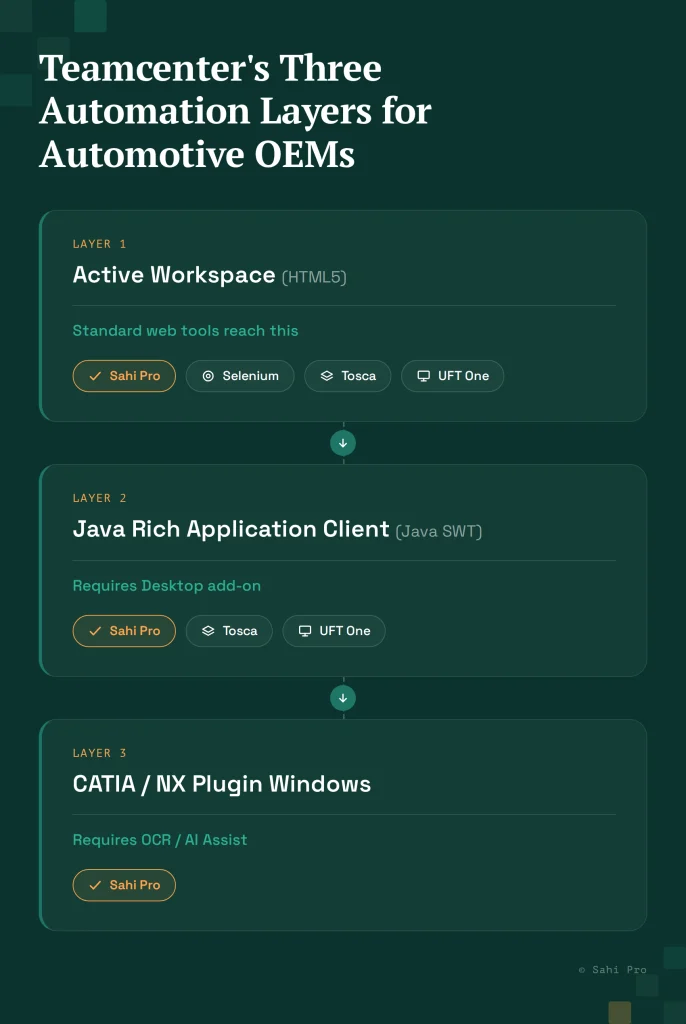
Active Workspace is the modern HTML5 browser interface. It handles navigation, search, workflow approvals, and increasingly, BOM viewing. Standard web automation tools reach Active Workspace reliably. For years, QA teams built Teamcenter automation against Active Workspace, measured healthy coverage statistics, and believed they were covered.
The Rich Application Client (RAC) is the Java SWT desktop application that handles BOM structure management, engineering change orders, part classification, and CAD integration. For automotive OEMs, the RAC is where the quality-critical workflows live. BOM validation before a production release, engineering change approval sequences that feed PPAP documentation, and configuration management across vehicle platforms all run through the RAC. Automating Active Workspace navigation and skipping the RAC produces coverage numbers that look healthy and miss the consequential scenarios.
CATIA and NX plugin windows add a third layer. These CAD integration windows render inside the Active Workspace session but outside the browser DOM. A CATIA design check running against a Teamcenter workflow opens a plugin window that standard web automation tools cannot reach. OCR or image recognition is the only reliable automation approach for these windows.
Multi-plant regression compounds all of this. An automotive OEM or Tier 1 running Teamcenter across 20 manufacturing sites needs regression coverage that runs across all sites simultaneously without a QA engineer manually orchestrating each site’s execution. Parallel execution architecture that scales across distributed environments is a separate evaluation criterion from element identification capability.
What IATF 16949 Actually Demands From Your Test Execution Records
IATF 16949:2016 is the automotive sector quality management standard, replacing ISO/TS 16949. It requires documented evidence that quality system processes are being executed as defined. In a software validation context for Teamcenter, this means test execution records that an IATF auditor can trace from test requirement to executed test to outcome to corrective action.
Standard automation output does not satisfy this without additional work. Console logs record what happened at the session level. JUnit XML captures pass/fail counts. Neither format provides the step-level traceability that IATF clause 9.2.2 (internal audit records) and clause 8.5.6 (production and service provision records) require as evidence.
What an IATF auditor expects to see: each test execution linked to a quality system process, timestamped per test step, attributed to a specific release cycle, and stored in a way that supports trend analysis across sites. Assembling this from standard automation output requires custom post-processing that becomes its own maintenance burden.
Five Questions That Tell You Whether a Tool Is Right for Your Environment
Before comparing features, ask these five questions of any tool under evaluation. They rule out more options than any capability comparison.
Does it cover both Active Workspace and the Java Rich Client in one script? If a tool covers only the browser layer, it leaves RAC-based BOM and change workflows untested. Ask vendors to demonstrate a cross-layer test live.
Does it handle CATIA or NX plugin windows? Ask vendors to show automation of a specific CATIA plugin interaction inside an Active Workspace session. Tools that cannot answer this question in a live demo cannot handle it in your environment.
What does a test execution record look like out of the box? Ask for a sample report from a completed test run. If it requires post-processing to produce audit-ready output, that post-processing is your team’s problem.
How much of a 200-script Teamcenter suite survives a major Active Workspace upgrade? Ask for a concrete answer with a specific version pair. “It depends” is not an answer. Look for a specific number or an architectural explanation for why the identification approach is upgrade-resilient.
What does multi-plant parallel execution look like at 20-site scale? Ask for a reference customer running at that scale, not a feature description.
The 6 Best Teamcenter Test Automation Tools for Automotive OEM Teams
1. Sahi Pro
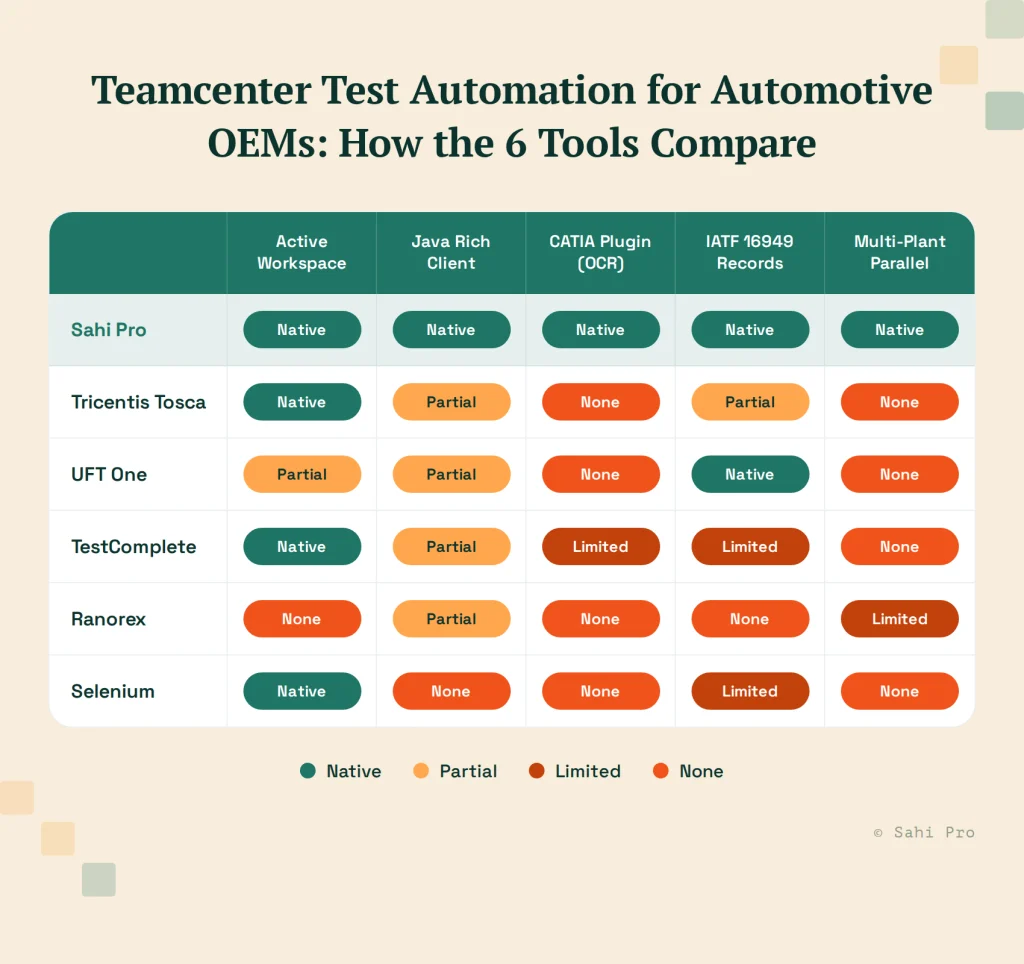
Sahi Pro is the strongest fit for automotive OEM teams running full-stack Teamcenter automation at multi-plant scale. The Desktop add-on covers the Java Rich Client natively through Java SWT and Swing, reaching BOM management panels, engineering change workflows, and part classification interfaces in the same test framework as Active Workspace browser automation.
The AI Assist OCR add-on applies OCR to CATIA and NX plugin windows inside Active Workspace, reading and interacting with controls that render outside the browser DOM. For automotive teams running CATIA-integrated change workflows, this is the coverage layer that other tools in this list cannot reach.
Proximity-based element identification means Active Workspace tests locate elements by visible label and spatial context rather than DOM XPath. When Siemens releases an Active Workspace update that restructures the DOM, tests continue resolving elements by their visible labels. A Siemens AG team running 340 Teamcenter BOM tree test cases saw zero script regressions after an Active Workspace 6.x upgrade and expanded their Teamcenter workflow coverage from 35% to 72% in six months.
Parallel execution across machines and sites is built into the core product. No separate grid server or orchestration layer is required. Automotive firms using Sahi Pro have reduced regression cycles from the five-day manual baseline to under eight hours for full multi-site regression.
IATF 16949-ready execution records come from the standard report format: timestamped, step-level, structured for audit evidence rather than requiring post-processing.
Honest limitation: Desktop add-on and AI Assist OCR are separately licensed. Confirm the full module stack cost and current CATIA version compatibility before finalizing the evaluation.
2. Tricentis Tosca
Tosca has extensive automotive deployment history and is widely used for Teamcenter BOM and workflow automation at enterprise scale. Its model-based approach creates a structured test asset library that centralizes change management and supports governance across large programmes. Active Workspace coverage is well-established, and Java Rich Client coverage exists through Tosca’s TCD model approach.
Tosca’s compliance record output is configurable for IATF 16949 documentation requirements. Its enterprise support organization is a genuine differentiator for programmes that need dedicated service-level agreements.
Tosca requires TBox certification for test authoring and suite maintenance. Without certified engineers on staff, new test development and post-upgrade maintenance require Tricentis professional services or an extended internal training investment.
Honest limitation: Year 1 total cost for a 10-person automotive QA team runs approximately double Sahi Pro based on the published Sahi Pro vs Tosca case study. For programmes where budget allocation is fixed, this difference affects team size and coverage scope achievable in year one.
3. UFT One (OpenText)
UFT One has served automotive QA programmes for two decades with genuine Java thick-client depth through its Java Add-in. For stable Teamcenter RAC environments where the Java object hierarchy does not change frequently, UFT One’s object recognition provides reliable element identification.
Compliance record output capabilities are mature and have been tested against automotive industry audit requirements over many programme cycles. On-premise deployment is fully supported.
Honest limitation: UFT One’s Java object recognition resets a significant portion of an existing test suite when major Teamcenter versions restructure the RAC element tree. CATIA plugin window automation is outside UFT One’s standard Java Add-in scope. OpenText licensing has increased substantially.
4. TestComplete (SmartBear)
TestComplete covers Active Workspace through standard browser automation and the Java Rich Client through its Java bridge. For automotive teams already running TestComplete for other applications in their stack, consolidating Teamcenter coverage avoids adding another vendor.
Scripting in JavaScript, Python, or VBScript allows engineers to leverage existing skills without additional certification requirements. CI/CD integration with Jenkins and Azure DevOps is native.
Honest limitation: CATIA plugin window automation requires custom scripting beyond TestComplete’s standard capabilities. IATF 16949-ready execution record output requires additional configuration and custom reporting. Teams should confirm both with SmartBear before committing.
5. Ranorex
Ranorex handles native Windows desktop automation well and covers Teamcenter Rich Client components where Windows UI Automation handles are accessible. On-premise deployment is straightforward, and the tool runs in air-gapped configurations without issue.
For automotive teams whose Teamcenter workflows are primarily text and form-based within the RAC, without canvas-rendered attribute grids, Ranorex provides solid coverage at a lower cost than Tosca or UFT One.
Honest limitation: CATIA plugin windows and canvas-rendered panels in the RAC are outside Ranorex’s scope. Multi-plant parallel execution at 20-site scale is not a core Ranorex architecture strength. For OEM-scale regression automation, these limitations are significant.
6. Selenium (Reference Baseline)
Selenium covers Active Workspace browser workflows reliably and is the most widely deployed open-source framework for web automation. On-premise deployment is straightforward.
Selenium is included as a reference baseline because it is the starting point for many Teamcenter automation projects. Teams begin with Active Workspace coverage, measure healthy statistics, and discover the RAC coverage gap later.
Honest limitation: The Java Rich Client and CATIA plugin windows are outside Selenium’s architectural scope. IATF 16949-ready execution records require substantial custom post-processing tooling. For automotive OEM programmes with RAC-based quality workflows and certification evidence requirements, Selenium covers the wrong layer.
What Multi-Plant Regression at Automotive Scale Actually Requires
A Tier 1 supplier running Teamcenter across 20 manufacturing sites has a regression problem that is different in kind, not just degree, from a single-site team’s problem.
Running 300 test cases sequentially across 20 sites takes days. Running them in parallel across sites takes hours. The difference between those two timelines determines whether regression fits inside a sprint or pushes release dates.
Parallel execution for multi-plant Teamcenter regression requires three things the tool needs to handle without manual coordination: distributing test execution across machines, managing dependencies so tests that must run sequentially within a site do not block parallel execution across sites, and aggregating results into a single execution report per regression cycle.
Ask vendors specifically about this scenario with your site count and test suite size. A tool that handles single-site parallel execution across browsers may not handle multi-site parallel execution across servers. The architecture difference is material.
Sources
- Siemens Teamcenter Active Workspace architecture documentation, blogs.sw.siemens.com/teamcenter
- Convergence Data: 4 Key Differences Between Teamcenter Active Workspace and the Rich Application Client, convergencedata.com
- IATF 16949:2016 standard: Quality Management Systems for the Automotive Industry, iatfglobaloversight.org
- Sahi Pro: 7 Best Teamcenter Test Automation Tools for BOM and Workflow Testing in 2026 (Siemens AG case study), sahipro.com/best-teamcenter-test-automation-tools-bom-workflow-testing-2026/
- Sahi Pro: PLM Test Automation Framework, sahipro.com/plm-test-automation-framework/