Worksoft handles your SAP workflows well. The question for automotive teams running Teamcenter alongside SAP is whether running two tools for two systems costs more than consolidating to one tool that covers both.
TL;DR
- Worksoft Certify is SAP-certified and is the purpose-built SAP automation tool with the deepest SAP GUI coverage in this comparison, this is acknowledged, not disputed
- Worksoft does have documented Teamcenter integration capability (“end-to-end business process validation across SAP and non-SAP landscapes including PLM workflows”), but the depth of that integration is different from native Java thick-client BOM management automation
- Sahi Pro covers SAP GUI, SAP Fiori, Teamcenter Active Workspace, and the Teamcenter Java Rich Application Client in one product, with native Java thick-client and OCR coverage for the layers that complex PLM workflows run in
- Running Worksoft for SAP alongside a separate PLM tool for Teamcenter creates two maintenance cycles, two training pipelines, and an untested integration boundary between the two systems
- The consolidation case comes down to one question: does Worksoft’s Teamcenter integration provide the depth of RAC BOM management and engineering change automation your team actually needs, or do you still need a second tool for that layer?
Worksoft’s Real Strengths: Start Here
Any comparison that starts by minimizing Worksoft’s capabilities will mislead you. Worksoft Certify has earned its position in automotive SAP testing over many years of deployment with real results.
Worksoft is SAP certified for integration with SAP applications. It covers SAP GUI transactions, SAP Fiori, SAP S/4HANA, and a large catalog of enterprise applications including non-SAP systems. The codeless authoring model means business analysts and process owners, not just automation engineers, can build and maintain tests for the processes they understand. This is the democratization argument Worksoft makes, and it is a legitimate one for SAP-heavy programmes.
For automotive teams running SAP production planning, procurement, quality management, and variant configuration, Worksoft handles these workflows with documented reliability. The integration with SAP Solution Manager and SAP Cloud ALM provides direct linkage between test assets and SAP change management processes, useful for IATF 16949 change control traceability.
Worksoft also has documented Teamcenter integration. Their integrations page states: “Worksoft supports Siemens PLM Software’s Teamcenter, bringing end-to-end business process validation across SAP and non-SAP landscapes including PLM workflows.” That is a real capability worth evaluating.
Where the Comparison Gets Precise: Teamcenter Coverage Depth
Acknowledging Worksoft’s Teamcenter integration is different from claiming it provides the same coverage depth as a tool built specifically for Teamcenter Java thick-client automation.
Worksoft’s Teamcenter integration supports business process validation at the workflow level. This means testing that Teamcenter processes execute correctly, approval workflows, status transitions, document submissions, primarily through the Teamcenter browser-based interfaces and integration APIs.
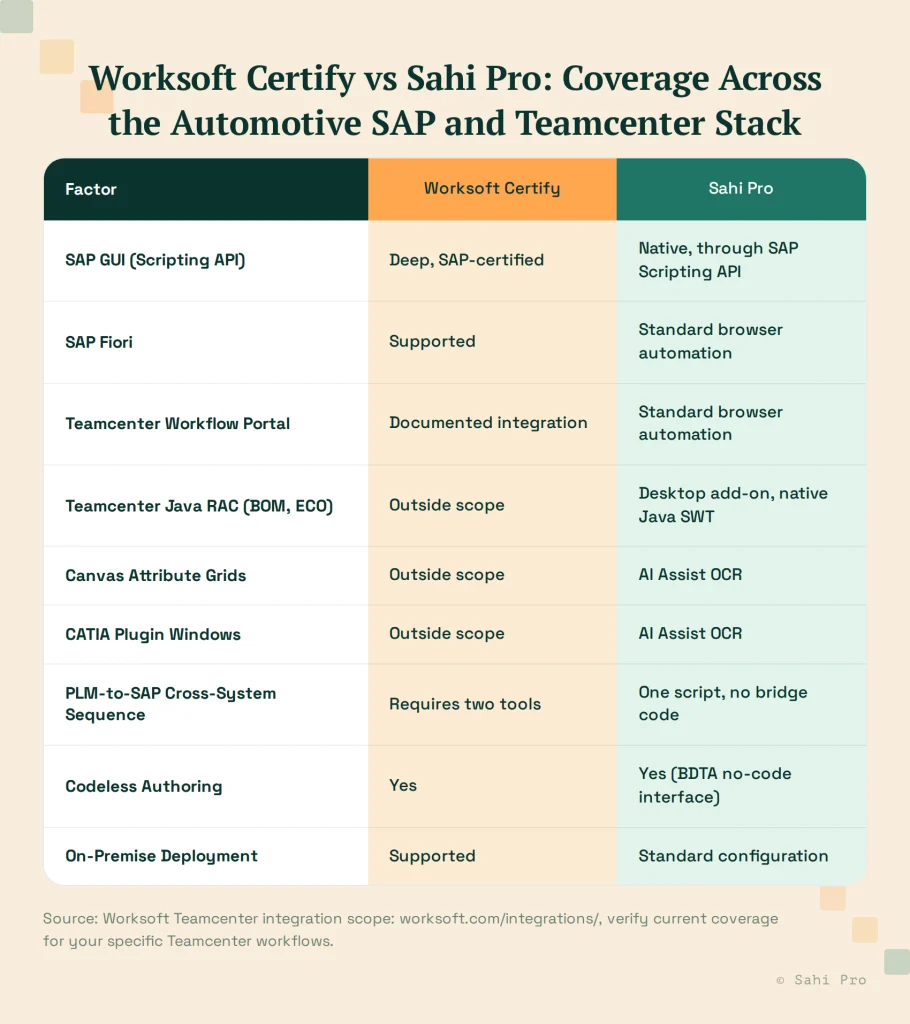
What Worksoft’s Teamcenter integration does not cover natively: the Teamcenter Java Rich Application Client for BOM structure management and engineering change record creation, canvas-rendered attribute grids inside Java panels, CATIA and NX plugin windows inside Active Workspace, and cross-layer test sequences that start in the Teamcenter RAC and continue into SAP GUI in one script.
For automotive OEM and Tier 1 teams, these uncovered layers are where the quality-critical workflows run. BOM validation before a production release, engineering change order routing in the RAC, and CATIA-integrated design check automation require Java thick-client and OCR capabilities that Worksoft’s Teamcenter integration does not provide.
The practical result for many teams: Worksoft covers SAP well, covers Teamcenter at the workflow portal level, but requires a second tool for deep Teamcenter RAC automation. That second tool is where the consolidation question begins.
What Sahi Pro Covers That Creates the Comparison
Sahi Pro covers the SAP layer through the SAP Scripting API (GUI transactions) and standard browser automation (Fiori). It covers the Teamcenter Active Workspace browser layer through proximity-based identification. It covers the Teamcenter Java RAC through the Desktop add-on for Java SWT and Swing. It covers canvas-rendered attribute grids and CATIA plugin windows through the AI Assist OCR add-on.
The cross-system integration sequence, start in Teamcenter RAC, trigger an engineering change, validate BOM propagation in SAP GUI, runs in one Sahi Pro script without custom bridge code between tools.
For automotive teams that need both SAP production process automation and Teamcenter Java RAC BOM management automation, Sahi Pro covers both in one product. Worksoft covers SAP deeply and Teamcenter at the workflow level, requiring a second tool for the RAC layer.
The Two-Tool vs One-Tool Calculation
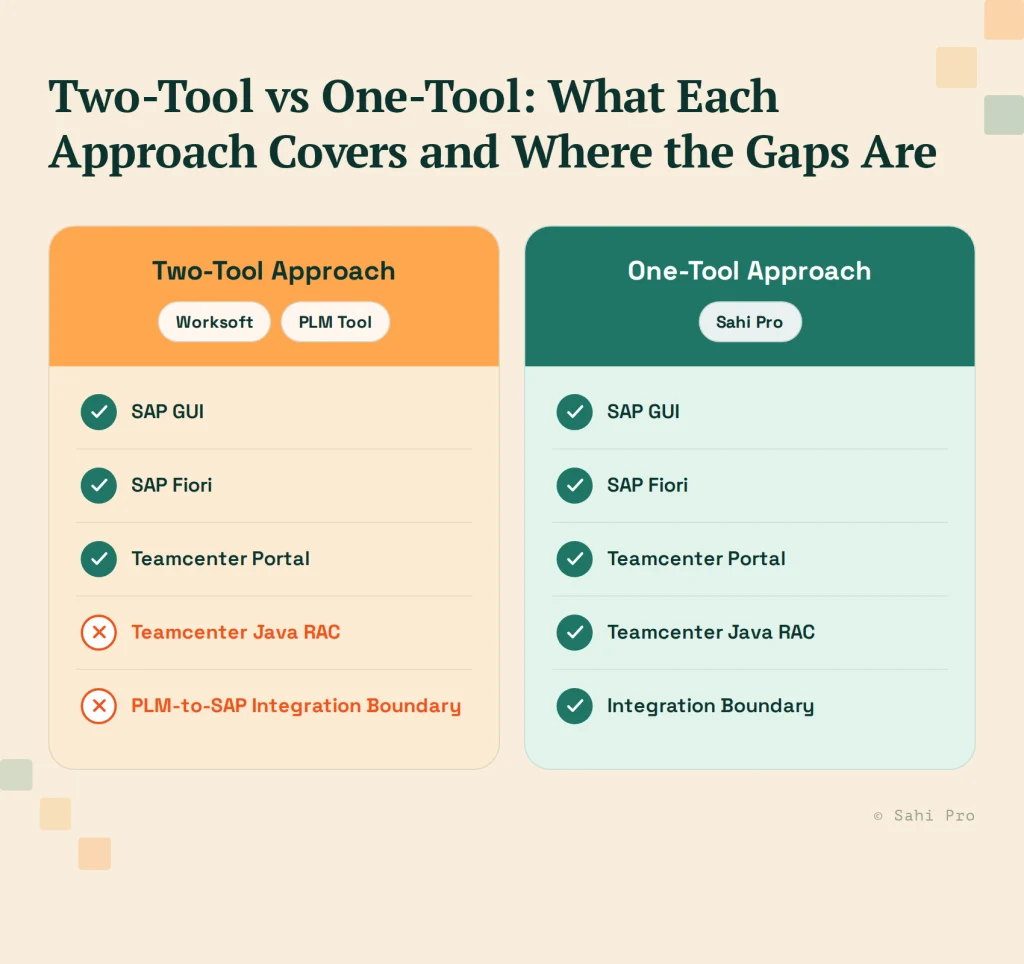
Running Worksoft for SAP and a second tool for Teamcenter RAC automation creates costs that are not always visible at the time of tool selection.
Two license renewal cycles. Each year, two separate tools have separate renewal negotiations, separate budget line items, and separate conversations about value justification.
Two training pipelines. Engineers who need to work on both SAP and Teamcenter automation need to know two tools. New team members need onboarding on both. Knowledge gaps in one tool do not transfer to the other.
Two maintenance schedules. SAP updates and Teamcenter upgrades trigger maintenance work on their respective tools. Managing maintenance coordination between two tools, ensuring that a SAP support pack doesn’t create schedule conflicts with a Teamcenter upgrade maintenance cycle, is overhead that disappears with a single tool.
The integration boundary gap. The PLM-to-SAP integration, the BOM sync from Teamcenter to SAP, the engineering change handoff, is the scenario neither tool covers in a two-tool approach. Worksoft covers the SAP side after the sync; the Teamcenter RAC tool covers the Teamcenter side before it. The integration boundary itself goes untested unless a third tool or custom code bridges the two.
For automotive teams running Teamcenter workflows that are primarily portal-level and do not require RAC BOM automation, Worksoft’s Teamcenter integration may be sufficient. For teams that need RAC-level BOM management and engineering change automation alongside SAP, the consolidation calculation favors a single tool with native coverage across both systems.
Side-by-Side: Worksoft vs Sahi Pro for Automotive SAP and Teamcenter
When to Keep Worksoft vs When to Evaluate Consolidation
Worksoft is the right choice to keep when: your Teamcenter test scope is genuinely limited to portal-level workflow validation; your SAP automation suite is large, mature, and validated; your team has significant Worksoft expertise; and adding a second tool for Teamcenter RAC automation is an acceptable cost.
Consolidation to Sahi Pro makes sense when: your Teamcenter automation requirements include Java RAC BOM management and engineering change record automation; you are maintaining or evaluating a second PLM automation tool alongside Worksoft; the PLM-to-SAP integration boundary is a test coverage gap you need to close; or Year 1 cost comparison favors a single-tool approach for your team size.
The Teamcenter RAC coverage question is the deciding factor. If Worksoft’s Teamcenter integration satisfies your Teamcenter test scope, the consolidation case does not apply. If it does not, the consolidation case is strong.
Sources
- Worksoft integrations page: Teamcenter integration documentation, worksoft.com/integrations/
- Worksoft SAP certification documentation, worksoft.com
- Sahi Pro: SAP Test Automation for PLM Teams: SAP GUI and Fiori Alongside Teamcenter, sahipro.com/sap-gui-fiori-test-automation-teamcenter/
- Sahi Pro: SAP PLM Test Automation: Teamcenter to SAP Integration Testing, sahipro.com/sap-plm-test-automation-teamcenter-to-sap-integration-testing-sahi-pro/
- Worksoft Capterra reviews: SAP automation scope and codeless authoring, capterra.com/p/197042/Worksoft-Certify/