


TL;DR
- A test automation framework is the structure that makes scripts maintainable at scale, without one, every script is its own island, and every SAP change means hunting down every place a transaction shows up and fixing it separately.
- Five layers hold up a solid framework: environment setup, data kept separate from logic, reusable components scoped to one business transaction each, verification steps between components, and reporting.
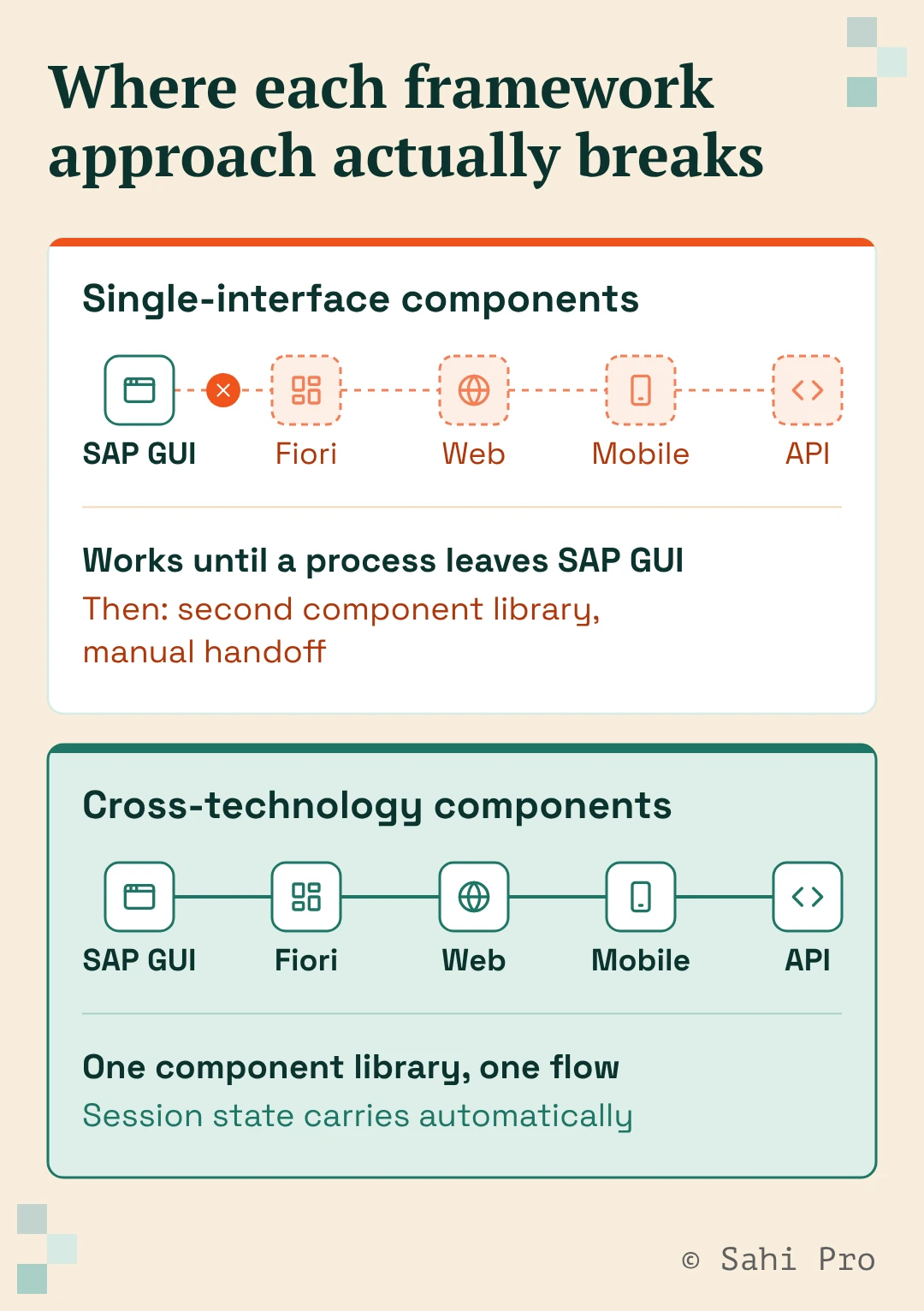
- The real SAP-specific decision isn’t whether to use these five layers, it’s whether your reusable components stay scoped to one interface, usually SAP GUI, or extend across GUI, Fiori, web, mobile, and API as one library. Most published guidance, including official vendor documentation, only covers the first.
- Test data strategy has to be designed into the framework’s data layer from day one. Retrofitting it after scripts are already written is where most teams lose the most time.
- We’ll name the actual tradeoff between single-interface and cross-technology components rather than pretend one is always right.
Most teams don’t fail at test automation because they can’t write a script that works. They fail because the tenth script looks nothing like the first one, the twentieth breaks something the fifth one already handled, and six months in, nobody can say with confidence which tests actually cover which SAP process.
That’s not a scripting problem. It’s a framework problem, and it’s usually invisible until the maintenance bill comes due. If you haven’t settled on a tool yet, our SAP automation tools buyer’s guide covers what to evaluate before you build a framework on top of one, this guide picks up from there.
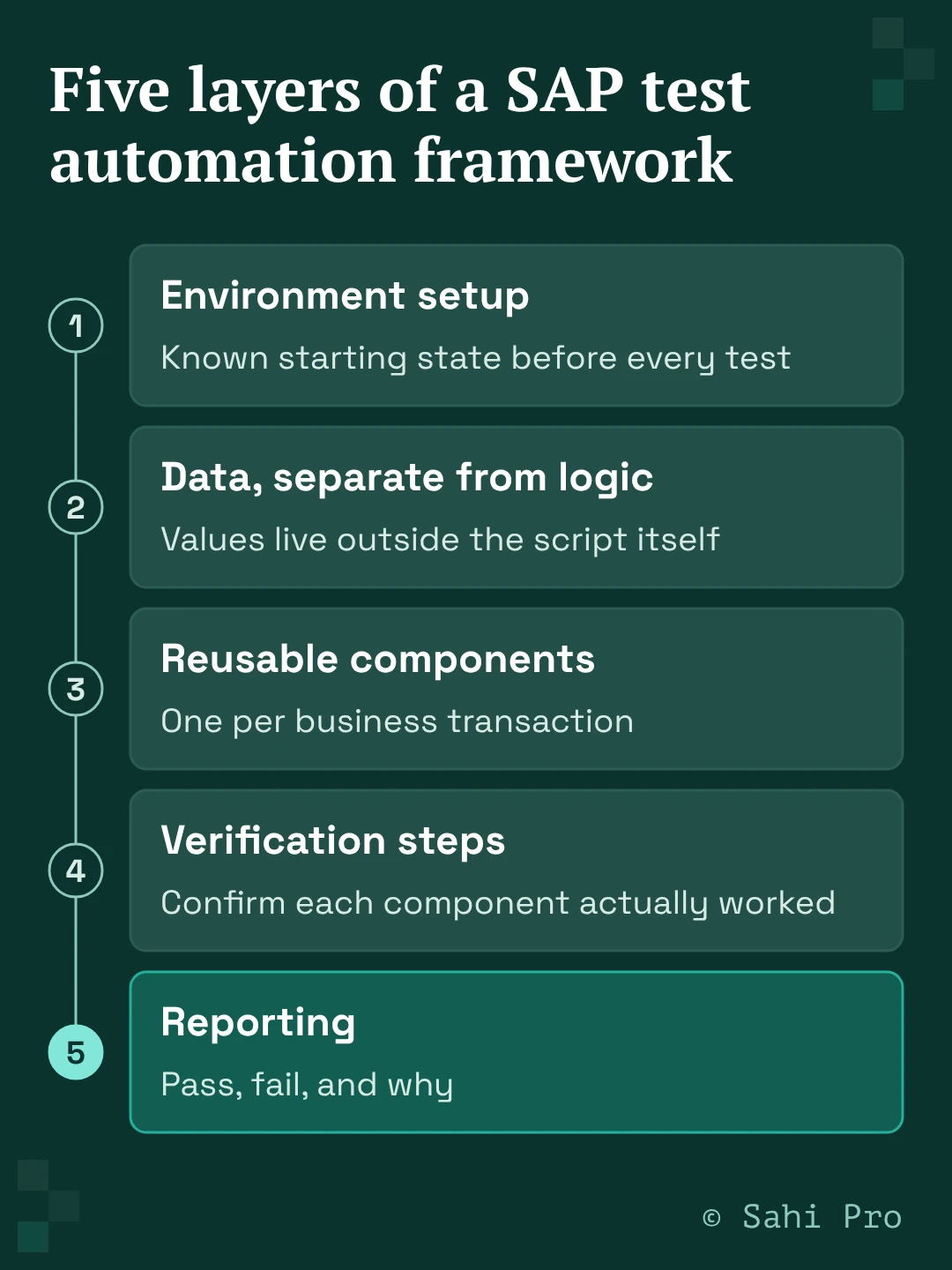
The five layers a real framework needs
A framework is the structure your scripts sit inside, not the scripts themselves. Get the structure right and adding the fiftieth test case looks like adding the fifth. Get it wrong and every new test case makes the whole suite harder to maintain, not easier.
Environment setup. Every test needs a known starting state, the right SAP client logged into, old sessions cleared, the system in a state where the test’s first step will actually work. This belongs in its own layer, run before every test case, not copied into each script individually.
Data kept separate from logic. The values a test uses, order numbers, material codes, customer records, shouldn’t live inside the same script that defines what the test does. Official SAP test automation documentation from UiPath makes this same point directly: keep test data distinct from automation logic, using a dedicated step for data preparation rather than hardcoding values into the flow. When data lives separately, changing an order number for a new test run doesn’t mean editing script logic, and a script doesn’t silently break because someone updated a hardcoded value in the wrong place.
Reusable components, one per business transaction. This is the layer that determines whether your framework scales or collapses under its own weight. UiPath’s own published guidance recommends structuring each reusable component around a single SAP transaction, starting and ending at a consistent point, so that component can be called from any test case that needs that transaction, instead of being rebuilt inside every script that touches it. Change how you create a sales order once, in one component, and every test case that creates a sales order picks up the fix automatically, which is exactly the property that makes regression testing sustainable instead of a rebuild project every release.
Verification steps between components. A component that creates a sales order should confirm the order was actually created, with the expected values, before the next component runs. Skipping this is how a broken component quietly produces false-positive test runs for weeks before anyone notices the underlying process is failing silently.
Reporting. Pass, fail, and why, in a format someone can act on without re-running the test to see what happened. This sounds obvious and is still the layer most frameworks bolt on last, as an afterthought, rather than designing in from the start.
The real SAP-specific decision: one interface, or the whole flow
Here’s where most published guidance on this topic, including official vendor documentation, quietly narrows its scope without saying so. The reusable-component pattern above is usually built around a single interface. UiPath’s own framework guidance, for instance, is explicitly structured around SAP GUI specifically, execution templates built for the WinGUI client, components scoped to SAP GUI transactions. That’s a completely reasonable way to structure a framework if every business process your team tests starts and ends inside SAP GUI.
Most SAP business processes don’t. A process might start in SAP GUI, hand off to Fiori for an approval step, and finish with a mobile confirmation or an API call to a connected system. If your framework’s reusable-component library only covers SAP GUI, that process needs a second component library for the Fiori portion and a third approach entirely for whatever happens outside SAP, with someone manually stitching the handoffs between them in every test case that touches the full flow.
This is the actual fork in the road, and it’s worth naming both sides honestly rather than pretending one is always correct. A single-interface framework is genuinely simpler to build and staff for, if your test scope is narrow and stays inside one interface, there’s no reason to build for cross-technology flows you don’t have.
A cross-technology framework, where reusable components carry session state and data across SAP GUI, Fiori, web, desktop, mobile, and API as one continuous flow, costs more to set up initially but pays off specifically once your business processes actually span multiple interfaces, which describes most SAP landscapes once you look past the individual transaction level. The mistake is picking single-interface by default because that’s what the available documentation shows you, without checking which situation your actual processes put you in.
Test data strategy belongs in the framework, not bolted on after
Production-realistic data is what makes a test meaningful, a test run against obviously fake values doesn’t tell you whether the real process works. But production data usually carries customer, financial, or employee information that can’t be copied into a test system wholesale.
This has to be solved at the data layer, as part of the framework itself, deciding how test data gets sourced, masked, and refreshed before the first script is written, not after the tenth script hits a wall because the test data it depends on has drifted out of sync with what production actually looks like. Teams that treat data strategy as a framework decision from day one spend far less time later re-building test cases around data that’s stopped resembling anything real.
Where Sahi Pro fits into this
Sahi Pro’s architecture is built around the cross-technology answer to the fork described above. A single reusable component, and a single test flow built from those components, can run across SAP GUI, Fiori, web, desktop, mobile, and API without a separate component library per interface, because Sahi Pro identifies elements by relationship and context rather than fixed screen position or DOM structure, the same identification method underneath the whole flow regardless of which interface a given step touches.
Session state and data carry through the entire flow automatically, so a component built for an SAP GUI transaction and a component built for a Fiori approval step can sit inside the same test case without a manual handoff between them. This is on a proprietary execution engine, not a Selenium or Appium wrapper, which is what lets it reach SAP GUI’s Java-based rich client in the first place.
Sahi Pro customers report a 90% reduction in regression man-hours and an 80 percent reduction in test maintenance compared to conventional tools, figures from Sahi Pro’s 1,000-plus enterprise customer base as a whole, not specific to framework design alone. Teams are typically productive within two weeks, with no certification required.
Want to see how this framework approach handles your actual SAP landscape? Book a demo and bring a process that spans more than one interface.
Sources
- UiPath, official SAP test automation best practices documentation (docs.uipath.com) — cited for the specific framework structure: execution templates, helper workflows, reusable components scoped to one SAP transaction each, verification steps between components, data kept separate from logic via dedicated preparation steps. This is a competitor’s own official documentation, cited for a factual, verifiable description of a real, published framework pattern, not as an endorsement of UiPath’s product. Also cited for the observation that this structure is explicitly scoped to SAP GUI (WinGUI) specifically, which is the basis for this piece’s central point about the single-interface vs. cross-technology fork.
- Ranorex, “Test Automation Framework Guide” (ranorex.com/blog) — competitor content check, confirmed this page, which ranks weakly for “sap test automation framework” per the content calendar’s competitor benchmark, is a generic framework guide that does not mention SAP anywhere in its content. Cited only to support the competitive-gap claim made in the outline, not for any technical claim about SAP testing.
- Sahi Pro proof points (90% regression man-hours reduction, 80% maintenance reduction, 1,000+ enterprise customers, productive within two weeks with no certification) are Sahi Pro’s own company-wide, previously established figures, not specific to framework design alone.
- https://www.sahipro.com/request-demo confirmed live in the previous row’s research this session.