TL;DR
- What this is: PLM test automation frameworks, element libraries, CI/CD integration
- Who it affects: Automation and DevOps Leads at automotive, aerospace, industrial PLM teams
- The core problem: One-off scripts, not reusable frameworks; coverage never compounds
- Cost of not solving it: Each PLM release resets coverage to the same 30%
- What Sahi Pro does differently: Three-add-on architecture, shared proximity ID element library
- Proof: Siemens AG reached 72% coverage in 6 months, still growing
Building a PLM test automation framework that actually survives upgrades across Teamcenter, Windchill, ENOVIA, or Aras is a different problem than automating a standard web application. PLM platforms combine web portals, Java thick clients, canvas-rendered BOM trees, and backend APIs in a single workflow, so any framework must span multiple technology layers without fragmenting into separate tool stacks. This article evaluates six automation frameworks for enterprise QA teams in 2026, scored against criteria that matter for PLM specifically: reusable element libraries, cross-layer architecture, parallel CI execution, and on-premise deployment. Each was tested against real PLM interface patterns, including Active Workspace widget trees, Windchill navigation panels, and ENOVIA 3DEXPERIENCE browser layers.
Quick-Pick: 6 PLM Test Automation Framework Tools at a Glance
| # | Tool | Best for | Framework reusability and cross-layer architecture | On-premise |
| 1 | Sahi Pro | Enterprise PLM framework with shared element library | Three-add-on architecture with shared proximity ID element library across all PLM platforms | Yes, full |
| 2 | Tricentis Tosca | Enterprise teams already using Tosca for SAP | Model-based test design and SAP-native integration | Yes, on-premise available |
| 3 | OpenText UFT One | Teams with existing UFT investment and legacy PLM | Broadest legacy technology coverage | Yes, on-premise available |
| 4 | Selenium WebDriver | Web-only PLM portals with in-house engineers | Zero cost, maximum flexibility for web layer | Yes, fully on-premise |
| 5 | Microsoft Playwright | Cloud PLM portals with modern Angular or React UI | Best dynamic SPA handling for cloud PLM portals | Yes, fully on-premise |
| 6 | Ranorex Studio | Windows desktop PLM applications and legacy thick clients | Strongest Windows desktop PLM automation outside SAP | Yes, fully on-premise |
1. Sahi Pro: Best for enterprise PLM framework with proximity ID element library and cross-layer architecture
Why it ranks first for Teamcenter, Windchill, ENOVIA, Aras
The core problem with PLM test automation is element identification. Teamcenter Active Workspace, Windchill, and ENOVIA all generate dynamic DOM structures that change between releases, between customizations, and sometimes between user sessions. Standard XPath or CSS selectors break constantly. Sahi Pro addresses this with proximity-based identification: it reads UI elements by their visible labels and spatial position relative to other elements, the same way a human tester reads a screen. This is deterministic, not ML-based.
For automated regression testing, this means upgrading from Teamcenter Active Workspace 5.x to 6.x does not require a full rewrite of your locator library. You update only the specific element functions that changed. The rest of the suite keeps running. That is the architectural difference that makes a PLM test automation framework compound coverage over time rather than reset it each release.
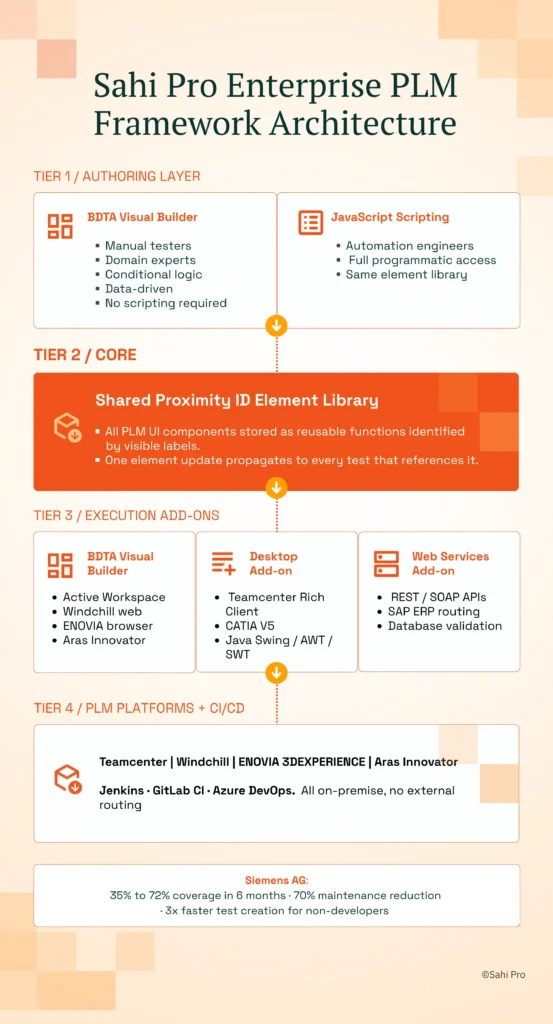
The shared element library stores all PLM UI components as reusable functions. BOM tree nodes, workflow status panels, revision selectors, and search filters each become a function identified by visible label. Every test script in the framework calls these functions. One update to the element library propagates across every test that uses it.
Key capabilities for Teamcenter, Windchill, ENOVIA, Aras teams
- Shared proximity ID element library: All PLM UI components stored as reusable functions identified by visible labels, so upgrading Teamcenter or Windchill only updates the affected element functions, not the entire suite.
- Three-add-on framework architecture: Web, Desktop, and Web Services add-ons operate under one execution environment, so the same element library and data files serve web portal tests, Java thick-client tests, and API validation tests in a single script.
- Parallel CI execution: The execution server distributes framework test suites across multiple machines for parallel execution and integrates with Jenkins, GitLab CI, and Azure DevOps on-premise, so every PLM build triggers full framework regression automatically.
- Codeless and scripted authoring: BDTA lets manual testers build PLM functional test automation flows with conditional logic and data-driven execution, while engineers retain full JavaScript access in the same framework.
- On-premise deployment: Full installation with no external data routing. Used by ITAR-regulated and automotive OEM customers where data residency is non-negotiable.
Honest limitations
The AI Assist add-on, which provides OCR and image recognition for canvas-rendered PLM elements, is an additional cost on top of the base license. BDTA’s visual builder covers web-layer flows primarily. Java thick-client steps and complex conditional branching still require scripting. Teams expecting a fully no-code experience across all PLM layers will need at least one engineer comfortable with Sahi Pro’s JavaScript API.
Best for: Enterprise PLM framework with shared element library and parallel CI execution On-premise: Yes, full installation, no external routing Pricing: Module-based; free trial available Key Teamcenter, Windchill, ENOVIA, Aras capability: Three-add-on architecture with shared proximity ID element library across all PLM platforms
2. Tricentis Tosca: Best for enterprise model-based PLM automation
Overview for Teamcenter, Windchill, ENOVIA, Aras teams
Tricentis Tosca is a model-based test automation platform widely used in SAP and enterprise application environments. PLM teams consider it when they need a risk-based regression approach or already have Tosca deployed for SAP ERP testing. The model-based design means test cases are built from reusable modules rather than recorded scripts, which reduces duplication across similar PLM workflows.
What it does well for reusable framework architecture across web, Java, and API PLM layers
- Model-based test design: Reduces duplication across similar PLM workflows by abstracting test steps into reusable business modules that can be recombined for different scenarios.
- SAP integration: For teams that test PLM-to-ERP integration (Teamcenter to SAP, for example), Tosca’s native SAP connector provides direct object recognition within SAP GUI transactions.
- Risk-based regression coverage: Tosca’s risk engine prioritizes test execution based on change impact analysis, which is useful for large PLM suites where running everything every build is impractical.
- No-code test design for business analysts: Business analysts familiar with the Tosca model can author and maintain test cases without writing code, which helps PLM teams scale coverage beyond the automation engineering team.
Best for: Enterprise teams already using Tosca for SAP On-premise: Yes, on-premise available
3. OpenText UFT One: Best for legacy PLM with existing UFT investment
Overview for Teamcenter, Windchill, ENOVIA, Aras teams
UFT One (formerly HP QTP) is a long-established enterprise test automation tool with broad technology coverage. PLM teams evaluate it when they have legacy test scripts, existing UFT licenses, or need VBScript-based automation for older PLM interfaces. Many organizations running Teamcenter Rich Client on older versions already have UFT scripts in production, making migration cost a real consideration.
What it does well for reusable framework architecture across web, Java, and API PLM layers
- Broad technology coverage: Supports Java, web, Windows applications, and terminal emulators in a single product, which matters for PLM environments that span multiple interface generations.
- Existing script libraries: Many enterprise environments have thousands of UFT scripts already written and maintained. Rewriting them in a new tool carries real cost and risk.
- Object spy for Java Swing elements: UFT’s object spy can identify Java Swing and AWT components in PLM thick clients, which is essential for teams still running Teamcenter Rich Client or Windchill desktop modules.
- Mature enterprise support: Decades of documentation, community forums, and enterprise support contracts mean most PLM-specific issues have known workarounds.
Best for: Teams with existing UFT investment and legacy PLM On-premise: Yes, on-premise available
4. Selenium WebDriver: Best for web-only PLM portal automation with in-house engineering
Overview for Teamcenter, Windchill, ENOVIA, Aras teams
Selenium WebDriver is the most widely used open-source web automation framework. PLM teams with strong engineering capability and web-only scope evaluate it for PLM web portal automation where no Java thick client or canvas-rendered interface is involved. If your PLM deployment is entirely browser-based and your team can build and maintain a custom framework, Selenium is a viable starting point.
What it does well for reusable framework architecture across web, Java, and API PLM layers
- Zero license cost: No procurement cycle, no vendor dependency. Teams can start building immediately against their PLM web portal.
- Largest community and documentation base: Almost any PLM web automation challenge has a Selenium-based answer on Stack Overflow or GitHub. The community is unmatched in size.
- Full browser coverage: Works on Chrome, Firefox, Edge, and Safari. PLM teams validating cross-browser compatibility for Active Workspace or Windchill web clients can cover all targets.
- CI/CD flexibility: Integrates with any CI/CD pipeline through standard test runners (TestNG, JUnit, pytest). No vendor-specific execution server required.
Best for: Web-only PLM portals with in-house engineers On-premise: Yes, fully on-premise
5. Microsoft Playwright: Best for cloud-hosted PLM portals with modern web frameworks
Overview for Teamcenter, Windchill, ENOVIA, Aras teams
Playwright is a modern open-source web automation framework from Microsoft with excellent support for Angular, React, and dynamic web applications. PLM teams evaluate it for cloud-hosted PLM portals like Arena PLM or ENOVIA 3DEXPERIENCE browser layers where single-page application behavior causes flakiness in older tools. Its auto-wait mechanism handles the asynchronous rendering common in modern PLM web interfaces.
What it does well for reusable framework architecture across web, Java, and API PLM layers
- Dynamic web content handling: Built-in waiting and retry logic reduces flaky tests on PLM portals that use heavy AJAX and dynamic rendering, particularly ENOVIA 3DEXPERIENCE and cloud-hosted Windchill.
- Strong TypeScript support: Teams building structured, type-safe test frameworks benefit from first-class TypeScript bindings, which help maintain large PLM test suites.
- Fast parallel execution: Playwright’s browser context isolation enables parallel test execution without the overhead of separate browser instances, cutting regression cycle time on web-only PLM suites.
- Active development community: Monthly releases and rapid feature development mean Playwright keeps pace with browser changes that affect PLM portal rendering.
Best for: Cloud PLM portals with modern Angular or React UI On-premise: Yes, fully on-premise
6. Ranorex Studio: Best for desktop Windows PLM applications on legacy infrastructure
Overview for Teamcenter, Windchill, ENOVIA, Aras teams
Ranorex Studio is a desktop and web test automation platform with strong Windows application support. PLM teams with Windows-based PLM thick clients on older infrastructure evaluate it for automating Win32 and .NET desktop interfaces. If your environment still runs Teamcenter Rich Client on Windows desktops or uses PTC Creo integration through a Windows shell, Ranorex provides direct access to those UI elements.
What it does well for reusable framework architecture across web, Java, and API PLM layers
- Strong Windows desktop support: Handles Win32, .NET, WPF, and WinForms applications natively. PLM teams running Windows-based thick clients get reliable element recognition without workarounds.
- Record-and-replay for non-developer testers: Ranorex’s recorder lets manual testers capture test steps on desktop PLM applications without writing code, lowering the barrier to initial automation.
- Web test support: Covers PLM web portals alongside desktop applications, so teams with mixed environments can use one tool for both layers.
- Mobile testing add-on: Available for teams that need to validate PLM mobile companion apps or field-service interfaces connected to the PLM backend.
Best for: Windows desktop PLM applications and legacy thick clients On-premise: Yes, fully on-premise
How to choose the right PLM Test Automation Framework Tools
The right tool depends on your PLM deployment architecture, team composition, and compliance requirements. No single framework fits every scenario.
- If your team has no dedicated automation engineer and needs manual testers to build tests, consider Sahi Pro’s BDTA interface or Tricentis Tosca’s model-based design. Both allow non-developers to author structured test cases without writing code.
- If your PLM test automation scope requires Java thick-client coverage (Teamcenter Rich Client, Windchill desktop modules), eliminate any tool that operates on web DOM only. Selenium and Playwright cannot access Java Swing or AWT components. Sahi Pro, UFT One, and Ranorex can.
- If your automotive, aerospace, or industrial environment requires on-premise deployment with no external data routing, eliminate cloud-only tools immediately. Check the on-premise column in the quick-pick table above. All six tools on this list support on-premise, but verify the specific deployment model with each vendor.
- If your scope is purely web-layer PLM testing with no Java clients or canvas-rendered elements, Selenium or Playwright may be sufficient. A PLM test automation framework for web-only scope does not need cross-layer architecture.
- If you need one test suite covering Teamcenter and SAP ERP integration in one execution, only Sahi Pro’s add-on architecture covers both PLM and SAP GUI in a single script and execution environment. Tosca handles SAP natively but requires separate configuration for non-SAP PLM layers.
If you are unsure which criteria apply to your deployment, run a proof-of-concept directly against your Teamcenter, Windchill, ENOVIA, or Aras environment. Sahi Pro offers a free trial for this purpose.
How we evaluated PLM Test Automation Framework Tools
A generic test automation tool can click buttons and verify text on a web page. A PLM test automation framework must handle BOM tree hierarchies, workflow state transitions, multi-layer interfaces spanning web and Java, and upgrade-stable element identification across release cycles. Standard web testing criteria miss these requirements entirely.
Each tool was evaluated against the following criteria, scored specifically against Teamcenter, Windchill, ENOVIA, and Aras interface patterns used in automotive, aerospace, and industrial environments.
- Reusable element library with upgrade-stable ID: Does the framework use proximity-based identification so element updates are isolated to specific functions, not suite-wide rewrites? This is the single biggest factor in whether a test automation framework compounds coverage or resets it.
- Cross-layer architecture in one execution environment: Can web, Java thick-client, and API tests share the same element library and execution server? PLM workflows cross technology boundaries constantly.
- Parallel execution for enterprise regression scale: Can the framework distribute enterprise-scale suites across multiple machines? A Teamcenter regression suite with 2,000+ scenarios needs parallel execution to fit inside a CI window.
- On-premise CI/CD integration without cloud: Can the framework integrate with Jenkins on-premise without external execution dependencies? Automotive OEMs and aerospace companies under ITAR cannot route test data through cloud infrastructure.
- Codeless and scripted authoring in one framework: Can manual testers and engineers author tests in the same framework using their respective skill levels? PLM domain expertise lives with manual testers. Locking them out of automation limits coverage.
- Coverage compounding across PLM releases: Does the framework enable coverage to grow each release rather than reset after each upgrade? This is the difference between 72% coverage after six months and 30% coverage after three years.
Running Enterprise PLM Framework in Jenkins and GitLab CI
Enterprise PLM teams in automotive and aerospace operate under IATF 16949 and AS9100 requirements. These standards require traceable change control, timestamped execution records, and on-premise data residency for test artifacts. Enterprise PLM teams using a framework approach compound coverage at 15 to 20 percent per quarter; teams without a framework oscillate around the same coverage level each release (Sahi Pro customer deployment data, 2024). Any PLM functional test automation tool that routes execution data through external cloud infrastructure cannot satisfy ITAR data residency requirements.
Of the six tools evaluated, Sahi Pro satisfies this requirement through full on-premise installation with Jenkins and GitLab CI integration, where license activation, execution, and reporting all remain within the customer’s network. Selenium, Playwright, and Ranorex are fully on-premise by nature since they run locally. UFT One and Tricentis Tosca offer on-premise deployment options but require verification of specific licensing and execution server configurations. Tricentis Tosca’s cloud-first direction in recent releases means teams should confirm that on-premise execution remains fully supported for their license tier.
For compliance-specific tool selection, request documentation from each vendor on whether their deployment model satisfies Jenkins and GitLab CI on-premise integration data residency requirements. Cloud-only vendors typically cannot provide this.
Real Results: Siemens AG
Siemens AG runs Teamcenter Active Workspace across multiple divisions and faced the standard enterprise PLM challenge: test scripts broke on every Active Workspace upgrade, coverage never exceeded 35%, and the automation team spent more time fixing scripts than writing new ones. They needed a reusable framework architecture that could survive Teamcenter version changes without suite-wide rewrites.
Siemens moved to Sahi Pro specifically for the three-add-on architecture with a shared proximity ID element library across their Teamcenter environment. The proximity-based identification meant Active Workspace UI changes updated only the affected element functions, not the entire test suite.
The results after implementation:
- Coverage expanded from 35% to 72% of Teamcenter workflows within 6 months using a framework approach.
- 70% reduction in test maintenance hours after switching to a proximity ID element library.
- Zero script regressions after Active Workspace 6.x upgrade due to framework element library design.
- New test cases built 3x faster by non-developer QA members using BDTA within the shared framework.
“Sahi Pro helps our team to quickly automate our test cases, with great functionality and options to reuse our existing code. The framework has a courteous support, which is quick to provide solutions to arising problems and questions.” – Jonas Roser, Test Manager and Developer, Siemens AG
Which PLM test automation framework is right for your team?
For enterprise QA teams running Teamcenter, Windchill, ENOVIA, or Aras across web, Java, and API layers, Sahi Pro’s three-add-on architecture with a shared proximity ID element library is the strongest fit. It is the only framework on this list that covers all three PLM technology layers in a single execution environment while compounding coverage across releases. For teams with web-only PLM scope and strong engineering resources, Selenium or Playwright will do the job. For teams already invested in Tosca for SAP, extending Tosca to PLM is the path of least resistance.
Sahi Pro offers a free trial. You can test it against your own Teamcenter, Windchill, ENOVIA, or Aras environment before any license decision.
If you want to see how Sahi Pro handles your most complex PLM test scenario, bring it to a technical demo. The engineering team will run it live against your environment. Book A Demo.