TL;DR
- What this is: Single-script PLM automation across web, Java, and API
- Who it affects: QA engineers at PLM companies using Teamcenter, Windchill, ENOVIA
- The core problem: Integration defects hide at cross-layer handoffs
- Cost of not solving it: 12 to 24 engineer-hours per production integration defect
- What Sahi Pro does differently: Web, Desktop, and Web Services add-ons in one script
- Proof: 20-year architecture, cross-platform single-flow proven at production scale
Your regression suite passes on Teamcenter, Windchill, or ENOVIA, yet production defects keep surfacing at the exact point where a web portal hands off to a Java thick client or fires an API call. Cross platform test automation is the missing piece, because PLM spans web, Java, and API layers, and most tools only cover one. Each undetected integration defect costs 12 to 24 engineer-hours to diagnose in production, burning sprint capacity that should go toward new coverage. This article covers how Sahi Pro’s Web add-on, Desktop add-on, and Web Services add-on work together in a single script to test Teamcenter, Windchill, and ENOVIA across every technology layer, and how to structure a test that survives a PLM upgrade without a rewrite. Sahi Pro handles this through a unified scripting engine that treats web, Java, and REST/SOAP API steps as part of one execution flow.
What Is Cross-Layer PLM Test Automation?
“Single-script PLM automation across web, Java, and REST/SOAP API.” That is the definition, and it matters because PLM applications do not live in a single technology layer. Teamcenter, Windchill, and ENOVIA each route user workflows through browser-based portals, Java thick clients for specialized modules, and backend API calls for data validation, approval routing, and system integration. For QA Automation Engineer teams, that means cross platform test automation must span all three layers in a single test execution, or the gaps between layers go untested entirely. PLM test automation that stops at the browser boundary misses the exact handoff points where integration defects originate.
The table below shows where this matters most for Teamcenter, Windchill, and ENOVIA teams.
Why PLM Spans Web, Java, and API; Tools Cover Only One Breaks Standard Automation
Standard web automation frameworks operate against the DOM. They locate elements by CSS selectors, XPath expressions, or element IDs. The problem is specific: Java Swing panels are invisible to WebDriver. When a Teamcenter workflow opens a Rich Client module, or when a Windchill action triggers a Java-based approval panel, the DOM-based test simply stops. There is no element to find. Cross platform test automation requires a fundamentally different identification layer, one that can read Java Swing, AWT, and SWT components alongside HTML elements. Without it, the test covers the web portal but skips the Java thick client entirely, leaving the integration point between them completely unverified.
Teamcenter, Windchill, and ENOVIA make this harder than standard web applications because of deliberate architectural decisions. These PLM platforms split functionality across technology layers by design. Teamcenter Active Workspace runs in the browser, but the Rich Client uses Eclipse RCP with Java SWT. Windchill uses a web front end for most workflows, then drops into Java applets or standalone clients for CAD integration and visualization. ENOVIA on the 3DEXPERIENCE platform renders certain collaboration views in WebGL canvases that return no DOM child nodes. Desktop test automation tools built for Windows native apps cannot reach these Java panels either, because Java Swing operates through its own accessibility bridge, not the Windows UI Automation API.
The business cost is measurable. Roughly 40 to 60 percent of PLM defects discovered in production originate at integration layer handoff points that are never tested by layer-siloed test suites (Siemens PLM Community, 2024). For PLM verticals running Teamcenter, Windchill, or ENOVIA, each of these defects takes 12 to 24 engineer-hours to diagnose because the root cause sits at a boundary that no single test covered. Automated end to end testing that spans all three layers eliminates this blind spot. Without it, teams ship releases with zero coverage at the exact points most likely to fail.
Why Standard Test Automation Tools Hit a Ceiling on Teamcenter, Windchill, and ENOVIA
Standard web automation tools are excellent at what they were designed for. They handle HTML forms, JavaScript-rendered content, and single-page applications with strong reliability. The ceiling appears when the application under test leaves the browser. Teamcenter’s Rich Client, Windchill’s CAD visualization modules, and ENOVIA’s WebGL-rendered 3DEXPERIENCE views all operate outside the DOM. A web-only framework cannot click a button inside a Java Swing panel or read text from a canvas element. End to end testing tools scoped to the browser layer were designed for browser-layer applications. PLM is not a browser-layer application. The tool is doing its job correctly. The scope simply does not match.
Enterprise model-based and codeless tools address a broader scope, but they introduce different constraints. Many require cloud-hosted execution infrastructure, which is blocked in ITAR-controlled, HIPAA-regulated, or IP-sensitive PLM environments. OCR-based identification can read visible text from non-standard interfaces, but without deterministic element identification it produces flaky results on dynamic PLM content. Codeless platforms often lack conditional logic depth for complex PLM workflows involving approval chains, BOM traversals, and role-based access patterns. PLM test automation at the enterprise level requires coverage across web, Java thick client, and API layers within a single test sequence, not three separate tools stitched together with custom glue code. The gap is a design scope problem, and Teamcenter, Windchill, and ENOVIA’s multi-layer architecture requires a product built for this specific layer.
How to Build a Cross-Layer PLM Test in Sahi Pro
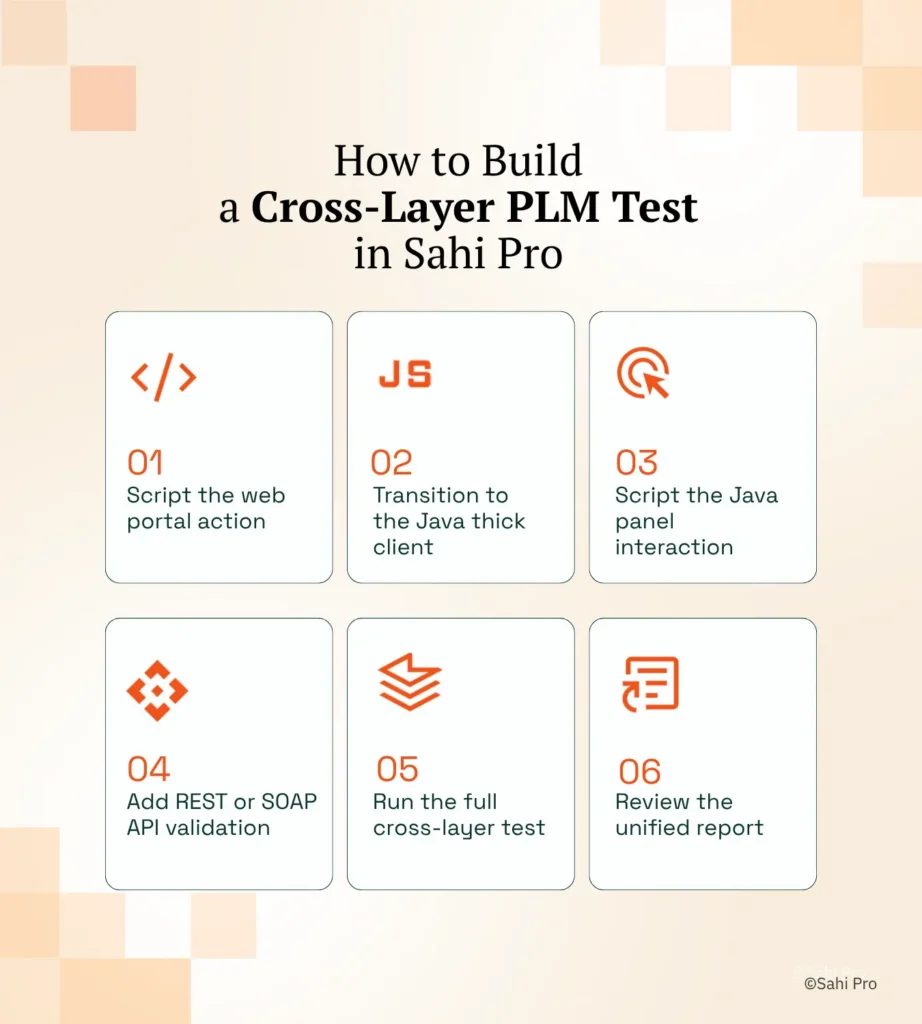
Step 1: Script the web portal action. Open the Teamcenter Active Workspace, Windchill, or ENOVIA web portal in Sahi Pro’s Web add-on. Cross platform test automation starts here because the browser layer is where most PLM workflows begin. Record or hand-code the initial navigation, search, or item selection using Sahi Pro’s proximity-based identification, which reads elements by visible labels rather than brittle DOM selectors.
Step 2: Transition to the Java thick client. When the workflow opens a Rich Client module or Java-based panel, switch context to Sahi Pro’s Desktop add-on within the same script. No separate tool launch is needed. The Desktop add-on connects to the Java Swing, AWT, or SWT session and identifies components through the Java accessibility bridge.
Step 3: Script the Java panel interaction. Execute the required action inside the Java thick client, whether that is an approval step, a BOM edit, or a CAD metadata update. PLM test automation at this layer uses the same scripting syntax as the web steps. The tester does not need to learn a second framework or switch to a different IDE.
Step 4: Add REST or SOAP API validation. Insert a Web Services add-on step to validate the backend state. Call the PLM system’s REST or SOAP API to confirm that the action completed in the database, that the workflow status updated, or that the integration message reached the downstream system. This step catches integration defects that the UI alone cannot reveal.
Step 5: Run the full cross-layer test. Execute the entire sequence as one test. Sahi Pro runs the web steps, transitions to the Java client, executes the desktop interaction, calls the API, and returns a single unified report covering all three layers.
Step 6: Review the unified report. The HTML, Excel, PDF, or XML report shows every step across every layer in sequence. Failed steps identify the exact layer and action where the break occurred. The most common break point teams expect is the web-to-Java handoff, and Sahi Pro’s approach prevents it by maintaining a single execution context across both layers.
How Sahi Pro Handles PLM Spans Web, Java, and API; Tools Cover Only One
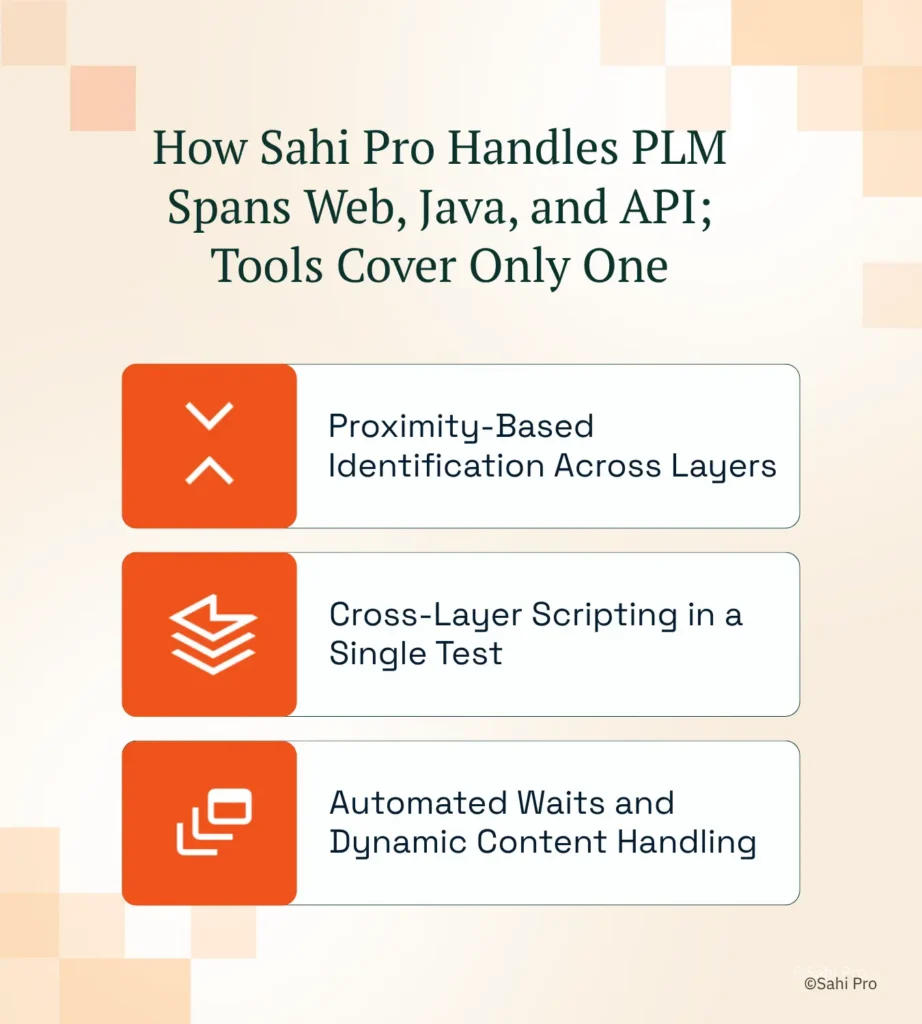
Proximity-Based Identification Across Layers
Sahi Pro identifies UI elements by visible labels and structural proximity, not DOM position or element IDs. In a Teamcenter Active Workspace BOM tree, this means the script locates a sub-assembly by its displayed name and its spatial relationship to surrounding elements. When Siemens releases a new Active Workspace version and the underlying DOM structure changes, the proximity-based locator still finds the element because the visible label has not moved. End to end testing tools that rely on XPath break here. Sahi Pro’s approach mirrors how a human tester reads the screen: find the label, find the element near it, interact.
Cross-Layer Scripting in a Single Test
The defining capability for cross platform test automation on PLM systems is the ability to span web, Java, and API in one script. Sahi Pro’s Web add-on handles the browser portal. The Desktop add-on handles Java Swing, AWT, and SWT thick clients through the Java accessibility layer. The Web Services add-on handles REST and SOAP API calls. All three operate within a single scripting context using the same Sahi Pro syntax. Desktop test automation and web automation are not separate products bolted together. They share one execution engine, one variable scope, and one report. A test that logs into Windchill’s web portal, opens a Java-based visualization module, approves a change order, and then validates the approval via REST API runs as six steps in one script.
Automated Waits and Dynamic Content Handling
PLM portals are AJAX-heavy. Teamcenter Active Workspace, Windchill, and ENOVIA all render content dynamically based on user roles, data volume, and server response times. Sahi Pro monitors application state automatically and proceeds only when elements are ready. No manual wait statements. No Thread.sleep calls. No explicit waits tuned to specific server response times. Automated end to end testing on PLM systems requires this because the same workflow runs differently depending on BOM size, user permissions, and server load. Hard-coded waits produce flaky tests. Sahi Pro’s intelligent wait mechanism eliminates that entire category of false failures.
Sahi Pro vs Generic Test Automation Tools for Cross-Layer PLM Test Automation
Standard web automation tools are the right choice for teams with simple, browser-only testing requirements. They are mature, well-documented, and supported by large communities. The comparison changes when the testing scope includes PLM workflows that span web portals, Java thick clients, and backend APIs, because that scope exceeds what browser-layer tools were designed to cover. Cross platform test automation for PLM requires a different evaluation framework, one that accounts for Java Swing coverage, on-premise deployment, and API validation within the same test execution. The table below compares eight criteria that matter most for Teamcenter, Windchill, and ENOVIA desktop test automation teams.
Teamcenter, Windchill, and ENOVIA Test Automation: Feature Comparison
| Criterion | Generic tools | Sahi Pro |
| Cross-layer: web + Java + API in one script | Separate tools for web, desktop, and API; integration handoffs are never tested together | Single script spans web portal, Java thick client, and REST/SOAP API; one report |
| Java thick-client coverage | No DOM access to Java Swing/AWT/SWT panels; test fails when PLM Java module opens | Desktop add-on reaches Java Swing/AWT/SWT in same script as web portal; no tool switching |
| SAP GUI coverage alongside PLM | Separate tool required for SAP GUI scripting; no single tool covers SAP and PLM | SAP add-on covers SAP GUI and Fiori in same script as Teamcenter; one suite |
| OCR and canvas element identification | Canvas-rendered PLM grids return no DOM nodes; WebDriver fails at identification | AI Assist OCR reads visible text from canvas and WebGL cells without DOM access |
| Maintenance after PLM upgrades | DOM-based scripts need partial or full rewrite after each major PLM release | Proximity ID survives structural UI changes; upgrade maintenance near zero |
| On-premise deployment | Most tools route execution data externally; blocked in ITAR and IP-sensitive environments | Full on-premise install; execution, results, and reporting stay within customer network |
| Dynamic content wait handling | Explicit wait commands needed for AJAX PLM portals; timing failures cause flaky tests | Automatic intelligent waits for AJAX and dynamic PLM content; no manual waits |
| On-premise CI/CD integration | On-premise PLM nodes need custom agent config; most tools assume cloud execution | Execution server integrates with Jenkins, GitLab CI, and Azure DevOps on-premise |
If your team only needs web-layer Teamcenter, Windchill, and ENOVIA testing with no cross-layer requirement, a standard web automation tool may cover your scope.
Real Results: eBaoTech-Collaborus
eBaoTech-Collaborus runs multiple insurance products built on JAVA-J2EE, Spring, Hibernate, JSP, JSF, HTML, Ajax, and Apache Wicket, facing the exact cross-layer challenge where a single web-only tool could not cover the full technology stack. They moved to Sahi Pro to consolidate their test automation under one product using the Web add-on and integrated scripting engine, eliminating the need for multiple tools across their application layers. The results after implementation:
- Regression test execution reduced to approximately 1 person-day, an effort saving of more than 85%.
- Single suite covered multiple applications built on JAVA-J2EE, Spring, Hibernate, JSP, JSF, HTML, Ajax, and Apache Wicket.
- PDF comparison, cross-browser execution, and parallel playback handled within one Sahi Pro suite with no separate tools.
- All QA team members trained across both manual and automation domains, eliminating the separation between automation and manual testing teams.
Testing Teamcenter, Windchill, and ENOVIA Without Starting Over After Every Release
PLM workflows cross technology boundaries. Your test suite must cross them too, or integration defects will continue surfacing in production where they cost 12 to 24 engineer-hours each to diagnose. Sahi Pro’s proximity-based identification, cross-layer scripting engine, and automatic wait handling address the three failure modes that break standard automation on Teamcenter, Windchill, and ENOVIA: brittle locators, layer-siloed coverage, and flaky timing.
If your team is evaluating how to close the gap between web-only testing and full cross-layer PLM coverage, bring your hardest test scenario. Sahi Pro offers a free trial, and you can test it against your own Teamcenter, Windchill, or ENOVIA environment before any license decision. Book a technical demo and see how it handles your specific stack.