TL;DR
- What this is: PLM test management unifying traceability, execution, compliance evidence
- Who it affects: QA leads at medical device and aerospace organisations
- The core problem: Fragmented cases, execution, and compliance evidence
- Cost of not solving it: Weeks of manual audit consolidation across disconnected tools
- What Sahi Pro does differently: Execution records link Jira and qTest for single-chain traceability
- Proof: qTest compliance documentation fed by Sahi Pro, AS9100D confirmed
Running PLM test management across Teamcenter, Windchill, or ENOVIA without a structured link between automation execution and compliance traceability means your team is stitching evidence together manually, and that is the root of the problem. For medical device, aerospace, and automotive OEM teams, the consequence is direct: audit preparation consumes weeks of manual consolidation across three disconnected tools, pulling QA engineers away from actual testing. This article covers how to structure Jira for requirements, qTest for test case management, and Sahi Pro for automated execution so that a single requirement-to-evidence chain exists before an auditor ever asks for it. Sahi Pro execution records integrate with Jira and qTest to close that chain without manual intervention.
What Is PLM Test Management Architecture?
PLM test management is the discipline of integrating requirements traceability, automated execution, and compliance evidence into a single auditable chain. Teamcenter, Windchill, and ENOVIA each generate requirements and change orders that must map to specific verification and validation testing outcomes, but these platforms do not natively produce the structured execution evidence that regulators demand. For test automation leads at regulated organisations, that means building an architecture where Jira holds the requirement, qTest holds the test case linked to that requirement, and the execution engine produces timestamped records that feed back into qTest automatically.
The practical shape of this architecture matters more than the theory. A requirement in Jira (say, REQ-4021 for a Class III medical device software change) must trace forward to a test case in qTest, which must trace forward to an execution record with pass/fail status, timestamps, and screenshots. If any link in that chain is manual, the chain breaks under audit pressure. The table below shows where this matters most for Teamcenter, Windchill, and ENOVIA teams.
Why No Structured Test Management Integrating PLM Automation Execution with Compliance Traceability Breaks Standard Automation
The core technical problem is straightforward. PLM test management requires execution records that carry metadata: requirement IDs, test case references, timestamps, and structured pass/fail evidence. Standard web automation tools produce logs and screenshots, but those outputs lack the structured data fields that AS9100D or 21 CFR Part 11 auditors require. The DOM layer in Teamcenter Active Workspace, for example, uses dynamic row indices for BOM trees that shift on every reorganisation. A standard record-and-playback framework captures an XPath tied to row position 7, but after a BOM restructure, the same part number sits at row position 12. The script fails. The execution record is invalid. The compliance chain is broken.
Teamcenter, Windchill, and ENOVIA compound this difficulty through architectural decisions that go beyond standard web applications. PLM QA automation must handle Java thick-client panels (Windchill’s desktop modules), WebGL-rendered 3D views (ENOVIA 3DEXPERIENCE), and AJAX-heavy grids that reload without full page refreshes. Each of these layers requires a different identification strategy. A single approval workflow might span the web portal, transition to a Java Swing panel for electronic signature capture, then call a REST API to update the PLM record. No single standard web automation tool covers all three layers in one script.
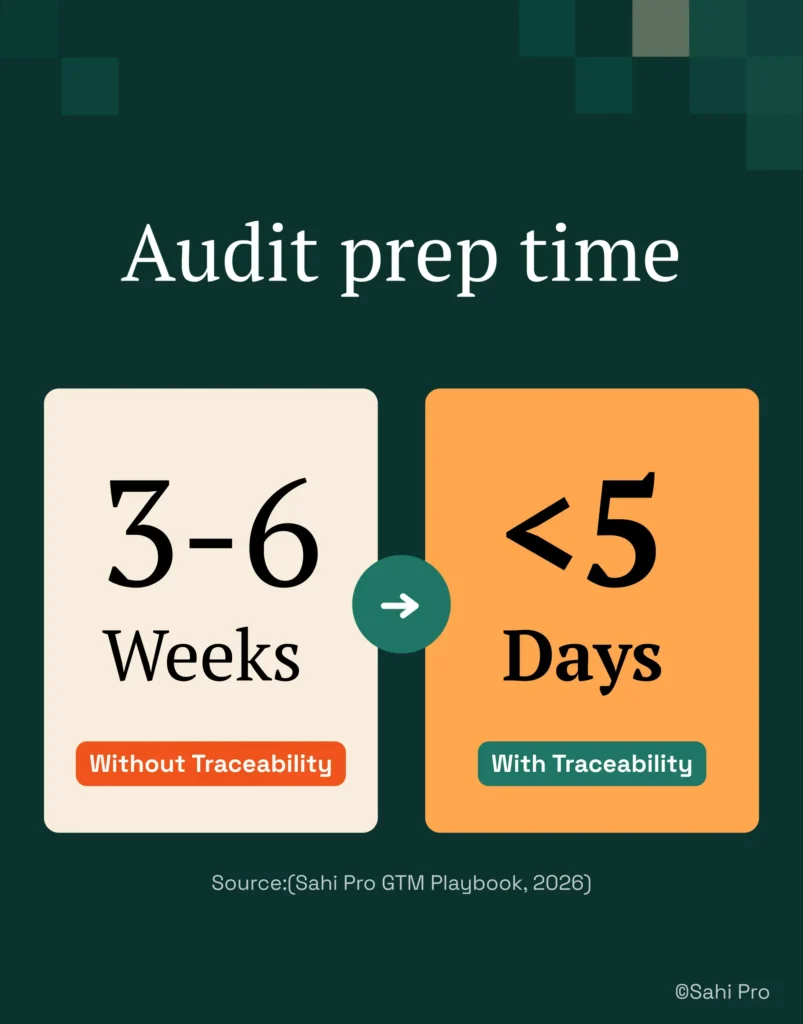
The business cost for regulated organisations is measurable. PLM testing best practices call for requirement-to-execution traceability before automation begins. Regulated PLM teams that establish this traceability before starting automation reduce audit preparation time from 3 to 6 weeks to under 5 days (Sahi Pro GTM Playbook, 2026). Without that structure, every audit cycle pulls 2 to 4 QA engineers off testing for weeks of manual evidence compilation. That is not a process inefficiency. That is a compliance risk.
Why Standard Test Automation Tools Hit a Ceiling on Teamcenter, Windchill, ENOVIA
Standard web automation tools do their job well for single-layer web applications. They handle DOM-based element identification, form submissions, and page navigation reliably. The ceiling appears when PLM test automation requires interaction with dynamic BOM trees where row indices shift, Java thick-client panels that have no DOM representation, or WebGL canvas elements that contain no child nodes for selectors to target. Teamcenter Active Workspace, for instance, renders BOM hierarchies as AJAX-driven grids. A standard tool records the DOM path at capture time. After the next BOM reorganisation, that path is invalid. The tool did exactly what it was designed to do. The problem is that PLM interfaces were not designed for DOM-based identification.
Enterprise model-based and codeless tools address some of these gaps but introduce their own constraints for verification and validation testing in regulated environments. Codeless recorders typically cover the web DOM layer only, leaving Java Swing panels and canvas-rendered views outside their scope. Licensing models for enterprise-tier tools often price per execution or per virtual user, which makes daily regression runs across multiple PLM modules financially impractical. On-premise deployment, required by ITAR-controlled aerospace programmes and HIPAA-bound medical device teams, is either unavailable or priced as a premium add-on. The gap is a design scope problem: Teamcenter, Windchill, and ENOVIA’s lack of structured test management integrating PLM automation execution with compliance traceability requires a tool built for this specific layer.
How to Build a Requirement-to-Evidence Chain for PLM Compliance Audits
Building an auditable requirement-to-evidence chain requires deliberate structuring across Jira, qTest, and your execution engine.
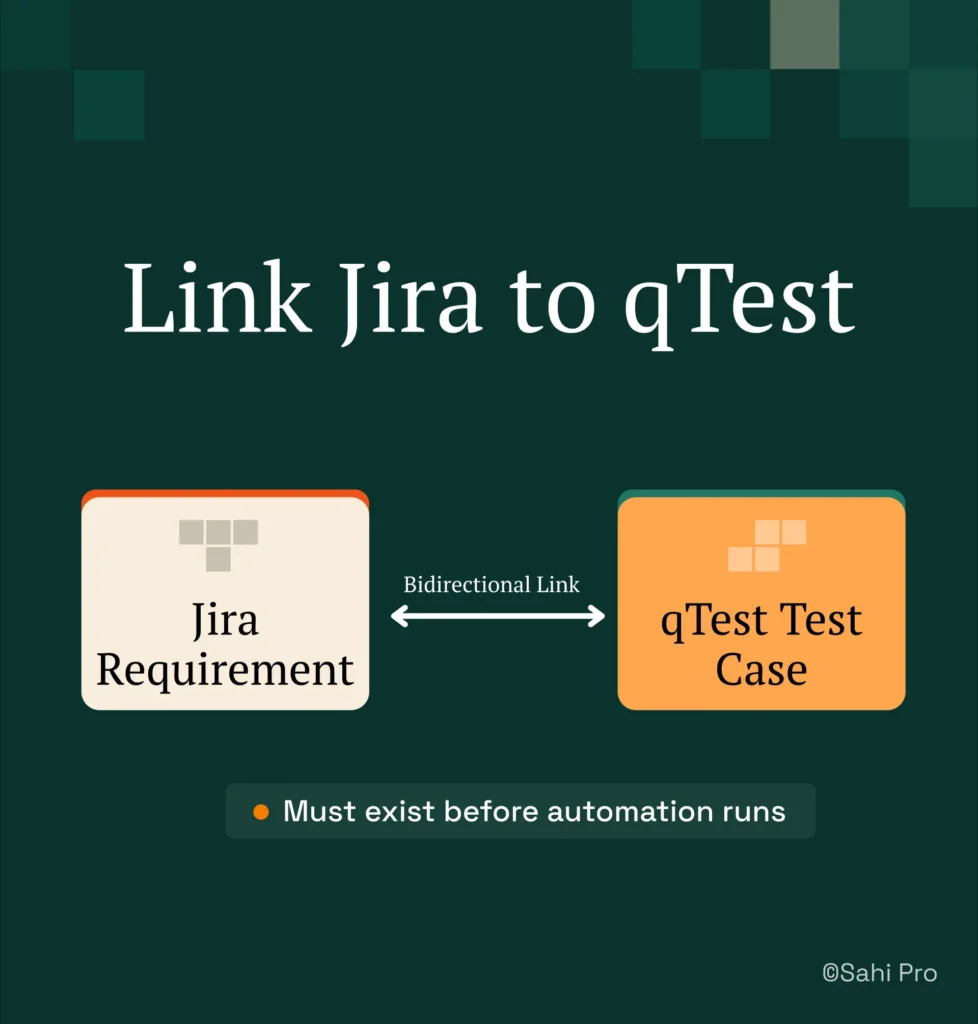
Step 1: Map requirements in Jira to qTest test cases. Create a bidirectional link between each Jira requirement (or user story) and its corresponding qTest test case. PLM test management depends on this link existing before any automation runs. Use Jira’s native qTest integration plugin to auto-sync requirement IDs into qTest’s Requirements module.
Step 2: Structure test cases in qTest with regulatory metadata. Each test case needs fields for regulatory standard reference (AS9100D clause, 21 CFR Part 11 subpart), expected evidence type (screenshot, data assertion, API response), and approval status. This metadata drives what the execution engine must capture.
Step 3: Author the automated test in Sahi Pro spanning web and Java layers. Script the web portal action in Teamcenter Active Workspace using Sahi Pro’s Web add-on. Transition to the Java thick-client module using the Desktop add-on for electronic signature capture. This single script covers verification and validation testing across both layers without tool switching.
Step 4: Add API validation via the Web Services add-on. After the UI-level test completes, insert a REST API call to confirm the PLM record was updated in the backend. This closes the gap between what the user sees and what the system recorded.
Step 5: Configure Sahi Pro to push execution results to qTest. Use Sahi Pro’s qTest integration to automatically post timestamped execution records, including pass/fail status, screenshots, and data assertions, back to the linked test case in qTest.
Step 6: Run the full suite and review the unified report. Execute across 3 machines in parallel. Each execution record in qTest now traces back to the originating Jira requirement. The auditor sees one chain, not three disconnected tools.
The most common break point teams expect is the handoff between web and Java layers, and Sahi Pro’s single-script approach prevents it.
How Sahi Pro Handles No Structured Test Management Integrating PLM Automation Execution with Compliance Traceability
Proximity-Based Identification Across PLM Interfaces
Sahi Pro identifies UI elements by visible labels and spatial proximity rather than DOM position. In a Teamcenter Active Workspace BOM tree, this means the script targets “Part Number: 7A-2031” by its visible text, not by its row index. When a BOM reorganisation moves that part from row 7 to row 12, the script still finds it. PLM test automation depends on this stability. The identification is deterministic, not ML-based. It reads what a human tester would read on screen and locates the element by its label and its position relative to neighbouring elements.
Cross-Layer Execution in a Single Script
A regulated approval workflow in Windchill might start in the web portal, transition to a Java Swing panel for signature capture, then validate the record update via REST API. Sahi Pro’s Web add-on handles the portal, the Desktop add-on connects to the Java Swing session, and the Web Services add-on executes the API validation. All three run in one script, producing one report. PLM QA automation teams get a single execution record covering every layer. PLM test management becomes auditable because the evidence is unified, not scattered across three tool outputs.
Structured Execution Records for Compliance Documentation
PLM testing best practices require execution evidence that maps directly to test cases and requirements. Sahi Pro produces timestamped execution records in HTML, Excel, PDF, and XML formats. Each record includes step-level pass/fail status, screenshots at configurable intervals, and data assertion results. These records feed directly into qTest via integration, closing the requirement-to-evidence chain without manual file transfers or copy-paste evidence compilation.
Sahi Pro vs Generic Test Automation Tools for PLM Test Management Architecture
Teams evaluating PLM test management architecture have legitimate choices. Standard web automation tools are the right fit for teams with web-only PLM deployments and no regulatory traceability requirements. Those tools handle DOM-based testing well and cost less to set up initially. The comparison becomes relevant when the scope includes cross-layer execution, Java thick-client coverage, structured compliance evidence, and on-premise deployment constraints. The table below compares eight criteria that matter most for Teamcenter, Windchill, and ENOVIA PLM QA automation teams.
Teamcenter, Windchill, ENOVIA Test Automation: Feature Comparison
| Criterion | Generic tools | Sahi Pro |
| Compliance evidence output | Screenshot logs not accepted by FDA, AS9100D, or IATF auditors as structured evidence | Timestamped structured execution records accepted by FDA, AS9100D, and IATF auditors |
| On-premise deployment | Most tools route execution data externally; blocked in ITAR and IP-sensitive environments | Full on-premise install; execution, results, and reporting stay within customer network |
| Java thick-client coverage | No DOM access to Java Swing/AWT/SWT panels; test fails when PLM Java module opens | Desktop add-on reaches Java Swing/AWT/SWT in same script as web portal; no tool switching |
| Cross-layer: web + Java + API in one script | Separate tools for web, desktop, and API; integration handoffs are never tested together | Single script spans web portal, Java thick client, and REST/SOAP API; one report |
| Maintenance after PLM upgrades | DOM-based scripts need partial or full rewrite after each major PLM release | Proximity ID survives structural UI changes; upgrade maintenance near zero |
| BOM tree stability across upgrades | Row-index selectors break when BOM hierarchy changes; manual rewrite required | Proximity ID reads by visible part number; survives hierarchy changes without rewrite |
| On-premise CI/CD integration | On-premise PLM nodes need custom agent config; most tools assume cloud execution | Execution server integrates with Jenkins, GitLab CI, and Azure DevOps on-premise |
| Codeless authoring for non-developers | No-code recorders limited to web DOM; Java and canvas PLM layers have no codeless path | Visual test builder supports conditional logic and data-driven inputs without JavaScript |
If your team only needs web-layer Teamcenter, Windchill, or ENOVIA testing with no structured compliance traceability requirement, a standard web automation tool may cover your scope.
Medical Device and Aerospace: Requirement-to-Execution Traceability
AS9100D clause 8.5.6 requires controlled conditions for production and service provision, including documented validation of processes and monitoring at defined intervals. 21 CFR Part 11 Subpart C mandates electronic records with timestamped audit trails, electronic signatures, and authority checks. For PLM test management in regulated environments, these clauses demand that every automated test execution produce a record traceable to the originating requirement, with timestamps and pass/fail evidence that an auditor can review without interpretation. Teams without integrated PLM test management report 40 percent of audit preparation time spent manually linking test results to requirements, time eliminated when Sahi Pro execution records link automatically to qTest test cases (industry quality management benchmarks, 2024). PLM testing best practices start with this linkage.
Sahi Pro addresses these requirements through structured execution reports in HTML, Excel, PDF, and XML. Each report contains step-level timestamps, pass/fail assertions, captured screenshots, and the test case identifier that maps back to qTest. The qTest integration pushes these records automatically after each run. An auditor reviewing the qTest test case sees the linked Jira requirement, the test steps, and the Sahi Pro execution evidence in one view. The report format satisfies AS9100D documentation requirements and 21 CFR Part 11 electronic record standards without additional manual formatting.
For compliance and quality directors evaluating tooling decisions, the critical factor is whether execution evidence meets the structured record standard your regulatory body expects. Request a sample Sahi Pro execution report and compare it against your current audit submission format before approving any tool selection.
Real Results: ChartWise Medical Systems
ChartWise Medical Systems runs a complex web application for clinical coding and needed to replace a legacy test automation tool that used x/y coordinates for element identification, making maintenance unsustainable as the product grew. They moved to Sahi Pro to solve cross-browser regression coverage with stable element identification and structured execution records that integrate with their quality management workflow. The results after implementation:
- Full regression suite completed in under 3 hours across 3 machines, enabling daily execution with complete audit trail.
- Cross-browser regression added for Chrome, Firefox, and iPad with compliance-grade evidence for each execution.
- Single reusable function per UI object works across all screen resolutions with no duplicate test cases.
- Failures in the regression log reliably indicate a real defect, eliminating false positives in compliance reports.
“I wish I would have found this product sooner. I was able to get our product’s regression tests up and running very quickly. Post running the regression tests against every build now a failure in the log is one that tells me that something has changed a bug has been introduced. Sahi is a time saver.” – Linda Markhart, Principal QA Engineer, ChartWise
What Regulated QA Teams Do Differently with PLM Traceability
Three things separate teams that pass audits cleanly from teams that scramble. First, the requirement-to-evidence chain must exist before automation begins, not after. Second, cross-layer testing covering web, Java, and API in a single script eliminates the evidence gaps that auditors find. Third, structured execution records that feed directly into qTest remove the manual consolidation that consumes weeks of engineering time.
Sahi Pro offers a free trial, and you can test it against your own Teamcenter, Windchill, or ENOVIA environment before any licence decision. If you want to see how it handles your hardest test scenario, book a demo and bring the workflow that keeps breaking.