Two tools can both claim desktop automation support and still fail differently the moment they hit a Windchill attribute grid
TL;DR
- TestComplete uses native object recognition for Windows applications, a mature, general-purpose approach to desktop automation.
- Windchill renders its attribute grids on canvas rather than as standard Windows controls, which is where object-recognition tools typically lose visibility.
- Sahi Pro combines relational, proximity-based identification with AI Assist image recognition specifically for canvas-painted UI, including Windchill’s grids and embedded Creo plugin windows.
- Licensing models differ: TestComplete has moved to a SmartBear ID-based model, while Sahi Pro is built around enterprise, no-code-first licensing.
- The right choice depends on how much of your Windchill workflow actually touches canvas-rendered elements versus standard Windows dialogs.
What TestComplete does well in a Windchill environment
TestComplete is a genuinely capable, mature desktop automation tool. Its object recognition engine is built to identify standard Windows controls, WinForms, WPF dialogs, and .NET, Java, Delphi, and C++ applications, by reading the underlying object model the operating system exposes. For the parts of Windchill that behave like conventional desktop software, standard dialog boxes, menus, file pickers, this approach works the way it’s supposed to. The same general-purpose-versus-PLM-specific tradeoff shows up across the broader PLM test automation framework landscape, not just on Windchill.
Where object recognition runs into Windchill’s canvas layer
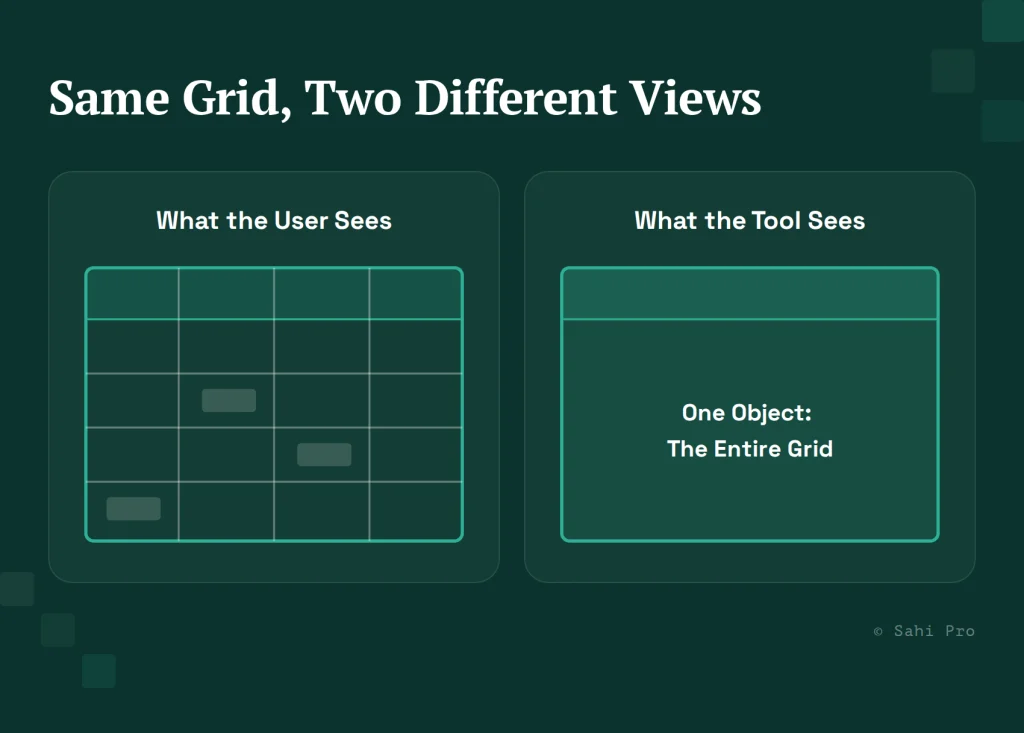
Windchill’s PDMLink interface renders certain UI elements, most notably attribute grids used for part and BOM data entry, on canvas rather than as addressable Windows controls. A canvas element is painted as pixels. There is no object tree for a recognition engine to query, because as far as the operating system is concerned, the entire grid is a single image.
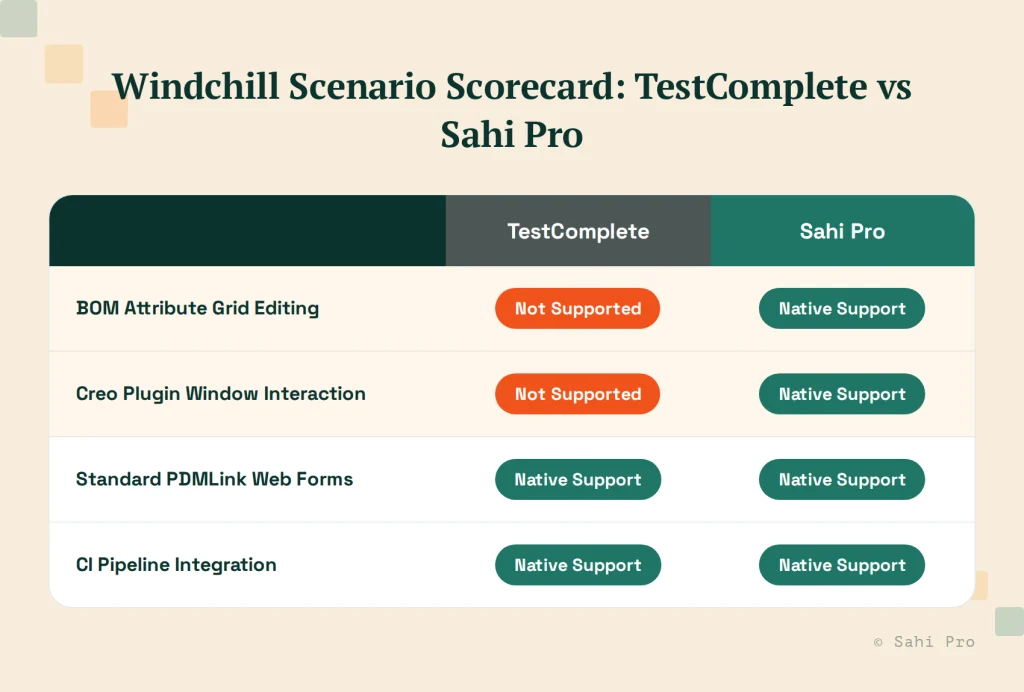
Picture a QA engineer trying to script an edit to a specific attribute cell in a Windchill BOM grid. An object-recognition tool can locate the grid as a container, but it has no way to identify the individual cell inside it, because that cell was never exposed as a distinct object. The same limitation applies to Windchill’s embedded Creo plugin windows, which open as their own rendering surface rather than as a set of recognizable native controls.
How Sahi Pro handles the same scenario
Sahi Pro’s approach starts from a different assumption: instead of relying on an exposed object model, it identifies elements by relational, proximity-based context, and where no object model exists at all, AI Assist reads the rendered region directly, the way a person looking at the screen would. For a Windchill attribute grid, that means locating a cell by its position relative to a row label or column header, rather than by querying an object tree that was never built for that grid in the first place.
The gap here is a specific technical mismatch, not a general verdict on which tool is more advanced: object-recognition engines are built for object models, and canvas-rendered UI does not have one. Sahi Pro’s comparison against Selenium covers the same underlying mismatch on the web-automation side.
Licensing models, described honestly
TestComplete’s licensing moved to a SmartBear ID-based model in 2022, replacing the earlier key-based, node-locked or floating license structure. Teams evaluating it today should confirm current terms directly with SmartBear, since licensing structures and pricing tiers change independent of this comparison. Sahi Pro is licensed for enterprise deployment with a no-code-first design intended to let manual testers and QA leads author tests without a specialist hire, a structural difference worth weighing against your team’s actual skill mix, not just against a price sheet.
Neither tool’s licensing model is inherently better. The more useful question for a Windchill-specific evaluation is how much of your test surface is standard Windows UI, where either tool’s approach may work, versus canvas-rendered grids and CAD plugin windows, where the underlying architecture starts to matter more than the license terms.
A scenario-by-scenario way to think about it
Before running a formal bake-off, map your actual Windchill test scenarios into two buckets: scenarios that interact with standard dialogs, forms, and navigation, and scenarios that touch attribute grids or embedded CAD plugin windows. If the second bucket is small, a general-purpose object-recognition tool may cover your needs adequately. If it’s not, that’s the specific gap worth testing directly with any tool you’re evaluating, on your own Windchill instance, not on a vendor’s demo environment. Teams running this exercise on high-mix manufacturing environments specifically can cross-reference PLM Test Automation Tools for High-Mix Manufacturing for a related breakdown.
Sources
- SmartBear TestComplete Licensing Documentation
- PTC Windchill PDMLink and Creo integration documentation (PTC)
- Sahi Pro AI Assist product documentation (sahipro.com)