TL;DR
- What this is: On-premise PLM test automation, no external data routing
- Who it affects: QA leads at aerospace, automotive, defence PLM organisations
- The core problem: Cloud tools route PLM data outside the firewall
- Cost of not solving it: Regulated teams left with zero sustainable automation
- What Sahi Pro does differently: Full on-premise install, nothing leaves your network
- Proof: Aerospace and automotive ITAR deployments confirmed on-premise
Every time your desktop test automation scripts push execution logs, screenshots, or test data through a cloud-hosted service while testing Teamcenter, Windchill, or ENOVIA, you have an IP exposure problem that no amount of encryption headers will fix. For aerospace, automotive, and defence teams, this is not a theoretical risk. It means regulated organisations have zero sustainable automation options that satisfy both their compliance officers and their release calendars. This article covers how to deploy a fully on-premise PLM test automation stack that spans web portals, Java thick clients, and REST APIs without routing a single byte outside your network, and how Sahi Pro’s proximity-based element identification and full on-premise installation model make that possible for IP-sensitive programmes.
What Is On-Premise PLM Test Automation?
“On-premise PLM test automation with no external data routing” means exactly what it states: every component of your test infrastructure, from script authoring and execution to result storage and reporting, runs on servers you own and control. Teamcenter, Windchill, and ENOVIA each generate technical data subject to export control, proprietary design IP, and contractual confidentiality obligations. Desktop test automation against these platforms captures screenshots of BOM structures, part attributes, workflow approvals, and CAD metadata. For Test Automation Lead teams in aerospace or defence organisations, that means every artefact your test suite produces is itself controlled data.
Windows GUI automation adds another dimension. PLM platforms frequently launch Java thick-client modules for tasks like structure editing, change management approvals, and classification. These windows contain the same controlled technical data as the web portal. Any test execution environment that touches these layers must keep all captured data within the organisation’s network boundary. The table below shows where this matters most for Teamcenter, Windchill, and ENOVIA teams.
Why Cloud Tools Route PLM Data Outside the Firewall Breaks Standard Automation
Standard web automation frameworks identify elements using DOM selectors, XPath expressions, or CSS paths. Desktop test automation against Teamcenter, Windchill, or ENOVIA hits a fundamental constraint here: cloud-hosted execution platforms must transmit test scripts, execution logs, screenshots, and assertion results to external servers for processing, storage, or reporting. The DOM itself is not the problem. The problem is that every data packet generated during test execution, including rendered BOM tree content, part number attributes, and approval workflow states, travels outside the firewall. For PLM platforms containing ITAR-controlled technical data, this transmission constitutes an unauthorised export.
Teamcenter, Windchill, and ENOVIA compound this challenge through their architecture. Teamcenter Active Workspace renders BOM hierarchies as dynamic web components, but the underlying data includes export-controlled part numbers, material specifications, and design revision histories. Windchill uses Java thick-client modules for structure editing. ENOVIA 3DEXPERIENCE renders 3D models in WebGL canvases. Each of these layers generates test artefacts that contain controlled technical data. PLM QA tools for enterprise environments must account for the classification level of every artefact the test suite produces, not just the test scripts themselves.
The business cost for aerospace, automotive, and defence organisations is direct and measurable. ITAR export control regulations under 22 CFR Parts 120 to 130 prohibit export-controlled technical data from being processed on foreign servers, a requirement that cloud-hosted test tools cannot satisfy for classified aerospace PLM programmes [22 CFR Parts 120-130]. A single compliance violation can trigger debarment, civil penalties exceeding USD 500,000 per violation, and criminal prosecution. Without a viable PLM test automation framework that operates entirely on-premise, regulated teams face a binary choice: manual regression testing that cannot scale, or cloud-based automation that creates export control liability with every test run.
Why Standard Test Automation Tools Hit a Ceiling on Teamcenter, Windchill, and ENOVIA
Standard web automation tools are excellent at what they were designed to do. They handle HTML form submissions, button clicks, table assertions, and API calls against modern web applications with high reliability. The ceiling appears when the scope extends to PLM test automation against platforms like Teamcenter, Windchill, and ENOVIA. These platforms route controlled technical data through multiple application layers. A single workflow, such as a change notice approval, may start in a web portal, transition to a Java thick-client panel for digital signature, and trigger a REST API call for downstream notification. Cloud-hosted execution platforms cannot contain this data within the organisation’s network. The moment a test script captures a screenshot of a BOM tree containing ITAR-controlled part numbers and transmits it to an external reporting server, the organisation has an export control problem.
Enterprise model-based and codeless tools address part of this gap but introduce their own limitations. Most codeless recorders operate only against the web DOM layer. When the PLM workflow transitions to a Java Swing panel for structure editing or a Windows GUI for batch processing, the codeless recorder stops. Windows GUI automation through OCR-based approaches can read visible text, but they lack the structural context to distinguish between identically labelled fields in different panels. Licence costs for enterprise-tier tools often require a separate procurement cycle, and on-premise deployment is either unavailable or priced as a premium add-on. The gap is a design scope problem. Teamcenter, Windchill, and ENOVIA’s cloud data routing restriction requires a tool built for this specific layer.
How to Deploy Sahi Pro On-Premise for Air-Gapped PLM Testing
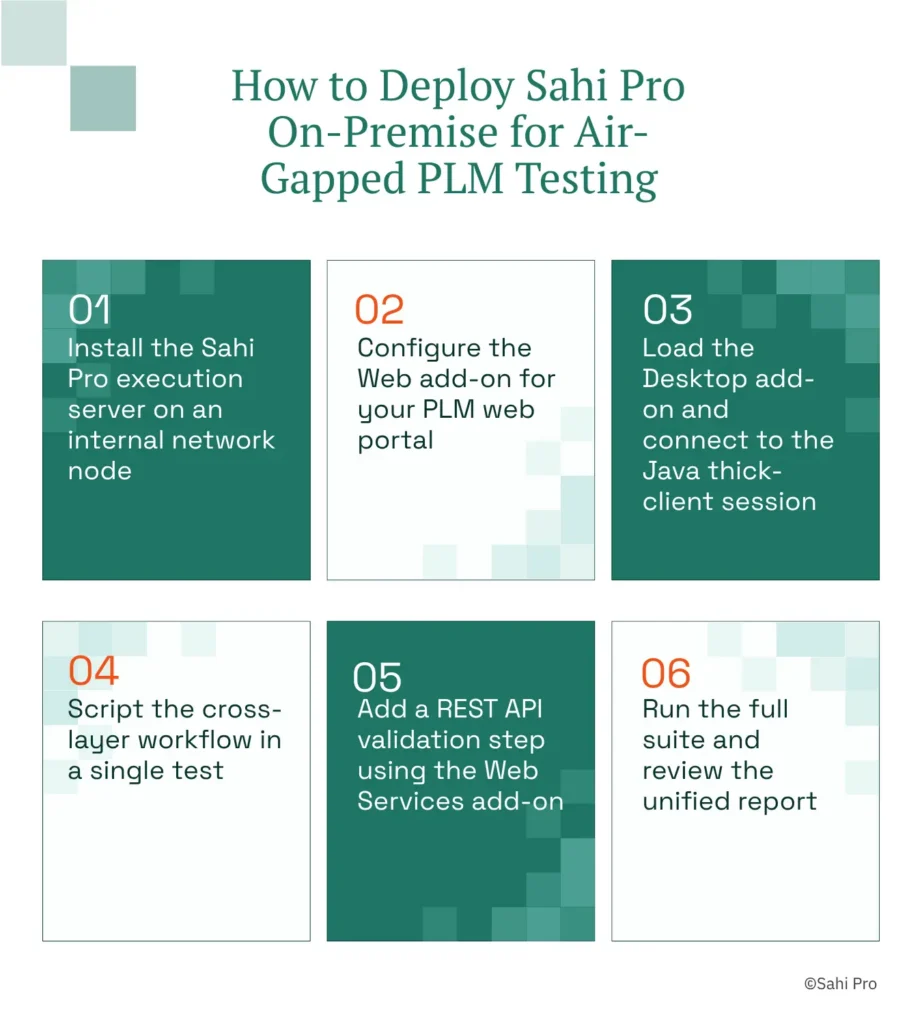
Step 1: Install the Sahi Pro execution server on an internal network node. The installer runs on Windows or Linux without any outbound network dependency. Desktop test automation begins here: the server hosts the script repository, execution engine, and reporting module. No licence activation call leaves the network. Offline activation is standard.
Step 2: Configure the Web add-on for your PLM web portal. Point the browser proxy to the Sahi Pro controller, then navigate to your Teamcenter Active Workspace or Windchill portal. Sahi Pro’s proximity-based identification reads elements by visible label and spatial context, so your locators reference “Part Number” next to a specific row rather than a brittle XPath index.
Step 3: Load the Desktop add-on and connect to the Java thick-client session. When the PLM workflow transitions from the web portal to a Java Swing panel for structure editing or approval, the Desktop add-on attaches to the running JVM. Windows GUI automation through this add-on identifies Java panel elements by their visible text and relative position, the same identification model used for the web layer.
Step 4: Script the cross-layer workflow in a single test. The same script that logged into the Teamcenter web portal now clicks “Approve” in the Java thick-client panel. No tool switching. No separate execution context. The script transitions between layers within one sequence.
Step 5: Add a REST API validation step using the Web Services add-on. After the approval completes in the Java client, the script calls the PLM REST API to confirm the workflow state propagated to downstream systems. This closes the verification loop without relying on UI assertions alone.
Step 6: Run the full suite and review the unified report. Execution logs, screenshots, and assertion results are stored on the internal server. The HTML and PDF reports contain timestamped evidence of every step. No data leaves the network. The most common break point teams expect, the transition between web and Java layers, is handled within a single script context, and Sahi Pro’s approach prevents it by maintaining one execution session across all layers.
How Sahi Pro Handles Cloud Tools Route PLM Data Outside the Firewall
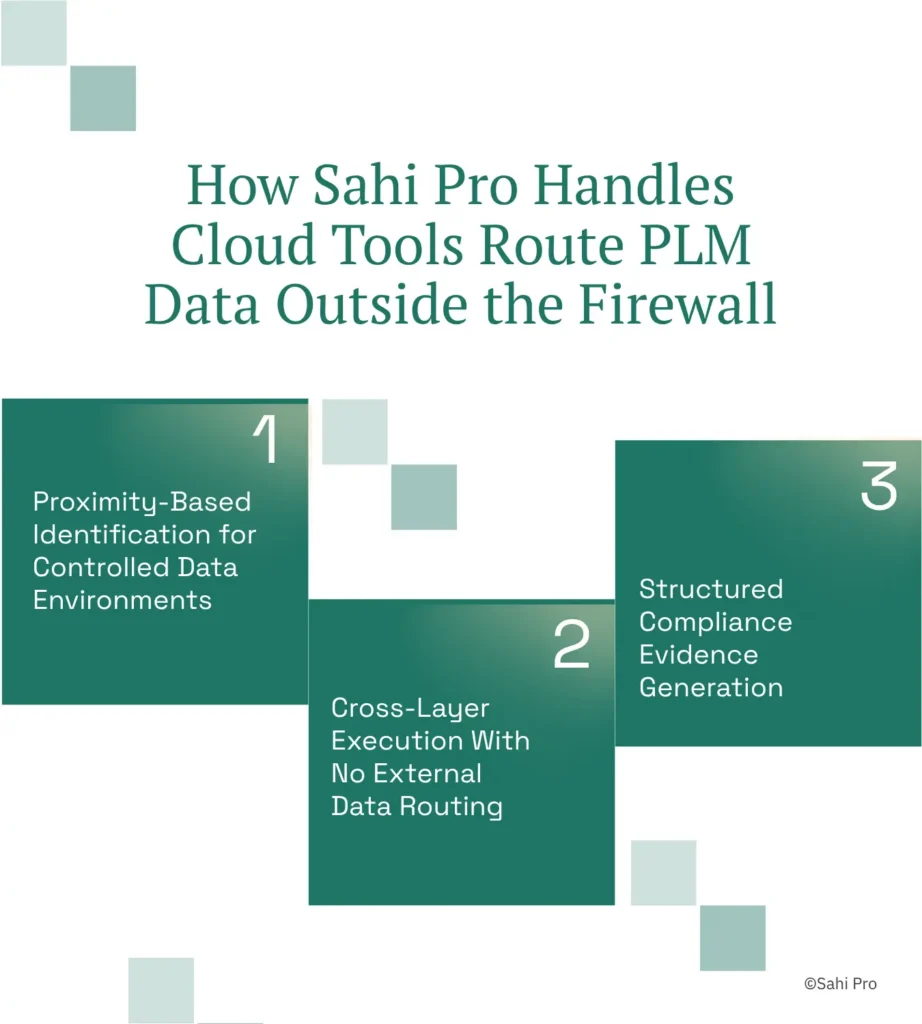
Proximity-Based Identification for Controlled Data Environments
Sahi Pro identifies UI elements by visible labels and structural proximity rather than DOM position or element ID. In a Teamcenter BOM tree, a part number like “PN-4471-REV-C” appears as visible text adjacent to its description and revision fields. Sahi Pro’s locator reads “PN-4471-REV-C” by its label and its spatial relationship to surrounding elements. When a PLM upgrade restructures the DOM hierarchy or changes element IDs, the visible label and its position relative to neighbouring fields remain stable. PLM test automation scripts written with this identification model survive major version upgrades without locator rewrites.
Cross-Layer Execution With No External Data Routing
A typical change notice workflow in a defence organisation spans three layers: the web portal for initiation, a Java thick-client panel for digital signature, and a REST API call for notification. Sahi Pro’s Web add-on handles the portal. The Desktop add-on attaches to the Java Swing session. The Web Services add-on executes the API validation. All three operate within one script, one execution session, and one report. Desktop test automation across these layers produces screenshots and logs that contain ITAR-controlled data. Because every component runs on-premise, PLM QA tools for enterprise teams can execute full regression suites without creating export control exposure.
Structured Compliance Evidence Generation
Every test execution produces a timestamped report in HTML, PDF, Excel, or XML format. Each step records the action performed, the element identified, the assertion result, and a screenshot. For organisations operating under AS9100D or IATF 16949, this structured output serves as the PLM test automation framework’s compliance evidence. Auditors review the report directly. No separate evidence collection step is required.
Sahi Pro vs Generic Test Automation Tools for On-Premise PLM Test Automation
Standard web automation tools are the right choice for teams whose scope is limited to browser-based testing against a single technology layer. They are well-supported, widely documented, and cost-effective for that use case. The comparison shifts when the scope includes IP-sensitive PLM environments where cloud data routing is prohibited and workflows span web, Java, and API layers. Desktop test automation in these environments requires on-premise deployment, cross-layer script execution, and compliance-grade reporting, none of which are standard features in general-purpose web frameworks. The table below compares eight criteria that matter most for Teamcenter, Windchill, and ENOVIA PLM QA tools for enterprise teams.
Teamcenter, Windchill, and ENOVIA Test Automation: Feature Comparison
| Criterion | Generic tools | Sahi Pro |
| On-premise deployment | Most tools route execution data externally; blocked in ITAR and IP-sensitive environments | Full on-premise install; execution, results, and reporting stay within customer network |
| Java thick-client coverage | No DOM access to Java Swing/AWT/SWT panels; test fails when PLM Java module opens | Desktop add-on reaches Java Swing/AWT/SWT in same script as web portal; no tool switching |
| On-premise CI/CD integration | On-premise PLM nodes need custom agent config; most tools assume cloud execution | Execution server integrates with Jenkins, GitLab CI, and Azure DevOps on-premise |
| Compliance evidence output | Screenshot logs not accepted by AS9100D or IATF auditors as structured evidence | Timestamped structured execution records accepted by AS9100D and IATF auditors |
| Cross-layer: web + Java + API in one script | Separate tools for web, desktop, and API; integration handoffs are never tested together | Single script spans web portal, Java thick client, and REST/SOAP API; one report |
| Maintenance after PLM upgrades | DOM-based scripts need partial or full rewrite after each major PLM release | Proximity ID survives structural UI changes; upgrade maintenance near zero |
| BOM tree stability across upgrades | Row-index selectors break when BOM hierarchy changes; manual rewrite required | Proximity ID reads by visible part number; survives hierarchy changes without rewrite |
| Codeless authoring for non-developers | No-code recorders limited to web DOM; Java and canvas PLM layers have no codeless path | Visual test builder supports conditional logic and data-driven inputs without JavaScript |
If your team only needs web-layer Teamcenter, Windchill, or ENOVIA testing with no cloud data routing restriction, a standard web automation tool may cover your scope.
Aerospace and Defence: ITAR and Air-Gapped Requirements
ITAR regulations under 22 CFR Parts 120 to 130 require that export-controlled technical data remain within authorised facilities and networks. Section 120.17 defines technical data to include engineering drawings, specifications, and associated test data. For PLM programmes classified under the United States Munitions List, test automation artefacts, including screenshots of BOM structures, workflow approval logs, and part attribute assertions, constitute technical data subject to these controls. Cloud-only execution platforms cannot meet air-gapped deployment requirements for ITAR-controlled or DO-178C avionics programmes; most SaaS test automation vendors have no on-premise deployment option [Sahi Pro Feature Library, Feature 4]. Any PLM test automation framework deployed against these programmes must operate entirely within the classified network boundary.
Sahi Pro addresses this through its standard on-premise deployment model. The execution server, script repository, and reporting engine install on customer-owned infrastructure. Licence activation supports offline mode. Every test execution produces timestamped structured reports in HTML, PDF, and XML formats. Each report entry includes the step description, element identification method, assertion outcome, and a screenshot. For AS9100D audits, these reports serve as objective evidence of test execution without requiring a separate evidence collection process. The report format maps directly to the quality record requirements in AS9100D clause 8.5.1.
IT Security Directors reviewing this deployment need to verify three things: no outbound network calls during execution, no external licence server dependency, and full data residency within the classified network. Sahi Pro’s architecture satisfies all three by default, not through a special configuration or premium add-on.
Real Results: Anonymous FinTech (Loan Origination)
An anonymous FinTech organisation operating a loan origination platform faced the same fundamental constraint: their PLM and financial data could not leave the internal network, and cloud-hosted test tools were blocked by their security team. They needed to automate end-to-end business process scenarios spanning web portals and backend validations without external data routing. The team moved to Sahi Pro specifically for its full on-premise installation model, where nothing leaves the customer network. The results after implementation:
- 40 man-hours of testing accomplished in under 10 hours through daily automated script execution.
- Tasks taking a full week of manual testing completed in under 8 hours through automation.
- Daily automation scripts execute for 3 to 4 hours, replacing repetitive manual test cycles entirely.
- Sahi Pro adopted across 3 different organisations over 9 years with smoother object identification and lower maintenance than Selenium.
What Defence and Aerospace QA Teams Do Differently
Three facts determine whether your PLM test automation survives its next audit and its next platform upgrade. First, on-premise deployment is not optional for ITAR-controlled programmes; it is a regulatory requirement with criminal penalties for non-compliance. Second, cross-layer coverage across web, Java, and API layers must exist within a single script to close the verification gaps where defects hide. Third, proximity-based identification eliminates the maintenance cycle that destroys regression coverage after every PLM release.Sahi Pro offers a free trial. You can test it against your own Teamcenter, Windchill, or ENOVIA environment before any licence decision. If you want to validate the cross-layer capability against your hardest workflow, book a technical demo and bring the scenario that has been blocking your automation programme.