
TL;DR
- What this is: PLM test automation for semiconductor NPI and EDA integration
- Who it affects: QA and DevOps leads at semiconductor companies using Arena, Teamcenter, Agile PLM
- The core problem: Dynamic session IDs break locators every login
- Cost of not solving it: Brittle scripts delay semiconductor NPI releases
- What Sahi Pro does differently: Proximity ID handles dynamic IDs across three PLM platforms
- Proof: Mahindra Comviva: 94% execution time saving, 2,300 scenarios in 21 hours
Every semiconductor QA team running automated tests against Arena PLM, Teamcenter, or Oracle Agile PLM has hit the same wall: session-generated element IDs that change on every login break locators, and scripts that passed yesterday fail today with no application change. Choosing the right PLM test automation tools for this environment is harder than selecting a standard web testing framework because NPI regression must cover multiple PLM platforms simultaneously, each with its own DOM behavior and release cadence. This article evaluates six tools against criteria specific to semiconductor and electronics workflows, including dynamic ID handling, parallel NPI regression, EDA integration validation, and on-premise deployment. Each tool was tested for its ability to maintain stable scripts across Arena PLM, Teamcenter, and Oracle Agile PLM login sessions and platform updates.
Quick-Pick: 6 Semiconductor PLM Test Automation Tools at a Glance
| # | Tool | Best for | Dynamic ID and multi-platform coverage | On-premise |
| 1 | Sahi Pro | Multi-platform semiconductor PLM with fast NPI parallel regression | Proximity ID handles dynamic IDs across Arena, Teamcenter, and Agile PLM in one suite | Yes, full |
| 2 | Microsoft Playwright | Cloud PLM portals with modern Angular or React UI | Best dynamic SPA handling for cloud PLM portals | Yes, fully on-premise |
| 3 | Selenium WebDriver | Web-only PLM portals with in-house engineers | Zero cost, maximum flexibility for web layer | Yes, fully on-premise |
| 4 | mabl | Cloud PLM portals with low-code test authoring needs | Fastest web PLM test authoring with auto-healing | No, cloud-only |
| 5 | Tricentis Tosca | Enterprise teams already using Tosca for SAP | Model-based test design and SAP-native integration | Yes, on-premise available |
| 6 | Katalon Studio | Budget-constrained teams with web-only PLM scope | Lowest entry cost for web PLM automation | Partial, cloud execution default; on-premise limited |
1. Sahi Pro: Best for multi-platform semiconductor PLM with fast NPI parallel execution
Why it ranks first for Arena PLM, Teamcenter, Oracle Agile PLM
The core challenge in semiconductor PLM automation is element identification. Arena PLM and Oracle Agile PLM generate session-specific IDs on every login. Standard XPath and CSS selectors break immediately. Sahi Pro’s Proximity ID reads elements by their visible field labels and spatial proximity, the same way a human tester scans a form. This keeps NPI regression scripts stable across platform updates and login sessions without locator rewrites.
For teams evaluating PLM test automation tools, this distinction matters at scale. Automated regression testing across three PLM platforms means hundreds of scripts. If each script requires locator maintenance after every platform patch, the maintenance cost exceeds the automation benefit. Proximity-based identification is deterministic, not ML-based. It does not guess. It reads the label “Part Number” and identifies the adjacent input field structurally.
Key capabilities for Arena PLM, Teamcenter, Oracle Agile PLM teams
- Proximity ID for dynamic sessions: Identifies PLM form elements by visible labels, surviving session ID changes across Arena, Teamcenter, and Agile PLM without script edits.
- Parallel NPI regression: Distributes execution across multiple machines, compressing semiconductor NPI regression from days to hours. This matches the 6-month chip design release cadences that demand daily regression coverage.
- EDA integration validation: The Web Services add-on validates EDA tool API integrations, including Mentor Graphics and Cadence BOM exports, and RoHS/REACH compliance data flows in the same script as PLM UI steps.
- Cross platform test automation in one suite: A single script spans Arena PLM web portals, Teamcenter Active Workspace, and Oracle Agile PLM without switching tools or stitching frameworks.
- Codeless test authoring: Non-engineers can build PLM regression tests using the BDTA visual builder with conditional logic and data-driven execution, reducing dependency on automation engineers.
Honest limitations
The AI Assist OCR add-on, which extends coverage to canvas-rendered and proprietary interfaces, is an additional cost item. It is not included in the base license. The BDTA visual builder covers web-layer flows primarily. Java thick-client steps in Teamcenter Rich Client require scripting through the Desktop add-on rather than the codeless interface.
Best for: Multi-platform semiconductor PLM with fast NPI parallel regression On-premise: Yes, full installation, no external routing Pricing: Module-based; free trial available Key Arena PLM, Teamcenter, Oracle Agile PLM capability: Proximity ID handles dynamic IDs across Arena, Teamcenter, and Agile PLM in one suite
2. Microsoft Playwright: Best for cloud-hosted PLM portals with modern web frameworks
Overview for Arena PLM, Teamcenter, Oracle Agile PLM teams
Playwright is a modern open-source web automation framework from Microsoft with excellent support for Angular, React, and dynamic web applications. PLM teams evaluate it for cloud-hosted PLM portals like Arena PLM or ENOVIA 3DEXPERIENCE browser layers where the UI is built on modern single-page application frameworks.
What it does well for dynamic session IDs and multi-platform NPI regression
- Dynamic web content handling: Playwright’s auto-waiting and retry logic reduces flaky tests caused by AJAX-heavy PLM interfaces that render asynchronously.
- TypeScript-first development: Strong TypeScript support gives engineering teams type safety and IDE auto-completion when building PLM test suites, reducing script errors.
- Fast parallel execution: Built-in parallelism across browser contexts allows multiple NPI test scenarios to run concurrently without external grid infrastructure.
- Active community and rapid iteration: Microsoft’s active development cadence means PLM-relevant fixes, such as improved iframe handling, ship quickly.
Best for: Cloud PLM portals with modern Angular or React UI On-premise: Yes, fully on-premise
3. Selenium WebDriver: Best for web-only PLM portal automation with in-house engineering
Overview for Arena PLM, Teamcenter, Oracle Agile PLM teams
Selenium WebDriver is the most widely used open-source web automation framework. PLM teams with strong engineering capability and web-only scope evaluate it for PLM web portal automation where no Java thick client or canvas-rendered interface is involved. Its ecosystem is the largest in test automation.
What it does well for dynamic session IDs and multi-platform NPI regression
- Zero license cost: No licensing fees at any scale. Semiconductor teams running thousands of NPI regression tests pay nothing for the framework itself.
- Language flexibility: Bindings for Java, Python, C#, JavaScript, and Ruby mean teams can write PLM test scripts in whatever language their engineering organization already uses.
- Universal browser support: Works on all major browsers, critical for PLM portals that must be validated across Chrome, Firefox, and Edge for different user groups.
- CI/CD integration: Integrates with any CI/CD pipeline, including Jenkins and GitLab CI, without vendor-specific plugins or agents.
Best for: Web-only PLM portals with in-house engineers On-premise: Yes, fully on-premise
4. mabl: Best for cloud-native PLM portals with low-code test authoring
Overview for Arena PLM, Teamcenter, Oracle Agile PLM teams
mabl is a cloud-native intelligent test automation platform targeting web applications. PLM teams using cloud-hosted platforms like Arena PLM or Agile PLM evaluate it where DOM access is reliable and on-premise deployment is not required. Its strength is speed of test creation for teams without dedicated automation engineers.
What it does well for dynamic session IDs and multi-platform NPI regression
- Low-code test authoring with auto-healing: Manual testers can build PLM regression tests through a browser-based recorder. Auto-healing adjusts locators when minor DOM changes occur.
- Built-in visual regression testing: Detects unintended UI changes in PLM portals after platform updates, catching layout regressions that functional tests miss.
- Cloud parallel execution: Runs tests in parallel across cloud infrastructure without teams needing to provision or manage execution environments.
- Jira and CI/CD integration: Native integrations with Jira and common CI/CD pipelines reduce the overhead of connecting test results to defect tracking for NPI workflows.
Best for: Cloud PLM portals with low-code test authoring needs On-premise: No, cloud-only
5. Tricentis Tosca: Best for enterprise model-based PLM automation
Overview for Arena PLM, Teamcenter, Oracle Agile PLM teams
Tricentis Tosca is a model-based test automation platform widely used in SAP and enterprise application environments. PLM teams consider it when they need a risk-based regression approach or already have Tosca deployed for SAP testing and want to extend coverage to PLM workflows.
What it does well for dynamic session IDs and multi-platform NPI regression
- Model-based test design: Reduces duplication across similar PLM workflows. A single model for BOM creation can generate tests for Arena, Agile PLM, and Teamcenter variants with parameter changes.
- SAP-native integration: Teams already using Tosca for SAP ERP testing can extend their existing models to cover PLM-to-ERP data flows without introducing a second tool.
- Risk-based regression coverage: Tosca’s risk scoring prioritizes test execution based on change impact, which helps semiconductor teams focus NPI regression on the highest-risk BOM and ECO workflows.
- No-code test design for analysts: Business analysts familiar with the Tosca model can create and modify PLM test cases without scripting, broadening ownership beyond the QA team.
Best for: Enterprise teams already using Tosca for SAP On-premise: Yes, on-premise available
6. Katalon Studio: Best for small PLM teams needing low-cost automated testing
Overview for Arena PLM, Teamcenter, Oracle Agile PLM teams
Katalon Studio is a low-cost test automation platform supporting web and API testing with a built-in IDE. PLM teams with limited budget and web-only PLM scope evaluate it as an accessible entry point to automation, particularly when the team has testers with some but not deep scripting experience.
What it does well for dynamic session IDs and multi-platform NPI regression
- Low entry cost with a free tier: Teams can begin automating PLM web portal tests without any license investment, reducing the barrier to starting NPI regression automation.
- Built-in test IDE: Reduces setup time significantly. Testers do not need to configure a separate IDE, build system, or dependency manager to start writing PLM tests.
- Web and API testing without additional configuration: Covers both PLM web portal interactions and API-level validations for BOM data exports in a single environment.
- Accessible to limited-scripting teams: Keyword-driven testing and a visual test builder allow testers with limited scripting background to contribute to PLM automation suites.
Best for: Budget-constrained teams with web-only PLM scope On-premise: Partial, cloud execution default; on-premise limited
How to choose the right Semiconductor PLM Test Automation Tools
The right tool depends on your specific PLM environment, team composition, and deployment constraints. Here are the decision factors that matter most.
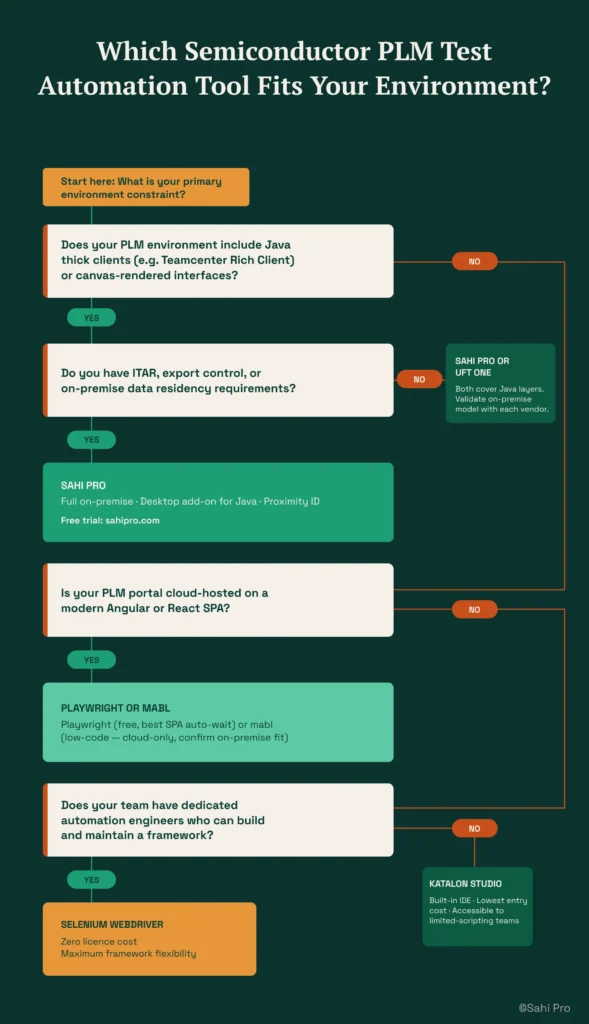
- If your team has no dedicated automation engineer and needs manual testers to build tests, consider Sahi Pro’s BDTA codeless builder or Tricentis Tosca’s model-based approach. Both allow non-engineers to author structured test flows without writing code.
- If dynamic session IDs across Arena PLM and Oracle Agile PLM are your primary source of test instability, eliminate any tool that relies solely on XPath or CSS selectors without a proximity-based or label-based identification layer. This is the core PLM test automation challenge for semiconductor teams.
- If your semiconductor environment requires on-premise deployment with no external data routing, eliminate cloud-only tools immediately. Check the on-premise column in the quick-pick table above. mabl and Katalon’s cloud execution model will not satisfy ITAR or export-controlled data residency requirements.
- If your scope is purely web-layer PLM portal testing with no Java thick clients or canvas-rendered elements, Playwright or Selenium may be sufficient. Both are free and well-supported for web-only automation.
- If you need one test suite covering Arena PLM, Teamcenter, Oracle Agile PLM, and SAP ERP integration in a single execution, only Sahi Pro’s add-on architecture spans web, desktop, API, and database layers in one script. This is where most PLM test automation tools hit their ceiling.
If you are unsure which criteria apply to your deployment, run a proof-of-concept directly against your Arena PLM, Teamcenter, Oracle Agile PLM environment. Sahi Pro offers a free trial for this purpose.
How we evaluated Semiconductor PLM Test Automation Tools
Most test automation tools are built for standard web applications. PLM platforms in semiconductor environments present a different problem: session-generated IDs, multi-platform NPI regression across Arena, Teamcenter, and Agile PLM, and integration points with EDA tools that standard web frameworks cannot validate. Evaluating PLM test automation tools for this context requires criteria that go beyond browser compatibility and CI/CD integration.
- Dynamic session ID handling: Can the tool identify PLM elements when session-generated IDs change on every login? This is the single largest source of test fragility in arena PLM test automation and Oracle Agile PLM environments.
- Multi-platform NPI coverage: Can the tool cover Arena PLM, Teamcenter, and Oracle Agile PLM in one suite for NPI regression? Teams managing multiple PLM platforms cannot afford separate automation stacks for each.
- Parallel execution for semiconductor NPI cadence: Can the tool compress NPI regression to meet fast semiconductor release cycles? A 2,300-scenario suite that takes five days sequentially is useless if the release window is 48 hours.
- EDA tool integration validation: Can the tool validate PLM integrations with Mentor Graphics, Cadence, or Synopsys EDA tools? BOM export accuracy between PLM and EDA environments is critical for tape-out validation.
- RoHS and REACH compliance workflow automation: Can the tool automate RoHS and REACH data entry and validation in PLM for regulatory filing? Manual compliance data entry is both slow and error-prone.
- Codeless authoring for NPI quality engineers: Can NPI quality engineers without scripting background build PLM regression tests? If automation requires a developer for every test, coverage will always lag behind the backlog.
Running Semiconductor PLM Regression in Jenkins and GitLab CI
Semiconductor companies subject to ITAR and EAR export controls must ensure that test execution data, including PLM element values, BOM structures, and compliance records, never leaves controlled infrastructure. Jenkins and GitLab CI on-premise integration requires that the test automation tool execute entirely within the organization’s network, with timestamped execution records stored locally for audit traceability. Semiconductor teams that run PLM regression daily detect integration defects 3 to 5 times faster, reducing NPI delay costs significantly (Sahi Pro customer deployment data, 2024). Cross platform test automation in this context means the CI pipeline must trigger tests spanning Arena, Teamcenter, and Agile PLM without routing data through external servers.
Of the six tools evaluated, Sahi Pro satisfies this requirement through full on-premise installation with no external routing at any point, including license activation. Selenium and Playwright also run entirely on-premise, though they require additional infrastructure setup for parallel execution grids. Tricentis Tosca offers on-premise deployment but at significantly higher infrastructure and licensing cost. mabl cannot satisfy on-premise data residency requirements. It is cloud-only. Katalon Studio defaults to cloud execution, and its on-premise options are limited.
For compliance-specific tool selection, request documentation from each vendor on whether their deployment model satisfies Jenkins and GitLab CI on-premise integration data residency requirements. Cloud-only vendors typically cannot provide this.
Real Results: Mahindra Comviva
Mahindra Comviva is a global leader in mobility solutions, deploying products across telecom operators that impact millions of users. Their QA team faced increasing cost, effort, and schedule pressure from manual testing across HTML, JSP, JavaScript, and Flex-based web applications, with dynamic session IDs breaking locators on every login. They needed a browser-agnostic automation tool with fast execution, minimal learning curve for manual testers, and scalability for parallel test runs.
They moved to Sahi Pro to solve locator instability and execution speed. Proximity ID handled dynamic IDs across their application stack in one suite, and built-in parallel playback across machines eliminated the need for separate grid infrastructure.
The results after implementation:
- 2,300 test scenarios executed in 21 hours, providing a 94% saving on execution time and manual efforts.
- HTML test suite: 7,400 test cases reduced from 1,480 manual hours to 115 automated hours (92% saving).
- Flex test suite: 600 test cases reduced from 120 manual hours to 9 automated hours (92.5% saving).
- Manual testers onboarded to automation with minimal learning curve.
Our verdict: the best PLM automation tool for semiconductor and electronics teams
For semiconductor teams running NPI regression across Arena PLM, Teamcenter, and Oracle Agile PLM with dynamic session IDs, on-premise requirements, and EDA integration validation, Sahi Pro is the tool that covers the full scope in one suite. Teams with simpler requirements, such as web-only PLM portal testing or cloud-hosted environments with no export control constraints, will find Playwright, Selenium, or mabl adequate for their scope. The right choice depends on your constraints, not on a generic ranking.
Sahi Pro offers a free trial. You can test it against your own Arena PLM, Teamcenter, Oracle Agile PLM environment before any license decision. If you want to see how Proximity ID handles your hardest PLM scenario, book a demo and bring the test case that breaks your current setup.