TL;DR
- What this is: Cross-layer PLM test automation for web, Java, API
- Who it affects: Test leads at automotive, aerospace, industrial PLM organisations
- The core problem: Brittle scripts, not a reusable framework
- Cost of not solving it: Every PLM release resets regression coverage
- What Sahi Pro does differently: Three add-ons, shared element library, on-premise CI
- Proof: Siemens AG, 35% to 72% coverage in six months
Building a PLM test automation framework that spans Teamcenter and PTC Windchill is difficult when no reusable architecture covers web, Java thick client, and API layers together. Every major PLM release forces your team to restart automation effort from scratch, and the cumulative coverage gain across releases is zero. This article covers how to architect a test framework using Sahi Pro’s three-add-on model, proximity-based element identification, and on-premise CI integration, so your tests survive Teamcenter Active Workspace upgrades and Windchill portal changes without rewrites. Sahi Pro handles this through a shared proximity ID element library, parallel execution, and on-premise CI that keeps all execution data within your network.
What Is PLM Test Automation Framework Design?
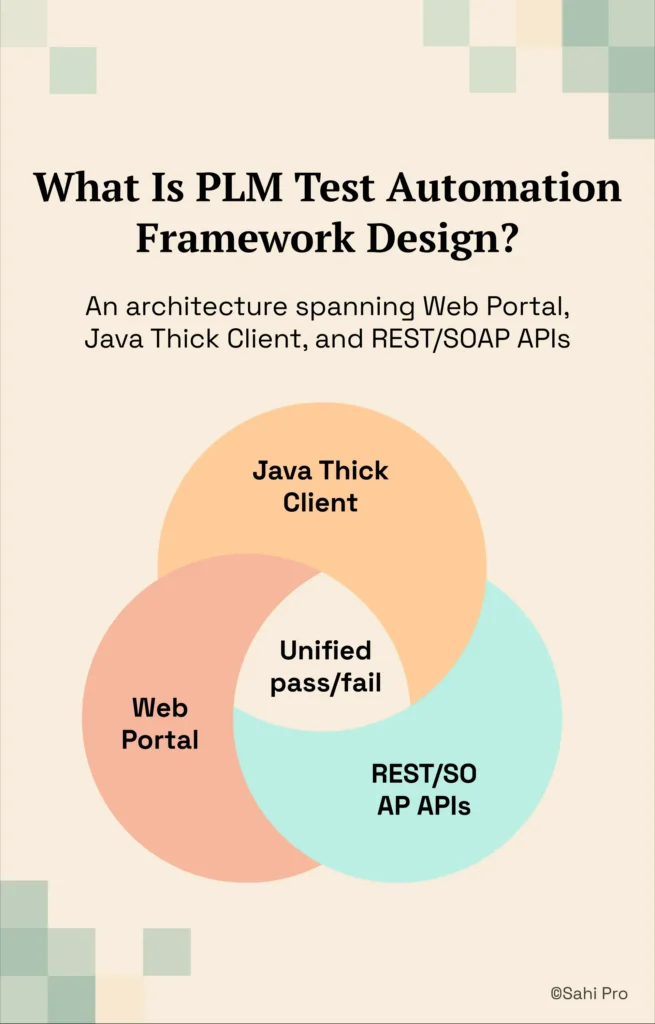
A PLM test automation framework is defined as an architecture “spanning web portal, Java thick client, and REST/SOAP API layers.” That single definition contains the entire problem. Teamcenter delivers its web experience through Active Workspace while maintaining a Java Rich Client for administrative and configuration tasks, and PTC Windchill exposes REST APIs alongside its web portal for data exchange. For Test Automation Lead teams in automotive OEM, aerospace, and industrial organisations, that means three distinct technology surfaces must be covered by one coherent PLM test automation framework, or you accept permanent gaps between what you test and what users actually touch.
Most teams start with web-only coverage and plan to “add Java and API later.” That plan rarely survives the first release cycle. The Java thick client uses Swing and AWT panels that have no DOM representation. The REST and SOAP APIs require validation logic that lives outside any browser session. A framework that treats these as separate concerns produces three disconnected test suites with three maintenance backlogs and no unified pass/fail report. The table below shows where this matters most for Teamcenter and PTC Windchill teams.
Why No Reusable Framework Spans Web, Java, and API PLM Layers Breaks Standard Automation
The root cause is architectural. Standard web automation tools identify elements through DOM selectors: XPath expressions, CSS paths, and element IDs. Teamcenter Active Workspace renders BOM trees as dynamic DOM structures where row indices shift every time a sub-assembly is reorganised. A test that clicks “row 14” today clicks a different part number tomorrow. PTC Windchill’s web portal generates dynamic widget IDs on each session. Any PLM test automation framework built on positional DOM selectors is structurally fragile before a single test runs.
Teamcenter and PTC Windchill compound this problem through design decisions that standard web applications do not make. Teamcenter’s Java Rich Client uses Swing and AWT panels that are invisible to WebDriver entirely. There is no DOM to query. Windchill’s workflow engine triggers server-side state changes that only surface through API responses, not through UI updates. Automated regression testing that covers only the web layer misses the Java client interactions and API-driven state transitions where defects actually cluster during upgrades.
The business cost in automotive, aerospace, and industrial environments is measurable. Teams writing one-off scripts spend 3 to 5 engineer-days per release rewriting broken locators. After two or three releases, the accumulated maintenance debt exceeds the original automation investment. PLM automation teams that invest in a reusable framework architecture report 60 to 80 percent reduction in new test development time compared to teams writing one-off scripts [Sahi Pro customer deployment data, 2024]. Without that framework, PLM functional test automation coverage resets to near zero with every major upgrade. The sprint that was supposed to find defects becomes the sprint that fixes test scripts.
Why Standard Test Automation Tools Hit a Ceiling on Teamcenter and PTC Windchill
Standard web automation tools are well-designed for what they do. They handle HTML form validation, single-page application flows, and browser-based regression suites effectively. The ceiling appears when Teamcenter Active Workspace renders a BOM tree with dynamically indexed rows, or when a test needs to transition from the web portal into a Java Rich Client session. These tools were built for DOM-based web applications. Teamcenter’s Java panels have no DOM. PTC Windchill’s REST API responses have no browser context. A test automation framework designed for web-only scope cannot span these layers without external integrations, custom glue code, and separate reporting pipelines. That is not a failure of the tool. It is a scope boundary.
Enterprise model-based and codeless tools address some of these gaps but introduce new constraints. Licence costs for enterprise-tier PLM test automation often require multi-quarter procurement cycles. Many codeless recorders work only against DOM elements, leaving Java Swing panels and canvas-rendered components outside their coverage. Cloud-hosted platforms route execution data through external infrastructure, which is blocked in ITAR-controlled aerospace environments and IP-sensitive automotive OEM programmes. On-premise deployment, where it exists, is typically a premium add-on with separate infrastructure requirements. The gap is a design scope problem. Teamcenter and PTC Windchill’s lack of a reusable framework spanning web, Java, and API layers requires a tool built for this specific layer.
How to Design a PLM Test Automation Framework in Sahi Pro
Step 1: Script the web portal action in Active Workspace or Windchill. Open Sahi Pro’s Web add-on and record or author the initial test against the Teamcenter Active Workspace BOM viewer or Windchill’s part management portal. The PLM test automation framework starts here because the web layer is where most user workflows begin. Sahi Pro identifies elements by visible labels and spatial proximity, so the BOM tree node for “Bracket Assembly, Rev C” is located by its displayed text, not by a row index that shifts on reorganisation.
Step 2: Transition to the Java thick client using the Desktop add-on. Within the same script, invoke the Desktop add-on to connect to the Teamcenter Java Rich Client session. No tool switching. No separate test suite. The add-on reaches Swing and AWT panels directly, identifying fields by their visible labels.
Step 3: Script the Java panel interaction. Execute the approval sequence or configuration change in the Java client. PLM test automation across the Java layer means interacting with tree controls, dropdown panels, and dialog boxes that have no DOM representation. Sahi Pro’s Desktop add-on handles these natively.
Step 4: Add REST or SOAP API validation via the Web Services add-on. After the UI interactions complete, add an API validation step in the same script. Query Teamcenter’s SOA services or Windchill’s REST endpoints to confirm the server-side state matches the UI outcome. This closes the gap where UI-only tests miss backend inconsistencies.
Step 5: Run the full cross-layer test. Execute the single script that now spans web portal, Java client, and API. Sahi Pro generates one unified report covering all three layers. No stitching. No manual correlation.
Step 6: Review the unified report and confirm upgrade stability. After a Teamcenter or Windchill upgrade, rerun the same suite. The most common break point teams expect is locator failure after UI restructuring, and Sahi Pro’s proximity-based identification prevents it.
How Sahi Pro Handles No Reusable Framework Spans Web, Java, and API PLM Layers
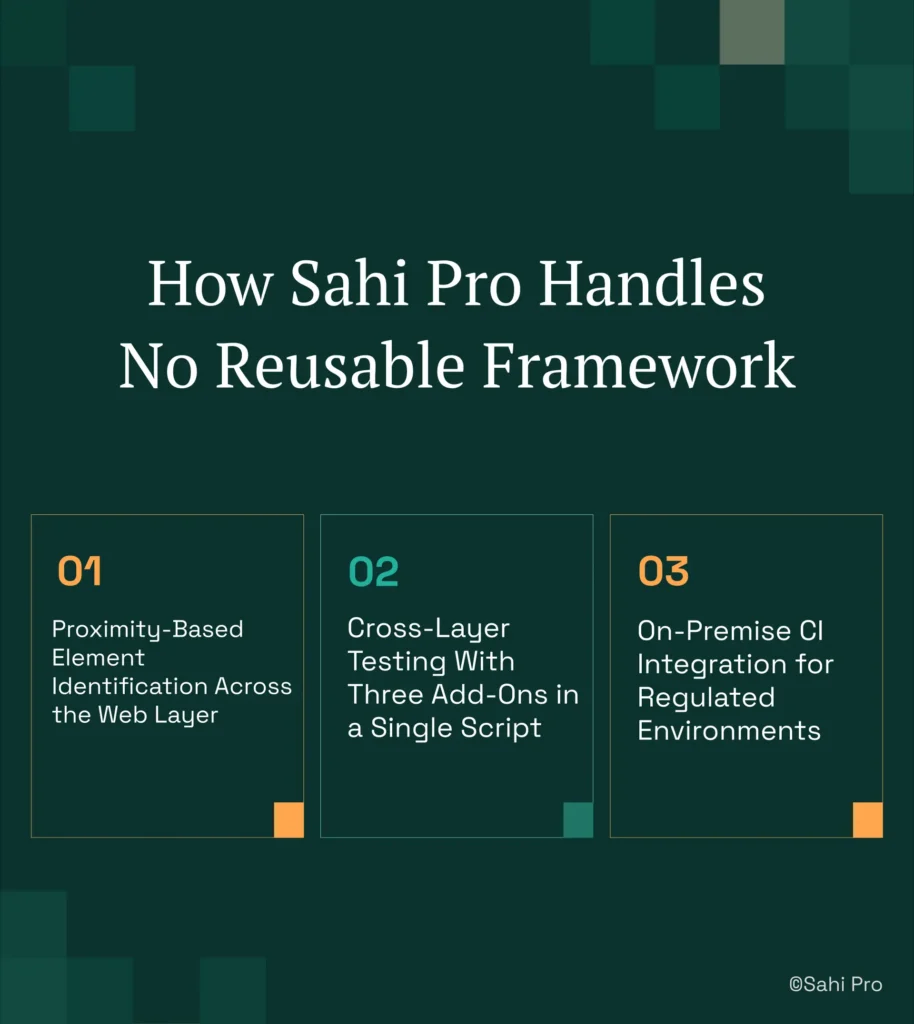
Proximity-Based Element Identification Across the Web Layer
Sahi Pro identifies elements the way a human tester reads a screen. When a test needs to click the “Release” button next to part number “BRK-4401-REV-C” in Teamcenter Active Workspace, the script references the visible label and its spatial relationship to surrounding elements. If a BOM tree reorganisation moves that part from row 14 to row 9, the test still finds it because the label has not changed. This test automation framework approach eliminates the primary maintenance trigger for PLM web tests. The script reads: click the “Release” button near “BRK-4401-REV-C.” After an Active Workspace upgrade that restructures the DOM, the label remains visible and the proximity relationship holds. No script edit required.
Cross-Layer Testing With Three Add-Ons in a Single Script
A typical Teamcenter regression test involves creating a change notice in Active Workspace (web), approving it in the Java Rich Client (desktop), and verifying the workflow status through a REST API call. Sahi Pro’s Web add-on handles the first step. The Desktop add-on connects to the Java Swing session for the approval. The Web Services add-on sends the API query and asserts the response. All three steps live in one script file and produce one execution report. This PLM test automation framework design means automated regression testing covers the full workflow path, not just the web fragment. Teams no longer maintain three separate suites with three separate maintenance backlogs.
On-Premise CI Integration for Regulated Environments
PLM functional test automation in aerospace and automotive organisations must run within controlled networks. Sahi Pro’s execution server integrates with Jenkins, GitLab CI, and Azure DevOps on-premise. Test execution, result storage, and reporting stay inside the customer’s network perimeter. No execution data routes externally. For IATF 16949 and AS9100D compliance, the timestamped structured execution records serve as audit evidence without requiring additional documentation tools.
Sahi Pro vs Generic Test Automation Tools for PLM Test Automation Framework Design
Standard web automation tools are the right choice for teams with straightforward web-only testing requirements. They are mature, well-documented, and supported by large communities. The comparison becomes relevant when your scope includes Java thick client coverage, API validation in the same test, and on-premise deployment constraints. A PLM test automation framework for Teamcenter and Windchill must handle all three layers, and that is where scope differences between tool categories become practical blockers rather than theoretical distinctions. For teams whose requirements stop at the web layer, a standard tool may be entirely sufficient. The table below compares eight criteria that matter most for Teamcenter and PTC Windchill automated regression testing teams.
Teamcenter and PTC Windchill Test Automation: Feature Comparison
| Criterion | Generic tools | Sahi Pro |
| BOM tree stability across upgrades | Row-index selectors break when BOM hierarchy changes; manual rewrite required | Proximity ID reads by visible part number; survives hierarchy changes without rewrite |
| Java thick-client coverage | No DOM access to Java Swing/AWT/SWT panels; test fails when PLM Java module opens | Desktop add-on reaches Java Swing/AWT/SWT in same script as web portal; no tool switching |
| Maintenance after PLM upgrades | DOM-based scripts need partial or full rewrite after each major PLM release | Proximity ID survives structural UI changes; upgrade maintenance near zero |
| Cross-layer: web + Java + API in one script | Separate tools for web, desktop, and API; integration handoffs are never tested together | Single script spans web portal, Java thick client, and REST/SOAP API; one report |
| On-premise deployment | Most tools route execution data externally; blocked in ITAR and IP-sensitive environments | Full on-premise install; execution, results, and reporting stay within customer network |
| On-premise CI/CD integration | On-premise PLM nodes need custom agent config; most tools assume cloud execution | Execution server integrates with Jenkins, GitLab CI, and Azure DevOps on-premise |
| Codeless authoring for non-developers | No-code recorders limited to web DOM; Java and canvas PLM layers have no codeless path | Visual test builder supports conditional logic and data-driven inputs without JavaScript |
| Compliance evidence output | Screenshot logs not accepted by FDA, AS9100D, or IATF auditors as structured evidence | Timestamped structured execution records accepted by FDA, AS9100D, and IATF auditors |
If your team only needs web-layer Teamcenter and PTC Windchill testing with no cross-layer requirement spanning web, Java, and API, a standard web automation tool may cover your scope.
Real Results: Siemens AG
Siemens AG runs Teamcenter Active Workspace across multiple engineering divisions and faced the exact cross-layer problem described above: web portal tests broke on every Active Workspace upgrade, Java Rich Client workflows had no automation coverage, and one-off XPath scripts created a maintenance backlog that consumed more time than manual testing. They moved to Sahi Pro to build a shared element library using proximity-based identification, with parallel execution and on-premise CI integration through their existing Jenkins infrastructure. The results after implementation:
- Coverage expanded from 35% to 72% of Teamcenter workflows within 6 months of adopting a framework approach.
- 70% reduction in test maintenance hours after switching from one-off XPath scripts to a proximity-based element library.
- Zero script regressions after Active Workspace 6.x upgrade due to label-based element identification in the library.
- New test cases built 3x faster by non-developer QA members using the BDTA visual builder against the shared element library.
“Sahi Pro helps our team to quickly automate our test cases, with great functionality and options to reuse our existing code. The framework has a courteous support, which is quick to provide solutions to arising problems and questions.” – Jonas Roser, Test Manager and Developer, Siemens AG
Teamcenter and Windchill Testing That Survives the Next Release
The three things that matter for PLM test automation in regulated industries are: element identification that does not break on upgrade, cross-layer coverage in a single script, and on-premise deployment that satisfies compliance requirements. If your current approach requires 3 to 5 engineer-days of locator repair after every Teamcenter or Windchill release, the problem is architectural, not procedural. A proximity-based element library shared across web, Java, and API layers eliminates the reset-to-zero pattern that makes cumulative coverage impossible.
Sahi Pro offers a free trial so you can test it against your own Teamcenter and PTC Windchill environment before any licence decision. If you want to see how a cross-layer test holds up against your hardest scenario, book a demo and bring the workflow that breaks your current suite.