
TL;DR
- What this is: DO-178C PLM test automation for avionics programmes
- Who it affects: Test Automation Leads at aerospace avionics companies
- The core problem: Most tools lack DO-178C tool qualification documentation
- Cost of not solving it: Certification delays of 6 to 12 months
- What Sahi Pro does differently: DO-178C Tool Qualification Kit, air-gapped, AS9100D output
- Proof: AS9100D-compliant records, air-gapped deployment, ITAR-verified
Test Automation Leads and Compliance Directors running aerospace test automation against Teamcenter, Windchill, or CATIA V5 face a qualification problem that standard web testing tools simply do not address. DO-178C Section 12.2 requires formal tool qualification documentation, AS9100D clause 8.5.6 demands timestamped execution evidence, and ITAR data residency rules eliminate any tool that routes data externally, yet most automation vendors treat these requirements as someone else’s problem. This article evaluates six PLM test automation tools against those exact criteria, ranking each on DO-178C tool qualification readiness, air-gapped on-premise capability, AS9100D record output, and coverage of Java thick-client PLM interfaces. Each tool was assessed specifically for its ability to operate within avionics programme constraints on Teamcenter, Windchill, and CATIA V5 environments.
Quick-Pick: 6 Aerospace DO-178C PLM Test Automation Tools at a Glance
| # | Tool | Best for | DO-178C qualification and air-gapped coverage | On-premise |
| 1 | Sahi Pro | Air-gapped avionics PLM with DO-178C Kit | DO-178C Tool Qualification Kit available; full air-gapped on-premise; AS9100D record output | Yes, full |
| 2 | Tricentis Tosca | Enterprise teams already using Tosca for SAP | Model-based test design and SAP-native integration | Yes, on-premise available |
| 3 | OpenText UFT One | Teams with existing UFT investment and legacy PLM | Broadest legacy technology coverage | Yes, on-premise available |
| 4 | Selenium WebDriver | Web-only PLM portals with in-house engineers | Zero cost, maximum flexibility for web layer | Yes, fully on-premise |
| 5 | Ranorex Studio | Windows desktop PLM applications and legacy thick clients | Strongest Windows desktop PLM automation outside SAP | Yes, fully on-premise |
| 6 | Leapwork | Non-developer PLM QA in regulated life sciences | Most accessible visual no-code for regulated industries | Partial, cloud-primary with limited on-premise |
1. Sahi Pro: Best for air-gapped avionics PLM with DO-178C Tool Qualification Kit
Why it ranks first for Teamcenter, Windchill, CATIA V5
The single biggest barrier to aerospace test automation on avionics PLM systems is not test coverage. It is tool qualification. DO-178C Section 12.2 requires that every software tool used in avionics development be formally qualified, and most automation vendors provide no documentation to support this process. Sahi Pro ranks first because its vendor provides a DO-178C Tool Qualification Kit covering tool qualification documentation required by Section 12.2 for software tools used in avionics development programmes at DAL A through D.
The identification architecture matters here too. Sahi Pro reads elements by visible labels and structural proximity rather than DOM position. This cross platform test automation approach means a single test script can span Teamcenter Active Workspace (web), CATIA V5 panels (Java thick client via desktop add-on), and Windchill (web) without switching tools or rewriting locators after PLM upgrades. The desktop add-on provides native Java Swing, AWT, and SWT access within the same script as the web layer. Full on-premise installation ensures nothing is routed externally, a requirement verified by network audit at ITAR-controlled aerospace customers.
Key capabilities for Teamcenter, Windchill, CATIA V5 teams
- DO-178C Tool Qualification Kit: Vendor-supplied documentation package satisfying DO-178C Section 12.2 requirements for DAL A through D avionics programmes, reducing the qualification burden on the programme team.
- Full air-gapped on-premise deployment: Execution, results, and reporting stay entirely within the avionics programme network. No external routing of any kind. Verified by network audit on request.
- AS9100D-compliant execution records: Timestamped structured records per test step satisfy AS9100D clause 8.5.6 and can be included directly in DO-178C Software Accomplishment Summary documentation.
- Cross-layer automated regression testing: A single script covers web PLM portals, Java thick-client panels, REST/SOAP APIs, and backend databases, eliminating coverage gaps between tools during regression cycles.
- Proximity-based element identification: Tests survive PLM UI changes without locator rewrites, reducing maintenance to near zero across Teamcenter and Windchill version upgrades.
Honest limitations
The AI Assist add-on, which provides OCR and image recognition for canvas-rendered or proprietary interfaces, is an additional cost module. It is not included in the base licence. The no-code visual builder covers web-layer flows primarily; automating Java thick-client steps in CATIA V5 or Teamcenter Rich Client typically requires scripting in Sahi Pro’s JavaScript-based language rather than the visual interface.
Best for: Air-gapped avionics PLM with DO-178C Tool Qualification Kit and AS9100D records On-premise: Yes, full installation, no external routing Pricing: Module-based; free trial available Key Teamcenter, Windchill, CATIA V5 capability: DO-178C Tool Qualification Kit available; full air-gapped on-premise; AS9100D record output
2. Tricentis Tosca: Best for enterprise model-based PLM automation
Overview for Teamcenter, Windchill, CATIA V5 teams
Tricentis Tosca is a model-based test automation platform widely used in SAP and enterprise application environments. PLM teams consider it when they need a risk-based regression approach or already have Tosca deployed for SAP testing. Its model-based design reduces duplication across similar PLM workflows, which can be valuable when multiple Teamcenter or Windchill modules share common UI patterns.
What it does well for DO-178C avionics PLM environments
- Model-based test design: Reduces script duplication across similar PLM workflows by abstracting test logic from technical implementation, allowing one model to cover multiple PLM module variants.
- SAP integration: Teams already running Tosca for SAP ERP gain a unified automation approach when PLM and ERP share the same release cycle.
- Risk-based regression coverage: Tosca’s risk engine prioritizes test execution based on change impact, which helps large avionics programmes focus regression runs on the highest-risk PLM areas.
- No-code test design for business analysts: Business analysts familiar with the Tosca model can contribute to test case creation without scripting, broadening the team’s capacity.
Best for: Enterprise teams already using Tosca for SAP On-premise: Yes, on-premise available
3. OpenText UFT One: Best for legacy PLM with existing UFT investment
Overview for Teamcenter, Windchill, CATIA V5 teams
UFT One (formerly HP QTP) is a long-established enterprise test automation tool with broad technology coverage. PLM teams evaluate it when they have legacy test scripts, existing UFT licences, or need VBScript-based automation for older PLM interfaces. Its longevity in the market means many aerospace organizations already have UFT infrastructure and institutional knowledge in place.
What it does well for DO-178C avionics PLM environments
- Broad technology coverage: Supports Java, web, and Windows applications, covering multiple PLM interface types within a single tool installation.
- Existing script libraries: Many enterprise environments have years of accumulated UFT scripts that represent significant investment in test logic and domain knowledge.
- Object spy for Java Swing elements: The object spy can identify Java Swing elements in PLM thick clients, providing a path to automating Teamcenter Rich Client and similar interfaces.
- Mature enterprise support: Extensive documentation, training resources, and a large user community reduce onboarding time for teams already familiar with the HP/Micro Focus/OpenText ecosystem.
Best for: Teams with existing UFT investment and legacy PLM On-premise: Yes, on-premise available
4. Selenium WebDriver: Best for web-only PLM portal automation with in-house engineering
Overview for Teamcenter, Windchill, CATIA V5 teams
Selenium WebDriver is the most widely used open-source web automation framework. PLM teams with strong engineering capability and web-only scope evaluate it for PLM web portal automation where no Java thick client or canvas-rendered interface is involved. If your avionics programme uses only Teamcenter Active Workspace or Windchill’s browser interface, Selenium can cover that scope at zero licence cost.
What it does well for DO-178C avionics PLM environments
- Zero licence cost: No procurement cycle required. The entire framework is open-source, which simplifies budget approval in programmes where tool costs face heavy scrutiny.
- Largest community and documentation base: More Stack Overflow answers, more tutorials, and more third-party integrations than any other test automation framework.
- Full browser coverage: Works on Chrome, Firefox, Edge, and Safari, covering every browser an avionics team might use to access web-based PLM portals.
- CI/CD pipeline integration: Integrates with Jenkins, GitLab CI, and any other pipeline tool through standard command-line execution, supporting fully on-premise build environments.
Best for: Web-only PLM portals with in-house engineers On-premise: Yes, fully on-premise
5. Ranorex Studio: Best for desktop Windows PLM applications on legacy infrastructure
Overview for Teamcenter, Windchill, CATIA V5 teams
Ranorex Studio is a desktop and web test automation platform with strong Windows application support. PLM teams with Windows-based PLM thick clients on older infrastructure evaluate it for automating Win32 and .NET desktop interfaces. If your avionics programme still relies on legacy Windows-native PLM clients rather than browser-based portals, Ranorex provides direct access to those UI elements.
What it does well for DO-178C avionics PLM environments
- Strong Windows desktop support: Handles Win32 and .NET desktop applications natively, which covers older Teamcenter and Windchill desktop client versions still running in some aerospace environments.
- Record-and-replay for non-developer testers: Provides a recorder that captures user actions on desktop applications, lowering the initial barrier for manual testers transitioning to automation.
- Web test support: Covers PLM web portals alongside desktop clients, though web and desktop tests use different identification mechanisms.
- Mobile testing add-on: Available for teams that need to validate PLM mobile interfaces, though this is rarely a primary requirement in avionics programmes.
Best for: Windows desktop PLM applications and legacy thick clients On-premise: Yes, fully on-premise
6. Leapwork: Best for non-developer PLM teams with visual flowchart automation
Overview for Teamcenter, Windchill, CATIA V5 teams
Leapwork is a visual no-code automation platform using diagram-based test design. PLM teams whose QA is entirely non-developer look at it as an alternative to scripted tools, particularly in life sciences and regulated industries. Its visual approach makes test logic visible to auditors and compliance reviewers without requiring them to read code.
What it does well for DO-178C avionics PLM environments
- Fully visual no-code test design: Tests are built by arranging blocks in a visual sequence, making the logic transparent to non-technical stakeholders and auditors.
- Audit-ready test documentation: Generates documentation formatted for regulated industry audits, which can reduce the effort needed to prepare compliance evidence.
- Strong presence in life sciences: Leapwork’s marketing and customer base skew toward life sciences regulation, so teams familiar with GxP may find its compliance approach familiar.
- Drag-and-drop accessibility: Non-technical testers can build and modify tests without any programming knowledge, broadening the pool of people who can contribute to automation.
Best for: Non-developer PLM QA in regulated life sciences On-premise: Partial, cloud-primary with limited on-premise
How to choose the right Aerospace DO-178C PLM Test Automation Tools
The right tool depends on your programme’s specific constraints, not on feature lists. Here is a decision framework for avionics PLM teams.
- If your avionics programme requires DO-178C tool qualification documentation, eliminate any tool that does not provide a formal Tool Qualification Kit. Only Sahi Pro currently offers a vendor-supplied kit covering Section 12.2 for DAL A through D. Every other tool on this list requires your programme team to build qualification documentation from scratch.
- If your PLM test automation scope includes Java thick-client panels in Teamcenter Rich Client or CATIA V5, eliminate any tool that operates on web DOM only. Selenium WebDriver and Leapwork cannot reach Java Swing elements natively. Sahi Pro, UFT One, and Ranorex can, through different mechanisms.
- If your aerospace environment requires on-premise deployment with no external data routing for ITAR compliance, eliminate cloud-only tools at this step. Check the on-premise column in the quick-pick table above. Leapwork’s cloud-primary architecture may not satisfy ITAR 22 CFR Parts 120-130 data residency requirements.
- If your scope is purely web-layer Teamcenter Active Workspace or Windchill testing with no Java clients or canvas-rendered elements, Selenium WebDriver may be sufficient, provided your team has the engineering capacity to build and maintain the framework.
- If you need one test suite covering Teamcenter, Windchill, and SAP ERP integration in a single execution for aerospace test automation, only Sahi Pro’s add-on architecture covers web, desktop Java, SAP GUI, APIs, and databases in one script.
If you are unsure which criteria apply to your deployment, run a proof-of-concept directly against your Teamcenter, Windchill, or CATIA V5 environment. Sahi Pro offers a free trial for this purpose.
How we evaluated Aerospace DO-178C PLM Test Automation Tools
A generic web testing tool and a PLM test automation tool built for avionics programmes are fundamentally different things. The difference is not features. It is evidence. Aerospace test automation for DO-178C programmes must produce qualification artifacts, timestamped records, and data residency guarantees that most testing tools were never designed to provide.
We evaluated each tool against six criteria specific to avionics PLM environments running Teamcenter, Windchill, and CATIA V5:
- DO-178C Tool Qualification Kit availability: Does the vendor provide formal Tool Qualification documentation satisfying DO-178C Section 12.2, or must the programme team create it independently?
- Air-gapped on-premise deployment: Can the tool run fully air-gapped with no external routing of avionics programme IP data, including licence activation and result storage?
- AS9100D execution record output: Does the tool produce timestamped structured records per test step satisfying AS9100D clause 8.5.6 for change verification and validation testing?
- Java thick-client PLM coverage: Can the tool reach Teamcenter Rich Client and CATIA V5 Java panels used in avionics PLM without relying on DOM access?
- ITAR compatibility: Is the tool architecture free from external routing that would violate ITAR 22 CFR Parts 120-130 for classified avionics programmes?
- Multi-standard compliance output: Can a single test execution produce records satisfying AS9100D, DO-178C, and ITAR requirements simultaneously, without duplicate documentation runs?
Avionics: DO-178C Tool Qualification and AS9100D Evidence
DO-178C Section 12.2 requires that all software tools used in avionics development be qualified according to their potential impact on the airborne software. A tool that automates verification activities and whose output is trusted without independent review falls under Criteria 1, 2, or 3, depending on the tool’s potential to introduce errors.
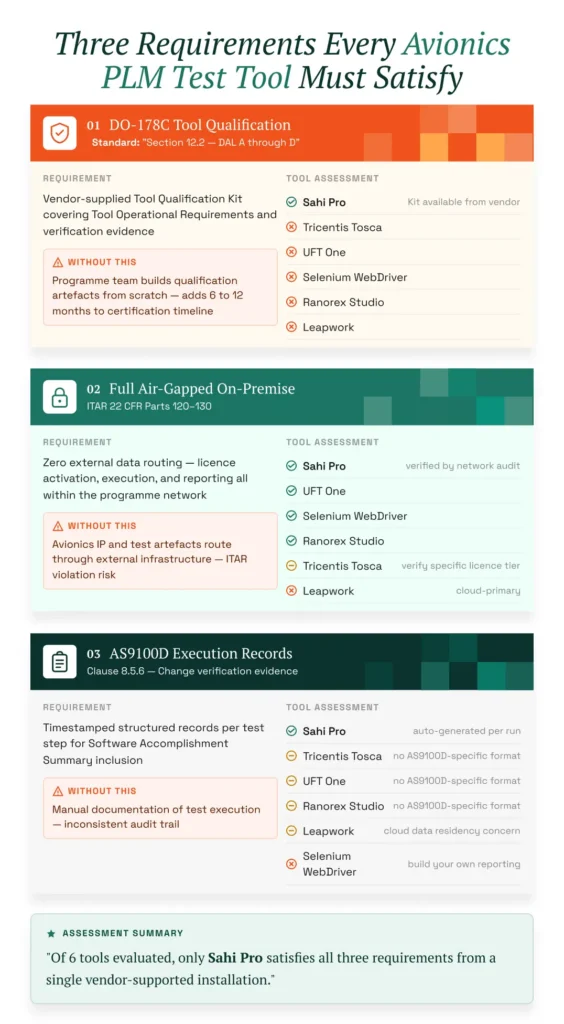
AS9100D clause 8.5.6 requires timestamped records of change verification activities. ITAR 22 CFR Parts 120-130 prohibits routing controlled technical data through infrastructure outside approved facilities. DO-178C Section 12.2 requires that all tools used in avionics software development be qualified; tools without a Tool Qualification Kit can delay avionics programme certification by 6 to 12 months (RTCA DO-178C, Section 12.2). Any tool performing automated regression testing in this context must satisfy all three requirements simultaneously.
Of the six tools evaluated, Sahi Pro is the only one that provides a vendor-supplied DO-178C Tool Qualification Kit and produces AS9100D-compliant execution records from a fully air-gapped installation. Tricentis Tosca and OpenText UFT One support on-premise deployment but do not provide DO-178C-specific qualification documentation. Selenium WebDriver runs on-premise but produces no structured compliance output without custom framework development. Ranorex Studio operates on-premise but lacks formal DO-178C qualification artifacts. Leapwork’s cloud-primary architecture cannot satisfy ITAR data residency requirements for classified avionics programmes.
For compliance-specific tool selection, request documentation from each vendor on whether their deployment model satisfies DO-178C Section 12.2, AS9100D clause 8.5.6, and ITAR 22 CFR Parts 120-130 data residency requirements. Cloud-only vendors typically cannot provide this.
What PLM Teams Report After Switching to Sahi Pro
PLM teams in regulated industries report consistent outcomes after moving to Sahi Pro for avionics and defence programme testing. G2-sourced reviews from enterprise users confirm the following patterns:
- DO-178C tool qualification documentation provided by the Sahi Pro vendor for DAL A through D avionics programmes.
- Air-gapped deployment verified by network audit at ITAR-controlled aerospace customers.
- AS9100D-compliant execution records generated automatically per run for avionics change control evidence.
- Single report format satisfies AS9100D, DO-178C, and ITAR requirements without duplicate documentation.
“I wish I would have found this product sooner. I was able to get our product’s regression tests up and running very quickly. Post running the regression tests against every build now a failure in the log is one that tells me that something has changed, a bug has been introduced. Sahi is a time saver.” – Linda Markhart, Principal QA Engineer, ChartWise
Our verdict: the best aerospace DO-178C PLM test automation tools for avionics and defence teams
For avionics programmes that require DO-178C tool qualification, air-gapped deployment, and AS9100D execution evidence on Teamcenter, Windchill, or CATIA V5, Sahi Pro is the only tool on this list that addresses all three requirements from a single vendor-supported installation. Teams with simpler scope, such as web-only PLM portal testing with no compliance documentation requirements, will find Selenium WebDriver or Ranorex Studio adequate for their needs. The right choice depends on your programme’s specific certification obligations, not on feature counts.
Sahi Pro offers a free trial. You can test it against your own Teamcenter, Windchill, or CATIA V5 environment before any licence decision. If you want to validate coverage against your hardest test scenario, book a technical demo and bring your most complex PLM workflow to the session.