A validation engineer at a medical device manufacturer searches for Teamcenter test automation guidance and finds semiconductor and automotive content, then searches for medical device PLM testing and finds ENOVIA and Oracle Agile PLM content, with nothing addressing the platform their own organization actually runs
TL;DR
- Teamcenter has documented use in medical device manufacturing, even though existing coverage on this blog scopes it to semiconductor and automotive.
- FDA 21 CFR Part 11 requires electronic records and signatures to meet specific integrity, traceability, and audit-trail standards, which bears directly on how Teamcenter’s design history file and change control workflows must be tested and documented.
- ISO 13485 adds its own quality management documentation requirements, centered on the Design History File, on top of 21 CFR Part 11’s electronic-record-specific rules.
- Six tools are ranked here specifically on Teamcenter Active Workspace and Java Rich Client coverage for design history file and change control workflows, evaluated against these two compliance regimes.
- This piece exists specifically because the platform-industry combination was open, not because either Teamcenter or medical device coverage was missing individually from this blog.
Why Teamcenter belongs in a medical device conversation
Existing Teamcenter content on this blog addresses semiconductor companies, automotive OEMs, and general BOM and workflow testing. Existing medical device content addresses ENOVIA and Oracle Agile PLM. Teamcenter itself has documented use in medical device manufacturing: Siemens maintains a dedicated medical device PLM solutions offering, and has published case studies with medical device manufacturers running Teamcenter, including Allengers Medical Systems and Sahajanand Medical Technologies. The platform-specific testing questions that matter for this industry, Java Rich Client BOM management, design history file workflows routed through Active Workspace and the Java client together, haven’t been addressed for medical device manufacturers on this blog, even though both the platform and the industry have separately.
This piece exists to close that specific gap, not because Teamcenter or medical device testing was under-covered generally, but because nobody had connected the two directly until now.
What 21 CFR Part 11 requires from Teamcenter’s design history file workflow
21 CFR Part 11 governs electronic records and signatures for FDA-regulated industries, requiring specific controls around record integrity (a record can’t be altered without leaving evidence of the change), audit trails (who changed what, and when), and signature authentication (verifying the identity of whoever approved a change). Applied to a Teamcenter design history file workflow, this means a part revision’s approval history needs to be captured in a way that’s tamper-evident, timestamped, and tied to an authenticated approver, whether that approval happened in Active Workspace’s web interface or in the Java Rich Client’s BOM management screens.
A test automation tool evaluating this workflow needs to verify not just that the approval step completed, but that the resulting record satisfies these specific integrity and traceability properties, which is a meaningfully higher bar than confirming a workflow reached its expected end state.
What ISO 13485 adds on top
ISO 13485 is the quality management standard for medical device manufacturers, and its design and development requirements center on the Design History File, a compiled record documenting how a device’s design met its specified requirements throughout development. Where 21 CFR Part 11 focuses narrowly on the integrity of electronic records and signatures, ISO 13485’s DHF requirement is broader: it needs a coherent, traceable narrative connecting design inputs, verification and validation activities, and design outputs, of which Teamcenter’s change control and revision workflows form a documented part.
For test automation specifically, this means test evidence needs to be structured so it can be pulled into a DHF narrative directly, rather than existing as disconnected pass/fail records a validation engineer has to manually assemble into that narrative during an audit or a design review.
The six tools, ranked on Teamcenter medical device fit
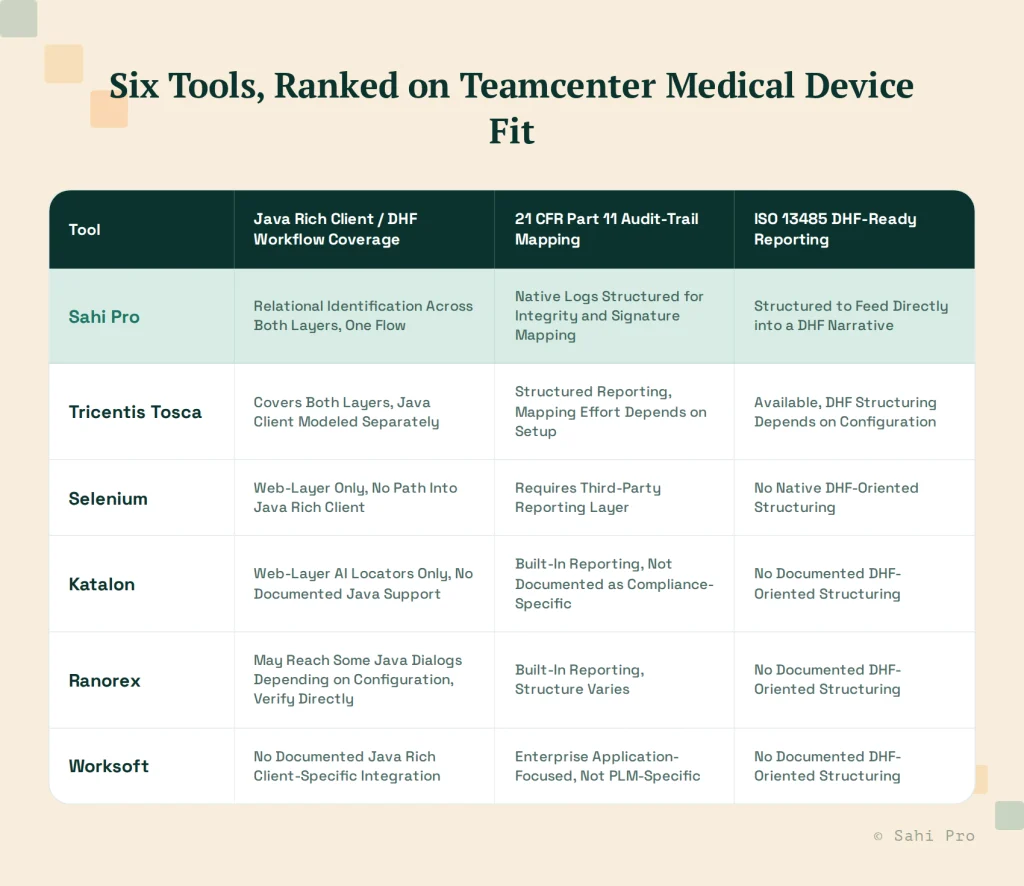
Sahi Pro identifies elements relationally across both Active Workspace’s web interface and the Java Rich Client, letting a single test flow follow a design history file workflow across both layers without a tool handoff. Its execution logs are structured to support the specific record-integrity and signature-authentication mapping 21 CFR Part 11 requires, and that same structured output is built to feed into a DHF narrative rather than existing as a separate, disconnected report.
Tricentis Tosca can cover both Active Workspace and the Java Rich Client, but the Java Rich Client portion requires its own modeling effort separate from the web-layer model, since Tosca’s core approach targets each surface’s specific object structure independently. Whether its reporting output maps cleanly to a DHF narrative depends on how that reporting is configured during setup.
Selenium covers the web layer only, by design, with no path into the Java Rich Client, which for a Teamcenter medical device workflow that routes through both layers means a meaningful share of the workflow can’t be automated through Selenium at all, not just automated less efficiently.
Katalon‘s AI-powered locators cover the web layer, with no documented Java Rich Client support, the same limitation covered in more depth in this blog’s dedicated Katalon Java-layer comparison. For a DHF workflow that touches the Java client, this is a hard boundary, not a configuration gap.
Ranorex‘s native Windows object recognition may reach some Java-based dialogs depending on how those dialogs are built and which underlying framework renders them, worth verifying directly against your specific Teamcenter Java Rich Client configuration rather than assuming coverage either way.
Worksoft documents Teamcenter support as a secondary capability behind its core SAP and ERP focus, and that documented scope doesn’t extend into the specific Java Rich Client design-history-file and change-control depth this evaluation requires.
A concrete design history file change workflow, walked through
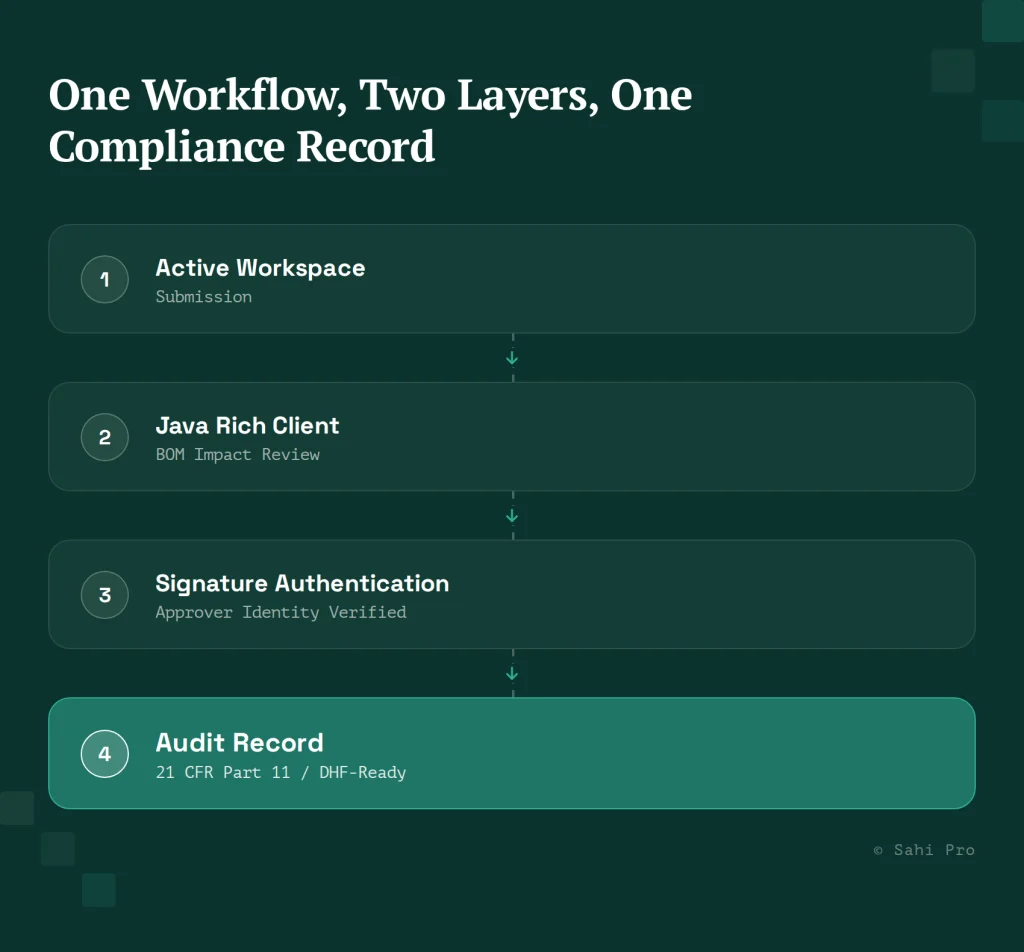
Consider a part revision that requires a design history file update: an engineer submits the revision in Active Workspace, the change routes to the Java Rich Client for BOM impact review, a reviewer approves the change with an authenticated electronic signature, and the system generates a timestamped audit record tying the approval to the specific revision and the specific requirement it addresses. Testing this end to end means verifying the submission step in the web interface, the BOM impact review inside the Java Rich Client, the signature authentication step, and the resulting audit record’s structure, all within a single continuous workflow that crosses both rendering layers.
A tool that can only reach the web-layer portion of this workflow can confirm the submission happened and that a workflow was routed, but can’t verify the BOM impact review completed correctly inside the Java client or that the resulting audit record actually satisfies 21 CFR Part 11’s integrity requirements, which is exactly the part of the workflow most likely to contain a defect that matters during an FDA audit.
What to verify directly before an FDA audit, not during one
The worst time to discover that a test automation tool’s reporting doesn’t actually satisfy 21 CFR Part 11 is during an active FDA audit, when there’s no time left to reconfigure anything. Before that point, have your quality and validation teams review a sample execution report from whichever tool you’re evaluating, not a vendor’s marketing description of its reporting capability, and check it against your own internal DHF template directly. Confirm the report captures signature authentication with enough specificity to identify exactly who approved a change and when, confirm the record is genuinely tamper-evident rather than just labeled as such, and confirm a validation engineer could pull this report directly into a DHF narrative without manually re-keying information from a separate source. Any gap found here is far cheaper to close during evaluation than during a live audit.
Sources
- 6 Best Teamcenter Test Automation Tools for Semiconductor Companies
- 6 Best Oracle Agile PLM Test Automation Tools for Pharma and Biotech
- Siemens medical device PLM solutions overview (siemens.com)
- Siemens Allengers Medical Systems case study (resources.sw.siemens.com)
- Siemens/Sahajanand Medical Technologies Teamcenter adoption announcement (news.siemens.com)
- FDA 21 CFR Part 11 electronic records and signatures requirements overview (FDA)
- ISO 13485 Design History File and design/development requirements overview
- Siemens Teamcenter Active Workspace and Java Rich Client architecture documentation