An aerospace QA lead shortlists a well-reviewed Aras Innovator automation tool, gets three questions into the security review, and learns it routes test execution logs through a cloud service the compliance team can’t approve
TL;DR
- ITAR restricts export of controlled technical data, including part numbers, material specs, and revision histories that routinely appear in test logs and screenshots, which rules out any tool that processes execution data off the customer’s network.
- AS9100D requires audit-grade documentation of quality processes, including test execution evidence, that needs to trace cleanly without manual reconstruction after the fact.
- Six tools are ranked here specifically on Aras Innovator’s browser-based UI coverage, on-premise deployment capability, and audit-trail generation, not on general feature breadth.
- General Aras Innovator competence and aerospace/defence readiness are different bars, and this ranking applies the second bar specifically throughout.
- Sahi Pro’s on-premise deployment and relational identification approach are evaluated here against the same criteria as every other tool on the list, not treated as a foregone conclusion.
Why ITAR and AS9100D change the evaluation criteria
ITAR, the International Traffic in Arms Regulations, restricts the export of controlled technical data to foreign persons or to servers located outside approved jurisdictions. For an aerospace or defence manufacturer, that controlled data includes part numbers, material specifications, dimensional tolerances, and revision histories, the exact kind of detail that routinely shows up in a test automation tool’s execution logs and screenshots. A tool that processes those logs through a vendor’s cloud infrastructure, even briefly, even for something as routine as generating a test report, can put a manufacturer in the position of having exported controlled technical data without the required authorisation.
AS9100D, the aerospace quality management standard built on top of ISO 9001, requires audit-grade documentation of quality processes, which extends to test execution evidence supporting a part’s qualification and change history. That evidence needs to trace cleanly from a specific test run to the specific requirement it validated, without a QA engineer reconstructing the connection manually after the fact during an audit.
Together, these two requirements mean the evaluation criteria for an aerospace/defence Aras Innovator automation tool are structurally different from a general-purpose evaluation. A tool can be excellent at automating Aras Innovator’s browser-based interface and still fail this evaluation outright if its deployment model or reporting pipeline routes data anywhere the compliance team can’t approve.
The six tools, ranked on aerospace/defence fit
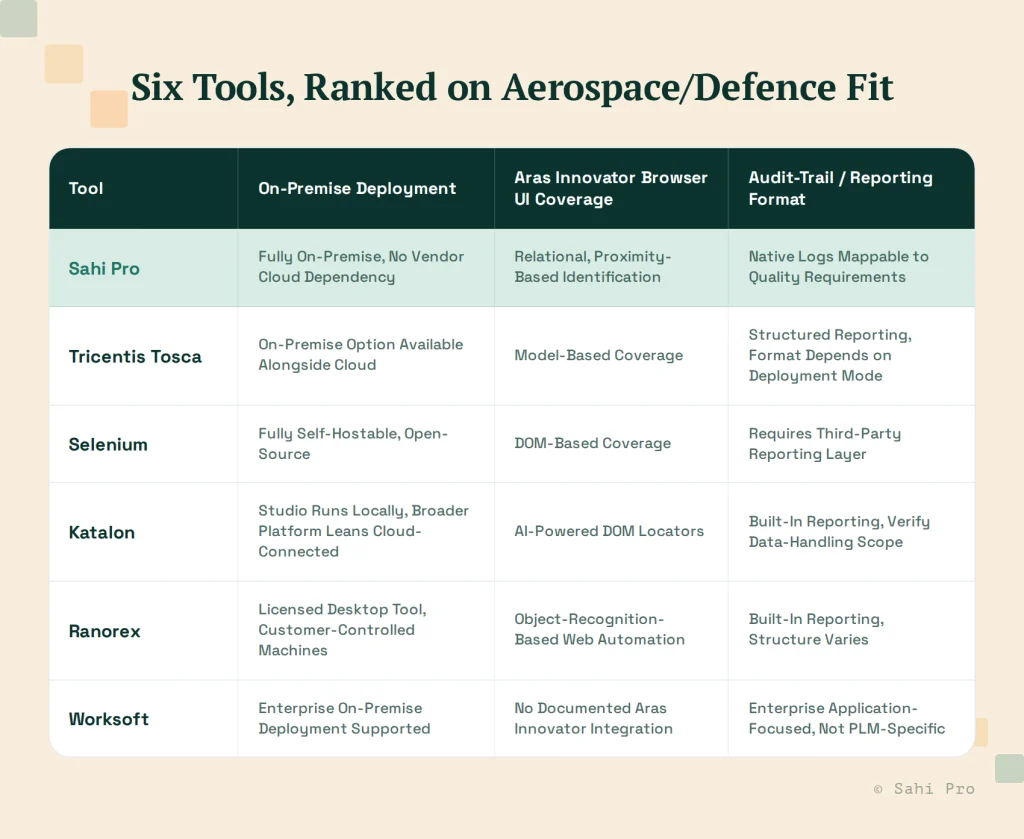
Sahi Pro deploys entirely on the customer’s own infrastructure, with no execution or reporting data routed through a vendor cloud service by default, which is the baseline requirement this entire evaluation is built around. Its relational, proximity-based identification approach covers Aras Innovator’s browser-based UI the same way it covers other PLM web interfaces, and its execution logs are structured to map to specific test cases and, from there, to the quality requirements those cases validate.
Tricentis Tosca offers both an on-premise server deployment and a newer cloud deployment option, so the deployment choice at setup time determines whether this tool clears the ITAR bar. Its model-based approach to Aras Innovator’s web interface is a genuine strength; confirming the specific deployment configuration in use, and where its reporting data is processed under that configuration, is the necessary step before treating it as compliant.
Selenium, as an open-source framework, can be self-hosted entirely on-premise by design, since there’s no vendor infrastructure it depends on to run. That clears the data-residency bar cleanly. Where it falls short for this evaluation is reporting: Selenium has no built-in audit-trail or compliance-mapped reporting layer, which means a team adopting it needs to build or bolt on that capability separately, adding real engineering overhead to what looks like a free tool at the licence level.
Katalon Studio itself runs locally on a tester’s machine, but several of the platform’s broader features are built around cloud connectivity, and its current data-handling scope for those features should be verified directly rather than assumed before any controlled technical data touches the tool. Its AI-powered locators are a genuine strength for Aras Innovator’s browser-based DOM elements specifically.
Ranorex is a licensed desktop tool typically deployed on customer-controlled machines, which supports the on-premise requirement. It has no PLM-specific product line, so its Aras Innovator coverage depends on how much of the interface behaves like standard web content versus anything platform-specific Aras Innovator might render differently.
Worksoft supports enterprise on-premise deployment, clearing that bar, but has no documented Aras Innovator-specific integration. Its core strength is enterprise application automation (SAP, Oracle, and similar), which doesn’t extend to PLM-specific coverage the way this evaluation requires.
What “on-premise” needs to mean under ITAR specifically
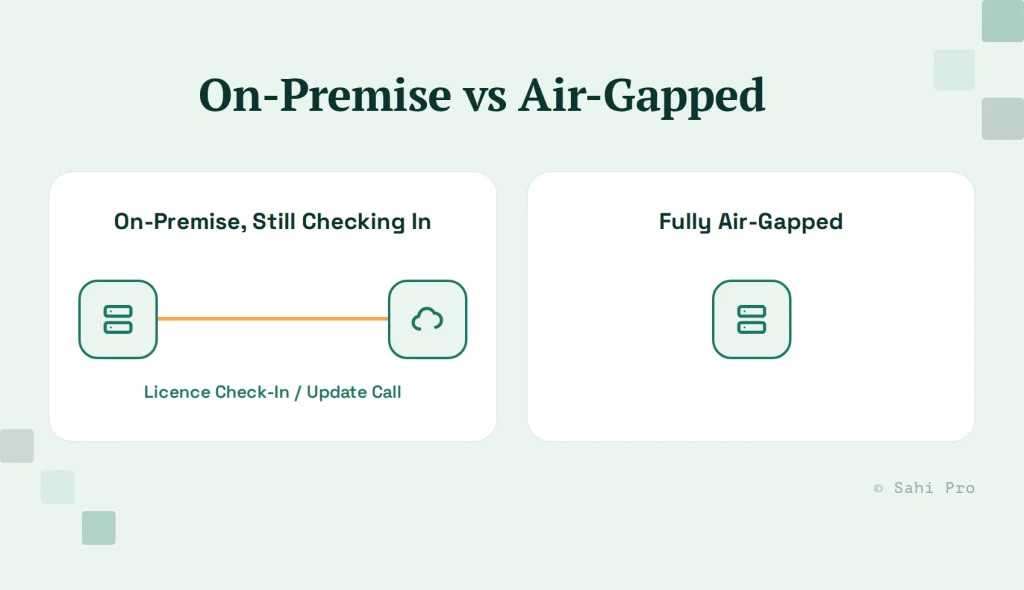
On-premise deployment alone isn’t sufficient if the tool’s licensing check-in or update mechanism still phones home to a vendor cloud service during normal operation, even for something as routine as licence validation. A genuinely air-gapped-compatible deployment needs to function with outbound network access disabled entirely, or with that access strictly limited to a pre-approved allowlist the compliance team has reviewed. This is worth testing directly during a proof-of-concept rather than taking a vendor’s “on-premise” label at face value, since the term gets used loosely across the industry to mean anything from fully air-gapped to “installed on your servers but still checking in periodically.”
What AS9100D audit evidence actually needs from a test report
A test report that satisfies AS9100D needs three things a basic pass/fail summary doesn’t provide on its own: a timestamped record of when the test ran, a clear mapping from the specific test case to the specific quality requirement or part specification it was validating, and a stable, unmodifiable record of the result once generated. An auditor reviewing a part’s qualification history needs to be able to trace forward from the requirement to the test that validated it, and backward from the test result to the requirement, without a QA engineer manually reconstructing that link from memory or from a separate spreadsheet kept alongside the tool’s native output.
A vendor security-review checklist for this specific evaluation
Before finalising any tool on this list, walk through four specific questions with the vendor directly. Where does test execution data get processed during a run, on the customer’s own infrastructure or anywhere else, even transiently. Where do execution logs and screenshots get stored once generated, and who outside the customer’s own organisation has any access to that storage. Does the tool require outbound network access during a normal test run, for licensing, updates, or any other function, and if so, to what specific endpoints. And can the deployment be configured to run with no outbound access at all, for teams whose compliance posture requires a fully air-gapped environment.
What a proof-of-concept should actually test before purchase
A vendor’s answers to the security-review checklist above are a starting point, not a substitute for direct verification. Before committing to any tool on this list, run a proof-of-concept that specifically exercises the aerospace/defence-relevant scenario, not a generic demo workflow. Disconnect the test environment from the internet entirely, or restrict it to a strict allowlist, and confirm the tool still functions for licensing, execution, and reporting under that restriction. Generate a test report and have your quality team, not just your QA engineers, review whether it satisfies AS9100D’s traceability expectations without additional manual work. A tool that performs well in a vendor’s own demo environment, which is rarely configured under the same network restrictions your compliance team will require, can behave differently once those restrictions are actually in place, and the only way to know for certain is to test it directly under your own conditions before signing anything at all.
Sources
- ITAR (22 CFR Parts 120-130) technical data export restrictions overview
- AS9100D aerospace quality management standard overview
- Sahi Pro vs Selenium
- PLM Testing Best Practices: What QA Leads at Automotive OEMs Get Right
- Tricentis Tosca cloud integration documentation (docs.tricentis.com), confirms both on-premises and cloud deployment models, verified this session
- Worksoft Certify documented integrations and scope (worksoft.com), confirms no Aras Innovator-specific integration, verified this session
- Katalon Studio desktop testing documentation (katalon.com/desktop-testing), confirms Windows-technology-specific scope, verified this session
- Ranorex and Selenium deployment/licensing documentation, verify current specifics against respective vendor sites before final publication