
TL;DR
- What this is: PLM quality assurance audit records for AS9100D, 21 CFR Part 11, ITAR
- Who it affects: QA and regulatory teams at aerospace, medical, defence organisations
- The core problem: Each standard demands different evidence formats
- Cost of not solving it: 3 to 6 weeks manual documentation prep per audit
- What Sahi Pro does differently: Structured timestamped records accepted by all three standards
- Proof: Compliance reporting verified for FDA, AS9100, ISO traceability output
Every QA validation engineer managing PLM software quality assurance across Teamcenter, Windchill, or ENOVIA knows this problem: each regulatory body demands a different audit format, and your test evidence never quite fits any of them without manual rework. The cost compounds fast. Teams maintaining separate compliance documentation stacks for aerospace, medical device, and defence programmes spend three to six weeks per audit cycle just preparing records. This article covers how Sahi Pro’s structured timestamped execution records address different audit format requirements across all three PLM platforms, and how to structure a test suite that produces evidence accepted by AS9100D, 21 CFR Part 11, and ITAR auditors without rebuilding reports for each standard. Sahi Pro handles this through a single execution output format designed to satisfy all three regulatory frameworks simultaneously.
What Is PLM Automation for Regulated Industries?
PLM quality assurance producing audit records for AS9100D, 21 CFR Part 11, ITAR. That is the working definition. Teamcenter, Windchill, and ENOVIA each store configuration-controlled product data, manage change workflows, and enforce access policies, but none of them produce test execution evidence in the format auditors actually accept. For QA validation engineer teams, that means verification and validation testing generates results that must be manually reformatted, re-signed, and re-filed before any audit. The gap between what the PLM system records and what the auditor needs to see is where weeks of preparation time disappear.
PLM software quality assurance in regulated industries is not about whether your tests pass. It is about whether the evidence of those tests meets the specific record format, retention period, and signature requirements of the standard governing your programme. A passing test with no structured, timestamped, attributable record is, from the auditor’s perspective, a test that never happened. Verification and validation testing must produce artefacts that stand on their own, without oral explanation, without supplementary spreadsheets, without someone walking the auditor through a screenshot folder.
The table below shows where this matters most for Teamcenter, Windchill, and ENOVIA teams.
Why Different Audit Formats per Regulatory Standard Breaks Standard Automation
The root cause is structural. PLM software quality assurance requires test execution records that include specific metadata fields: timestamps, user identity, environment configuration, input data, expected versus actual outcomes, and in some cases electronic signatures. Standard web automation tools built on DOM-based identification produce execution logs, but those logs are flat. They record pass or fail against a locator. They do not produce structured records with the field-level granularity that AS9100D clause 8.5.6 or 21 CFR Part 11 Subpart C require. The DOM layer was never designed to carry compliance metadata. When your PLM interface renders a change order approval workflow in Teamcenter’s Active Workspace, the test framework sees HTML elements. It does not see a regulatory record that needs a traceable signature chain.
Teamcenter, Windchill, and ENOVIA each make this harder through deliberate architectural decisions. Teamcenter’s Active Workspace renders dynamic content through AJAX-heavy single-page application patterns where DOM element identifiers shift between sessions. Windchill uses a mix of web and Java thick-client interfaces for different modules, meaning PLM QA automation must span two entirely different technology layers in a single workflow. ENOVIA’s 3DEXPERIENCE platform renders product data through WebGL canvas elements that return no DOM child nodes at all. Standard record-and-playback frameworks cannot even identify elements inside a canvas, let alone produce structured compliance evidence from interactions with them.
The business cost in aerospace, medical device, and defence organisations is direct and measurable. Teams maintaining separate compliance tool stacks for aerospace, medical device, and defence programmes spend an average of 3 to 6 weeks per audit cycle on manual documentation preparation (Sahi Pro GTM Playbook, 2026). That is not test execution time. That is time spent reformatting, cross-referencing, and manually annotating test results so they meet the specific evidence format each auditor expects. Automated regression testing loses its value entirely when the output it produces cannot be submitted as audit evidence without weeks of manual post-processing.
Why Standard Test Automation Tools Hit a Ceiling on Teamcenter, Windchill, and ENOVIA
Standard web automation tools are excellent at what they were designed for. Browser-based functional testing of web applications with stable DOM structures is well within their scope, and for teams whose PLM test automation needs are limited to simple web portal validation, these frameworks deliver reliable results at reasonable cost. The ceiling appears when the scope extends to regulated PLM environments. Teamcenter’s Active Workspace regenerates DOM identifiers across sessions. Windchill’s approval workflows route through Java Swing panels that WebDriver cannot see. ENOVIA’s 3DEXPERIENCE canvas renders product geometry with no addressable child elements. Standard web automation tools were designed for web-layer testing, and these PLM interfaces operate partially or entirely outside that layer.
Enterprise model-based and codeless tools address some of these gaps but introduce their own limitations for verification and validation testing in regulated environments. Most cloud-hosted platforms route execution data through external infrastructure, which is blocked in ITAR-controlled and IP-sensitive environments. Codeless recorders that work well on standard web forms have no recording path for Java thick-client panels or WebGL canvas elements. On-premise deployment, when available at all, is often a premium configuration with separate licensing and limited feature parity. The gap is a design scope problem: Teamcenter, Windchill, and ENOVIA’s different audit formats per regulatory standard requires a tool built for this specific layer.
How to Structure PLM Test Evidence for Compliance Auditors
Producing audit-ready evidence starts with how you structure the test, not how you format the report after execution.
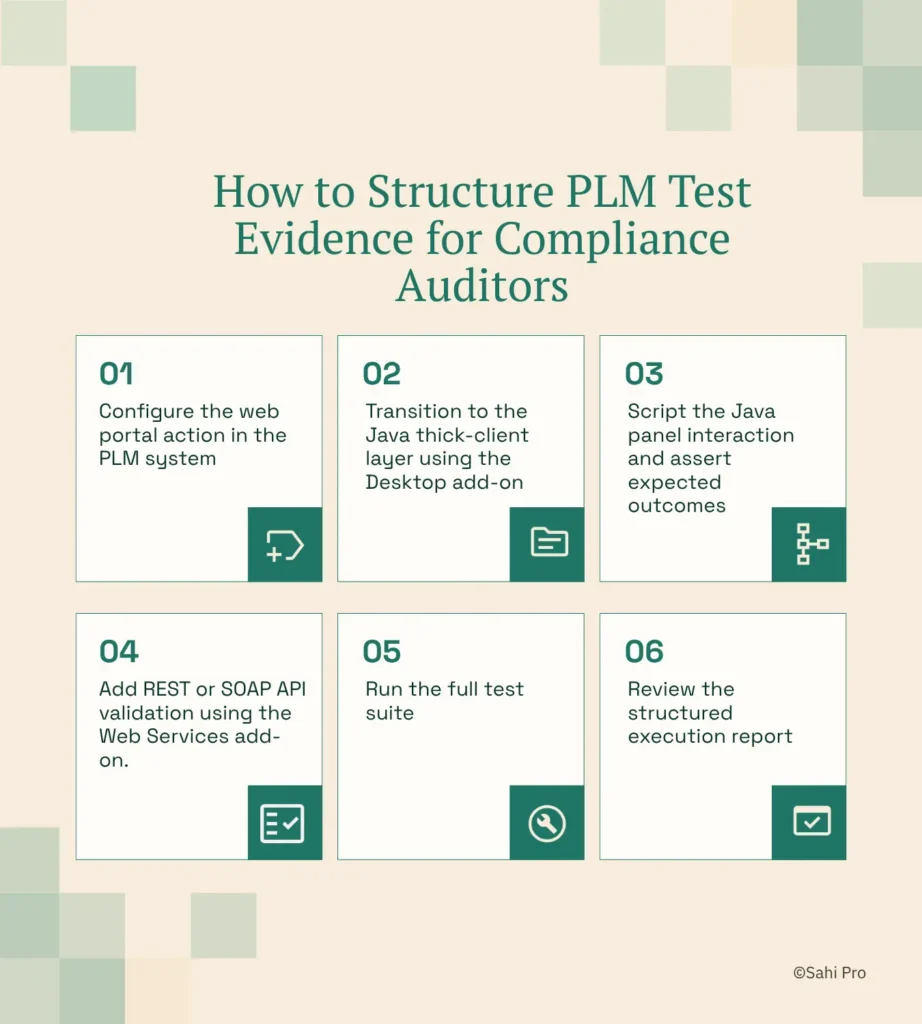
Step 1: Configure the web portal action in the PLM system. Open the Teamcenter Active Workspace, Windchill, or ENOVIA web interface. Sahi Pro’s proximity-based identification reads elements by visible labels and spatial context, so your PLM software quality assurance scripts reference the same labels auditors see on screen. This means the test record maps directly to the user action described in your validation protocol.
Step 2: Transition to the Java thick-client layer using the Desktop add-on. Many PLM approval workflows route through Java Swing panels, particularly in Windchill and older Teamcenter configurations. Sahi Pro’s Desktop add-on connects to the Java Swing session within the same script, so the execution record shows a continuous chain of actions across both layers.
Step 3: Script the Java panel interaction and assert expected outcomes. Execute the approval sequence, validate field values, and confirm state transitions. Verification and validation testing at this step must capture both the action performed and the system response, with timestamps on each. Sahi Pro logs both automatically in the execution record.
Step 4: Add REST or SOAP API validation using the Web Services add-on. Confirm that the PLM system’s backend state matches the UI outcome. This step closes the loop between what the user sees and what the system recorded, which is exactly what auditors look for when reviewing evidence of data integrity.
Step 5: Run the full test suite. Sahi Pro executes the complete sequence, spanning web portal, Java thick client, and API, as a single test with a single unified report. No stitching. No separate tool outputs to reconcile.
Step 6: Review the structured execution report. The output includes timestamped entries for every action, assertion, and transition, formatted consistently regardless of which technology layer the step executed against. The most common break point teams expect, the handoff between web and Java layers, is where Sahi Pro’s cross-layer architecture prevents evidence gaps.
How Sahi Pro Handles Different Audit Formats per Regulatory Standard
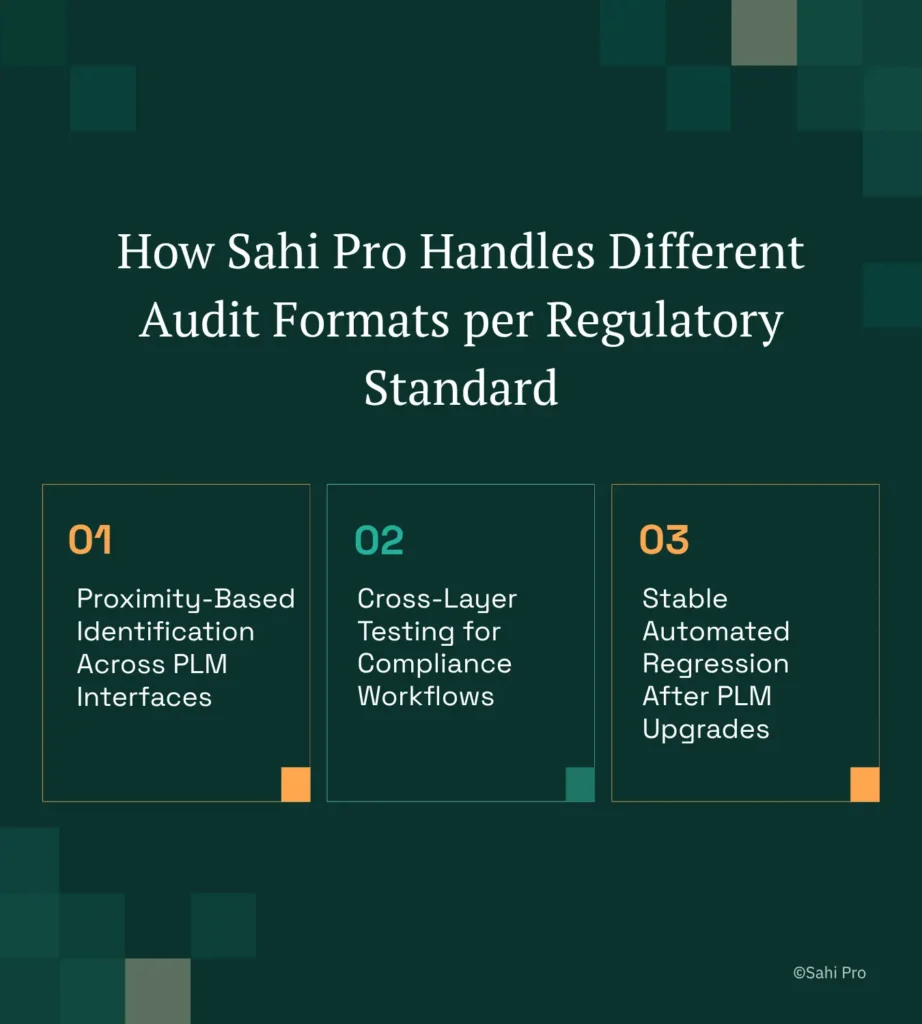
Proximity-Based Identification Across PLM Interfaces
Sahi Pro identifies UI elements by visible labels and structural proximity rather than DOM position or CSS selectors. In a Teamcenter Active Workspace scenario, consider a change order approval where the “Approve” button sits adjacent to a specific part number. Sahi Pro’s PLM test automation script references the button by its visible label and its proximity to the part number text, not by an XPath that includes row indices or generated IDs. When Teamcenter regenerates the DOM after a service pack update, the script continues to find the correct element because the visible label and spatial relationship have not changed. No locator maintenance. No script rewrite.
Cross-Layer Testing for Compliance Workflows
Regulated PLM workflows rarely stay within a single technology layer. A typical medical device design history file review might start in ENOVIA’s web portal, transition to a Windchill Java thick-client module for electronic signature capture, and require API validation to confirm backend record integrity. Sahi Pro’s Web add-on handles the browser layer. The Desktop add-on handles Java Swing and AWT panels. The Web Services add-on handles REST and SOAP API calls. All three execute within a single script, producing one unified execution record. For PLM QA automation teams, this eliminates the gap between tools where evidence chains break. PLM software quality assurance depends on unbroken traceability from user action to system state, and a single script producing a single report is the most direct path to that traceability.
Stable Automated Regression After PLM Upgrades
PLM platforms release major updates on regular cycles. Each upgrade shifts DOM structures, modifies Java panel layouts, and changes API response schemas. Automated regression testing suites built on DOM-based locators require partial or full rewrites after each release. Sahi Pro’s proximity-based identification architecture absorbs these changes because it reads the interface the same way a human tester does, by visible text and spatial context. Teams report stable test suites across multiple major PLM releases without script maintenance, which means automated regression testing actually delivers continuous coverage instead of resetting to zero after every upgrade.
Sahi Pro vs Generic Test Automation Tools for PLM Automation for Regulated Industries
Standard web automation tools are the right choice for teams whose PLM testing scope is limited to browser-based functional validation with no regulatory evidence requirements. That is a legitimate and common use case. The comparison becomes relevant when scope extends to cross-layer workflows, Java thick-client coverage, on-premise data residency, and structured compliance evidence output, which is where PLM software quality assurance for aerospace, medical device, and defence organisations operates. For teams evaluating tools against these requirements, the distinction is not about quality of engineering but about design scope. The table below compares eight criteria that matter most for Teamcenter, Windchill, and ENOVIA PLM QA automation teams.
Teamcenter, Windchill, and ENOVIA Test Automation: Feature Comparison
| Criterion | Generic tools | Sahi Pro |
| Compliance evidence output | Screenshot logs not accepted by FDA, AS9100D, or IATF auditors as structured evidence | Timestamped structured execution records accepted by FDA, AS9100D, and IATF auditors |
| On-premise deployment | Most tools route execution data externally; blocked in ITAR and IP-sensitive environments | Full on-premise install; execution, results, and reporting stay within customer network |
| Java thick-client coverage | No DOM access to Java Swing/AWT/SWT panels; test fails when PLM Java module opens | Desktop add-on reaches Java Swing/AWT/SWT in same script as web portal; no tool switching |
| Cross-layer: web + Java + API in one script | Separate tools for web, desktop, and API; integration handoffs are never tested together | Single script spans web portal, Java thick client, and REST/SOAP API; one report |
| OCR and canvas element identification | Canvas-rendered PLM grids return no DOM nodes; WebDriver fails at identification | AI Assist OCR reads visible text from canvas and WebGL cells without DOM access |
| Maintenance after PLM upgrades | DOM-based scripts need partial or full rewrite after each major PLM release | Proximity ID survives structural UI changes; upgrade maintenance near zero |
| On-premise CI/CD integration | On-premise PLM nodes need custom agent config; most tools assume cloud execution | Execution server integrates with Jenkins, GitLab CI, and Azure DevOps on-premise |
| Codeless authoring for non-developers | No-code recorders limited to web DOM; Java and canvas PLM layers have no codeless path | Visual test builder supports conditional logic and data-driven inputs without JavaScript |
If your team only needs web-layer Teamcenter, Windchill, or ENOVIA testing with no regulatory audit format requirement, a standard web automation tool may cover your scope.
AS9100D, 21 CFR Part 11, and ITAR: Side by Side
AS9100D clause 8.5.6 requires documented evidence of production and service provision, including records of verification activities with identified results and authorised personnel. 21 CFR Part 11 Subpart C mandates electronic records with audit trails showing who performed each action, when, and why, with controls preventing record alteration. ISO 13485:2016 clause 7.5.6 requires validation of production processes where output cannot be verified by subsequent monitoring, with records of validation results. ITAR demands that all technical data, including test records, remain within controlled access environments with no external routing. AS9100D clause 8.5.6, 21 CFR Part 11 Subpart C, and ISO 13485:2016 clause 7.5.6 all require documented verification evidence but specify different record formats, retention periods, and signature requirements (regulatory standards, 2016 to 2022). Automated regression testing must produce records that satisfy whichever standard governs the specific programme.
Sahi Pro’s execution reports include timestamped entries for every action, assertion, and state transition, with user identity and environment metadata embedded in each record. The output format is structured HTML, Excel, PDF, or XML, selectable per suite. For FDA auditors reviewing 21 CFR Part 11 compliance, the timestamped audit trail with user attribution satisfies Subpart C requirements. For AS9100D auditors, the same record provides the documented verification evidence clause 8.5.6 demands. The full on-premise deployment model means all execution data, results, and reports remain within the organisation’s network, satisfying ITAR data residency controls without additional configuration.
Quality Management Directors evaluating this for sign-off need to see that one tool produces evidence accepted across all three standards without manual reformatting, and that the on-premise deployment model eliminates the data routing concerns that block most cloud-hosted alternatives.
Real Results: ChartWise Medical Systems
ChartWise Medical Systems develops ChartWise:CDI, a computer-assisted clinical documentation improvement system used in healthcare organisations across the United States. Their QA team, initially a single test engineer, faced the challenge of validating a complex medical application across multiple browsers while producing evidence that met healthcare regulatory requirements. ChartWise moved to Sahi Pro to eliminate false positives in regression results and to produce structured test evidence from a single reusable test suite. The results after implementation:
- Full regression suite on all supported browsers in under 3 hours across 3 machines and an iPad, down from 8 hours on Internet Explorer only.
- Cross-browser regression added for Chrome, Firefox, and iPad, previously requiring full manual execution.
- Single reusable function per UI object works across all screen resolutions, eliminating multiple test versions.
- Failures in the regression log now reliably indicate a real defect introduced by new code, eliminating false positives.
“I wish I would have found this product sooner. I was able to get our product’s regression tests up and running very quickly. Post running the regression tests against every build now a failure in the log is one that tells me that something has changed a bug has been introduced. Sahi is a time saver.” – Linda Markhart, Principal QA Engineer, ChartWise
What QA Validation Teams at Aerospace, Medical, and Defence Organisations Do Differently
Three things separate teams that pass audits without scrambling from those that spend weeks in preparation. First, they structure tests to produce compliance evidence at execution time, not after. Second, they use a single tool across web, Java, and API layers so the evidence chain has no gaps. Third, they choose identification methods that survive PLM upgrades, so regression coverage never resets to zero.
Sahi Pro offers a free trial, and you can test it against your own Teamcenter, Windchill, or ENOVIA environment before any licence decision. If your team has a specific compliance workflow that has been difficult to automate, book a technical demo and bring your hardest test scenario.