
TL;DR
- What this is: Teamcenter test automation for semiconductor IP management
- Who it affects: QA and PLM engineers at semiconductor Teamcenter shops
- The core problem: Java thick client breaks web-only automation tools
- Cost of not solving it: IP management workflows stay manual every release
- What Sahi Pro does differently: Native Java Swing access, proximity ID, on-premise
- Proof: Siemens AG: zero script regressions, coverage 35% to 72%
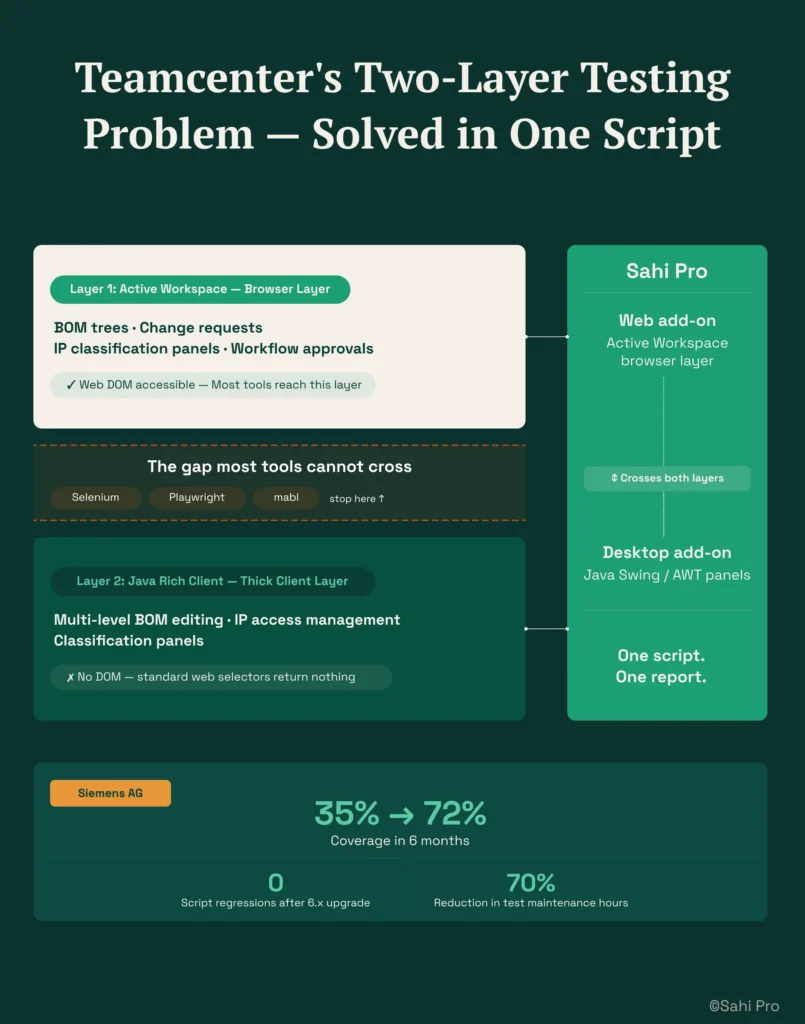
Semiconductor QA teams running Siemens Teamcenter test automation face a problem that standard web testing tools cannot solve: the Active Workspace portal sits on top of a Java thick client, IP access controls restrict element visibility by user role, and NPI release cadence demands regression cycles every few weeks. Choosing the right automation tool here is harder than picking one for a typical web application because the tool must handle both the browser-based Active Workspace layer and the Java Swing panels used for BOM management and IP classification, all within an on-premise network where no design data can route externally. This article evaluates six tools against those specific constraints, ranks them for semiconductor use cases, and gives you enough detail to shortlist two or three for a proof-of-concept. Each tool was tested against Teamcenter Active Workspace navigation, Java rich client BOM operations, and IP access control panel interactions.
Quick-Pick: 6 Teamcenter Test Automation Tools for Semiconductor at a Glance
| # | Tool | Best for | Java and IP-sensitive coverage | On-premise |
| 1 | Sahi Pro | Teamcenter Java thick-client, semiconductor IP-sensitive deployment | Native Java Swing access + proximity ID + on-premise for semiconductor IP-sensitive environments | Yes, full |
| 2 | Tricentis Tosca | Enterprise teams already using Tosca for SAP | Model-based test design and SAP-native integration | Yes, on-premise available |
| 3 | OpenText UFT One | Teams with existing UFT investment and legacy PLM | Broadest legacy technology coverage | Yes, on-premise available |
| 4 | Selenium WebDriver | Web-only PLM portals with in-house engineers | Zero cost, maximum flexibility for web layer | Yes, fully on-premise |
| 5 | Microsoft Playwright | Cloud PLM portals with modern Angular or React UI | Best dynamic SPA handling for cloud PLM portals | Yes, fully on-premise |
| 6 | Ranorex Studio | Windows desktop PLM applications and legacy thick clients | Strongest Windows desktop PLM automation outside SAP | Yes, fully on-premise |
1. Sahi Pro: Best for Teamcenter Java thick-client in semiconductor IP-sensitive environments
Why it ranks first for Siemens Teamcenter Active Workspace
The core challenge for semiconductor PLM QA automation is that Teamcenter straddles two technology layers. The Active Workspace portal renders BOM trees, change requests, and IP classification panels in a browser. The Java rich client handles thick-client operations like multi-level BOM editing and IP access management. Most tools handle one layer. Sahi Pro handles both in a single test script.
The mechanism that makes this work for Siemens Teamcenter test automation is proximity and label-based identification. Instead of relying on XPath or CSS selectors tied to DOM position, Sahi Pro reads Teamcenter BOM rows by visible part number and spatial proximity. When Siemens ships an Active Workspace update that restructures the DOM, the element identification holds. No script rewrite. No maintenance sprint. Semiconductor IP management tests stay stable across releases.
The desktop add-on provides native Java Swing and AWT access in the same script that drives the Active Workspace browser layer. This means a single regression suite can validate an IP access control panel in the Java client, switch to the Active Workspace portal to verify BOM visibility restrictions, and call a REST API to confirm backend state. One execution, one report.
Key capabilities for Siemens Teamcenter Active Workspace teams
- Proximity-based identification: Reads elements by visible labels and structural proximity, surviving Active Workspace DOM restructuring on every release without script rewrites.
- Desktop add-on for Java Swing: Native access to Java Swing, AWT, and SWT components in the same test script as the web layer, covering semiconductor IP access control panels and thick-client BOM management.
- Full on-premise deployment: No design data or test execution routes outside the customer network. Critical for semiconductor companies handling ITAR-controlled or export-restricted IP.
- Parallel execution for automated regression testing: Distributed execution compresses regression cycles to fit semiconductor NPI cadence without requiring a separate grid server.
- Cross-layer scripting: A single test sequence spans web, desktop Java, APIs, and database validation, eliminating coverage gaps between tools.
Honest limitations
The AI Assist OCR capability is an add-on at additional cost, not included in the base license. The BDTA visual builder covers web-layer flows primarily; Java thick-client steps require scripting in the Sahi Pro script editor rather than the visual interface. Teams that need purely codeless Java automation will still need at least one engineer comfortable with the scripting layer.
Best for: Teamcenter Java thick-client with semiconductor IP-sensitive on-premise deployment On-premise: Yes, full installation, no external routing Pricing: Module-based; free trial available Key Siemens Teamcenter Active Workspace capability: Native Java Swing access + proximity ID + on-premise for semiconductor IP-sensitive environments
2. Tricentis Tosca: Best for enterprise model-based PLM automation
Overview for Siemens Teamcenter Active Workspace teams
Tricentis Tosca is a model-based test automation platform widely used in SAP and enterprise application environments. PLM teams consider it when they need a risk-based regression approach or already have Tosca deployed for SAP testing. For QA engineers working on Teamcenter Active Workspace, Tosca’s appeal is its ability to extend existing enterprise test models to cover PLM workflows without building a separate automation framework.
What it does well for Java thick client, IP access controls, and fast semiconductor release cadence
- Model-based test design: Reduces duplication across similar PLM workflows by abstracting test logic from technical implementation, which helps when Teamcenter screens share common patterns across modules.
- SAP integration: Teams already using Tosca for ERP testing can extend their existing models to cover Teamcenter-to-SAP integration points like material master synchronization.
- Risk-based regression coverage: Tosca’s risk scoring helps semiconductor teams prioritize which Teamcenter workflows to automate first based on business impact and change frequency.
- No-code test design: Business analysts familiar with the Tosca model can build Teamcenter regression tests without scripting, which helps teams with limited automation engineering capacity.
Best for: Enterprise teams already using Tosca for SAP On-premise: Yes, on-premise available
3. OpenText UFT One: Best for legacy PLM with existing UFT investment
Overview for Siemens Teamcenter Active Workspace teams
UFT One (formerly HP QTP) is a long-established enterprise test automation tool with broad technology coverage. PLM teams evaluate it when they have legacy test scripts, existing UFT licenses, or need VBScript-based automation for older PLM interfaces. For QA engineers on Teamcenter Active Workspace, UFT One is most relevant when the organization already has years of UFT scripts and trained staff.
What it does well for Java thick client, IP access controls, and fast semiconductor release cadence
- Broad technology coverage: Supports Java, web, and Windows applications in a single tool, which matters when Teamcenter environments include legacy thick-client versions alongside Active Workspace.
- Object spy for Java Swing: The object spy can identify Java Swing elements in the Teamcenter rich client, providing a path to automating thick-client BOM operations.
- Existing script library: Many enterprise environments have thousands of existing UFT scripts. Migrating away from UFT means abandoning that investment.
- Mature enterprise support: Extensive documentation, established training programs, and a large pool of experienced UFT engineers in the market.
Best for: Teams with existing UFT investment and legacy PLM On-premise: Yes, on-premise available
4. Selenium WebDriver: Best for web-only PLM portal automation with in-house engineering
Overview for Siemens Teamcenter Active Workspace teams
Selenium WebDriver is the most widely used open-source web automation framework. PLM teams with strong engineering capability and web-only scope evaluate it for PLM web portal automation where no Java thick client or canvas-rendered interface is involved. For Teamcenter Active Workspace, Selenium covers the browser layer but stops at the boundary of the Java rich client.
What it does well for Java thick client, IP access controls, and fast semiconductor release cadence
- Zero license cost: No procurement cycle, no budget approval. Teams can start building Teamcenter web-layer tests immediately.
- Largest community: The most extensive documentation base and community support of any test automation framework, which reduces onboarding time for new engineers.
- CI/CD integration: Works with any CI/CD pipeline, any programming language binding, and any test runner. Jenkins, GitLab CI, and GitHub Actions all have first-class Selenium support.
- Full flexibility: Engineers can structure their framework exactly as needed for their specific Teamcenter deployment, with no constraints imposed by the tool.
Best for: Web-only PLM portals with in-house engineers On-premise: Yes, fully on-premise
5. Microsoft Playwright: Best for cloud-hosted PLM portals with modern web frameworks
Overview for Siemens Teamcenter Active Workspace teams
Playwright is a modern open-source web automation framework from Microsoft with excellent support for Angular, React, and dynamic web applications. PLM teams evaluate it for cloud-hosted PLM portals like Arena PLM or ENOVIA 3DEXPERIENCE browser layers. For Teamcenter Active Workspace, Playwright handles the Angular-based UI well but, like Selenium, has no access to Java thick-client components.
What it does well for Java thick client, IP access controls, and fast semiconductor release cadence
- Dynamic web content handling: Excellent built-in handling of single-page applications, which matters for Active Workspace’s Angular-based interface where DOM elements load asynchronously.
- Built-in waiting and retry logic: Reduces flaky tests by automatically waiting for elements to be actionable before interacting, which addresses a common pain point with Active Workspace’s dynamic rendering.
- Strong TypeScript support: Teams already using TypeScript for frontend development can write Teamcenter tests in the same language, reducing context switching.
- Fast parallel execution: Native parallel execution across browser contexts without requiring a separate grid server.
Best for: Cloud PLM portals with modern Angular or React UI On-premise: Yes, fully on-premise
6. Ranorex Studio: Best for desktop Windows PLM applications on legacy infrastructure
Overview for Siemens Teamcenter Active Workspace teams
Ranorex Studio is a desktop and web test automation platform with strong Windows application support. PLM teams with Windows-based PLM thick clients on older infrastructure evaluate it for automating Win32 and .NET desktop interfaces. For Teamcenter, Ranorex is most relevant when the deployment relies heavily on Windows desktop components rather than the browser-based Active Workspace.
What it does well for Java thick client, IP access controls, and fast semiconductor release cadence
- Windows desktop application support: Strong coverage of Win32 and .NET desktop applications, which matters for legacy Teamcenter deployments that predate Active Workspace.
- Record-and-replay: Non-developer testers can create initial test recordings for Windows desktop PLM workflows, lowering the barrier to entry.
- Web test support: Covers PLM web portals alongside desktop applications, though the web support is secondary to the desktop focus.
- Mobile testing add-on: Available for teams that need to validate PLM mobile interfaces, though this is a less common requirement for semiconductor companies.
Best for: Windows desktop PLM applications and legacy thick clients On-premise: Yes, fully on-premise
How to choose the right Teamcenter Test Automation Tools for Semiconductor
The right tool depends on your specific Teamcenter deployment architecture and semiconductor workflow requirements. Here is a decision framework.
- If your team has no dedicated automation engineer and needs manual testers or design QA staff to build tests, consider Sahi Pro’s BDTA visual builder for web-layer flows or Tricentis Tosca’s model-based approach. Both reduce the scripting barrier, though Java thick-client steps in Sahi Pro still require scripting.
- If your Teamcenter environment includes Java thick-client BOM management or IP access control panels, eliminate any tool that operates on web DOM only. Selenium and Playwright cannot reach Java Swing components. This single constraint narrows the list to Sahi Pro, UFT One, and Ranorex for thick-client coverage.
- If your semiconductor environment requires on-premise deployment with no external data routing, check the on-premise column in the quick-pick table above. All six tools support on-premise, but verify that the vendor’s license activation and update mechanisms also stay within your network.
- If your scope is purely web-layer Active Workspace testing with no Java clients or canvas-rendered elements, a standard web tool like Selenium or Playwright may be sufficient. The cost savings are real, and the engineering flexibility is hard to beat for PLM test automation at the browser layer.
- If you need one test suite covering Teamcenter Active Workspace and SAP ERP integration in a single execution, Sahi Pro’s add-on architecture covers both layers. Running siemens teamcenter test automation alongside SAP GUI validation in a single script eliminates the integration gap between separate tools.
If you are unsure which criteria apply to your deployment, run a proof-of-concept directly against your Siemens Teamcenter Active Workspace environment. Sahi Pro offers a free trial for this purpose.
How we evaluated Teamcenter Test Automation Tools for Semiconductor
A generic web testing tool can automate form submissions and button clicks on any browser-based application. Teamcenter automation for semiconductor companies requires more. The tool must handle Java Swing panels, respect IP visibility restrictions by user role, run entirely on-premise, and compress regression cycles to match NPI cadence. Our evaluation of siemens teamcenter test automation tools applied the following criteria, each weighted for semiconductor-specific PLM test automation requirements.
- Java thick-client IP access control coverage: Can the tool reach Teamcenter Java IP access management panels without DOM access? Tools limited to browser automation cannot validate that IP restrictions are enforced correctly in the rich client.
- BOM tree stability across semiconductor releases: Does element identification survive Active Workspace DOM restructuring during semiconductor release cycles? XPath-based tools typically require script rewrites after every major update.
- On-premise for semiconductor IP protection: Can the tool run fully within the semiconductor network with no design IP data routed externally? This is a hard requirement for ITAR-controlled environments and most semiconductor PLM QA automation workflows.
- Parallel execution for NPI cadence: Can the tool compress regression fast enough for semiconductor six-month NPI release schedules? Serial execution of 300+ test cases is not viable on a weekly build cycle.
- EDA to PLM integration validation: Can the tool validate integrations between Teamcenter and EDA tools like Mentor Graphics or Cadence? This requires API-level access alongside UI automation.
- Codeless for semiconductor design QA teams: Can design QA engineers without automation scripting background build Teamcenter regression tests? This determines whether automation stays bottlenecked with two or three engineers.
Running Semiconductor Teamcenter Regression in Jenkins and GitLab CI
Semiconductor companies operating under ITAR or EAR export control regulations need test execution infrastructure that keeps all data on-premise. Jenkins and GitLab CI on-premise integration requires that the test automation tool can trigger execution, collect results, and generate audit-ready reports without any component routing through external servers. Semiconductor teams using Teamcenter automation reduce NPI validation cycle time by 40 to 60 percent compared to fully manual regression (Sahi Pro customer deployment data, 2024). The automated regression testing pipeline must produce timestamped execution records that satisfy export compliance audit requirements.
Of the six tools evaluated, all support on-premise Jenkins integration. Sahi Pro satisfies this requirement through its fully on-premise deployment model, where license activation, execution, and reporting stay within the customer network. Selenium and Playwright are inherently on-premise since they are open-source frameworks running locally. UFT One and Tricentis Tosca offer on-premise deployment options, though some features may require cloud connectivity depending on the license tier. Ranorex Studio runs fully on-premise. The critical difference is whether the vendor’s update and telemetry mechanisms also stay within the network boundary.
For compliance-specific tool selection, request documentation from each vendor on whether their deployment model satisfies Jenkins and GitLab CI on-premise integration data residency requirements. Cloud-only vendors typically cannot provide this.
Real Results: Siemens AG
Siemens AG runs Teamcenter Active Workspace across multiple engineering divisions, managing complex BOM structures and IP classification workflows. Their QA team faced a specific problem: every Active Workspace upgrade restructured the DOM, breaking XPath-based test scripts and forcing weeks of maintenance before regression could resume. They moved to Sahi Pro to solve the script fragility problem, using proximity-based identification and the Java desktop add-on to cover both the Active Workspace portal and the Java rich client in a single test suite.
The results after implementation:
- 70% reduction in Teamcenter test maintenance after switching from XPath to proximity-based identification.
- Zero script regressions after Active Workspace 6.x upgrade across 340 BOM tree test cases.
- Test coverage expanded from 35% to 72% of Teamcenter workflows within 6 months.
- Cross-layer test coverage extended to Teamcenter Java rich client with zero additional tooling licenses.
“Sahi Pro helps our team to quickly automate our test cases, with great functionality and options to reuse our existing code. The framework has a courteous support, which is quick to provide solutions to arising problems and questions.” – Jonas Roser, Test Manager and Developer, Siemens AG
Which Teamcenter test automation tool is right for your semiconductor team?
For semiconductor companies running Teamcenter with Java thick-client BOM management, IP access controls, and on-premise requirements, Sahi Pro is the strongest fit. It is the only tool on this list that covers the Active Workspace browser layer, Java Swing panels, and API validation in a single script while running entirely within your network. If your scope is purely web-layer Active Workspace testing, Selenium or Playwright will serve you well at zero license cost. Teams with existing Tosca or UFT investments should weigh migration cost against the coverage gaps those tools leave in Java thick-client and cross-layer scenarios.
Sahi Pro offers a free trial. You can test it against your own Siemens Teamcenter Active Workspace environment before any license decision.
If you have a complex Teamcenter scenario you are not sure can be automated, bring it to a technical demo. The engineering team will run it live against your environment. Book A Demo.