TL;DR
- What this is: ENOVIA 3DEXPERIENCE test automation for WebGL and e-signatures
- Who it affects: QA Validation Engineers at medical device companies using ENOVIA
- The core problem: WebGL canvas elements have no DOM child nodes
- Cost of not solving it: Weeks added to every FDA submission cycle
- What Sahi Pro does differently: AI Assist OCR reads WebGL content without DOM
- Proof: Confirmed automating CATIA, Windchill, DELMIA non-DOM UIs
Every time your regression suite hits a WebGL viewer or an e-signature panel inside Dassault ENOVIA 3DEXPERIENCE, your XPath queries return nothing, and your test automation for medical device QA teams stalls at the worst possible moment. The downstream cost is real: two to four weeks added to every FDA submission cycle while engineers manually re-verify what should have been covered by automation. This article covers how Sahi Pro’s AI Assist OCR identifies visible text inside canvas-rendered ENOVIA components, how to structure a test that spans the web portal, WebGL viewer, and e-signature workflow in a single script, and what that means for your IQ/OQ/PQ documentation. Sahi Pro handles this through AI Assist, which reads WebGL content without DOM access.
What Is ENOVIA 3DEXPERIENCE Automation?
ENOVIA 3DEXPERIENCE test automation covering WebGL and e-signatures is the practice of scripting repeatable verification against every UI layer in the 3DEXPERIENCE platform, including the layers that standard DOM-based locators cannot reach. Dassault ENOVIA 3DEXPERIENCE renders 3D part viewers, BOM comparison grids, and electronic signature panels through WebGL canvas elements and proprietary JavaScript widgets that produce no inspectable child nodes. For QA Validation Engineer teams, that means verification and validation testing cannot rely on traditional element identification, and any test that touches a viewer or an approval signature must use an alternative identification method or fall back to manual execution.
This distinction matters most in medical device environments where every test must produce a traceable, timestamped record for FDA auditors. Test automation for ENOVIA in this context is not just about speed. It is about producing structured evidence that a human reviewer did not manually screenshot. The table below shows where this matters most for Dassault ENOVIA 3DEXPERIENCE teams.
Why WebGL Viewers and E-Signatures Without DOM Breaks Standard Automation
The root cause is straightforward. WebGL renders content to an HTML5 canvas element. That canvas is a single bitmap surface with no DOM child nodes. Standard web automation frameworks query the DOM tree to locate buttons, text fields, and table cells. When the entire 3D viewer, BOM grid, or e-signature confirmation panel is painted onto a canvas, XPath and CSS selectors return empty results. There is nothing to select. Test automation for medical device QA teams relying on DOM-based locators hits a hard stop at this layer, not a soft failure.
Dassault ENOVIA 3DEXPERIENCE compounds this problem through specific architectural decisions. The platform uses a widget-based composition model where each dashboard tile, including the 3D viewer, the lifecycle status panel, and the change action approval widget, is loaded as an independent iframe or web component. Many of these widgets render their interactive content through canvas or through proprietary JavaScript that generates no stable DOM attributes. PLM UI test automation against ENOVIA is not a standard web testing problem because the interface is not a standard web application. It is a composite of web, canvas, and widget layers, each with different rendering behaviors.
The business cost in medical device is quantifiable. Manual re-validation after a PLM upgrade costs medical device companies an average of 6 to 12 weeks of QA engineer time [FDA Computer System Validation guidance, 2022]. Every ENOVIA service pack or hotfix that changes widget rendering forces a full manual pass through affected test cases. Without automated regression testing that can identify elements inside canvas layers, the QA team absorbs that cost on every release cycle. For a team managing 500 or more validation test cases, even a minor ENOVIA update can consume an entire sprint in re-verification.
Why Standard Test Automation Tools Hit a Ceiling on Dassault ENOVIA 3DEXPERIENCE
Standard web automation frameworks are well-designed for what they were built to do. They excel at identifying DOM elements, handling AJAX waits, and running parallel browser sessions against conventional web applications. For ENOVIA’s standard web forms, navigation menus, and search interfaces, these frameworks perform reliably. The ceiling appears at the canvas boundary. When a PLM test automation script navigates from a standard web form into a WebGL viewer or an e-signature approval panel, the framework loses visibility. The canvas element is present in the DOM, but its contents are not. The script can confirm the canvas exists. It cannot read what is inside it. For ENOVIA teams, this means partial coverage at best: the web-layer workflows are automated, but every viewer interaction and every signature confirmation requires a manual tester.
Enterprise model-based and codeless automation platforms face a different constraint. Many offer visual test builders and AI-powered element detection, but their OCR capabilities are tuned for standard UI components, not for PLM-specific canvas content like BOM comparison grids or lifecycle approval stamps. Verification and validation testing in a medical device context also requires on-premise deployment, since patient data and design history files cannot route through external cloud infrastructure. Several enterprise platforms either lack a full on-premise option or charge significantly more for it. The gap is a design scope problem: Dassault ENOVIA 3DEXPERIENCE’s WebGL viewers and e-signatures without DOM requires a tool built for this specific layer.
How to Automate ENOVIA WebGL Viewers and E-Signatures in Sahi Pro
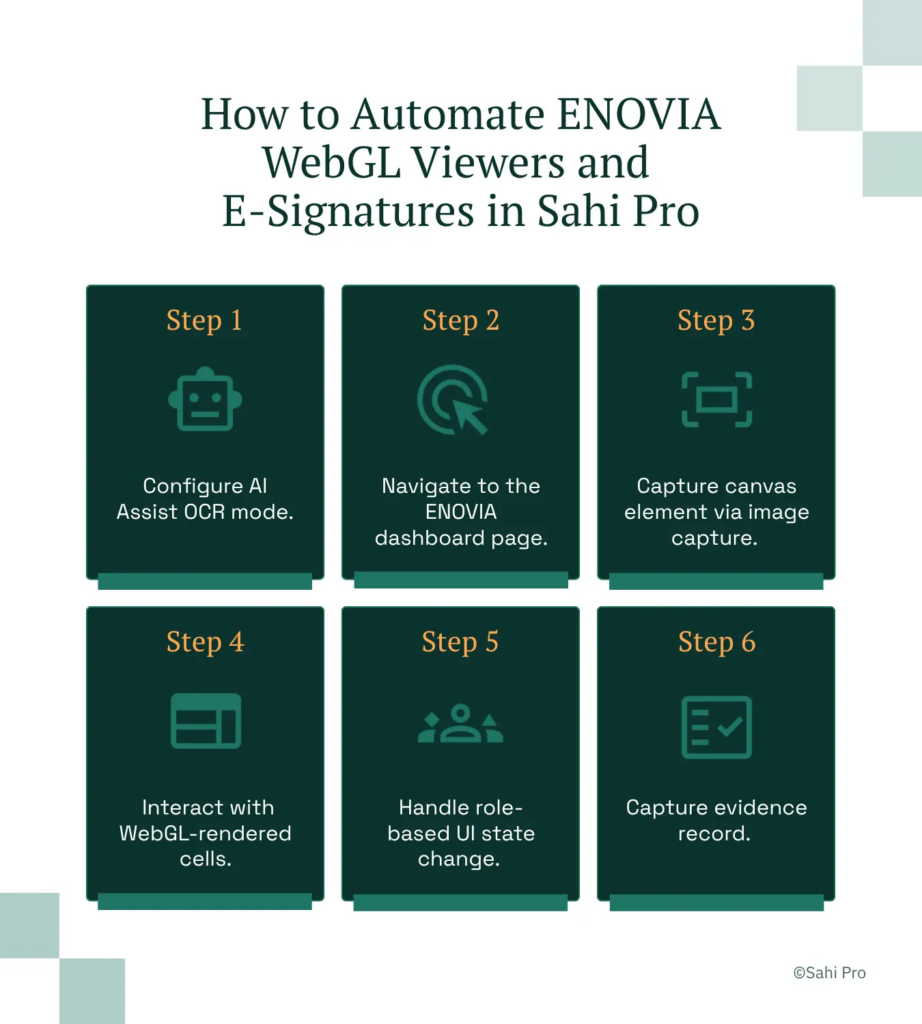
Step 1: Configure AI Assist OCR mode. Open the Sahi Pro AI Assist add-on and enable OCR capture for the target ENOVIA environment. Point the configuration at your 3DEXPERIENCE instance URL. This step establishes the OCR engine that will read visible text from canvas elements where DOM-based test automation for medical device QA returns nothing.
Step 2: Navigate to the ENOVIA dashboard page. Script the login and navigation sequence using Sahi Pro’s standard web identification. Standard ENOVIA navigation elements, menus, search bars, and breadcrumbs, are DOM-accessible and work with label-based locators. The script handles AJAX loading and iframe transitions automatically.
Step 3: Capture canvas element via image capture. When the script reaches a WebGL viewer or e-signature widget, Sahi Pro’s AI Assist captures the canvas region as a screen image and applies OCR to extract visible text. For verification and validation testing, this means the script can read part numbers, revision labels, approval status text, and signature timestamps directly from the rendered canvas, then assert against expected values.
Step 4: Interact with WebGL-rendered cells. Use positional relation APIs to click specific regions of the canvas based on the OCR-identified text positions. If the BOM grid shows “Rev B” next to a part number, the script locates “Rev B” by its visible text and proximity to the part identifier, then performs the required action.
Step 5: Handle role-based UI state change. Script the e-signature approval sequence by switching user roles within the same test. Sahi Pro maintains the session context across role changes, so the script can submit a change request as an engineer, then approve it as a quality manager, all in one execution.
Step 6: Capture evidence record. Each step produces a timestamped execution record with screenshots, OCR-extracted values, and pass/fail assertions. The output format is structured for FDA audit review.
The most common break point teams expect, a canvas re-render after an ENOVIA service pack, is handled by the OCR layer reading whatever is currently visible rather than depending on a fixed DOM structure. That is why Sahi Pro’s approach prevents it.
How Sahi Pro Handles WebGL Viewers and E-Signatures Without DOM
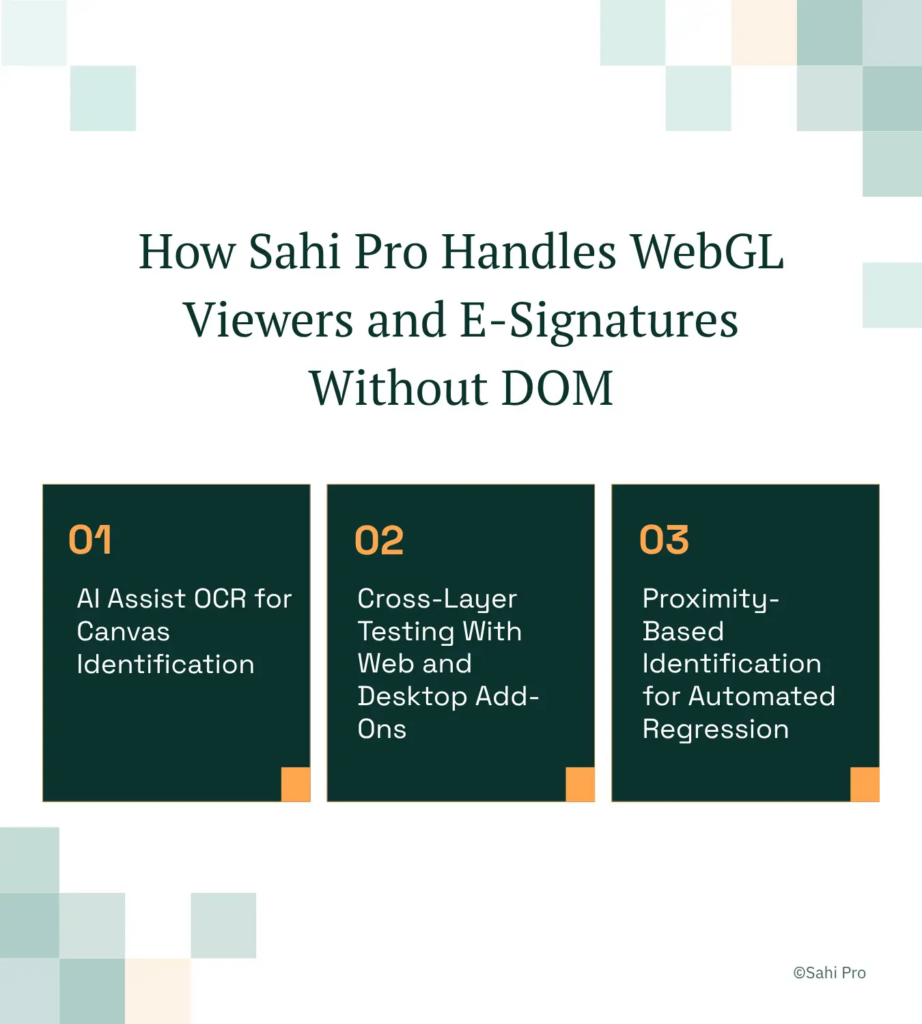
AI Assist OCR for Canvas Identification
Sahi Pro’s AI Assist add-on captures a defined screen region containing the ENOVIA WebGL viewer and runs OCR against the rendered pixels. The script reads visible text, part numbers, revision codes, lifecycle states, directly from the canvas surface. Consider a concrete scenario: your test needs to verify that a design review BOM shows “Released” status for component X after an engineering change order. The script captures the viewer region, extracts text via OCR, and asserts that “Released” appears adjacent to the component identifier using proximity-based matching. When Dassault updates the viewer’s internal rendering in a service pack, the visible text remains the same. The PLM test automation script does not break because it never depended on a DOM node that no longer exists.
Cross-Layer Testing With Web and Desktop Add-Ons
A realistic ENOVIA test in a medical device environment spans multiple layers. The engineer logs in through the web portal, opens a 3D viewer rendered in WebGL, then launches a Java-based CATIA integration panel for detailed markup. Sahi Pro’s Web add-on handles the portal. The Desktop add-on connects to the Java Swing session for the CATIA panel. The Web Services add-on validates the underlying REST API to confirm the change propagated to the PLM database. All three layers execute in a single script with a single report. PLM UI test automation that requires three separate frameworks and manual integration between them introduces gaps at every handoff. Teams familiar with oracle agile PLM testing or similar multi-layer PLM environments recognize this pattern immediately.
Proximity-Based Identification for Automated Regression
When ENOVIA upgrades restructure widget layouts or change iframe hierarchies, DOM-based locators fail. Sahi Pro identifies elements by their visible labels and spatial relationships. A button labeled “Approve” next to a field labeled “Change Request #4421” is located by that label and proximity, not by its position in the DOM tree. Automated regression testing suites built on this identification method survive ENOVIA upgrades without script rewrites. No maintenance ticket. No sprint disruption.
Sahi Pro vs Generic Test Automation Tools for ENOVIA 3DEXPERIENCE Automation
For teams whose ENOVIA testing scope is limited to standard web forms, navigation, and search, standard web automation frameworks are a sound choice and often the simplest path. The evaluation shifts when your scope includes WebGL-rendered viewers, canvas-based BOM grids, e-signature approval panels, or cross-layer workflows that span web, Java thick client, and API layers. Teams working in oracle agile PLM testing environments or similar multi-technology PLM stacks face the same scope question. The table below compares eight criteria that matter most for Dassault ENOVIA 3DEXPERIENCE PLM UI test automation teams.
Dassault ENOVIA 3DEXPERIENCE Test Automation: Feature Comparison
| Criterion | Generic tools | Sahi Pro |
| OCR and canvas element identification | Canvas-rendered PLM grids return no DOM nodes; WebDriver fails at identification | AI Assist OCR reads visible text from canvas and WebGL cells without DOM access |
| Compliance evidence output | Screenshot logs not accepted by FDA, AS9100D, or IATF auditors as structured evidence | Timestamped structured execution records accepted by FDA, AS9100D, and IATF auditors |
| On-premise deployment | Most tools route execution data externally; blocked in ITAR and IP-sensitive environments | Full on-premise install; execution, results, and reporting stay within customer network |
| Java thick-client coverage | No DOM access to Java Swing/AWT/SWT panels; test fails when PLM Java module opens | Desktop add-on reaches Java Swing/AWT/SWT in same script as web portal; no tool switching |
| Cross-layer: web + Java + API in one script | Separate tools for web, desktop, and API; integration handoffs are never tested together | Single script spans web portal, Java thick client, and REST/SOAP API; one report |
| Maintenance after PLM upgrades | DOM-based scripts need partial or full rewrite after each major PLM release | Proximity ID survives structural UI changes; upgrade maintenance near zero |
| Codeless authoring for non-developers | No-code recorders limited to web DOM; Java and canvas PLM layers have no codeless path | Visual test builder supports conditional logic and data-driven inputs without JavaScript |
| On-premise CI/CD integration | On-premise PLM nodes need custom agent config; most tools assume cloud execution | Execution server integrates with Jenkins, GitLab CI, and Azure DevOps on-premise |
If your team only needs web-layer Dassault ENOVIA 3DEXPERIENCE testing with no WebGL viewers and e-signatures without DOM requirement, a standard web automation tool may cover your scope.
Medical Device: 21 CFR Part 11 and IQ/OQ/PQ Validation
21 CFR Part 11 Subpart C requires that electronic records used in FDA-regulated processes include controls for closed-system access, audit trails, and electronic signatures that are legally binding. ISO 13485:2016 clause 7.5.6 requires that all software used in production be validated prior to initial use and after any changes that could affect its ability to achieve intended results [ISO, 2016]. For medical device QA teams running automated regression testing against ENOVIA, both standards demand that the test automation system itself produce verifiable, tamper-evident records of every execution, and that the system be revalidated after any change to the platform or the automation scripts.
Sahi Pro addresses this through structured execution reports in HTML, Excel, PDF, and XML formats. Each report includes timestamped step-level records, captured screenshots at assertion points, pass/fail status per step, and the exact script version executed. The full installation runs on-premise, so design history files, patient data references, and test evidence never leave the customer network. For IQ/OQ/PQ documentation, the execution reports serve as OQ evidence, while the installation qualification is supported by Sahi Pro’s documented deployment verification steps.
For the Quality Management Director reviewing tool qualification, the key artifact is the structured execution report mapped to your validation protocol. The report format aligns with GAMP 5 Category 4 software validation expectations, and the on-premise deployment eliminates the data residency objection that blocks many cloud-based alternatives.
Real Results: ArisGlobal
ArisGlobal is a life sciences technology company whose products support regulatory compliance, pharmacovigilance, and quality management across global markets. Their Dassault-integrated environment required automation of dynamic UI elements, multi-format report generation, and data-driven test execution across product variants. They moved to Sahi Pro to solve canvas-level identification failures and to enable non-technical team members to participate in automation using AI Assist OCR for reading content without DOM access.
The results after implementation:
- 70% reduction in time for multiple report generation for one of the life sciences products.
- Data-driven tests reduced testing cycles across multiple test data sets, improving total coverage.
- Non-technical team members able to participate in automation without specialized skills.
- Positional Relation APIs automated controls without specific unique identifiers, critical for dynamic PLM UI elements.
What QA Validation Engineers at Medical Device Companies Do Differently
Three things separate medical device QA teams that ship on schedule from those that lose weeks to every ENOVIA upgrade. First, they automate the canvas layer, not just the web forms around it. Second, they run a single script across web, Java, and API layers so that handoff defects do not hide between tools. Third, they produce structured execution evidence that satisfies 21 CFR Part 11 without a separate documentation sprint.Sahi Pro offers a free trial, so you can test it against your own Dassault ENOVIA 3DEXPERIENCE environment before any license decision. If you want to see how it handles your hardest test scenario, book a technical demo.