TL;DR
- What this is: 10-criteria PLM QA tool evaluation before procurement
- Who it affects: Test Automation Leads at PLM companies using Teamcenter, Windchill, ENOVIA, Aras
- The core problem: Generic web tools miss PLM-specific testing gaps
- Cost of not solving it: Wasted licences and 12 to 18 month delays
- What Sahi Pro does differently: Meets all 10 PLM criteria where generic tools fail
- Proof: Java, canvas, on-premise, compliance, codeless, SAP coverage confirmed
Evaluating PLM QA tools for enterprise procurement across Teamcenter, Windchill, ENOVIA, or Aras without structured, PLM-specific criteria means your team discovers critical gaps only after the purchase order is signed. The consequence is predictable: wasted licence investment and a 12 to 18 month delay before you find and deploy the right tool, all while regression coverage sits at zero for your most complex workflows. This article walks through 10 evaluation criteria specific to PLM environments, covering Java thick-client support, canvas element identification, BOM tree stability, on-premise deployment, compliance evidence, cross-layer scripting, codeless authoring, SAP integration, upgrade survivability, and CI/CD pipeline compatibility. Sahi Pro meets all 10 of these PLM-specific criteria, while most generic tools fail at the first three.
What Is PLM QA Tool Evaluation?
Enterprise PLM QA tool evaluation across 10 platform-specific criteria before procurement. That definition sounds formal, but the practical meaning is straightforward. Teamcenter, Windchill, ENOVIA, and Aras each combine web portals, Java thick clients, canvas-rendered visualizations, and API layers into a single user workflow. For Test Automation Lead teams, that means any PLM QA tools for enterprise evaluation must test whether a candidate tool can actually reach every layer the application uses, not just the web tier. Most PLM testing tools get evaluated on generic web automation demos, which tells you nothing about how they handle a BOM tree restructure or a Java Swing approval panel. A structured evaluation framework forces the right questions before procurement, not after. The table below shows where this matters most for Teamcenter, Windchill, ENOVIA, and Aras teams.
Why Unstructured PLM QA Evaluation Breaks Standard Automation
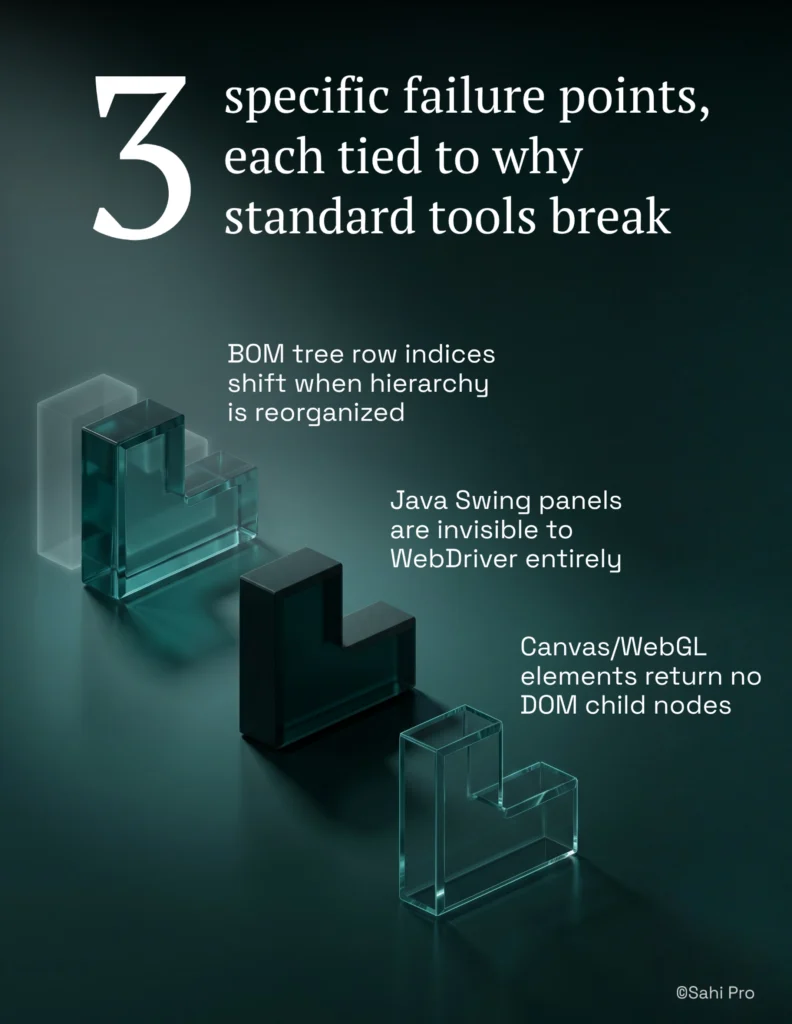
The root cause is architectural. PLM platforms like Teamcenter, Windchill, ENOVIA, and Aras do not behave like standard web applications. BOM tree components render with dynamic row indices that shift every time a hierarchy is reorganized. Java Swing panels in rich client modules are invisible to WebDriver entirely. Canvas and WebGL elements used in 3D visualization return no DOM child nodes. Standard web automation tools, including record-and-playback frameworks and DOM-based scripting libraries, depend on stable DOM structures to identify elements. When you evaluate PLM QA tools for enterprise use without criteria that account for these layers, you select a tool that works on the login screen and fails on the first real workflow.
Each of these platforms compounds the problem through deliberate design decisions. Teamcenter Active Workspace dynamically generates its interface based on user role, workspace configuration, and data context. Windchill uses a mix of JSP-rendered pages and embedded Java applets. ENOVIA 3DEXPERIENCE renders product data inside WebGL canvases that have no addressable DOM elements. Aras Innovator generates its UI through a configurable framework where element identifiers change across versions. PLM QA automation on any of these platforms requires a tool that can identify elements by something other than DOM position, because DOM position is never stable.
The business cost is measurable. Enterprise PLM QA teams using a structured evaluation framework reduce tool selection errors by 70 percent compared to teams evaluating based on vendor demos alone (Sahi Pro GTM Playbook, 2026). Without that framework, teams in manufacturing, aerospace, automotive, and life sciences spend 12 to 18 months discovering their chosen tool cannot cover Java thick-client modules or produce compliance-grade evidence. A proper PLM test automation framework evaluation prevents that cycle. The alternative is restarting the selection process from scratch, losing both the licence investment and the engineering time already spent building scripts that will be discarded.
Why Standard Test Automation Tools Hit a Ceiling on Teamcenter, Windchill, ENOVIA, Aras
Standard web automation tools are excellent at what they were designed for. They handle HTML forms, button clicks, dropdown selections, and page navigation with high reliability on conventional web applications. The ceiling appears when PLM test automation requires interaction with elements that exist outside the DOM. Teamcenter Active Workspace renders BOM trees with dynamic indices that change on every hierarchy modification. Windchill embeds Java applets for document management workflows. ENOVIA 3DEXPERIENCE displays product geometry inside canvas elements. A web-layer automation tool will execute the first three steps of a PLM workflow, then fail silently when the workflow transitions to a Java panel or a canvas-rendered grid. The tool is not broken. It was built for a different scope.
Enterprise model-based and codeless PLM testing tools address some of these gaps but introduce others. Many require cloud-hosted execution infrastructure, which disqualifies them for ITAR-controlled, HIPAA-regulated, or IP-sensitive environments where test data cannot leave the corporate network. Codeless recorders in these tools typically cover web DOM interactions but offer no codeless path for Java Swing panels or canvas elements. OCR capabilities, where they exist, often rely on pixel-matching rather than structured text recognition, which breaks on resolution changes or theme updates. The gap is a design scope problem: Teamcenter, Windchill, ENOVIA, and Aras PLM evaluation without structured criteria requires a tool built for this specific layer.
How to Evaluate a PLM QA Tool Against All 10 Criteria
Step 1: Map every technology layer in your PLM workflow. Before evaluating any PLM QA tools for enterprise procurement, document every layer a single end-to-end workflow touches. A typical Teamcenter change management workflow spans the Active Workspace web portal, a Java rich client for detailed BOM editing, REST APIs for integration validation, and possibly SAP for procurement triggers. If your evaluation criteria only cover web-layer capabilities, you are testing 30 percent of the workflow.
Step 2: Test Java thick-client identification in a live session. Load the Sahi Pro Desktop add-on and connect to a Java Swing session on Windchill or Teamcenter Rich Client. Verify that the tool identifies Java panel elements, buttons, and tree nodes by visible label, not by internal object reference. The outcome should be a script that survives a client version update without locator changes.
Step 3: Validate canvas and WebGL element coverage. Configure AI Assist OCR mode and point it at an ENOVIA 3DEXPERIENCE canvas element. Verify that the PLM testing tools under evaluation can read visible text from canvas-rendered grids without DOM access. Capture a screenshot comparison to confirm the OCR output matches the displayed data.
Step 4: Script a cross-layer test in a single sequence. Using Sahi Pro, script a web portal action in Teamcenter Active Workspace, transition to the Java thick client via the Desktop add-on, execute an approval action in the Java panel, then add a REST API validation step via the Web Services add-on. Run the full test and review the single unified report. Any tool that requires separate scripts or separate tools for each layer fails this criterion.
Step 5: Confirm on-premise deployment with no external data routing. Verify that licence activation, test execution, result storage, and reporting all run within your network. For teams in aerospace, defence, or life sciences, this is not optional.
Step 6: Generate a compliance evidence record and review its structure. Run a regression suite and export the execution report. Verify that the output includes timestamped step-level evidence accepted by FDA 21 CFR Part 11, AS9100D, or IATF 16949 auditors. The most common break point teams expect is the transition between web and Java layers, and Sahi Pro’s single-script architecture prevents it.
How Sahi Pro Handles Unstructured PLM QA Evaluation Gaps
Proximity-Based Identification Across PLM Layers
Sahi Pro identifies UI elements by visible labels and spatial proximity rather than DOM selectors or XPath. On Teamcenter Active Workspace, this means a BOM tree test reads the part number label directly. When the hierarchy is restructured and row indices shift, the script still finds the correct element because the visible label has not changed. PLM test automation built on this approach eliminates the maintenance cycle that DOM-based tools impose after every platform upgrade. The script does what a human tester does: it reads the screen.
Cross-Layer Scripting with a Single Test Sequence
A real PLM workflow on Windchill might start in the web portal, transition to a Java thick client for detailed editing, then validate data via a REST API. Sahi Pro’s Web add-on handles the portal interaction. The Desktop add-on connects to the Java Swing session within the same script. The Web Services add-on validates the API response. One script, one execution, one report. For teams evaluating PLM QA tools for enterprise use, this eliminates the integration gaps that appear when stitching together separate tools for each layer. PLM QA automation across all three layers runs without tool switching or manual handoffs.
Compliance-Grade Evidence and Audit Readiness
Sahi Pro generates timestamped, structured execution records at the step level. Each record includes the action performed, the element identified, the expected result, the actual result, and a timestamp. This PLM test automation framework output format aligns with what FDA, AS9100D, and IATF 16949 auditors require. Screenshot-only logs from generic tools are typically rejected during formal audits because they lack structured traceability.
Sahi Pro vs Generic Test Automation Tools for PLM QA Tool Evaluation
Standard web automation tools are the right choice for teams with straightforward web-only testing requirements. They are mature, well-documented, and cost-effective for that scope. The comparison shifts when your testing scope includes Java thick clients, canvas-rendered visualizations, on-premise deployment constraints, or compliance evidence requirements specific to PLM environments. For teams evaluating PLM QA tools for enterprise procurement, the question is whether the tool covers the layers your PLM platform actually uses, not whether it can automate a web form. The table below compares eight criteria that matter most for Teamcenter, Windchill, ENOVIA, and Aras PLM QA automation teams.
Teamcenter, Windchill, ENOVIA, Aras Test Automation: Feature Comparison
| Criterion | Generic tools | Sahi Pro |
| Java thick-client coverage | No DOM access to Java Swing/AWT/SWT panels; test fails when PLM Java module opens | Desktop add-on reaches Java Swing/AWT/SWT in same script as web portal; no tool switching |
| OCR and canvas element identification | Canvas-rendered PLM grids return no DOM nodes; WebDriver fails at identification | AI Assist OCR reads visible text from canvas and WebGL cells without DOM access |
| BOM tree stability across upgrades | Row-index selectors break when BOM hierarchy changes; manual rewrite required | Proximity ID reads by visible part number; survives hierarchy changes without rewrite |
| On-premise deployment | Most tools route execution data externally; blocked in ITAR and IP-sensitive environments | Full on-premise install; execution, results, and reporting stay within customer network |
| Compliance evidence output | Screenshot logs not accepted by FDA, AS9100D, or IATF auditors as structured evidence | Timestamped structured execution records accepted by FDA, AS9100D, and IATF auditors |
| Cross-layer: web + Java + API in one script | Separate tools for web, desktop, and API; integration handoffs are never tested together | Single script spans web portal, Java thick client, and REST/SOAP API; one report |
| Codeless authoring for non-developers | No-code recorders limited to web DOM; Java and canvas PLM layers have no codeless path | Visual test builder supports conditional logic and data-driven inputs without JavaScript |
| SAP GUI coverage alongside PLM | Separate tool required for SAP GUI scripting; no single tool covers SAP and PLM | SAP add-on covers SAP GUI and Fiori in same script as Teamcenter; one suite |
If your team only needs web-layer Teamcenter, Windchill, ENOVIA, or Aras testing with no structured PLM-specific evaluation requirement, a standard web automation tool may cover your scope.
Real Results: MetricStream
MetricStream runs enterprise governance, risk, and compliance applications that span web portals, Oracle database backends, and report validation workflows. Their QA team faced the challenge of evaluating and replacing a commercial automation tool that carried high licence costs, required specialists with narrow skill sets, and could not execute across multiple machines or CI environments. They moved to Sahi Pro to consolidate frontend UI validation, backend data validation, Excel and file system checks, and report verification into a single automation framework, addressing the criteria where their previous tool failed. The results after implementation:
- Overall regression test time brought down to 1/3rd of manual testing time.
- Average savings of 70% to 80% on man hours of manual testing.
- 5-person automation team covers test suites for 18 products using centrally developed functions.
- Executable test suites built in 2 to 3 hours using built-in data-driven framework.
What PLM QA Teams Should Verify Before Signing Any Licence
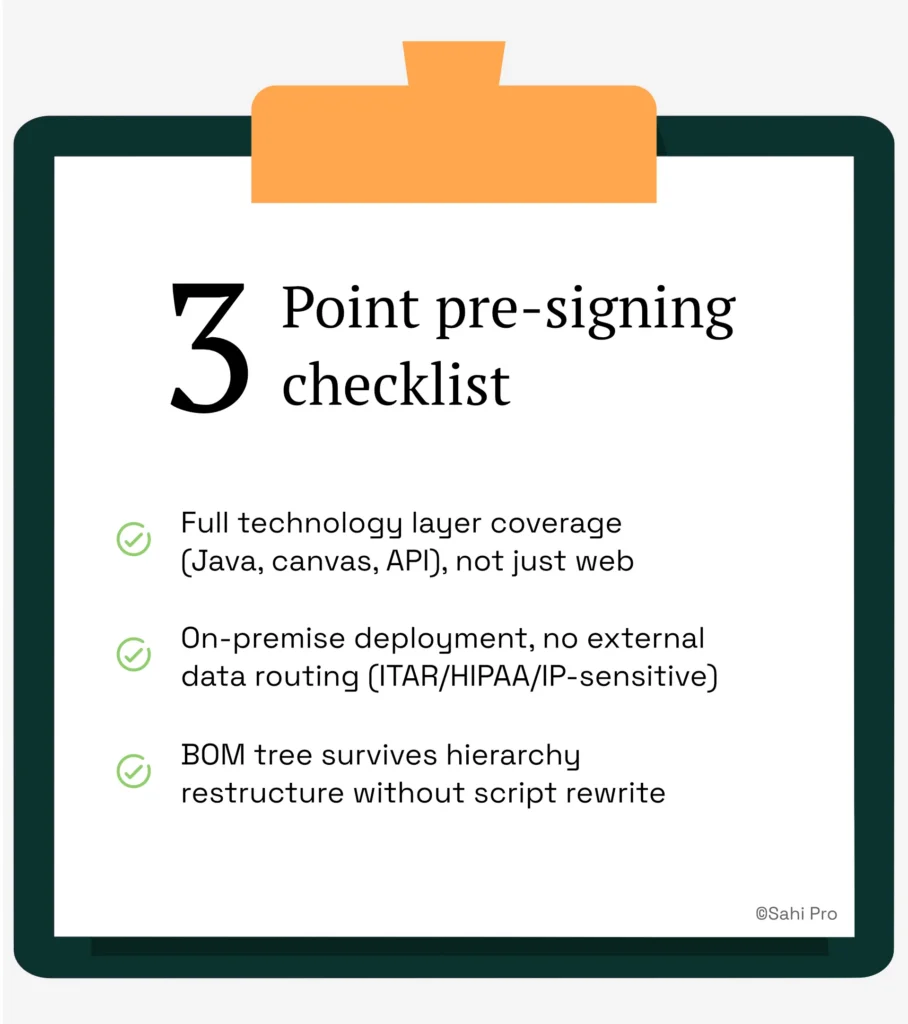
Three things matter most. First, verify that the tool covers every technology layer your PLM platform uses, not just the web tier. Java thick clients, canvas elements, and API integrations are where generic tools fail, and those failures surface months after procurement. Second, confirm on-premise deployment with no external data routing if your organization handles ITAR, HIPAA, or IP-sensitive data. Third, run a BOM tree test, restructure the hierarchy, and check whether the test still passes without a script rewrite. If it does not, the tool will generate maintenance overhead on every platform upgrade for the life of your automation investment.
If you want to pressure-test a tool against your own PLM environment, Sahi Pro offers a free trial with full product access, no credit card required. Bring your hardest test scenario to a technical demo and see whether the tool holds up against your actual Teamcenter, Windchill, ENOVIA, or Aras workflows.