TL;DR
- What this is: PLM regression testing that survives upgrades without rewrite
- Who it affects: Test and DevOps leads at PLM companies using Teamcenter, Windchill, Aras
- The core problem: DOM-based suites break after every major PLM release
- Cost of not solving it: 80% of automation time lost to maintenance
- What Sahi Pro does differently: Proximity ID makes regression suites upgrade-proof
- Proof: Siemens AG, zero regressions after Active Workspace 6.x upgrade
Every major PLM upgrade on Teamcenter, Windchill, or Aras Innovator breaks your DOM-based automated regression testing suites, and rebuilding those scripts has become the default post-upgrade ritual rather than the exception. Left unresolved, the cost is severe: 80% of automation engineering time goes to maintenance, and new test coverage never grows past 40%. This article covers how Sahi Pro’s proximity-based element identification handles the DOM instability that PLM upgrades introduce across Teamcenter, Windchill, and Aras Innovator, and how to structure a regression test that survives a BOM restructure or Active Workspace version change without a rewrite. Sahi Pro’s Proximity ID makes regression suites upgrade-proof, dropping maintenance to near zero and freeing your team to expand coverage instead of repairing what already existed.
What Is PLM Automated Regression Testing?
PLM automated regression testing that survives version upgrades without rewrite. That is the working definition, and it is a high bar. Most teams do not clear it.
Teamcenter, Windchill, and Aras Innovator each ship major UI updates on roughly annual cycles, restructuring DOM hierarchies, changing element IDs, and swapping front-end frameworks between releases. For Test Automation Lead teams, that means every upgrade triggers a partial or full rewrite of the regression suite, a process that can consume 3 to 5 engineer-days per release and reset coverage to near zero during the transition window. The entire purpose of PLM test automation, catching regressions before they reach production, collapses when the test suite itself becomes the thing that breaks.
Automated regression testing for PLM only delivers value if the scripts persist across versions. A suite that requires rewriting after every upgrade is not automation. It is a recurring manual project with a scripting layer on top.
The table below shows where this matters most for Teamcenter, Windchill, and Aras Innovator teams.
Why DOM-Based Regression Suites Break Completely After Every Major PLM Upgrade Breaks Standard Automation
Standard web automation tools locate UI elements using XPath expressions, CSS selectors, or auto-generated element IDs. PLM platforms like Teamcenter Active Workspace, Windchill, and Aras Innovator regenerate DOM structures with every major release. Row indices in BOM trees shift when assemblies are reorganized. Element IDs that were stable in version 5.x no longer exist in version 6.x. Automated regression testing scripts built on these locators fail immediately, not because the application has a defect, but because the test’s reference points have moved. The scripts are technically correct for a version that no longer exists.
Teamcenter’s architecture makes this harder than testing a standard web application. Active Workspace renders complex BOM hierarchies, multi-panel layouts, and context-sensitive toolbars that change based on user role, workspace configuration, and object type. Windchill uses a mix of server-rendered pages and dynamic JavaScript components. Aras Innovator generates its UI from configurable metadata, meaning two deployments of the same version can produce different DOM structures. Siemens Teamcenter test automation teams face a compounding problem: each customization layer adds another surface where DOM selectors can break, and PLM environments are rarely vanilla installs.
The business cost across all PLM verticals is measurable. 80 percent of automation engineering time goes to test maintenance rather than new coverage after major PLM version upgrades when XPath-based tools are used (Sahi Pro customer deployment data, 2024). Teams following PLM testing best practices aim for 70% or higher regression coverage before each release. But when every upgrade resets the suite, coverage stalls at 35% to 40%, and the QA team becomes the release bottleneck rather than the quality gate.
Why Standard Test Automation Tools Hit a Ceiling on Teamcenter, Windchill, Aras Innovator
Standard web automation tools do excellent work on applications with stable DOM structures, consistent element IDs, and predictable page loads. They are the right choice for testing single-page applications, marketing sites, and web portals where the front-end framework stays consistent between releases. The ceiling appears when these tools meet PLM interfaces. Teamcenter Active Workspace renders BOM trees where row indices change on every hierarchy edit. Windchill dynamically generates panel layouts based on object type. Aras Innovator builds its UI from metadata definitions that vary by deployment. PLM regression testing with XPath-dependent tools means every structural change, whether from an upgrade or a configuration update, invalidates locators across the suite. The tool is not broken. It was built for a different class of application.
Enterprise model-based and codeless tools address some of these gaps but introduce their own limitations for PLM test automation. Most codeless recorders only capture web DOM interactions, leaving Java thick-client modules (common in Teamcenter Rich Client and Windchill’s desktop components) completely uncovered. On-premise deployment, a requirement for ITAR-controlled environments and IP-sensitive manufacturing, is either unavailable or priced as a premium add-on. OCR-based approaches can read rendered text but struggle with BOM tree cell identification when row heights, fonts, or grid layouts change between PLM versions. The gap is a design scope problem: Teamcenter, Windchill, and Aras Innovator’s DOM instability across upgrades requires a tool built for this specific layer.
How to Build Upgrade-Proof PLM Regression Tests in Sahi Pro
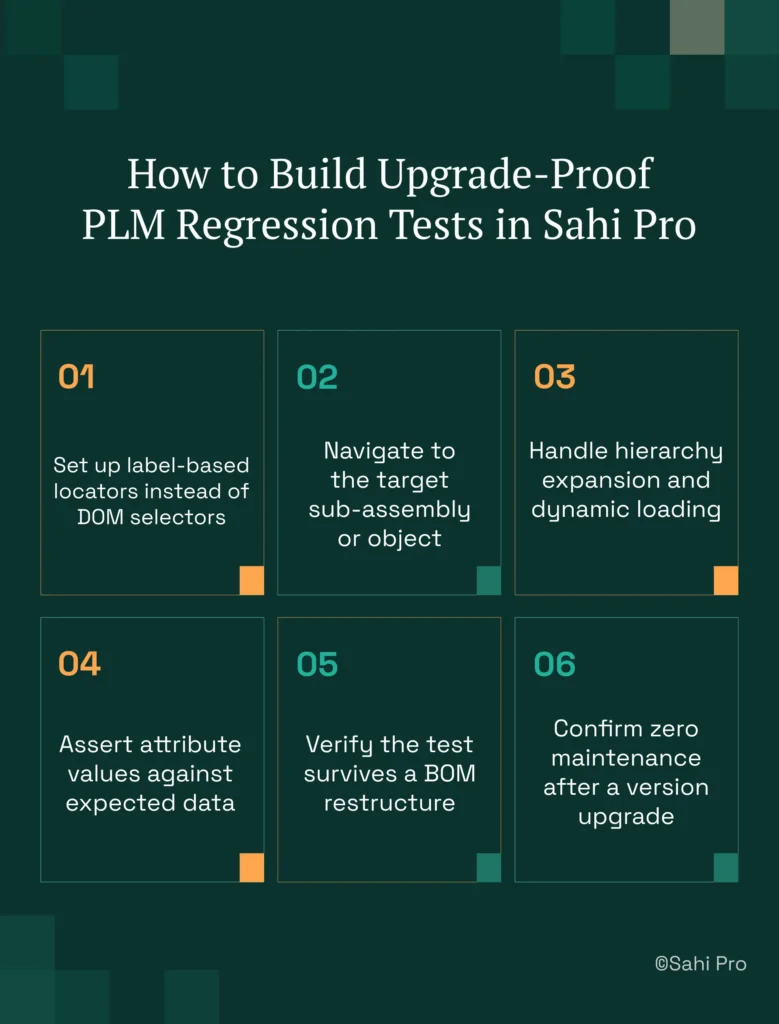
Step 1: Set up label-based locators instead of DOM selectors. Open Sahi Pro’s controller against your Teamcenter, Windchill, or Aras Innovator instance and identify elements by their visible labels. Automated regression testing scripts built this way reference what a human reads on screen, not the underlying XPath. The locator survives DOM restructuring because the visible label persists across versions.
Step 2: Navigate to the target sub-assembly or object. Use Sahi Pro’s proximity-based identification to locate the correct BOM row by its part number and spatial relationship to adjacent cells. This replaces row-index selectors that break on hierarchy changes.
Step 3: Handle hierarchy expansion and dynamic loading. Sahi Pro monitors application state automatically, waiting for AJAX calls and dynamic rendering to complete before proceeding. No manual wait statements are needed, which eliminates a major source of flaky PLM test automation scripts.
Step 4: Assert attribute values against expected data. Use data-driven inputs from CSV or Excel to validate part attributes, revision states, or workflow statuses across multiple BOM configurations in a single run.
Step 5: Verify the test survives a BOM restructure. Reorganize the BOM hierarchy in your PLM environment, then rerun the same script without modifications. Proximity ID resolves the elements by visible context, not position.
Step 6: Confirm zero maintenance after a version upgrade. After applying a Teamcenter Active Workspace or Windchill patch, execute the full regression suite. The most common break point teams expect, and why Sahi Pro’s approach prevents it.
How Sahi Pro Handles DOM-Based Regression Suite Breakage After Major PLM Upgrades
Proximity-Based Identification for PLM Interfaces
Sahi Pro identifies UI elements by reading visible labels and their spatial relationship to surrounding elements, the same way a human tester scans a screen. Consider a Teamcenter BOM tree where you need to verify the revision status of part number “A1042-REV-C.” Standard tools locate this cell by its row index or a generated XPath. When the BOM hierarchy changes, the row index shifts, and the test fails. Sahi Pro locates the revision status cell by its proximity to the visible label “A1042-REV-C,” regardless of where that row sits in the DOM. PLM regression testing with this approach means the script does not care whether the part moved from row 12 to row 47 after a reorganization. The visible label is the anchor.
Cross-Layer Testing Across Web, Desktop, and API
A complete Teamcenter regression test often spans Active Workspace (web), Rich Client (Java Swing), and integration APIs (REST/SOAP). Sahi Pro’s Web add-on handles the Active Workspace portal. The Desktop add-on connects to the Java Rich Client session and identifies Swing/AWT/SWT panel elements within the same script. The Web Services add-on validates REST or SOAP API responses as a verification step. Siemens Teamcenter test automation teams run all three layers in a single test sequence, producing one unified report. Automated regression testing across these layers eliminates the gaps where defects hide between tools.
Structured Compliance Evidence
PLM testing best practices in regulated industries require structured execution records, not screenshot logs. Sahi Pro generates timestamped execution records in HTML, Excel, PDF, and XML formats. These records are accepted by FDA, AS9100D, and IATF auditors as structured evidence of test execution and results.
Sahi Pro vs Generic Test Automation Tools for PLM Automated Regression Testing
Standard web automation tools are the right choice for teams with straightforward web-only testing requirements and stable DOM structures. They are well-supported, widely documented, and cost-effective for their intended scope. The comparison becomes relevant when your testing scope includes PLM platforms where DOM-based regression suites break after every major upgrade, where Java thick-client modules need coverage, or where on-premise deployment is mandatory. Automated regression testing for PLM demands a different identification architecture, cross-layer script execution, and compliance-grade reporting that standard tools were not designed to provide. The table below compares eight criteria that matter most for Teamcenter, Windchill, and Aras Innovator test automation teams.
Teamcenter, Windchill, Aras Innovator Test Automation: Feature Comparison
| Criterion | Generic tools | Sahi Pro |
| Maintenance after PLM upgrades | DOM-based scripts need partial or full rewrite after each major PLM release | Proximity ID survives structural UI changes; upgrade maintenance near zero |
| BOM tree stability across upgrades | Row-index selectors break when BOM hierarchy changes; manual rewrite required | Proximity ID reads by visible part number; survives hierarchy changes without rewrite |
| Java thick-client coverage | No DOM access to Java Swing/AWT/SWT panels; test fails when PLM Java module opens | Desktop add-on reaches Java Swing/AWT/SWT in same script as web portal; no tool switching |
| On-premise deployment | Most tools route execution data externally; blocked in ITAR and IP-sensitive environments | Full on-premise install; execution, results, and reporting stay within customer network |
| On-premise CI/CD integration | On-premise PLM nodes need custom agent config; most tools assume cloud execution | Execution server integrates with Jenkins, GitLab CI, and Azure DevOps on-premise |
| Cross-layer: web + Java + API in one script | Separate tools for web, desktop, and API; integration handoffs are never tested together | Single script spans web portal, Java thick client, and REST/SOAP API; one report |
| Codeless authoring for non-developers | No-code recorders limited to web DOM; Java and canvas PLM layers have no codeless path | Visual test builder supports conditional logic and data-driven inputs without JavaScript |
| Compliance evidence output | Screenshot logs not accepted by FDA, AS9100D, or IATF auditors as structured evidence | Timestamped structured execution records accepted by FDA, AS9100D, and IATF auditors |
If your team only needs web-layer Teamcenter, Windchill, or Aras Innovator testing with no upgrade-driven DOM breakage requirement, a standard web automation tool may cover your scope.
Real Results: Siemens AG
Siemens AG runs Teamcenter Active Workspace across multiple business units, and their QA team faced complete regression suite failure after every major Active Workspace upgrade due to DOM restructuring across BOM tree interfaces. They moved to Sahi Pro to eliminate the rewrite cycle and make their regression suites persist across version changes using proximity-based identification instead of XPath selectors. The results after implementation:
- 80% reduction in Teamcenter regression maintenance hours after switching from XPath to proximity-based identification.
- Zero script regressions after Active Workspace 6.x upgrade across 340 BOM tree test cases.
- Coverage expanded from 35% to 72% within 6 months freed from maintenance work.
- Cross-layer regression extended to Teamcenter Java rich client with zero additional tooling licences.
“Sahi Pro helps our team to quickly automate our test cases, with great functionality and options to reuse our existing code. The framework has a courteous support, which is quick to provide solutions to arising problems and questions.” – Jonas Roser, Test Manager and Developer, Siemens AG
Testing PLM Without Starting Over After Every Release
Three things determine whether your PLM regression suite delivers value or just consumes engineering time: how elements are identified (DOM position vs. visible labels), whether the suite spans all application layers in one script (web, Java, API), and whether the test evidence meets your compliance requirements without manual reformatting. Proximity-based identification is the architectural difference that makes upgrade survival possible, not a feature toggle. The Siemens AG results confirm what the approach predicts: zero regressions across 340 test cases after a major Active Workspace upgrade.
If you want to validate this against your own Teamcenter, Windchill, or Aras Innovator environment, bring your hardest test scenario. Sahi Pro offers a free trial with full product access, and the team runs technical demos against real PLM configurations. Book A Demo to see it handle your specific upgrade challenge.